Desertcart purchases this item on your behalf and handles shipping, customs, and support to Slovakia.
💼 Elevate your storage game with enterprise-grade hot-swap ease!
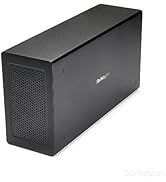
The StarTech.com 3-Bay Hot Swap Backplane transforms two 5.25" bays into a versatile, trayless mobile rack supporting up to three 3.5" SATA or SAS hard drives. Delivering 6 Gbps transfer speeds, it features individual drive LEDs, key-lock security, and a vented aluminum enclosure with a quiet, speed-controlled fan to maintain optimal temperatures. Designed for professional IT environments, it offers quick installation, broad compatibility, and is backed by a 2-year warranty with lifetime technical support.


| ASIN | B00HS23QZO |
| Best Sellers Rank | #324 in Enclosures |
| Brand | StarTech.com |
| Built-In Media | Storage mobile rack |
| Color | Black |
| Compatible Devices | PC |
| Connectivity Technology | SATA |
| Customer Reviews | 4.3 out of 5 stars 574 Reviews |
| Data Transfer Rate | 6 megabits_per_second |
| Enclosure Material | Aluminum |
| Global Trade Identification Number | 00065030855297 |
| Hard Disk Form Factor | 3.5 inches |
| Hardware Interface | SAS |
| Hardware Platform | PC |
| Item Dimensions L x W x H | 7.64"L x 5.75"W x 3.35"H |
| Item Type Name | Startech.Com HSB3SATSASBA 3 Bay Trayless Hot Swap 3.5" SATA HDD Mobile Rack Backplane, Storage, Black |
| Item Weight | 0.87 kg |
| Manufacturer | StarTech.com |
| Material | Aluminum |
| Memory Storage Capacity | 6 GB |
| Mfr Part Number | HSB3SATSASBA |
| Model Number | HSB3SATSASBA |
| Number of Items | 1 |
| Product Dimensions | 7.64"L x 5.75"W x 3.35"H |
| Supported Devices Quantity | 3 |
| UPC | 065030855297 |
| Unit Count | 1 Count |
| Warranty Description | 2 Years |
J**G
Great backplane, perfect for custom builds of multidisk enclosures.
I needed a 4 Disk back plane that didn't use port multiplication for my RAID 10 setup on my server system and this worked perfectly. It is intended to fit inside of the actual PC chassis, but for what I was doing that was not possible. I needed it to be able to connect to 4 WD Red 3TB drives for RAID 10 with hotswap, but needed it to be separate from the actual server computer. I was able to build a custom case for this, and wired up a power supply to go in the bottom of the case to run the enclosure. The enclosure sits in the top of the case, and has 4 SATA plugs coming from my Intel RS2PI008 RAID Card via a Mini SAS to SATA breakout cable. Once I finished with all of the building, I plugged it all up to the server and set up the RAID without a hitch. I like the fact that this backplane has individual LEDs for each drive to monitor activity and will tell you when one of the drives in not functioning. Each drive slot is trayless, and is easy to insert and remove the disks from. All you have to do it open the door on the front for the slot you want to insert the disk in, and slide the disk in partially. Then close the door and the spring in the hinge will do the rest for you, pushing the disk all the way in and making the connection on the PCB. To remove the disk, just open the door, and the disk will partially pop out of the slot allowing you to grab hold of it to install a new one. Each slot has a lock on it, so you can lock the doors to prevent someone from opening the doors and disconnecting the disks. This is nice if the unit is in a place where others are able to access it, just don't lose the keys (It comes with 2). If you are installing it inside of a chassis, there are slots on each side for installing screws to hold the backplane in position. It requires 2 SATA Power connectors from you PSU, and it is recommended to use each from a different rail, especially if you are using the same rails for powering other things. This way you won't over load the rails. There are 2 switches on the back, one for turning on and off the LEDs, and one for setting the fan to either off, low or high. There is also a cut out where you can see 4 pin spots on the PCB that are not filled in. I took the whole thing apart to try and figure out what they are for, and as far as I can tell, they are for a temp sensor. I looked around on the net and there are a few models similar to this one that have a temp sensor installed from the factory. I guess if you wanted to, and you are good at soldering, you could install your own if you have a thermocouple, but without an LCD readout it would be kinda pointless. Overall this is a nice backplane, that is built really well and is ready for the long haul. I forgot to mention, that the 4 drive slots are able to accept either SATA or SAS drives, but the ports on the back are only SATA unfortunately, but it isn't hard to find a SAS to SATA cable adapter or even a SATA to eSATA adapter if needed. The fan that installed in it is a standard 3 pin 80mm fan, and it is really quite as it is with it set to low. If the fan ever fails, or you just want to install a higher grade one, it isn't hard. There are 4 screws on the housing for the fan that need to be removed to gain access to the fan, but the other 12 screws around the outside of the back plate have to be removed to gain access to the PCB so you can unplug the fan. I can't remember right off the top of my head, but I think the plug for the fan is a non-standard 3 pin plug, so you may want to have a de-pinning kit ready so you can swap the plugs out. The PCB for the backplane is not readily available online, I did some searching for it to see, as really for what I wanted to do that was the only part of this I really needed, but I was unable to find one. As long as the temps stay relatively low, and the input voltages don't spike ( I have it connected to a APC 1500 Pro UPS so there shouldn't be any fluctuations in voltage) and blow the circuit it should be fine and not need replacement. If it does, I guess I will have to contact StarTech and see if they can point me in the right direction to procure a replacement. Since this is going to be used for my server to maintain all of my media and backups it will be on 24/7 so I will put time on it quickly and I will post back later on to let you guys know how it holds up. I predict there will not be any issues, but I have been wrong before, just ask my Wife.
G**R
Quick an easy way to add hot swap bays.
I now have two of these units for separate machines, not because of failure. The first one I installed in mid 2021, the second in late 2023. It's now fall of 2025 and both units are going strong fully populated, 24/7. In the multiple years I've had these units I've never experienced a fault that wasn't due to a drive dying. I fell in love with hot swapping hard drives using old server hardware but hated the noise, weight and physical space often required for such machines, and wanted to "downgrade" to more consumer desktop-style cases. Few cases like that are designed for pulling drives without opening the case but these bays solved that problem as long as your case has 3 5.25" bays that open to the outside. Admittedly even THAT is becoming harder to find in cases since fewer people are adding accessory components that need them. If you can install a hard drive then you can install this; although since it's longer than a typical hard drive if your case is small, or otherwise cramped around the back of the 5.25" bays then getting to the power and SATA cables could be a bit difficult when you install it. Fortunately because it's a hot swap bay you shouldn't ever need to access the back of the unit after installation. The unit does require a SATA data cable for each drive, but only needs 2 SATA power cables which makes cable management a bit easier. I've run everything from older 1TB drives to 16TB 7200RPM "Enterprise" drives and they've all been detected no differently than if they were directly connected to the motherboard. This is expected but I'm pointing it out as sometimes there are compatibility issues particularly with larger hard drives. The drives are firmly secured but promptly pop out for removal when you open the each door fully. The door doesn't extract the drive until it's nearly fully open so you don't have to worry about accidentally disconnecting a drive if you open the wrong slot. I don't use the locks on the doors. They exist which is nice, and would slow someone from easily ripping your drives out (such as a curious child) but I wouldn't rely on them for actual security purposes. Other reviews have commented that the fans are loud. Either that was an issue with units older than mine and has since been fixed, or I'm just lucky because both of mine are dead silent. Drive temps are kept well within reasonable levels; checking my logs (monitored with AnalogJ Scrutiny) I peak at 40c on one drive over the last year, with the average being 38c; and neither machine is particularly well ventilated.
A**R
The best unit I could find and perfect for use in Anidees AI Raider XL full tower case
This bay works great and fits perfectly in Anidees AI Raider XL full tower case or old Antec 1200 case. The design allows for installing in cases that have the supporting tabs between each 5.24in drive bay which is a very important design feature to have for compatibility for non-rackmount cases. The build quality is excellent and easily handles 4 drives keeping heat at a manageable level. The fan however is quite noisy and I would recommend replacing it with a Noctua fan. As with many drive bays of this type the PCB holes designed for air movement are probably too small so air flow across drives probably isn't the best one would hope for. I don't have any connectivity issues between my HBA and this unit any my drives transmit data a full speed with no disconnects.
M**9
StarTech.com 3-Bay Hot Swap Backplane
I purchased this StarTech.com 3-Bay Hot Swap Backplane for installation in my iStarUSA 2U Compact Server Chassis (D-214-MATX). The server chassis has 2x5.25 ODD cage in it that was going unused - the StarTech.com 3-Bay Hot Swap Backplane fits perfectly. My short depth 2U case is fairly cramped due to its shallow depth (~15.5 inches/~40cm), and the included HDD mounting locations can be difficult to access, especially if you are using a 4 DIMM mATX motherboard, as the motherboard runs underneath the 3.5" HDD mounting locations - at best I was only going to be able to install 2x3.5" HDDs in the upper locations of the dual mounting brackets - the lower locations are virtually unusable for 3.5" HDDs as they would interfere with the 24 pin motherboard power cable, 4xDIMM slots, and 6XSATA ports. The StarTech.com 3-Bay Hot Swap Backplane allowed me to leverage the unoccupied 2x5.25 ODD drive location to expand the 3.5" HDD capacity to more than 3 drives. I also installed a SFF power supply to give me additional cabling room as the StarTech.com 3-Bay Hot Swap Backplane sits in front of the PSU (see photos). I have seen some complaints about the included cooling fan being noisy - my server is installed in an unfinished basement where noise isn't an issue. I have also seen complaints about the drive doors being flimsy - I am not really using the hot swap capabilities so not really an issue for me - the drive doors seemed adequate to me for the one-time installation of my 3x3.5" HDDs - I believe the doors would be adequate for hot swap situations if they are operated carefully, but if you're looking at these for continuous hot swapping, perhaps there are more robust alternatives - overall the build quality seemed very good to me (I am a bit puzzled by the brushed aluminum black enclosure though, as this item is installed internally where that nice finish detail will never be seen). There are switches on the back of the unit that allow both the fan and the HDD activity lights to be turned on/off - they are both left on in my case as the light/noise are not an issue in my unfinished basement, which serves for the most part as my "lights out" server room. There are 3X SATA cables included, a nice touch. I am very pleased with this purchase, as it makes installing hard drives in my 2U case a breeze - SATA power and data cabling are a one-time effort, and mean there won't be a prolonged disassembly/reassembly process when adding or replacing drives. 5 stars.
E**R
Great! Fit into 2 5 1/4" disk bays.
I purchased this 3-bay hot-swappable disk enclosure to improve cooling for my disks, as my tower was running them a bit warm. The built-in fan has been very effective at keeping the disks cooler. It also replaced three full-height hot-swap drive caddies, consolidating the space and simplifying my setup. Installation: This enclosure is designed to fit into two CD-ROM bays. My case only had two standard drive bays available, so I needed to flatten the 8 positioning "ears" that align hard drives/floppys in the bays. This was a simple adjustment with a small hammer, though not something I planned for. If your case has two CD-ROM bays, installation should be a breeze and take just a few minutes. Cabling and Functionality: The cabling is straightforward and easy to manage once installed. It uses two power connections for the three disks, and the instructions provide a very helpful tip: connect the power from two different cable bundles. This setup helps prevent interruptions to other disks during hot-swapping, which is a thoughtful design feature. Overall, this is a well-designed enclosure that performs great for its intended purpose. It’s a particularly good solution if you’re looking to consolidate or upgrade from individual full-height caddies. Just be sure your case has the appropriate CD-ROM bays, or be prepared for a minor adjustment during installation.
A**E
Extremely lightweight/fragile, door latch broke apart on the 5th opening
While the function of this unit is fine, the fan is LOUD and you can't easily find a replacement that is quiet because it's an odd size. Also, this thing uses plastic clips and brackets for the latch hinge and apparently isn't intended to be opened more than once or twice a year. It broke the 5th time I opened it and will no longer latch closed. I'd suggest finding a backplane from a vendor that uses trays and sells products meant for businesses primarily...this isn't worth the money.
J**S
Excellent SATA Rack for Cloning & Test-Restoring from Images
I bought this item primarily as a fast way to access my Hard Drives for Backup purposes. I Clone my Windows OS Hard Drive every ~2 weeks (& Image less frequently) & occasionally "Test-Restore" a recent Image to one of my bare (unallocated/clean) spare Hard Drives. I've had 2 SATA Racks installed in my PC since I bought my Desktop PC ~12 years ago. I use the 2nd Rack for my 2nd Hard Drive non-OS files, mainly Photo Albums, etc and as my "Target Hard Drive" Cloning Rack. These Racks are a real time-saver for such Backup activities as they allow fast access & eliminate the necessity of accessing the internal chassis of a Desktop PC to swap out a Hard Drive. I bought this Rack to replace another brand's Rack after my original Rack's Door broke after ~10-11 years of constant usage. I've tried a couple other brand's Racks without satisfaction due to their Door Mechanism's being too hard on the plastic Door's Eject action (too stiff, causing more stress on the plastic Doors). One of the alternate brand's Racks broke 2 weeks after I installed it (Door broke). This item's Door Eject mechanical action is very smooth, thus greatly reducing mechanical stress on the Door Assembly. The only critique is one that's been mentioned in other reviews : the Power On/Off Switch is located in the rear of the Rack so there's no way to access it without going into the PC's chassis. For me though, it's not an issue as I'm not using these Racks as "Hot Swap" racks as my BIOS isn't set up for "AHCI". I rate this basically a 5-Star purchase with one exception in the "Sturdiness" category as I've only had this item for a few weeks & only time will answer that question but I anticipate getting years of trouble-free use from this item.
A**N
Perfect
I needed a trayless hard drive hot-swap bay for my tower, so I got this one. Trayless hot-swap bays aren't as cheap as I would like, but it's still a good price for the AMAZING convenience you get with it. It works as expected. If you are new to hot-swap bays, some computers will need to have their BIOS changed so that the SATA port will allow a hard drive addition or removal while a system is running. Otherwise your computer will freeze when you add or remove a drive through this bay. Since it doesn't have any moving parts of it's own, it doesn't make any noise, so any noise you do get is from the drive you put in it. It's put together well, so I expect it to last a long time.
C**N
Excellent performance, easy swapping and additional cooling
I originally bought two of these to enable easy swapping of drives in a backup server. They have worked flawlessly since then, running 24/7 for over a year. The build is robust and swapping out drives is very easy. I later added one to my desktop PC because I have a 24TB drive that runs very hot, but the built in fans in this enclosure also cool the drives far more than any case fan. Since moving the drive to the enclosure I have had no problem with overheating. So, great for swapping drives but also great for cooling drives.
B**S
loud fan
Well built and sturdy, the only downside is the extremely loud fan. For the price it is It should have been something more silent. I'll probably end u switching the fan later on myself.
D**D
These are working as intended
No issues, fan on lowest setting is still audible but not loud imo, measured 30-35db with a phone app
F**O
Excelente
Excelente solución para intercambiar discos duros entre un ordenador y un reproductor multimedia con bandeja extraíble. Me llegó sin problemas en apenas dos días laborables, pese a coincidir con las fiestas navideñas. La calidad de los materiales es muy buena, y el funcionamiento impecable. Windows 8.1 reconoció los tres discos nada más arrancar. Sin embargo, para poder expulsarlos en caliente, tuve que configurar la BIOS como AHCI, ya que por defecto venía como IDE. Tenía dudas sobre el ruido del ventilador, pero poniendo el selector de velocidad en "baja", apenas se distingue del ruido habitual del resto del ordenador. No lo he probado en "alta" porque solo inserto los discos a la hora de transferirles las películas y la música, estando el resto del tiempo en el reproductor o en un estuche Inatek que compré también por Amazon, por lo que no tengo problemas de sobrecalentamiento. Por ponerle un único pero, las bisagras de las puertas están aún un poco duras, pero me imagino que se irán aflojando con el tiempo. Aunque parece un poco caro, lo recomiendo 100% frente a otros productos de su clase.
U**O
Fa il suo mestiere ma...
Fa il suo mestiere ma gli sportellini sono di scarsa consistenza e fanno pensare che, per evitare che vi restino in mano o si deformino, sia meglio non sostituire i dischi troppo spesso. La ventola inoltre è rumorosa: anche impostandola al minimo si sente distintamente; al massimo (impostazione che con dischi che non scaldano troppo non credo serva) è anche fastidiosa. La valutazione dunque è forse generosa ma tiene conto che l'apparecchio può ad esempio essere tranquillamente utilizzato per un NAS da tenere in uno sgabuzzino. Certamente non ve lo suggerisco se intendete installarlo nel PC che tenete nello studio per cambiare il sistema operativo ogni volta che ne avete bisogno. il problema che di queste dimensioni e con questa capienza non c'è molto... Saluti a tutti.
Trustpilot
3 days ago
5 days ago