

Desertcart purchases this item on your behalf and handles shipping, customs, and support to Slovakia.
🎙️ Capture your next hit with studio-grade power in a pocket-sized powerhouse!
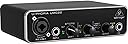
The Behringer UMC22 is a compact 2x2 USB audio interface featuring a legendary Midas-designed mic preamp, 48 kHz sample rate, and versatile input/output options. Perfect for solo musicians and content creators, it offers seamless integration with major DAWs, direct zero-latency monitoring, and USB bus power for ultimate portability and professional sound quality at an unbeatable price.


| ASIN | B00FFIGZF6 |
| Audio Input | USB |
| Best Sellers Rank | #3,086 in Musical Instruments ( See Top 100 in Musical Instruments ) #24 in Computer Recording Audio Interfaces |
| Brand | Behringer |
| Brand Name | Behringer |
| Compatible Devices | Laptop, Personal Computer |
| Connectivity Technology | USB |
| Customer Reviews | 4.5 out of 5 stars 12,745 Reviews |
| Frequency Response | 48000 KHz |
| Global Trade Identification Number | 00696859053863 |
| Included Components | 2x2 USB 2 Interface 28K Midas |
| Item Type Name | audio interface |
| Item Weight | 16 ounces |
| Manufacturer | Music Tribe US |
| Manufacturer Part Number | UMC22 |
| Maximum Sample Rate | 96 KHz |
| Model Number | UMC22 |
| Number of Channels | 2 |
| Number of Items | 1 |
| Operating System | Windows |
| Supported Software | Production software |
| UPC | 696859053863 |
| Unit Count | 1 Count |
| Warranty Description | Please refer to http://www. Music-group. Com/warranty. Aspx. |
A**R
Gets the job done on a budget.
Like just about everything Behringer makes at this price point, the UMC22 is chiefly one thing: cost-effective. You don't get best-in-class sound quality. You don't get a flashy brand name. You don't get the most features. What you do get is an audio interface that works, and honestly does a surprisingly good job. Setup is easy. Plug it into your computer. USB2 is fine. Plug in your headphones. Plug in your monitors. Plug in your mics/instruments. Done. Drivers aren't obscure or finicky. Don't worry about it. Outputs in the rear need two 1/4" TR cables for left and right channel. Output in the front needs a 1/4" TRS cable. Make sure you've got semi-decent studio headphones and/or monitors, too - an audio setup is only as strong as its weakest link, and if you're looking up 1/4" adapters for your Beats or whatever, maybe skip this and invest in better headphones instead. Craftsmanship's okay. It's a Behringer audio interface, not an SM-58. I wouldn't go throwing it down flights of stairs for fun. You have two audio inputs - the XLR/TRS hybrid jack going through the Midas preamp, and the second TRS jack that goes through a Xenyx preamp. Neither are particularly touted for their sound quality (the Midas is better than the Xenyx by far, though), but it's miles above motherboard-integrated stuff. Both can record at 48KHz tops - as far as I'm concerned, if you're looking at this interface instead of something higher-end, that's plenty. The "direct monitor" button you see on the front ducks your computer sound output and lets you listen to your connected inputs through the hardware, which has its uses. The interface outputs to headphones and to external monitors by means of 1/4" TRS and TR cables, respectively. Sound is clean - mind you, my ears aren't well trained to that sort of thing, and if yours aren't either then the sound quality should be fine. It's important to note that it will always output to both headphones and monitors - if you want to listen to just headphones or just monitors on-the-fly, this won't provide a convenient solution to that. It does, however, eliminate the need to go through your OS's sound system, which can be useful when working with ASIO or CoreAudio exclusive modes to reduce latency. If you want the best and have the money to back up your needs, consider looking elsewhere. Again - an audio setup is only as strong as its weakest link. But if you want the pretty solid, and you're on the kind of budget that has you saving up for purchases like these, I think you can't go wrong with the UMC22, or the U-PHORIA series in general. TL;DR: It's cheap. It's fine. If you need it, get it.
J**E
You will not find a better Audio Interface for the price.
First things first. I am not a huge Behringer fan. In the past they have put out some crap, so I was weary about buying a Behringer product, but after looking and looking for a cheaper alternative after my MUCH much more expensive Focusrite bit the dust, I needed a quick cheap fix. I went on the lookout for another Audio Interface where I could play and record some guitar parts, and I came across some awesome Utube reviews for the UMC22. Long story short, this little box packs a punch, ESPECIALLY for the sales price which is 40 bones right now. It doesn't break up, is in an all metal casing, has three year warranty, has a clip feature, direct monitoring, is ultra quiet, has power out, and has MIDAS preamp, which is insane because Midas usually only comes with much more expensive audio equipment. It will also take two 1/4 inch jacks. I am actually blown away with what this little box can do, so much that I was planning on replacing my Focusrite with another, but now I have no need. It works just as good, and dare I say almost better. Behringer also made a deal with Tracktion (DAW Software) for recording. Most places don't state this and it is not in the box, but after reading reviews from others I found out. When you register the product with Behringer, they are supposed to send you a free Tracktion redemption code (60 dollar value) for their latest software. This is where it became a little bit of a pain in the butt. It was like pulling teeth, but I emailed Behringer after I did not receive my code in 48 hours. They sent me a code, but it didn't work, and then they told me I had to email tracktion because Tracktion sent them a wrong code? Sounds like Behringer is trying to get out of giving these codes away now and will not send them unless you contact Behringer directly. That said, I did email Tracktion with the bum code Behringer gave me and they did send me a new redemption code, so it did work..eventually. Long story short. This is a hell of an Audio Interface for the price. If this thing was branded Focusrite on the box it would be two to three times the cost. Highly recommended.
A**R
Great for people just getting into recording, podcasting, or just skyping!
Pros: Price XLR / 1/4in combo jack + 1/4in jack = A cheap and handy way to get two inputs from a mic or a guitar, or two guitars. Perfect if you're podcasting or doing light home recording. (Or if you just want a great mic for skype) Multiple options for monitoring, through headphones and a stereo, or all at once. Can play sound from the computer into your monitors if you wanted Cons: Monitor output quality is poor Signal/Clipping lights only work when the gain is turned up past 50% even if the audio is coming into your computer at a proper level. The direct monitor button appears to do nothing This audio interface is very good if you are trying to plug your guitar or a microphone (Or both at the same time!) Into a computer. My only complaint is that there is a very audible hiss on the front headphone monitor jack, and the rear stereo outputs also have this problem to a significantly lower extent. One big problem that will keep you from using the monitoring on the interface altogether (and from using it as a convenient headphone amp too) is that it absolutely KILLS the highs in anything that comes through these ports. Mids are ok, bass is ok, but the highs are just smushed and muddy. Not to worry too much though, as the quality of the recording that you end up with in your DAW is just exactly what the microphone picked up, no added EQ. That I've noticed, anyway. The build quality on this unit, at least externally, is superb, and far above what you'd expect from a consumer device in this price range. The unit is an all metal enclosure (Or an extremely durable plastic) with some silver plastic trim on the front. The knobs feel weighty and give very good confidence in the device.
W**_
Still a great first interface for $50 even now.
Purchased through Sweetwater, can confirm this is indeed a plug and play unit and have had no issues so far, i can confidently say that this unit despite having been around for a decade now, is still great for anyone wanting their first interface or is on a tight budget the mic preamps are great for the price and headphone outputs works fairly well with easy to drive IEMS and has little to no noise for the volume I have it set to So for $50 or less it's still a good choice for getting started with if you're new with audio interfaces like me.
H**R
Does what it's supposed to
As an audio engineer and musician for well over three decades I have learned two things in my journey: 1) That more complicated audio interfaces are not necessarily better sounding nor easier to contend with than less expensive ones, especially when their drivers create an ongoing nightmare, turning your recording sessions into a saga of hardware issues, crashes and annoyance. And 2) Simplicity truly is the art of invention. Having said that, I'd been using a Saffire Pro40 for the past several years. First downside was FIREWIRE. Ugh! I'm running Windows 10 and Pro Tools 11 and things worked okay but Windows doesn't like old Firewire cards too much and drivers were a problem. Also, the Pro40 was problematic all its own, with having to turn it off and on after it got hung up for some unknown reason, and it's native mixer/controller interface was a nightmare. Got to the point where I just didn't want to mess with recording anymore, so I took a break. After several months abstaining from recording, I decided to see if I could get PT11 working with my standard Windows audio, the build-in sound on my Asus Sabertooth X99 board, and with the help of ASIO4ALL bingo! That worked nicely, but then I didn't have any way to get an XLR studio mic into my machine. Should I put dig the Pro40 out and hook it up? Heck no! What to do... I shopped around for a USB audio interface and the Behringer UMC22 looked really promising. I was looking for something with one XLR-in for a mic, but the 1/4" Instrument input is nice to have as well. All I needed to do in PT was go into the setup and open the ASIO4ALL control panel and select the "generic USB audio device" (or something along those lines) and wala! It works great! I really appreciate the "Live Monitoring" button option as there is a bit of latency without it, but that might be something I can iron out, though it's not a problem really, and far, far less a problem than having to deal with a futzy Firewire-based one. I don't hate Firewire by the way, just not happy at all with the Pro40. They sound amazing, when they're working properly, but... anyway... I used an SM57 as my first test mic and that sounded very good. Then I switched to a Sennheiser E935 and it sounds great! Crisp highs, solid mids and good lows. Sweet! I have not tried anything requiring phantom power yet, but I'm sure it'll sound fine. I have not tried recording anything thru the instrument input, but I'm sure it sounds fine. This thing is great. Get one! It works very well and while it may not have quite the lushness of more expensive mic pre's, it's as simple as plug in the cable and go. Not bad! Metal case. Decent buttons and switches. Taken care of it should last some good years. Hope this was helpful. Jam on!
D**E
A Beginner's Must
Best basic setup at cost value. Pair it with an interface and record anywhere anytime. Excellent for beginners and hobbyists alike. This little piece of equipment could easily be the first step toward mastery of sound. Or not. Either way, it's pretty cool.
M**N
10 years ago, this box would have cost over $300.
Reviewed as a $40 piece of computer audio recording equipment. First of all, I am a sound engineer with about 15 years in the trade. I have experience with all sorts of equipment ranging from low end to mid grade. I am absolutely blown away at what this $40 box is able to accomplish. Recording vocals and acoustic guitar with an SM57 sounded lifelike. I will follow up with some sound samples. You will not be disappointed with this, ESPECIALLY if you are new to recording and need a simple "songwriter" type setup. On one input, plug in your microphone, and on the other, plug in your guitar, keyboard, etc. Behringer has free multitrack software for download in case you don't have any, although I cannot speak for its usefulness, but I am sure it is fine. I repurposed an old Cubase program I purchased MANY years ago, and it worked flawlessly. Of course, there is always the hassle of setting up the software, making sure the busses are correct and the inputs are all set, but if you don't know how to do that, you need to learn these recording basics because these are essential to the craft. *Other notes: make sure you download the ASIO4ALL driver located at the Behringer website, and that driver also has an official website as well. Upon plugging in the UMC22, the generic drivers install and appear to make your box ready to use, but this is very misleading. The generic ASIO drivers that install upon plugging in this unit for the first time do not play well with this box, and this confused me for a few minutes as I thought they were the drivers that were intended to be used. These generic drivers will also cause the popping and clicking ('weird' as one reviewer put it) noises that some users stated they heard while recording, thinking the unit was faulty. You won't be disappointed. Try this box, especially if you are on the fence between this and other similar options units.
A**X
Great quality for the price, Definitely buy if on sale
This thing is amazing for the price. It works with mics that need phantom power, the dials feel great and very sturdy, the thing itself feels high quality without being extremely heavy/bulky, it looks pretty simple and stays out of the way when you're not using it, and it passes through audio signal great. I'm not a fan of the USB-B port for connectivity, but if you really don't want to keep that included cable around, get yourself a USB-C to USB-B adapter and you'll be good to go, because I tested that, and it worked for me too.
S**N
Günstig gut
Macht was es soll
M**S
Ótimo
Ótimo custo benefício, até o momento não tive problemas.
J**N
Excelente interfaz por su precio
Puedo decir que es la mejor interfaz que se puede conseguir por los 36 euros que me costó. La he usado para grabar mi guitarra y jugar a Rocksmith, y me ha sorprendido gratamente: responde muy rápido, su latencia es bajísima y entrega un sonido muy limpio. Un punto muy a favor es que en distribuciones de Linux como Ubuntu no hay que instalar drivers; funciona perfectamente con solo conectarla. Ahora, para Windows 11, si solo la conectas sin instalar nada, tendrás mucha latencia y bastante ruido de fondo. Por eso es totalmente recomendable usar el driver ASIO nativo de Behringer (versión 2.8.40, que se encuentra fácilmente con una búsqueda de dos minutos en internet). He visto que mucha gente tiene problemas con el driver genérico ASIO4ALL que recomienda la página oficial, pero con la versión 2.8.40 va perfecto. No deja de ser una interfaz básica, pero por su precio es insuperable.
H**D
Top quality
I have been using it for 3 years and i never faced any problem with it. The best quality.
H**Y
good quality and clean design
metal body with good quality, it run stable and provide a clean sound to my expectation. simple and easy to use for a general user, nice to have.
Trustpilot
3 weeks ago
4 days ago