


SG13B-USA
Product ID: 100364127
Details
- BrandSilverStone
- Case TypeMini-Tower
- ColorBlack
- Cooling MethodAir Water
- Fan Size140
- MaterialMesh or front
💾Up to 3 drives (1x3.5", 2x2.5")
📏Supports 10.5" GPU length
❄️120/140mm fan & AIO cooler support
Buy anything from 5,000+ international stores. One checkout price. No surprise fees. Join 2M+ shoppers on Desertcart.
Desertcart purchases this item on your behalf and handles shipping, customs, and support to Slovakia.
🖤 Small Case, Big Impact: Build Bold, Stay Cool, and Own Your Space!
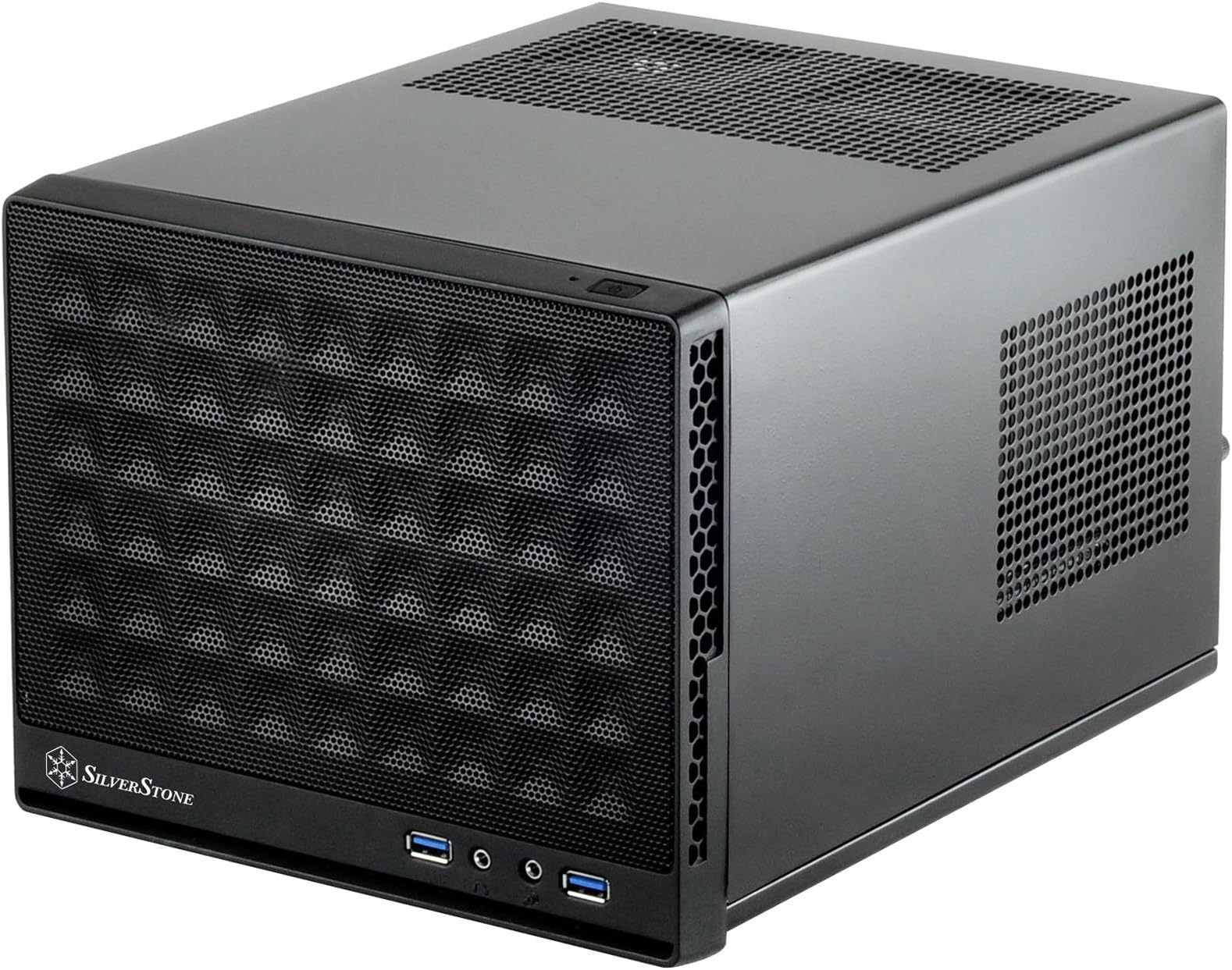
The SilverStone SG13B-USA is an ultra-compact Mini-ITX computer case designed for professionals and enthusiasts seeking a powerful yet portable build. With support for standard-length GPUs up to 10.5 inches, flexible cooling options including 120mm/140mm fans and AIO liquid coolers, and versatile storage configurations, it balances performance and size perfectly. Compatible with both ATX and SFX power supplies, this 11.5-liter chassis features a durable steel body and mesh front panel for superior airflow, making it ideal for travel-friendly, high-performance PC builds.


| ASIN | B07MNC3JCB |
| Antenna Location | Business, home, and gaming |
| Best Sellers Rank | #370 in Computer Cases |
| Brand | SilverStone |
| Built-In Media | Computer Case |
| Case Type | Mini-Tower |
| Color | Black |
| Compatible Devices | Personal Computer |
| Cooling Method | Air, Water |
| Customer Reviews | 4.6 out of 5 stars 532 Reviews |
| Enclosure Material | Mesh or plastic front panel, steel body |
| Fan Size | 140 Millimeters |
| Global Trade Identification Number | 00844761017415 |
| Hard Disk Form Factor | 3.5 Inches |
| Internal Bays Quantity | 1 |
| Item Dimensions D x W x H | 8.74"D x 11.22"W x 7.13"H |
| Item Type Name | SilverStone Technology Ultra Compact Mini-ITX Computer Case with Mesh Front Panel in Black SG13B-USA |
| Item Weight | 5.4 Pounds |
| Light Color | Blue |
| Manufacturer | SilverStone |
| Material | Mesh or plastic front panel, steel body |
| Mfr Part Number | SST-SG13B-USA |
| Model Name | SilverStone Technology Ultra Compact Mini-ITX Computer Case with Mesh Front Panel |
| Model Number | SST-SG13B-USA |
| Motherboard Compatability | Mini ITX |
| Number of Fans | 3 |
| Other Special Features of the Product | Front Fan |
| Power Supply Maximum Output | 500 Watts |
| Power Supply Mounting Type | Bottom Mount |
| Recommended Uses For Product | Business, home, and gaming |
| Supported Motherboard | Mini ITX |
| Total USB 2.0 Ports | 2 |
| Total USB 3.0 Ports | 2 |
| Total Usb Ports | 2 |
| UPC | 844761017415 |
| Unit Count | 1.0 Count |
| Warranty Description | 1 Year Parts and Labor |
P**P
Great ITX case for travel and compact builds—plan your cooling and take it apart carefully
I bought this SilverStone ITX case to downsize my PC for travel and small spaces. Overall, it’s a sturdy, compact case with good build quality and lots of airflow options, but there are a few things to watch out for if you’re building a tight setup. First tip: When taking apart the front panel, don’t just pry it off—there are screws hidden in the back, and if you don’t unscrew them first, you can break the plastic clips like I did. Take your time and remove the back panel first, then unscrew the front. Build experience: I was able to fit my ASRock B550M motherboard, a 5060Ti GPU, and even a full Corsair H60 AIO liquid cooler, which is impressive for a case this size. I also added three 80mm by 10mm fans for extra cooling, using the top for exhaust and the side for intake. The case does flex a little when you install an AIO, so if you’re using a liquid cooler, look for one with flexible hoses or slim fans—ThermalRight or Thermaltake have some affordable options. Fan and dust cover advice: You’ll want extra fans and at least two fan splitter hubs to get everything powered, since the motherboard headers can’t handle all the extra fans on their own. I also added custom-cut dust covers for the front, top, and side vents to keep out dust while traveling. Be ready to cut your own because most dust covers won’t fit right out of the box. Thermals: With my extra fans and good thermal paste, idle temps dropped from 63°C all the way down to 38–42°C. Under load, everything stays much cooler than in my old big tower. The only downside is space—building in this case is tight, and there’s not much room for extra hard drives if you go with a big cooler and GPU. But if you get creative, you might squeeze in another SSD or two. Summary: If you want a portable, travel-friendly ITX build and don’t mind a little extra work on the cooling and cable management, this case is a great pick. Just be careful when opening it up, plan your fan setup, and invest in some dust covers for long-term use. For the price and size, it’s a sturdy, customizable case that’s perfect for compact power builds.
B**D
Love this Case!
Just want to say that I love this case. It seems that ultra small form factor cases in 2024 have lost a bit of actual small form factor. The SG13 has been around for a long time, but in my opinion is still awesome. It is truly hard to grasp how small this case is until you unbox it. I am by no means an expert PC builder, but built this to replace a 10yr old HT PC and also use for gaming. Silverstone engineered this case quite brilliantly. Many of the reviews I have read state that it takes quite a bit of planning for layout and cable management. I found that is was actually quite simple. This is what I quite easily placed ( I did not find this build to be like stuffing myself into jeans 2 sizes too small). Motherboard-Gigabyte B550I Auros Pro AX, CPU-AMD 7 5800X, Cooler-LiquidMaster AIO 120L Core, RAM-Corsair Vengance LPX 2x16GB 3200MHZ, Storage-Crucial P3 4TB M.2 SSD, Power Supply- SilverStone SX500, GPU-Gigabyte RTX 4060 Eagle OC 8GB. (These parts listed are the order in which they were installed. Tip-attach power supply cables to motherboard headers prior to mounting to case). Highly recommend to use an SFX modular power supply and an AIO cooler to reduce stuffing this with unnecesary cables. The top rails on this case actually perfectly accomodate width of ribbon power supply cables to keep them out of the way. Pictures I attached are prior to graphics card install showing there really is quite a bit of space in this case. After is with the graphics card installed. Eventhough the specs do not officially support this, the Gigabyte RTX 4060 Eagle version is 272mm long, and fits in the case perfectly without needing any modification whatsoever. I went with this GPU because it had 3 fans instead of going with a shorter 2 fan 4060. It was the only 3 fan gpu I found at 272mm. The GPU runs quite cool and most of the time at default settings the fans will not even run because it does not get to warm. I altered the fan profile to actually keep them running at lower temps simply to introduce more air into the case. CPU temps thus far have not exceeded 60c when testing OC settings. CPU is averaging about 35c. The only con I have to mention is really just a nit. The case does not ship with instructions, just a warranty card in the case. Highly recommend downloading the manual from SilverStone website as it tells you precisely the order in which to install the parts. I personally permanently removed the ATX support bracket and the topside drive mount tray that both simply unscrew from the frame. I did not want extra metal warming up the case and obstructing air flow.
N**.
A great case at a great price!
I love this little case! It's as small (or smaller) as a shoe box and if you keep your expectations realistic, you can really do great things with it. I have a Gigabyte AB350N WiFi Mini ITX motherboard, Ryzen 5 1400, R9 270, 16GB RAM and a full size ATX Power Supply with all the cables, and I still have room to spare! Not much room, but a little bit! I was not expecting a lot here but wow what a case! It's got a bit of room to work in, and the temperatures are pretty good, too! I have a 140mm Noctua fan mounted in front as an exhaust, and I have the Power Supply fan facing up towards the top vent so it only pulls in cool air from the outside. The GPU brings in cool air to cool itself, and the CPU gets some fresh air from the little vents on the back. I really wish that Silverstone would have included a fan with this case but they didn't. The other complaint I have is I wish they included better instructions. They aren't hard to find online. The case is very straightforward and I only needed the instructions twice, but I am a fairly seasoned PC builder. This was, however, my first foray into Small Form Factor (SFF) PC building. Overall I am very pleased with the case. I didn't try to cram too much power into it and it really rewards good planning with cable routing and the like. Zip ties in this case are an absolute must as well! 10/10 would recommend.
R**G
Tiny and well-designed
Overall, a quite excellent little Mini-ITX case. It's definitely even smaller than I was expecting but still has plenty of room for all of my components. Just be careful to not get too long of a GPU! Air-cooling works well with a stock CPU cooler, single intake fan, and the PSU (a full-sized ATX!) set upside-down to help exhaust heat from the CPU. The materials are all quite quality and assembly (though naturally tight due to the small form factor) was relatively simple. I only knock off a single star because the screws were not organized and are all surprisingly similar, though not identical. It would have been better to have greater variety in the screw sizes so I don't get them so easily mixed up. Also, the front I/O cables are not very quality, though I think this is reasonable considering the low cost.
I**C
Great Versatile Easy to Use Case
Easy to assemble and fits a full size ATX (assuming you have an AIO for the CPU). Really only spot for 1 120mm fan, but I have no issues with cooling the system as the venting doesn't trap any heat. This is a small case at 11.5 liters which looks great. The lighting for power and drive activity is subtle and look good. No PCIe cable to deal with nor any issue with GPU sag since the GPU is vertical. The only con is that you are limited to what GPU you use as the length of the case is <11"...officially 10", but maybe 10.5" or so with some mods.
U**A
Nice SFF (Small Form Factor) mITX Case (V2)
Disclaimer: This is not the smallest SFF case out there, and it also doesn't have rgb lights all over the place. Now that you're aware, let's continue with the details you might want. Packaging was adequate and the case was protected with styrofoam holders. The case was painted inside and outside (powder coat maybe). There were no sharp edges anywhere. It included a small baggie of screws and some foam rings for fan mounting. The finish is "slick" feeling and nicely done inside and outside. This model did not include any case fans. Honestly, there's not a lot of room for extra fans. I picked up a Noctua NF-P12 redux, 120mm fan and installed it in the front (see photo). Don't bother with rgb fans on this. The case is very easy to disassemble. Be careful with the front - it's attached by screws on the side of the frame and some tabs. Remove the screws and be careful to thread out the front I/O cables. Once the fan was installed, there was plenty of space to reinstall the cables and the front panel. The front panel has a removable dust filter. There's another photo with a measurement touching the front dust filter to the back where a video card would be installed. If you wanted, you could buy some magnetic dust screens to cover the other vents. I recommend a modular power supply. There's only 4 mother board standoffs. Install your CPU, CPU fan, ram, and connect power cables to the mother board first. Then connect the power cable to the power supply once it's installed. The case has 4 nice, soft rubber feet on the bottom. All-in-all, this is a great, small form factor case with a few nice features. Note that the user's manual is online - not included in the box.
T**.
THE BEST SFF CASE HANDS DOWN!!!! FULL ATX PSU SUPPORT TOO!!
This is HANDS DOWN the best small form factor inexpensive PC Case I've purchased and built a PC with. The next best thing to me is the Node202 but this thing is damn near like a PC version of a GameCube. It's small, Compact, and will fit a regular sized ATX PSU. My specs are: Ryzen 7 1700 CPU Zotac Mini GTX 1080 GPU 16GB of DDR4 of Ram Gigabyte AB350N-Wifi motherboard 500 watt PSU Two SSDs, a 120gb and a 1TB A single 120mm intake fan for cooling Even though I used a non modular full sized ATX PSU, if done right air can be pulled from the front onto you CPU. At full load and playing games at maxed settings, my temps never went above 50C. I'm using a wraith steath instead of a spire for my CPU cooler. It leaves enough breathing space between the ATX sized PSU and the CPU for breathing. I am very happy with this case, my build is so compact and I can easily put it in a book bag or small duffle bag and I normally use it with a portable monitor when I go to gatherings and when people pull out consoles, I pull this out. They thinking I have a high dollar gaming laptop, nope, Im pulling out something that's more powerful than your consoles and gaming laptop put together!
D**G
Understated and very compact; perfect for small gaming or home theater builds
The whole chassis is about the size of a shoebox, and has ventilation everywhere it needs to. It's fairly versatile and can support SFX or ATX power supplies, as well as an AIO for the CPU. You'd probably want to use an AIO since there isn't much room for airflow with any conventional CPU air cooler, as even an SFX power supply leaves barely a few centimeters in space between it and the low-profile coolers. The GPU has its own direct intake on the side, and the case supports a fairly wide range of sizes. If you plan on using the 2.5" drive mount on the top of the case, be aware that it can put pressure on the 8-pin connector to the actual graphics card if it's on the side of it instead of the end, but this would depend on the actual card length. Cable management is practically impossible in this case. There's literally just enough room for your parts, cables, and space for airflow. If you enjoy RGB and tons of lights in your PC, this case isn't for you. Almost nothing from inside the case is visible on the outside. This wasn't an issue for me, but everyone has different preferences. Overall, very good case; 9/10. One point deducted for a slight lack of airflow options.
K**N
It’s okay
It’s a good case. But I think if u prefer more thumb screws, u can consider the NR200 by Cooler Master
A**R
Decent case for a Mini ATX.
I recommend this case if you build a Mini ITX. It fits a medium graphic card inside easy. Also can be fitted with a normal size power supply. The case has enough holes in it for the airflow.
C**Z
Uno de los mejores mini itx cases para la sala.
Case muy pequeño, aunque por ser tan pequeño significa que los componentes internos deben estar controlados para no generar tanto calor. Ryzen 5 o Intel i5, mas alguna gráfica como 3060 o 6600 son perfectos. Se necesita comprar un ventilador para mejorar el flujo y que tenga sentido ese frente en malla. Uno de 140mm es buena opción. Fuente de poder SFX y modular es lo recomendado, aunque sin ser modular funciona, importante dedicarle tiempo al manejo de cables. Recomendado usar unidades nvem para evitar menos cables y con funcionara todo de maravilla. Excelente opción para tener en la sala junto a las consolas.
B**N
Great SFF case
Needed a case for my HTPC and this holds an ITX MB, ATX PSU, and a 1650 GPU. I use a 120mm AIO for CPU cooling and all devices are set to exhaust to help with thermals (including PSU pulling air from inside the case). The GPU selection is tough so be careful there. My MSI 3050 didn't fit, for example.
N**R
Incredible is the least i can say, easy 5 stars
I have a full ATX non modular power supply and a stock intel fan cooler with a 120mm high rpm intake fan in the front, at first i thought i would deal with high temperatures but with some cable management that I put a lot of time into im really happy to play with 1080p having 50-60 Degrees as my CPU Temps for the most games I play. My biggest advice especially if your planning to do what i did is cable management take all the time you need to think and manage the cables, zip ties are very necessary. Two things that can make things way easier is a SFX modular power supply, a water cooling system for your CPU especially if you wanna do some overclocking.. it really depends on what are you planning to do with the PC. And I really didnt find it that hard to build in considering this is the first system to build my self. I love how it looks just clean I can even put it in my backpack its way smaller than you can possibly think easy 10/10 thanks silverstone.
Trustpilot
2 weeks ago
5 days ago