๐ท Zoom, shoot, and share like a proโdonโt let your memories wait!
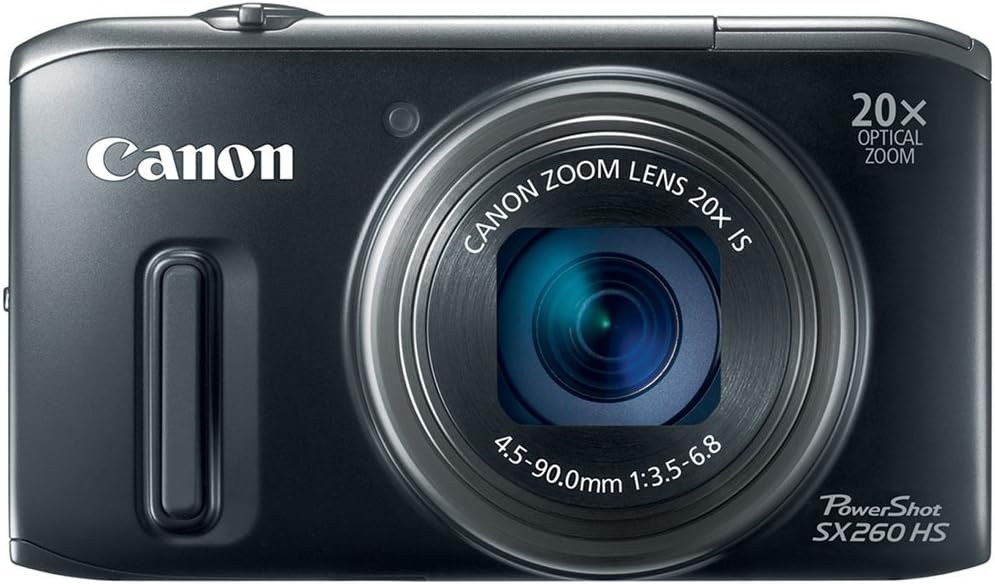
The Canon PowerShot SX260 HS is a sleek, compact digital camera featuring a 12.1MP CMOS sensor and DIGIC 5 processor for superior image quality. Its standout 20x optical zoom with Optical Image Stabilization lets you capture sharp photos from wide-angle to far away. Shoot smooth 1080p Full HD videos with stereo sound using the dedicated movie button. Smart AUTO mode with 58 scene presets and Face ID ensures effortless, optimized shots. GPS functionality records your photo locations, perfect for the modern explorer. Ideal for professionals and enthusiasts seeking a versatile, travel-friendly camera with advanced features.
| ASIN | B0075SUK14 |
| Age Range Description | Adult |
| Aperture modes | Aperture priority, Manual |
| Are Batteries Included | Yes |
| Auto Focus Technology | Center, Continuous, Contrast Detection, Face Detection, Multi-area, Single, Tracking |
| Autofocus | Yes |
| Autofocus Points | 9 |
| Best Sellers Rank | #27,054 in Electronics ( See Top 100 in Electronics ) #241 in Digital Point & Shoot Cameras |
| Bit Depth | 12 Bit |
| Brand | Canon |
| Built-In Media | Camera Body & Accessories |
| Camera Flash | Built-In |
| Camera Lens | [INF] A 20x optical zoom, wide-angle lens. |
| Color | Black |
| Compatible Devices | Computers, smartphones, tablets |
| Compatible Flash Memory Type | SD, SDHC, SDXC |
| Compatible Mountings | Canon RF |
| Connectivity Technology | USB |
| Continuous Shooting | 10 FPS |
| Customer Reviews | 4.1 out of 5 stars 1,603 Reviews |
| Digital Scene Transition | zoom |
| Digital Zoom | 4.00 |
| Digital-Still | No |
| Display Fixture Type | Fixed |
| Display Maximum Resolution | 1080p |
| Display Resolution Maximum | 461000 |
| Display Type | LCD |
| Dots Per Screen | 680 |
| Effective Still Resolution | 12.1 MP |
| Expanded ISO Minimum | 100 |
| Exposure Control | Aperture priority, Automatic, Easy, Live View Control, Manual, Movie Digest, Program, SCN, Shutter priority |
| File Format | MP4 |
| Flash Memory Type | SD/SDHC/SDXC |
| Flash Modes | Auto, On (Scene Modes) |
| Flash Sync Speed | 1/200 or 1/250 |
| Focal Length Description | VeryLong millimeters |
| Focus Features | Contrast Detection |
| Focus Mode | Automatic AF (AF-A) |
| Focus Type | Manual Focus |
| Form Factor | Compact |
| Generation | 2 |
| HDMI Type | Type C Mini HDMI |
| Hardware Interface | SDHC, SDXC |
| Has Color Screen | Yes |
| Image Capture Type | Video |
| Image Stabilization | Optical |
| Image stabilization | Optical |
| Item Weight | 8.1 Ounces |
| JPEG Quality Level | Fine, Normal |
| Lens Type | Wide Angle, Zoom |
| Manufacturer | Canon |
| Manufacturer Part Number | 5900B001 |
| Maximum Aperture | 6.8 f |
| Maximum Focal Length | 500 Millimeters |
| Maximum Image Size | 1920 Pixels |
| Maximum Shutter Speed | Jan-00 Seconds |
| Memory Slots Available | 1 |
| Memory Storage Capacity | 4 GB |
| Metering Methods | Multi, Center-weighted, Spot |
| Minimum Focal Length | 25 Millimeters |
| Minimum Shutter Speed | 15 seconds Seconds |
| Model Name | 5900B001 |
| Model Number | 5900B001 |
| Model Series | PowerShot |
| Movie Mode | Yes |
| Night vision | No |
| Optical Zoom | 20 x |
| Photo Sensor Resolution | 12.1 MP |
| Photo Sensor Size | 1/2.3-inch |
| Photo Sensor Technology | CMOS |
| Real Angle Of View | 66.2 Degrees |
| Recording Capacity | 120 Minutes |
| Remote Included | No |
| Screen Size | 3.2 Inches |
| Self Timer | 10 Seconds |
| Sensor Type | CMOS |
| Series Number | 260 |
| Shooting Modes | Automatic, Movie |
| Skill Level | Professional |
| Special Feature | 16x Digital Zoom |
| Specific Uses For Product | Photography |
| Supported File Format | MP4 |
| Supported Image Format | JPEG |
| Total Still Resolution | 12.1 MP |
| Total USB 2.0 Ports | 1 |
| Total USB Ports | 1 |
| Total Video Out Ports | 1 |
| UPC | 013803146448 |
| Unit Count | 1.0 Count |
| Video Capture Format | AVC |
| Video Output | HDMI |
| Video Resolution | FHD 1080p |
| Viewfinder | LCD screen |
| Viewfinder Magnification | 1.0x |
| Warranty Description | 1 year limited |
| White Balance Settings | Auto |
| Wireless Technology | Yes |
| Write Speed | 200 MB/s to 800 MB/s |
| Zoom | Digital Zoom, Optical Zoom |
C**B
This camera reads your mind!
I would characterize myself as a mid-level amateur photographer - I'm picky about good image quality and not satisfied with cell phone pictures or a basic point and shoot. On the other hand, I don't want to carry a lot of bulky equipment and I don't know enough about photography to mess with things like aperture settings. Between 2005 and 2009 I went through four or five digital cameras as the technology evolved trying to find one that fit my needs. In May of 2009, I got the first camera in this series, the SX 200, and felt that I finally had the camera for me. It just takes fabulous pictures, is so easy to use, and easy to carry around. It has 12 X optical zoom, which was unbeatable in a compact point and shoot at that time. I've kept my eye on the newer models coming out and haven't been tempted to upgrade until I saw that the SX 260 had a 20 X optical zoom. I was concerned that some of the modes I used regularly on the SX 200 (indoor lighting, landscape) didn't seem to exist anymore, and another mode that I used frequently (portrait) still existed but wasn't accessible through the dial, you have to go through the menu. After a few days of trying this camera, I am just blown away by the image quality. I experimented with different scene modes, but there's really very little need to use anything but auto. The camera just figures out what you want to do. I've gotten a number of incredibly beautiful flower pictures without ever leaving auto mode. If you want macro, you just zoom in on what you want and there it is. If you want pictures of people, it figures that out and adjusts accordingly. The 20 X zoom is phenomenal and, as others have stated, the image stabilization is flawless. I can take pictures one-handed while holding my two dogs' leashes in the other hand as they pull and tug to keep walking, and there's no blur or lack of focus whatsoever in the pictures (I will say this was also true of the SX 200). I've uploaded a couple of images if you want to look at them. Regarding video, I'm of the school that if you want video, use a video camera. I do have a video camera, but I don't use it very often. Generally I prefer still photographs. So, I would use the video in limited situations where something came up that I wanted to capture and I didn't have my video camera with me. I did a little testing of the video and did not hear the whirring and clicking that others reported. The video quality is very good. I did notice that the playback was atrocious using VLC media player - there was a very loud hiss and the images would pixelate and freeze during playback. However, when using Windows media player for playback, the hiss was only slightly audible and significantly reduced, and the video playback was flawless. For the limited occasions that I expect to use the camera for video, it's perfectly adequate for my needs. I've been so happy with the Canon SX 200 that I really hesitated a lot before purchasing the upgrade. Finally I decided to give it a try, knowing that Amazon would take it back if I wasn't happy with it. I'm so happy that I did - I'm extremely pleased with this camera. Oh, I got red, not black, and it's a little more pinkish than I would like, a darker red wold be nicer :) But who cares, a fun color is nice but what really counts is how it performs.
B**I
Great camera in it's class
I had bought this camera a few years ago for my wife to replace an older Canon point and shoot. The old one took great pictures, but noise or artifacts started to show up in the pictures in the form of dots here and there. Then bought another one for her mother few years later. Right away, when she started using the new camera, she noticed that it took great, sharp pictures. What the difference was that by just using the auto setting, the pictures came out great, effortlessly. No need to fuss with the settings for anything particular. The camera did the adjustments quite accurately, enough. The camera is full of useful features. One I was interested in was the burst modes, where you can take several shots in a row. I took a sequence shot of my kid jumping off from a swing. It captured the path that she took to where she landed in the sand. I've read comments about noises/hissing with video mode. We never noticed any noises until I compared the second SX260 with my old Sanyo video camera. Sure enough, there was hissing. Then I compared the first SX260 and the same hissing was there as well. I don't know if the hissing I heard is the same as ones mentioned in other comments, though. But it wasn't bad enough that we didn't even realize until they were compared. There were other comments about speed. This camera can be fast in bright settings, but will yield poor/blurred images in darker situations. I'd guess that this is related to the size of the optical sensor where the light is absorbed. So, (in simplified form) if you have lots of light, the "shutter" speed can be fast, but with low light, the shutter has to be slower. Therefore, blurred images. So, this camera may not be for taking sports scenes in all types of lighting. Find a camera with much larger sensor(s) if you want to take fast action shots. Lastly, this camera has been obsoleted a while ago when the SX280 came out. It turns out that the SX280 is inferior to SX260 in quality. They have low ratings for being a "lemon." So, at that time of purchase, SX280 was selling for much less than the SX260. That is if you can find SX260 any more. The SX260 seems to be getting harder to find, so I was afraid that some of the stores that are still selling these, may be the last of the returned items. They could be defective/refurbished, or last of the leftover stocks. The one I got turned out fine. Everything seems to be in order. But then, we haven't used it much, since it's a gift to my wife's mother.
H**N
Overall very happy
I have had this camera for over a year now and didn't feel I should write a review until I had used it enough to get a good sense of it. It takes good pictures and is fairly easy to use. I'm just a casual user who prefers to point and shoot, not interested in being a professional photographer. I tend to not use most of the special features of the camera, but at least they are there if I want them. I did accidentally discover the Movie Digest setting, which turned out to be pretty cool. I didn't realize the setting had gotten bumped to that and to my surprise when I went to play back the pictures I had taken at a concert, I had gotten a little movie with clips from various parts of the concert where I had taken a still picture. I knew the camera had some sort of feature like that but had never investigated it. A neat feature that I will use again. Other features that I like are the size of the screen, the 20x zoom and the wide angle lens. The only cons I can think of are 1) it has a proprietary battery, which I knew when I purchased it and debated about, but so far it hasn't been too much of a problem since I try to keep it charged knowing that I can't simply put in new disposable batteries in a pinch, and 2) the flash is a bit awkward, as it suddenly pops up when needed, right where your finger is. I've learned to expect it and have gotten used to it but it never fails to surprise someone else when I have them take a picture for me. It's kind of like when the Jack-In-The-Box pops up, lol. The placement could've been better for sure but it is not a deal breaker for me.
N**V
Amazing Camera! Very impressive
Canon SX260 HS: I'm happy to say that I was one of the first people to buy this camera. I bought it from one of the sellers on Amazon Marketplace, before it was officially released (it wasn't even available on amazon.com itself when I bought it). It's a good camera & quality clear pictures, with a clear & sharp LCD screen. The camera has the option of changing the aspect ratio for the pictures; you could choose from 16:9, 4:3, 3:2 & 1:1. You could also change the amount of recording pixels from L, M1, M2 & S. In auto mode, it has many predefined scenes. The camera could also be set to various scene modes, including portrait, Smooth skin, smart shutter, High-speed Burst HQ, Handheld night scene, low light, underwater, snow, fireworks, discreet & stitch assist. It does not have the scene modes for Kids & pets, foliage or beach, which other Canon powershot cameras have, but I don't think that would make a big difference, as it takes great pictures anyway. It also has creative filters which I haven't yet used, including fish-eye effect, miniature effect, toy camera effect, soft focus, monochrome, super vivid, poster effect, color accent & color swap. It has the movie digest feature & face ID. It also features continuous shooting. In manual mode, there are many different options, including setting the ISO speed (speeds available: 100, 200, 400, 800, 1600 & 3200), flash output, changing the compression between fine & superfine (superfine is not available in Auto mode, but is available in P mode), white balance (settings available: auto, daylight, cloudy, tungsten, fluorescent, fluorescent H, underwater & custom), my colors (including: vivid, neutral, sepia, B/W, film, lighter & darker skin tone, vivid blue, vivid green, vivid red & custom) & light metering. Manual mode has the option to have the flash forced on (forced flash is not available in auto mode, but is available in P mode). You can also set the shutter speed anywhere between 1/3200 of a second & 15 seconds (with speeds slower than 1.3 seconds, ISO speed is set at 100). Aperture value could be set anywhere between f/3.5 & f/8.0, but it also depends on the zoom position (with maximum zoom, aperture value could be set either at f/6.8 or at f/8.0). There is also a P mode, where various functions can be set. (Many of the options available in manaual mode are available in P mode also, including forced flash). I'm not here to describe every detail of the camera, as there are many more functions available as well (including setting the focus & exposure, plus some more that I haven't yet figured out), but for those that would like to know everything prior to buying the camera, they could go to Canon's website - [...] (find the camera, click on brochures & manuals) & download the complete user guide. Movies: Good quality with very clear sound. Optical zoom could be used for movies (& the sound of the zoom during the movie is extremely faint, not like some of the previous canon powershots). Options available are: Full HD (1920 x 1080, 24 fps), HD (1280 x 720, 30 fps) & VGA (640 x 480, 30 fps). Maximum clip length is approx 30 minutes for Full HD & HD, & approx an hour for VGA (or until the memory card is full). Movie format is .MOV. It also has iFrame (1280 x 720), & super slow motion (640 x 480, 120 fps, or 320 x 240, 240 fps). Please note since the primary function of this camera is for stills (as this is not a camcorder), therefore when you shoot a movie, it uses quite a lot of memory & the files will be very big. On an 8GB memory card: Full HD will be approx 30 minutes, HD - approx 42 minutes & VGA - approx 1 hour & 28 minutes, whereas on a camcorder, for the same amount of memory, the shooting time could be much longer, even in HD. But for shooting small clips here & there, it's very good. Zoom: zoom is very good - 20x zoom. It zooms quickly. Wide angle is 25mm which is very good & for some pictures you might want to zoom in a bit; otherwise it might be a bit too wide. In full maximum zoom, you may want to use a tripod; otherwise it might take some time to focus (but you could get good pictures even without a tripod). I found that in full maximum zoom (indoors), auto mode might not get the right ISO speeds etc. & you might need to use some manual settings, but that shouldn't be a big problem (plus you don't have to always use the full maximum zoom). Playback: It has some cool features for playback, including giving you various transitions between pictures (fade, slide or scroll), or watch them in a slide show on the camera. Erasing pictures is very easy; you do not need to go into the menu to erase pictures. You could also organize pictures in categories, or set-up a photo book. It has red-eye correction in shooting mode & in playback. You can also trim pictures or resize them in playback. Camera body: I find that the camera is very solid; the door for the memory card & battery compartment is sturdy, though the cover for the (AV & HDMI) terminals is flexible. The tripod socket is metal. The feel of the camera is smooth & it has a rubber grip on the front. In the USA, this camera is available in three colors; black, red & green. In other countries it's also available in dark silver; I don't know why this color is not available in the US. GPS: I have not yet used the GPS, so I can't give any info on that. In other countries, Canon also makes the "Powershot SX240 HS". The difference between the SX240 & the SX260 is that the SX240 does not have the GPS feature, whereas the SX260 has the GPS feature. The SX240 HS is not available in the USA. Flash: The flash is a pop-up flash. Some people might think this is not convenient. However it's ok & it's more convenient than the previous model, the SX230 HS. In the SX230, the flash takes up the entire depth of the camera; therefore there's almost nowhere to place your left finger. In this model however, the flash only takes up half the depth of the camera, enabling one to place their left finger behind the flash. The flash does not pop up automatically every time you turn on the camera. It pops up (in Auto-flash) when it determines that it needs to use the flash, or when you set the flash to (forced) on. If your finger is stopping the flash from popping up properly, it might tell you to power-off the camera & then to power-on, in order to be able to pop-up completely. After a while of using the camera, you should get used to the pop-up flash. Software: I have not yet used the software on my computer, so I can't say anything about it. But you can still connect the camera to a computer (via the USB cable) even without installing the software. Included in the box are: The camera SX260 HS, Battery NB-6L, Battery charger CB-2LY, Wrist Strap WS-DC11, USB Interface Cable IFC-400PCU & the Digital Camera Solution CD-ROM. The camera comes with a printed version of the "Getting Started" guide. The complete "User Guide" is to be found on the disk that comes with the camera (together with the software), or it could be downloaded from[...] . If you would like to get product updates from canon, you could register your camera on usa.canon.com . For those who are aware of differences in other Canon models between being made in Japan or in China, the camera that I purchased was made in Japan, & the battery & battery charger were made in China. Memory Card: The memory card of a camera is like the processor of a computer. The faster the memory card, the faster the camera. Canon recommends a "Class 6 or Higher Memory Card". I got the SanDisk Ultra Class 10 Memory Card 16GB Sandisk SDSDU-016G-A11 16GB Ultra SDHC UHS-I Card 30MB/s (Class 10) . It's also available in 32GB & 64GB (The 64GB is SDXC, not SDHC). Please note: if your memory card is SDHC or SDXC, make sure you have a card reader that could read those types of cards, as some card readers only read SD cards, but not SDHC & SDXC (or it might not support a certain class speed). (You might be interested in the SanDisk USB 3.0 card reader that I purchased SanDisk ImageMate All-in-One USB 3.0 Flash Memory Card Reader (SDDR289A20) ). But even if you don't have such a reader, you can still connect the camera to a computer via the USB cable (even without installing the software). Camera Case: Personally I prefer a case with a flap opening (as opposed to a zipper opening) together with a shoulder strap. The Canon cases do not have a shoulder strap. For my previous model, I had the Lowepro rezo 10. For the size of this camera, the Lowepro cases that were big enough have zipper openings. So I searched for a case. Eventually I came across the Tamrac cases. First I tried the Tamrac 3819 Case, but it was extremely tight. So I got the next size - the Tamrac 3821 Tamrac 3821 Neo's Digital 21 Camera Bag (Black) , & it fits perfectly. (It's available in 4 colors; black, red, green & rust). It has a Velcro opening, small pocket (but make sure nothing falls out) a belt loop & an extendable shoulder strap.
W**E
Ergonomically ridiculous
I am stunned that this camera has such high ranking feedback. I assume the picture quality is very good (I've yet to download and see my photos.) The issue is--TAKING THE PHOTOS! Good luck. There's multiple huge issues: The mechanical FLASH is placed exactly where most people hold the camera with their left hand. The shutter release button is right next to the Power on/off switch on the right side top of the camera. AGAIN? After All These Years!? How long have digital cameras been around now? I remember having this crazy-making issue (accidentally shutting the camera off rather than snapping the photo) on cameras years and years ago. After inadvertenly shutting the camera off, now you have the ten second restart cycle and the picture is gone. WHY HAS CANON NOT LEARNED THIS? (Yes, the power button is shaped differently. So what? When taking a picture, one's left and right brain are most likely occupied with the subject and the picture.) I'll tell you why the on/off button is next to the shutter--because the engineers put it there and do not care about what the consumers/users want or need. It's a classic example of "The Inmates Are Running the Asylum: Why High Tech Products Drive Us Crazy and How to Restore the Sanity"--This is a book written over ten years ago and available here on Amazon. BTW, I am an engineer with an MSEE---I know when I see tech decisions that totally ignore common street smarts. (I owned a Ford Explorer where the change holder was immediately next to the CD player cartridge door. Coins would fall into the player and destroy it. Ford's solution---they placed a sticker on the CD player which read: DO NOT DROP COINS INTO THE CD PLAYER--making it YOUR PROBLEM.) 'pretty bad, but it really gets worse. The brilliant, crack engineering team put the flash unit (which mechanically rises out of the camera) on the exact opposite (top left) side of the camera, where most everybody (symmetrically) holds the camera. Your right hand/finger are on the right at the shutter/power button, and your left hand/finger are now on the left side, covering the flash unit. SHAME ON YOU! So what happens? You're trying to get a picture off---you're lucky enough not to shut the camera off with the power button, then the flash struggles to pop up through your finger...then it jams. Not only is the picture lost---but it gets user-unfriendly WORSE from here. The camera's software now goes into an error mode. The flash can no longer be used with the camera. An ERROR MESSAGE comes up on the screen telling you that you must restart the camera before the FLASH can be used again. WOW!! I'm writing this from the floor. Really? Imagine if airline software or even automobile software was written this way. You'd have to pull off the road and restart the car because you didn't get your seatbelt on right. WHY can't the software itself reboot without your attention? BTW: Canon's solution to this: MAKE IT YOUR PROBLEM: In the instruction manual they tell you how you should hold the camera---palm down under the bottom. Really? Good thing Canon does not (re)design forks or knives. We'd be holding them in some foreign way. So now, again, you are in a power-recycle mode trying to get a picture taken. FRUSTRATING frustrating FRuStRaTiNg! We want to take pictures of our ACTIVE five year old. The reason I bought this specific camera after hours of research was because its response time was supposedly quick. We completely miss the shots with all this nonsense---and guess what? Its response time is miserable anyway---pathetic---even if you manage to get your fingers in all of the right places. Lastly (in the physically ridiculous department) the battery goes in MORE EASILY backwards. One needs to struggle to get it in correctly. It's easier to "plop" it in backwards. You only then know it's backwards because it will not seat the remaining 5% of the way down. YIKES again! I am so disappointed with this design-disaster. I believe the optical/electronic engineers did their job, but the interface engineers were out to lunch. Shameful---after years and years of people using cameras, they ignore how people use cameras and the booby traps that they so easily fall into. I want to cry or smack a designer after all of the time and trouble I put into choosing this camera FOR MY WIFE for Christmas. Rather than showing her how easy it is to use, I have to show her the many things to avoid, watch out for, and how to RECOVER from the problem once engaged. Sad.
K**2
This Could Be the One
I am an experienced amateur photographer and I've owned many cameras over the past 40 years. I've had some photos published but photography has always been strictly a hobby, though a serious one. I shoot with a Canon 7D, Rebel backup, various 'L' lenses, and I also use an Olympus E-P1 occasionally as well as a Canon S90 and Powershot 1100S (kept in my glovebox for 'emergencies'). I enjoy taking pictures. I also enjoy traveling and have traveled around the states as well as visited many foreign countries. I'm sure I echo the frustrations of every photographer out there when I say that choosing which photo equipment to take on a vacation is the most agonizing process in planning a trip. Let me share two experiences--one pleasant, another frustrating. In 2003, I visited New Zealand and took one of Canon's first digital Powershots. It was very small, fit in my pocket, and I could easily whip it out for quick photos. Even though the pictures were not pristine SLR quality, it was easy and fun using that camera and I still enjoy viewing those photos today. I had a pleasant and memorable trip. Second experience: a 10-day tour of China in 2007. I took a DSLR and 3 lenses as well as an HD camcorder, all in the same shoulder bag. It turned out to be total frustration. Instead of being able to enjoy the moment of seeing all that glorious ancient history and the people of China, I was overly concerned with 'getting the shot' -- all the time. Also, HD video was new in those days and I thought I could record the 'trip of a lifetime' with the latest technology. But switching between video and still photography simply added to my frustration. Although I got quite a few good pictures and videos, I did not enjoy that trip as much as I should have because I let my photo-taking desires get in the way of my vacation needs and cultural immersion. As a matter of fact, my wife used a point-and-shoot to get some great candid photos of people and children that totally outshone my efforts. OK, fast forward to 2012. Like so many other photographers out there, when traveling I need a camera that's pocketable but can do everything. Impossible. It doesn't exist. But I remember the lessons learned from the experiences described above. Concessions must be made. With experience, I've learned what is a necessity, and what 'would be nice to have' when traveling. I have concluded that for me, a camera that takes 'very good' pictures, that is small and lightweight, is a NECESSITY. Anything else would be 'nice to have' but is not worth the enormous hassle. I've had the Powershot SX260 HS for about a week now and I think I may have found the camera that will adequately meet my travel needs. I've shot a couple hundred photos and I'm surprised at the results. They are sharp, contrasty, colorful, noiseless, and good enough to use as desktop pictures on my 24-inch monitor without editing. The 20x lens is coupled to a shake-free technology that is very, very good. It's pocketable and has easy to use buttons that are logically placed. Canon has done their homework in finding the right balance between sharpness and noise, as far as I am concerned. Although it doesn't shoot RAW (that's a debate for another time), I am very happy with the JPEGs and I use the included highlight-taming technology built in to the camera and it works very well. What I like: 1) Pocketable. Pocketable. Did I say pocketable? 2) Turns on quickly to get the shot. 3) 20x lens -- 25mm to 500mm. The 25mm shots are corrected internally for distortion and the 500mm shots are sharp thanks to the IS technology. 4) Very good noise control -- I haven't tested it at 1600 or 3200 but several other review sites reveal surprising, low noise photos at those ISO levels. 5) My copy is very sharp -- no need to sharpen the photos it produces. 6) Color accuracy is on par with my Olympus E-P1, which I consider to be the paragon of color accuracy. 7) Full manual when desired. 8) Takes very good HD video -- though that doesn't interest me so much these days. IS corrects for camera shake in video mode and zooming works well. What I don't like: Nothing yet, though I will update this review if anything comes up. Does this camera take pictures comparable to my 7D? No. My E-P1? Very close. My S90? Superior to the S90 in my view. The 20x zooming feature of this camera can't be overstated -- it's wonderful. So many reviewers nitpick about technical matters. Sure, I could do that with any camera, including this one. But the point is--what need does the camera serve? All I know is this: If this camera had existed at the time, the SX260 would be the camera I would have taken to China. Highly recommended. [UPDATE: Many people have asked me about the so-called 'squeal' in video mode. When ambient sounds are low, the condenser mic (as in all cameras) boosts the gain. Most cameras will then pick up the internal motor/electronic sounds. This camera is no exception. The noise I've noticed is a very subtle high pitched ring similar to tinnitus. Am I surprised? No. It's the same sound I've heard in every video unit I've owned in the past 25 years. Medium to loud sounds will cause the mic to adjust and the tinnitus disappears. Folks, if video is important, buy a dedicated video camera. This is a PHOTO camera that has video capability, which is what I wanted.]
C**J
Nice outdoor pics; disappointing indoors.
We have taken some very nice pics of our kids outdoors, but the indoor pics have disappointed us. I have an old Canon 4MP camera that's about six years old that's better indoors. The flash photos are slow, in my opinion, and the photos did not look like they came from the same camera as the pics we took of our kids playing in the backyard. I'm no camera buff and have not owned an SLR since the film days, so I don't pretend to be an expert. Just want to share my experiences as someone who bought this for an all-around-use camera. It's too heavy to put in a pocket or even for long hikes, so really I wish I had just spent some more money and bought one of the higher-end cameras. If I am not using it as a compact camera anyway, something a bit larger and more ergonomic would have been better. Plus - and this is my fault - I should have gone by Target or somewhere and felt the camera - a mistake I won't make again. I bought this because it was rated highly on Amazon and by a consumer magazine, but overall think I should have spent the extra $100 and moved up. I would suggest putting any camera in your hands before you buy it - lesson learned. If you want a camera with a nice zoom to take outdoor pics of your kids, this is a good one, but for birthday parties and other indoor uses, based on my personal experience here my suggestion is look elsewhere, as the speed and quality of the flash photos left us disappointed. We are keeping this, though, because for $200 it is still a good deal based on the zoom/outdoor capabilities - just not the all-around camera we were looking for.
E**.
Another winner from Canon
I received my SX260 last Wednesday and have taken about 700 shots and a few quick 5 minute video. Without writing a novel, here are the high/low points of this unit. In addition to this unit, I also purchased a couple of aftermarket batteries (and after market A/C adapters for about $5.00 each) for about $5.00 each and the batteries work fine. With the battery (original and aftermarket) I was able to get over 300 shots (50% flash) with zooming and playback and the battery meter still showed about 25% charge remaining. Pro's Zoom - very long for a subcompact camera 20x optical, total 81x combined (yes 81 times!) Image Stabilizer - Excellent (far superior than the DSC-HX9V); Even at 81x the picture did not come out of focus, but of course not as sharp. I think it's still acceptable Scenes - A few scenes; I think the portrait, sepia, B/W works real well (the Portrait+ suppose to blur the picture a bit, but it's not to my liking) It has a few effects (fish eye, toy, miniature) that's very effective and can be fun for creative shots. Auto Mode - was able to pick the correct type of scene almost all the time; it has an easy mode, and smart auto. Not sure why they have an easy mode, but the smart auto works great Size/Weight - very compact and weigh's 8.2 oz. I would have prefer if the lens was flushed with the unit, but at 20x it may not have been possible Uniformity - the unit does not feel cheap, and beautifully curved; no sharp jagged corners Grip - the right side of the camera has a nice plastic strip for easier grip Controls - Dial extremely easy to use with one hand. The other buttons, if you're a previous Canon user, it's a no brainer; the menu and setup are practically the same across all their models. Screen - 3 inch TFT LCD screen very beautiful; nuff said Processor - Didn't notice that much difference between the DIGIC 4/DIGIC 5, but compared to the DSC-HX9V, this camera is like a Ferrari. GPS - Camera has it, but I never used it and probably won't; at least for the time being. Am more interested in a camera that takes excellent picture Con's Video - compared to the Sony DSC-HX9V this Canon comes in a distant second; if you plan on using this primarily as a video recorder, look elsewhere. I think Sony has excellent lens on their camera but their processing technology is clumsy, painfully slow and unacceptable; whereas with taking videos, the Sony does not do any processing (not to mention it captures at 60fps compared to Canon's 24/25 fps) This is one thing I will miss dearly. Flash - not sure if there is a good place but I had to change my grip as the flash is on the top left corner. Couple of times, I had my left index finger on the flash and the camera gave some flash error message and had to power off and power on the camera to reset the flash. If you're a casual or intermittent photographer (or a professional wanting an everyday point and shoot camera without carrying a luggage everywhere) that is interested in looking for a well refined point and shoot camera, yet has manual controls usually found on higher end DSLR (or higher end point and shoot camera), this is it! UPDATE 04/14/2012 - I paid $349 and today I noticed it's selling for $299, a 15% price drop in less than a month! I thought cars depreciate quick ... UPDATE 04/18/2012 - The Live Mode works great! For those hard shots (for example, taking indoor picture with fluorescent lighting and without a flash), you can view the screen and make the adjustment right then and there. You look at what you plan to take, compare it to the SX260 LCD screen and press the shutter button.
C**X
Awesome camera!
I bought this as a father's day gift for my dad, as his old canon was dying (and very out of date!). The price was better than anywhere else, and shipping was quick. My dad loves the camera. 20X optical zoom means he can take photos from almost any distance. The image stabilization is very good, and surprisingly even at 20X the photos don't come out blurry. Mind you he has a very steady hand for photos, so a tripod is still recommended for high zoom photos. The wide angle is perfect for indoors, with very little bowing (fish eye effect). Overall very impressed with the camera. Canon certainly got this one right!
Trustpilot
2 days ago
5 days ago