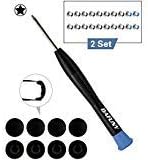

8 Pack Rubber Case Feet + 2 Set (20pcs) Repair Replacement Screws Set + 1pcs 5-Point Pentalobe Screwdriver Compatible with Unibody MacBook Retina for A1425 A1502 A1398 13" 15" Bottom Case
Details
- BrandDAFUNY
- ColorB07PTSKVDC
- Item Weight0.3 Grams
- ManufacturerDRONAR
- UPC713721009473
Details
- BrandDAFUNY
- ColorB07PTSKVDC
- Item Weight0.3 Grams
Description
Specifications
| Asin | B07PTSKVDC |
| Brand | DAFUNY |
| Color | B07PTSKVDC |
| Customer Reviews | 4.7 4.7 out of 5 stars (1,317) 4.7 out of 5 stars |
| Item Weight | 0.3 Grams |
| Manufacturer | DRONAR |
| Mfr Part Number | DF1108 |
| Model Number | 8541677207 |
| Unit Count | 1 Count |
| Upc | 713721009473 |
Reviews
User
Easy Peasy! + Foolproof Steps!
This makes me feel like I’m an Apple Genius Guy! I had so much fun replacing the feet and cleaning my years collection of dust in my MacBook!Here are the foolproof steps!1. Place your MacBook on a sturdy desk preferably over a mat/towel so it wont move. Have good lighting over it too for maximum visibility.2. Start taking off all 10 screws (2 short, 8 long) and put each of them aside according to where they are on your MacBook. This helps remembering which ones they are.3. Slowly take off the back panel and you should hear two clips unlatch from the middle. These latches are to hold the back panel in place.4. Clean out all the dust using a blower, canned air, or makeup brushes! This is the fun part!5. On the back panel, remove the old feet and take off all the black plastic nubs that are in each of the holes. For the back two ones, cut an X with a knife to release the nubs (use the screwdriver to poke them out). Clean out the glue residue with nail polish remover/rubbing alcohol. I also washed the back panel with soapy warm water.6. Remove new feets from the plastic container and align the big & small dots. Press firmly. I heated them up with hair dryer to solidify the glue even more.7. Align the back panel with your MacBook back and make sure the two latches from earlier click before you screw it back all together.8. I used the same screws to screw back the back panel since they are still good. Don’t worry about using new/old screws as long as they fit flush with the MacBook!9. Now your MacBook will not move around on the table anymore!!Overall review: this kit is amazing, and definitely would recommend anyone looking for feet replacement. The whole process took 10-15min and now I feel like I have a new MacBook!
User
If you lose a foot on your MacBook Pro this is the simple, quality replacement kit you need.
I noticed that one rubber foot was missing on my 13" MacBook Pro and so didn't sit balanced on a desk. I imagined finding a replacement and installing it might pose a hassle though felt sure Amazon might list some kind of kit. There were, in fact, several to choose from and I picked this one based on the positive reviews. I could not be more satisfied. Opening up the innards of your laptop is not for the faint of heart and I always expect something will spring out and create a costly repair. but there was zero drama. Everything you need is provided and swapping out for the new rubber foot was both quick and simple and now looks like new. It's perhaps inevitable that with the constant wear and tear, especially if you're constantly transporting your MacBook Pro around, that eventually you'll notice a foot has been lopped off. If so, don't hesitate to send for this kit to do the repair yourself. Extremely simple.
User
Very good value
Other than taking 3 weeks to arrive, I am happy with the installation. We'll see how long it lasts. I had one foot wear off my mid-2014 13" MBP. Since the kit came with 2 full sets I replaced all 4 feet. It did take a good bit of cleaning with rubbing alcohol to get the old goop off. Old feet crumbled into many pieces. There was a clear round disc the size of the foot that you can't readily see that was the holder of the adhesive. If you scrape the perimeter with your fingernail or a blade you can peel it up and most of the goop will come up. Lined up new feet with tabs and they went on fine. Wiggled them a bit to be sure center post went in holes okay. Then just press hard. I used the new screws because I had them and my old ones were a little dirty although I'm sure they would have worked fine. Saved them for spares. Took a bit of wiggling to get the 2 center clips of the laptop back to reseat in their slots. Took maybe 15 minutes total if that much. All good now - laptop stays put on the beanbag lap pad I use.
User
Works. No Instructions
My poor MacBook was in need of new feet so here I am. The kit includes two complete sets of screws and feet. The screws seem to be better quality than what came out. And there was even a magnetised screwdriver, which was much appreciated. When dealing with tiny screws a magnet really helps.The bad news is that no instructions are included. I had to come back to the product listing to verify which screws went where. They are colour coded, which is helpful, but if you don’t know which go where it doesn’t help much. It could be printed on something the size of a business card.I’m happy to have found this set and hope it lasts a long time. I hope this is helpful to someone.
User
Nice replacement, but no need to remove the base (at least on my model).
These footpads have the same look and feel as the originals. The instructions were a bit off though as there doesn't appear to have been any reason to remove the backing plate? I did remove it, and clean the fans and exhaust ports while I was in there, but there is no "backside" to the foot pads. From the photo, and inclusion of screws, I'd thought there would be a foot that went on the outside and a holder tab that went on the inside, but these just glue onto the outside of the case, at least on my MacBook? It was nice to have the replacement screws, and the included tool worked perfectly. So, if the outer footpad area is clean and clear than these easily glue on with their pre-applied adhesive, but you might want to open it up anyway–there's years of dust inside ;)
User
Great product
Very happy with the change of these feet. Two fell off about a year old and I had no idea how easy it would be to change them! Also a nice added bonus to clean out the inside of my laptop. Only took about 5 minutes to change and only that long because I cleaned the inside and the screws are little. You do need the screwdriver though, I have seen other options on amazon without the screwdriver and those would be useless. You need to take off the bottom to change them out. It came with 8 new feet and 2 sets of screws!! I will keep them incase I need them again for some reason! Thankful to have a level laptop again :)
User
Works with A1502 Macbook Pro Early 2015
OEM is definitely plastic, while this product is just rubber, so expect a different feel after you put it on. With OEM, you could easily slide your computer around. With this, expect some resistance since it's rubber. At first, your mac might be elevated a little higher that you're used to, but it should level out after some time.When installing, remember to remove all residue from previous "feet" so use isopropyl alcohol if needed. With OEM, there might be a very thin sticker left behind after removing the "feet" so just pick it and take that out. The new "feet" should be put on directly to the aluminum casing, and you really only have one shot to put it in so be careful and make sure you're happy with the positioning before firmly pressing it against the aluminum casing.It was nice they included new screws, but I didn't need them.
User
Excellent Product Great Supplier
This product filled all my needs. It was great to see a supplier to offer such a great product. The parts fit perfect. It was also very great that the screwdriver, brush, and screws were included. Easy to install. Now my MacBook Pro is in perfect shape again. By the way complete parts are included to repair 2 MacBook Pro's which I have. Great value for the money.
User
Exactly what I was expecting
Perfect replacement to the original rubber feet for the MacBook Pro. I had a disappointing experience buying plastic feet before but these are rubber and create a great anti-slip grip for your $$$ Macbook! Highly recommended and will buy again if I ever need feet again. Comes with two sets so you have plenty of replacements if they fall off again.Also since it came with new screws, I replaced the originals from Apple with these ones.
User
great deal
excellent set of tools for Mac. At a great price.
User
Buena calidad
Este kit es de una muy buena calidad y las gomas cumplieron mis expectativas. El adhesivo que tiene es bastante fuerte una vez que se pega a la cubierta. Es importante considerar que el destornillador que viene de regalo sólo sirve para los tornillos de la cubierta, para tornillos internos es necesario otro destornillador.
User
Funcionaron con una MacBook Pro 2017
Los tornillos se sienten de calidad muy similar a los que originalmente vienen en la parte de abajo de una MacbookPro 2017 sintouchbar. Funcionaron perfectamente y no se nota una diferencia a los originales.
User
Excellent replacement rubber feet for 2015 MBP 13"
Rubber feet feel just like the originals and fit perfectly and stick very well. Included 5-point pentalope screw driver, although not high-quality, did an awesome job. I did not use any of the screws as I re-used the original ones from the case.
Common Questions
Trustpilot