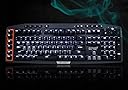
⌨️ Elevate your game with precision, power, and style — the G710+ means business.
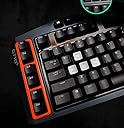
The Logitech G710+ Mechanical Gaming Keyboard combines 110 anti-ghosting tactile keys with dual-zone white backlighting and 6 programmable G-keys, delivering a premium, quiet mechanical typing experience optimized for serious gamers and professionals alike. Its robust build and intuitive media controls make it a top-tier choice for Windows and Mac users seeking precision and customization in a sleek, stealthy design.
| ASIN | B009C98NPY |
| Additional Features | Backlit |
| Antenna Location | Gaming |
| Best Sellers Rank | #31,122 in Video Games ( See Top 100 in Video Games ) #1,564 in PC Gaming Keyboards |
| Brand | Logitech G |
| Built-In Media | USB Cable |
| Button Quantity | 110 |
| Color | Black |
| Compatible Devices | PC, Mac |
| Compatible Operating System Family | Windows |
| Connectivity Technology | USB |
| Customer Reviews | 4.1 out of 5 stars 1,546 Reviews |
| Enclosure Material | Plastic |
| Generation | 3rd Generation |
| Global Trade Identification Number | 00097855089007 |
| Hand Orientation | Ambidextrous |
| Item Dimensions L x W x H | 20.7"L x 9"W x 2.4"H |
| Item Weight | 4.8 pounds |
| Keyboard Backlighting Color Support | Single Color |
| Keyboard Description | Gaming |
| Keyboard Layout | QWERTY |
| Language | English |
| Manufacturer | Logitech |
| Mfr Part Number | 920-003887 |
| Minimum Required Operating System Version | Windows Vista |
| Model Name | Logitech G710+ |
| Model Number | 920-003887 |
| Number of Items | 1 |
| Number of Keys | 26 |
| Number of Packs | 1 |
| Power Source | Wired |
| Recommended Uses For Product | Gaming |
| Series Number | 920003887 |
| Special Feature | Backlit |
| Style Name | Retro |
| Switch Type | Tactile |
| Theme | Rainbow |
| Total USB 2.0 Ports | 1 |
| UPC | 097855089007 803982743855 |
| Unit Count | 1 Count |
D**T
Another awesome keyboard from Logitech
Approx. I had this keyboard for about a month, and so far, no backlighting issue with it going out. I always have this keyboard plugged into a USB 3.0 port and am curious if the people having backlit issues are plugging into USB 2.0. Keyboard feels really nice to type on and the cherry mx brown is a nice switch between the loud cherry mx blue and the linear light (non tactile or clicky) red. I'm not new to the mechanical keyboard scene, before this I had the Rosewill RK-9000I (blue switch) and Cooler Master Quickfire TK (red switch). I started off with a red switch and going from that to the brown switch was a big improvement to my typing feel. (Also keep in mind that cherry mx switch preference is totally up to that person. No switch is the perfect switch for everyone.) Now after this I bought the cherry mx blue switch and typing on that for a month and coming back to this makes the tactile feeling almost non existent, but the key is to touchtype really soft compared to the blues and you will feel the tactile bump. Ok enough about the switches. back to the G710+ keyboard. The G710+ has pretty much all the features that the gamers are looking for. It has total of 18 programmable macro keys via the M1, M2, M3 buttons. Nice bright even white backlighting, separate backlight controls for WASD/Arrows buttons and the rest of the keyboard light, Windows disable button for when your gaming, separate media controls including a scrolled volume knob, O-rings on all the keycaps to reduce noise, and the build quality is really solid with 4 big rubberized feet. Also the entire keyboard has mechanical switches including the macro keys, the only buttons that are non mechanical is the little media buttons on the top of the keyboard. Logitech's software is really easy to use and program macro's in. The only thing that I can see that would really be a con would be the orange painted macro rows. But that is people's preference, I have no qualms with it, but others might. All in all a really solid keyboard from Logitech, considering that this is their first. Pros: -Solid build quality. -Nice even backlighting and separate controls for WASD and the entire keyboard. -O-rings under each keycaps to reduce bottoming out noise. -Separate media control keys and volume wheel knob -Windows disable key for gaming. -Non detachable chord for longer reliablitily. (Even though is people's preference but I like my chords non detachable, less problems that way.) -18 in total programmable macro keys -Easy to use Logitech's gaming software. Cons: -Orange painted macro rows (it would've been nice if it was detachable and if logitech gave people black colored ones, even though its up to people if they like the orange color or not.) -The symbols on the keycaps are not backlit. -The long keys such as spacebar, shift, enter, and backspace are I believe cherry stabilizers instead of costar which my Rosewill keyboard uses and the long keys feel more solid, but compared to my Cooler Master TK, the cherry stabilizers on this keyboard feels a lot better.
F**Y
A Gamer's Dream. Tested on FPS, Diablo & Others.
I wanted to fully test Logitech's as much as I could before writting this review, so rest asured that I have done my homework and like the tittle of the review says, this is a Gamers Dream. (Bought in December of 2012 and have been using it since) First, its features: Dual zone lighting, at first I thought this to be a simple gimick, but if you play in low to-almost-no-light rooms, the dual zone comes in handy. With the press of a button, you can adjust the brightness of the entire keyboard, but also isolate the W,A,S,D and arrow keys, so you can have the entire keyboard off with only those keys on. I found this to be extremely useful for when playing games like BF3. Macros, both on the fly and pre-gaming. Macros can be done on the fly. LUAs are done before hand. Whatever your style, you'll find this to be an easy task and will become familiar fairly quick. Logitech has experience with macros, so if you've used their keyboards before, you should have no problems here. As expected, and which should be the standard with gaming boards, the G710+ has a "gaming" key, which will render the windows key useless while playing games, so no risk of accidental window mode taking you to the desktop while playing. USB 2.0 passthrough. Great for peripherals, such as mice, headsets, etc. I tested it with a razer mamba and had no issues, I also tested it with Logitech's own G700 mouse and worked perfectly. Media keys, which enable playback, track foward/back, stop and a very useful and well built volume wheel, which feels solid and extremely responsive. Now, the main reason this keyboard is a beast and a gamers dream...The superb, anti-ghosting mechanical keys. These are excellent in every sense of the word. If you are an avid FPS player, this keyboard will improve your input/output ratio with great results. Each key has a Cherry Brown switch made by the masters at ZF Electronics, which used to be called the Cherry company. Do not fear though, the quality is still there and you can feel it. While playing BF3, the board did an excellent job at translating my every key stroke into a perfect output, each key stroke engages its respective switch, eliminating ghosting. Multiple key functions are also improved, going to prone, to crouch and slidding at the same time is done with such ease that I my hands/fingers felt more natural and at rest, even after hours of playing. During RPGs, RTS and other genres, I found the macros to work as I had them programmed. Reaching for the keys was never an issue. Menus and their subs, such as inventory, quest, etc. worked with each key stroke as well. Typing: not really the reason why I bought the board, but worth mentioning. Have you ever tried to login into your email acount and mistakenly press more keys when entering your password? With the G710+ you won't, because as you get to use it more and more, your brain will adapt to the fact that each key represents a single digit, period and you'll feel it as well. Build: Well made, high quality parts. Heavy, but not like a brick either, it's hard to describe. It is well balanced and feels very comfortable to use during long gaming sessions. Noise: Logitecs claims this keyboard to be very quiet, but that's not the case. They tried to decrease the amount of "click" noise by including O-rings under each key to function as noise dampeners, which work to an extend, but if you are migrating from a common rubber membrane style of board (Logitech G19, G510, Razer, etc), you will notice the noise even more. But quite honestly, it can't be avoided. Don't be fooled though, the noise is not incredible loud either, I've heard statements such as "if your neighbor (gaming neighbor) doesn't like noise, then mechanical is not for you", this far from true, the fact is , it does make noise, but not hammer and chisel noise. If you have a rubber membrane board, press on a key, it makes noise right? well, the mechanical does the same but it is more of a dry, more pronounced noise. In conclusion. If you are a PC gamer, you should defenitely give the G710+ a try. You can trust me and buy this keyboard. If not, go to your local PC store and play around with their display models. I did and tried Razer's Blackwidow Ultimate, which uses Blue switches, I also happened to try (from a friend)the "stealth version", which uses Brown switches, and quite honestly, the amount of noise was just about the same, but the "tactical" feel was a bit loose, at least for my taste. So there it is. I tested this bad boy and as always, Logitech delivers. Not only has it made an excellent mechanical keyboard, but it has kept it at an affordable price with hight quality parts. The software is easy to use and the user experience from gaming to typing has improved, at least for me.
T**S
A Review From a Non-Gamer
Starting Point I've had this keyboard for just over a week and feel like I can give it an honest review. I'd like to start with a few things to keep in mind while reading my review: 1. This is my first mechanical keyboard. The only previous experience that I have with them is a Cherry POS keyboard that was used at a retailer I worked for. 2. I originally wanted a Das Keyboard with blank keys ( Das Keyboard Model S Ultimate Soft Tactile Mechanical Keyboard ), but it was tough to pass up the G700+ when it came down to $99.99 3. I don't play computer games (or at least haven't yet). 4. I work from home and use my keyboard 8-12 hours per day, although I do not spend the entire time typing. 5. My old keyboard is a Logitech MK710 that came with a mouse Pros and Cons Here is a quick list of the pros and cons for those who don't want to read the entire review. I'll try and cover each one in more detail further down. Pros: 1. The keyboard feels great to type on. 2. The keys sound quieter than I expected 3. Macro keys are easy to program and the software seems pretty stable Cons: 1. Backlighting is slightly inconsistent and is faded out on some keys 2. There is a strange "pinging" sound that I get when I type quickly 3. The wrist rest feels kind of cheap compared to the rest of the keyboard Verdict: I recommend the keyboard to anyone who wants a cherry brown switch mechanical keyboard and won't mind some inconsistent backlighting. I give the keyboard 4 stars because it works as I expected it to but it didn't blow me away. First Impressions: The first thing I noticed about the keyboard is how crisp it looked. I love unpacking a new toy--err--tool, so unpacking it and removing the plastic is a big part of the experience for me. It's hard to give something a chance if it does not suppress the buyer's remorse feelings right away. Most Logitech products seem to present themselves well visually. I don't mind the orange ring around the macro keys or the branding printed on the keyboard, although I know that some people are turned off by it. The wrist-rest was about the only physical part of the keyboard that looked and felt a little cheap; although, it is hard for me to describe what a high-quality wrist-rest should look and feel like. The cable is nice and long and splits into two USB plugs for about the last foot of the cable. There is a USB port on the top of the keyboard next to where the cable comes out which is nice to have available. Macro Keys: Like I wrote at the top of the review, I don't play computer games so I cannot comment on the functionality of the keyboard for gaming. I did find that the software is pretty easy to use and has a bunch of pre-loaded profiles for different games. I don't really use the macro keys but have programmed one of them to type "Select * from " every time I hit it. I frequently poke around in databases and it is one of the most common things that I type, so it seemed like a good use of a macro key. I've been thinking about setting up one of the macro profiles to be strictly SQL keywords, which may be useful. I do occasionally hit the macro keys accidentally when using a shortcut involving CTRL or SHIFT, but that is likely just due to the fact that I've never had anything to the left of those keys anyway so I developed some bad habits. The Sound of Typing: I knew that mechanical keyboards are noisy by nature and that brown switches were supposed to be quieter. I wanted quieter keys because I take notes during conference calls and don't want to be ridiculed for overly-aggressive typing. The keyboard is definitely quieter than I expected and gets even better the more I learn to type without bottoming out the keys. I guess the combination of brown switches and the rubber o-rings really helps cut down on keyboard noise. The Feel of Typing: I love typing on this keyboard. The whole reason that I started looking for a new keyboard was wrist pain that I developed and blamed on having to type increasingly harder on my old keyboard. It is nice to be able to just touch a key and know that it will work rather than worrying about if it will get stuck or just decide not to work at random. This is my first mechanical keyboard so I cannot compare the way it feels compared to other mechanical boards. My only previous experience with cherry switches was a cherry POS keyboard with cherry blues. I didn't do a lot of typing on it since it was in a retail environment. Backlighting: Before I purchased the keyboard, I read many reviews about the backlighting being inconsistent across the keys and sometimes failing all-together. I haven't experienced an issue with the lights failing completely; however, I do agree that the backlighting is not as nice as I would expect. As others have mentioned, the secondary characters on the keys don't really light up and some of the keys seem to be brighter than others, regardless of the brightness setting. I did not originally want a backlit keyboard, so poor backlighting does not affect the functionality of the keyboard for me, but I thought it was worth mentioning for others who are specifically looking for backlit keys. The only real annoyance the backlighting creates for me is the OCD part of me that can't stand things that are not uniform, but appear to have been intended to be uniform. At a very minimum, the poor backlighting makes the keyboard look a little cheap--which is not good for a product that carries a $150 price tag. Strange Pinging Noise: I mentioned that there is sometimes a strange "pinging" noise that comes from the keyboard. I don't know how else to describe it or if it is a normal noise. It doesn't seem related to any individual keys; it seems like some sort of an echo and it only happens when I type really fast. I don't know if I am bottoming out the keys more frequently and that they are traveling further back up but it can be an annoying sound. All the research that I did prior to buying this keyboard has created an obsession that will likely lead to future keyboard purchases, so I may be able to find out if the sound is normal or unique to me. Summary: This has been a great first mechanical keyboard so far and I definitely don't regret getting it, especially for the $100 price. I would recommend it to anyone who doesn't really care about the quality of the backlighting. If you want/need perfect backlighting (either because of the desire for backlit keys or you can't overcome the OCD annoyance of having the keys not light up uniformly) then you may want to look elsewhere. If you've made it this far, thanks for reading. i hope that my review was helpful.
1**1
Just about everything I've ever wanted in a keyboard
This keyboard can be either louder or quieter than what your currently using; in my case, it's much louder than the Logitech Illuminated Keyboard, which was my previous keyboard, but I've gotten used to the noise and it's not really a bother anymore. The only real irk I have is really more with the Logitech software. The "setpoint" software that I use for my Marble Mouse and used for my Illuminated Keyboard doesn't list the G710+. I used to disabling caps lock, scroll lock, and insert with setpoint, but that's not the case with the 710+, there's no way to disable these keys via setpoint or the gaming keyboard software. I would dock a star, but it's the software portion and not the hardware. I have noticed a slight increase in my typing speed, even though the actuation distance is about the same with the Illuminated Keyboard. I've also noticed that can feel a bit of difference between typing on a mechanical keyboard and a "regular" keyboard. Even though there's 6 physical G keys, there are three "modes" (for those who missed it), giving you a total of 18 G keys. If you need easier access to a lot of G keys without having to switch "modes", this keyboard won't help you much. The tactile feel is inconspicuous when typing on the G710+, and is really only perceptible if you lightly press down on the keys. For those that don't know, the mechanical switches are made by Cherry GMBH (which was actually bought by another company). The ones used in this keyboard is the "brown" series, and if you dig around online, you can actually replace it with a different series; though from what I've found, they can get pricey. I rest my palms when I type (which is bad, I know), and while the palm rest looks great, I find that's it's minutely unstable in the sense of that it's not a perfect form-fit; there's a bit of gap between the palm rest and the keyboard when attached, and I can still type with it, it's just a tad bit unsightly when I look at it. One strange thing I've noticed: in LibreOffice with the Illuminated Keyboard, it doesn't let the "soft" media keys reach the music program, but works just fine in Mabinogi. With the G710+, it is the obverse, the dedicated media keys work fine in LibreOffice, but I need to be in a text entry field in Mabinogi for the media keys to work. I would reiterate some of the pros and cons that others have posted, but I'm too lazy to do so :P ---------- In short, it is a great investment and I love this keyboard. A lot.
H**S
Better than Razer Black Widow 2014
--Brief-- Great keyboard, the number of G keys are perfect - not overdone like others, where most will never use more than whats provided here. White light is nice and goes with any light theme your gaming rig has. Keys feel very high quality as does the entire, heavy keyboard. Volume is a huge bonus as is wonderful software - best in the industry with easy backup. --About my experiences with Mechanical Keyboards-- I've only bought Razer and Corsair mechanical keyboards before - I was naive enough to think that Logitech wasn't up to the challenge but I was wrong. I bought this from a competitors website after a great sale, I thought I'd try it out. I expected it to be worse than the Razer from some reviews, but then found out those reviews were people being fanboys because when you set them side by side, you actually cant feel a difference with the keys at all other than switches. Switches with Razer are their own thing vs Logitech which uses an international proved standard. --Pros-- - Keys dont wobble as much as Razer and identical to Corsair. Although the quality feels exactly the same with all 3 of them to be honest. - Design is my absolute favorite, it looks so freaking nice compared to my other mechanical high end keyboards. This is now my primary for my main rig. The sides remind me of a ultra modern tank, it looks stealthy and clean. The orange looks better in person, and the whole thing shines bright like a diamond.. pay up Rihanna! - Multiple key brightness means that you can have 5 levels of brightness for your arrow keys (awsd too) and the rest of your keys separately so if you're playing all night and your eyes hurt but you want to at least see your arrow keys for reference - you can just keep those on which is fantastic. - Quality is top notch. Linus Tech on YouTube points this out to how impressive it feels, it's heavy which is great because it's made of quality. A TANK literally can run over this thing (not that it matters, how often is your keyboard going to be ran over by a tank? lol). -Software with Logitech has always been my favorite - its why their gaming pads, and other gaming PC things are always #1. It's just sooo easy, works every time, and so many options on the fly. Plus you can back it up which is great. --Cons-- -Having multiple colors is nice, if you feel like going green for a month - you can quickly do that with other keyboards. Heck if your GF wants to use the keyboard too you can set her color scheme to hot pink on M2 so she pressed M2 and it's all customized. This keyboard can do all that but the color scheme which sucks for this price range but thats how they all are unfortunately. -The brightness levels dont stick per profile or even when you reset your computer so when you bring down the brightness then go to restart your PC, they're back at max settings. I believe this could be changed simply by software update from Logitech. It is annoying if you like it more dim as I do. --CONCLUSION-- My primary keyboard, I just absolutely LOVE the design and the quality is the same as other high end keyboards. My only thing is there's only white, but at least white matches with absolutely every color scheme (mine being blue lights in my rig). The volume is something everyone loves immediately along with the simple G keys, there's not a million of them which is a good thing. Paired with a gaming mouse - you can't go wrong. Again - This is now my main keyboard, I absolutely love it a lot and would highly recommend it. If money is no option than spend a bit more for the new colored version.
I**T
First time for everything.
This is the first time I have ever bought something and been so unimpressed, disgusted, and stressed out that I just wasted money on a purchase that has turned out to be completely unacceptable. Pros: The box smelled nice when opening it. Before I go into Cons, I will state that I have been using computers since they came about and have typed on so many keyboards in my life. For the past many years I have enjoyed the smooth soft typing that apple mac keyboards provide (for my macs). I type all day at work; code, IMs, emails, support letters… so my fingers know what they like. However my game machine is a PC, and I bought this keyboard in hopes it would adequately replace an aging keyboard that is faulting. People hyped "get mechanical" so I did. Big mistake. Cons: - The keys feel like they are lined with sandpaper when depressed. Scratchy, rough. You can kinda feel the actual tactile 'bump' that should exist in MX Browns, but with all the scratchiness, its lost. - You have to push straight down or the keys rub their sides and scratch or snag or just stop altogether. This has got to be the worst feeling keyboard since I programmed on a VAX machine in the 80s. - Noise. Cherry MX Brown = quieter mechanical?? Yeah, sure, compared to a jackhammer in your hands? It is loud, sounds like cheap plastic banging about, echos and makes me not want to type at all. Especially when it sounds like the whole thing is going to break. - The keyboard is abnormally thick. I thought brick keyboards were done with the Vic20. It is so thick it immediately induces carpal tunnel. - So it comes with a wrist rest to combat the thickness. However its short, and has a steep slope. It is also the matted plastic surface which makes it 'slippery'. Thus your hand slips down, which is an upward battle to keep your hand in place to reach the furthest keys. - The f-keys are in egypt. What is the fascination with putting useful keys so far away? Coupled with the difficult to reach number keys while playing a game, the f-keys are simply impossible to reach and use. (the esc key is beyond egypt) - The spacebar is sharp (its bottom edge). It angles away from you with this sharp edge, which is where I like to keep my thumb at the ready. I have developed a sharp groove in my skin in just the few days I've tried to get used to this keyboard. - All keys angle away from you. Without the back support feet turned up, the keys angle away. Making them different to use and see. With the support up, they angle straight up, like you are supposed to sit with it in your lap? - The backlight is very spotty. It doesn't cover everything on the keys. Long words and any "Shift" level symbols are unseen. - Even during the day with backlight on, all shift-symbols are a dark gray color on a black key making them difficult to see. I can recall thousands of functions, parameters and controls for programming, but I have never been able to remember which key makes the ampersand. Go figure. (not sure how people use a dasKeyboard). - The light to show you have the capslock key 'on' is on the complete opposite side of the keyboard. What fool thought that brilliant idea up. Same goes for the numlock indicator. Although at least numlock is actually nearby. Its still a stupid design. - Not a fan of the different colored WADS keys. I know where WADS is, my fingers rest on them almost exclusively. However when I begin to type out a lot of words and sentences I tend to glance down at the keyboard to keep refreshing my mind where all the keys are. Seeing the colored blocks on WADS throws me off overtime and I start mistyping, and slowing down. - Roller volume: Complete waste of engineering. External sound systems have their own volume controls. Games have their own individual volumes for sound sets. What good is a system-level volume control? - Cord is too short. Seems to be designed for people who jamb all their computer equipment in a pile with their monitor on top of their desk. I have my computer down to the left off the desk so my desktop is clear and quiet. Sure, I can use USB Extensions, but you have to use two of them to utilize its second usb port (like my microphone). TL;DR: I have never been so disgusted with a purchase before. This keyboard is completely horrible to me. I got sucked in by hype and "you have to get a mechanical keyboard" and now fully regret it.
C**W
First mechanical keyboard, not a terrible purchase but not great value either
This is my first mechanical keyboard, and while it performs adequately as a keyboard, I'm a bit underwhelmed in regards to the supposed superior feel of mechanical keyboards. Granted I bought this a few weeks ago, so I'm willing to grant that it may be an issue of getting used to it. Overall, it's a decent keyboard and the basic functions, while not perfect, are quite serviceable. The extras, like lighting, configurable keys, and so on, don't add much for me, except for the multimedia keys and volume controls (which are excellent). Do I like this keyboard? Sure. Would I use it for a few years? Probably, if it doesn't hurt my wrists too much. Do I think it's worth the $100 price? Nah. Honestly, I have not found it superior to even Comfort Curve 3000 which is a fifth of the price, and for the next keyboard I buy, if I had to choose between those two, I'd prefer the Comfort Curve to this even if they were the same price. If you just need a new keyboard, get at least a Comfort Curve, or look for something better. If you're really dying for a mechanical keyboard, IMO keep looking. I'd like to add here a note about Linux compatibility: While the normal keys and media keys work as expected, on Arch the G1-6 keys just get treated like the numbers 1-6 (shift+G1 even prints !), while M* keys do nothing. There are two drivers in AUR for this keyboard: sidewinderd, which did not work for me, and hid-lg-g710-plus-dkms-git, which is broken and has not maintained since 2015. Just something to keep in mind. SWITCHES: I would say these are the least satisfactory part of this product. They are loose so the keys wobble, and feel gritty when pushing down. Despite Browns supposedly being the "quiet" switch, I would say they have medium loudness compared to most non-mechanical keyboards. I honestly don't think they feel superior to membranes, even those with years of heavy use. Update: Since buying this, I have had experience with other mechanical keyboards and it's confirmed my feeling of these not being great. Among others, I've tried to the Azio Retro Classic - obviously not a real alternative to this keyboard, but they had it at Fry's where I could try the keys. They're much better! Don't wobble, much quieter, way more comfortable to type on. I wouldn't have gotten that exact keyboard because its layout, price and style are not what I'm looking for - but had I tried it first, I would have instantly recognized the G710+ for the low quality product it is, and known to return it before my 30-day window was closed. Downgrading by 1 star based on this. BASICS: It does a pretty good job with standard keyboard functions. All the keys are there, and not rearranged or altered in some stupid way. The labels are clear, although for instance Helvetica would have been more legible than the all caps blocky font they used. For some reason the indicator lights are caps-num-scroll instead of the standard num-caps-scroll, I think this was a dumb decision, though rather trivial. EXTRAS: The volume controls are excellent. There is a dedicated mute button, which is great, but even better is the volume spinner, allowing you to make fine or rough volume changes at will. This has been a huge improvement over +/- keys. The media keys are also good. I haven't really used the configurable keys. The G1-6 keys are positioned pretty badly, I occasionally press G6 them instead of Ctrl or G1 instead of Esc. The keys also light up, and actually the WASD and arrow keys can be lit separately from the rest. There are five levels: Off, bright, brighter, really bright, extremely bright. Basically the last three hurt my eyes even in daylight. The second is a bit too much at night. I keep them off and rely on the light from my monitor to see them (which I rarely need to do anyway). Also it cycles from brightest downward when you press the light key, so at night you are liable to get flashed with the brightest setting. if you decide to turn it off. It seems like a no-brainer that it should start at dim and get brighter. But really the light controls should have been knobs or dials, not buttons. And they should have been a milder color, like red or amber, instead of blue-white. LOOK&FEEL: The keyboard generally looks nice and is very solid. It's actually the first keyboard I've seen that requires effort to move it. The hand rest snaps off when lifting it but since it's heavy you end up not lifting it much. The grey WASD/arrow keys are a nice touch. What I dislike is the gigantic, gaudy "G710+" branding everywhere, the garish safety orange around G1-6 keys, and the bright, harsh white lights (the keys you can turn off, but the num lock light is still there). The cable is oddly thick (7 mm) and ends in two bright orange USB connectors (one for keyboard and one for the USB plug in the back of the keyboard).
R**.
A couple broken bits, but otherwise decent
Volume wheel stopped working after about 6-8 months. Palm rest is broken on one side. I've been using this keyboard every day for just about a year. It was great while all its bits were intact. The mechanical action is great. I've never owned one before. Edit: Found out how my volume wheel broke. Shear fracture, possibly torsional :|. Basically, there's this little hexagonal prism-shaped thin part that comes out of one side of the volume wheel. This hexagonal prism interfaces with the volume control (a potentiometer assembly) by poking through the center of it. Basically, imagine a large donut, but instead of a hole, there's this hexagonal shape in the center. Now, the bit that goes INTO this hexagonal hole is the plastic part that has sheared off. It's this teeny, tiny little maybe 3/4 of a millimeter in diameter rod. Now, that hexagonal rod is what you're turning when you use the volume wheel. As the volume wheel spins (that you touch), it also turns this little hexagonal rod. The issue is... it's a very thin part, and if you press on the wheel, it can break. Or, even if you use the wheel normally, it can shear off because of the rotational force- the torque- so, torsional shear fracture. I'm going to see if I can maybe glue this little hexagonal rod back to the big volume wheel, and try to use it. I'll update this review if I can fix it. If you're a watchmaker or jeweler, you might have some nice tools for very small parts like this. If I had a small drill bit, I'd maybe try drilling into the volume wheel, and then placing a metal hexagonal rod where the plastic one was. Of course, that requires you to manufacture or otherwise find some nice piece. Edit 2 (one day from previous edit): I used some Duco Cement to re-attach one of the prongs of the palm rest. Seems to be holding up so far. I can snap in and remove the palm rest and it works alright. The volume wheel was much more difficult. I had let it cure overnight for 16 hours, as recommended by Duco Cement. Unfortunately, while I was re-installing the wheel, the hexagonal rod snapped off. Today, after several attempts, I have successfully snapped the wheel back in, and have it functioning. I had to use Acetone to melt the hexagonal rod back to the wheel itself. It took several attempts before I had a good method for snapping the wheel assembly back into the keyboard. Key points: 1) Make sure to dip the broken ends in acetone, to give them a nice coating. A brush might work too. I tried using Q-tips, but they didn't put a good enough coat onto the pieces to create a good bond. 2) You'll know you've applied an okay-ish amount if you can stick one part back to the other, and they stay together. You have about a minute, maybe two, once the acetone is mixed with the plastic. You can fiddle and center the hexagonal rod during this time. 3) VERY IMPORTANT: Once you have the fixed volume wheel assembled, you HAVE to press it in and "snap" it back into the keyboard shell. I failed during this point about 3 times, because I would try to gently slide it in, and then pull it out- refracturing the volume wheel in the process. Put it in, snap it in, then try it out. 4) To get to the volume wheel assembly, you need to push off some of the plastic "ends" poking through the PCB. Use a razor to cut them off, or force them off with something like a flathead screwdriver. Use electrical tape to keep the PCB in place once you've refitted it to the keyboard shell.
C**A
Lo mejor de lo mejor
No se podía esperar otra cosa, es mi primer experiencia con un teclado mecánico y lo único es que se extráña la "Ñ", y al tener que cambiar el idioma a español se complica un poco el uso, pero para el experimentado ya es pan comido. Como siempre Logitech 100% calidad!
E**O
Logitech G710+
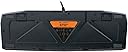
Premetto che la descrizione del prodotto è errata: si tratta della tastiera meccanica Logitech G710+, come si evince dalla figura, e non della G710, come dichiarato nell'intestazione. Prima di acquistare il prodotto ho fatto alcune verifiche, contattando più volte il venditore, il quale, penso, mi avrà preso per pazzo! Si tratta, infatti, di un venditore tedesco, che su Amazon.de ha parecchie recensioni, tutte positive. Qui, su Amazon.it, invece, non ne ha nessuna, e la cosa mi preoccupava non poco, anche e soprattutto vista la recente notizia di account di venditori, soprattutto tedeschi, hackerati, e utilizzati per creare finte inserzioni su altri store Amazon. Ho contattato, allora, il venditore, sia via Amazon.it, sia via Amazon.de, sia usando un indirizzo email reperibile sul suo sito. Egli mi ha assicurato che il prodotto era affidabile, che si trattava della 710+, e che il prodotto era in condizioni ottime. Infatti si tratta di una tastiera usata per appena 4 giorni, durante i quali è stata esposta al Gamescom. L'articolo è arrivato in un imballaggio perfetto, e la sua confezione originale, completa di tutto, non aveva nemmeno un graffio. La tastiera è in condizioni ottime, e non presenta alcun segno di usura. Tutti i tasti funzionano al meglio, l'illuminazione non presenta alcun led non funzionante, e il passthrough USB 2.0 non dà alcun problema. Veniamo alla tastiera in sé: si tratta di una tastiera meccanica, gemella della G710, la quale monta, come switch, gli Cherry MX Blue. Questa, invece, usa i Brown. Si tratta di switch spesso scelti per chi utilizza il PC più per lavorare che per giocare, come è il mio caso. Essi hanno una forza di attivazione di 45g, un feedback tattile all'attivazione, e una corsa efficace di 2mm, a fronte di una corsa totale di 4mm. La forza necessaria ad arrivare fino in fondo alla corsa totale è di circa 55g. Si tratta di un tipo di switch che sto trovando davvero gradevole, e mi ci sono abituato quasi subito. Inoltre, venendo da una tastiera a membrana di livello basso, sto appezzando non poco la novità! Ancora, mi aspettavo che gli switch fossero più rumorosi, e la cosa mi ha piacevolmente sorpreso. La tastiera in sé ha una qualità costruttiva ottima, seppur la scocca sia di plastica. Una parte del rivestimento frontale ha una plastica glossy, l'altra, invece, ha una plastica matte. La retroilluminazione ha due zone indipendenti, una costituita dai tasti WASD e dalle frecce direzionali, e l'altra, invece, da tutto il resto della tastiera. Vi sono 5 livelli di illuminazione: 100%, 75%, 50%, 25%, 0%. Mi sto trovando bene a usare quello al 50%, che trovo molto gradevole, soprattutto la sera, mentre quelli al 100% e 75% trovo siano troppo brillanti, tanto da dare fastidio anche mentre si guarda lo schermo. Piacevole, inoltre, il feeling della plastica dei tasti, abbastanza ruvida sotto le dita. I tasti hanno una geometria concava che limita la deriva delle dita, cosa che trovo molto utile. Ci tengo a sottolineare che la tastiera ha un layout US, diverso da quello italiano. Sul sito della Logitech è possibile acquistare i kaycaps sostitutivi per passare al layout Italiano, ma, visto il costo della tastiera (70€ comprensivi di spedizione), e visto il costo del set di keycaps (25€ + spedizione), direi che non ne vale assolutamente la pena. La tastiera è dotata di 6 tasti G configurabili come meglio si crede, tramite il software adeguato scaricabile dal sito della casa madre. Inoltre, essa ha 4 modalità di funzionamento, a ciascuna di esse associata una diversa funzione dei tasti G, e, tramite software, è possibile definire alcuni profili di funzionamento; a ciascuno di essi viene associata una diversa combinazione di modalità. Insomma, la scelta, per quanto riguarda le modalità di impiego e il relativo comportamento della tastiera, è veramente vasta. Forse anche troppo, per quel che mi riguarda, non avendo particolarmente a cuore l'universo dei MMORPG! Ancora, essa dispone di una porta USB 2.0 sul retro, che ho utilizzato per collegare il mouse, e ridurre il numero di cavi a vista sulla scrivania. Proprio per via della presenza del passthrough USB, la tastiera necessita di due porte USB per funzionare: una dedicata alla tastiera in sé, l'altra, invece, al passthrough. Sul backplate della tastiera è presente una guida per portare un eventuale cavo USB all'utente, anche se non riesco a immaginare chi mai vorrebbe usare una cosa del genere! La tastiera arriva corredata di poggiapolsi, in plastica, removibile, che trovo particolarmente comodo, seppur esteticamente non eccelso. Ancora, ha dei tasti multimediali particolarmente comuni, nel mondo delle tastiere meccaniche, ma altrettanto comodi ed eleganti, e dispone del sempre più classico pulsante per disattivare il tasto Windows, dedicato alle sessioni di gioco più immersive. Insomma, ora come ora non riesco a trovare un punto a sfavore di questo prodotto, né del venditore. Mi riservo, però, di aggiornare la recensione tra una settimana, e ancora tra un mese, per vedere come si comporta nel tempo. Inoltre, ancora non l'ho provata in game, quindi non so dire come mi troverò. Corredata di 26 rollover keys, e 110 antighosting keys, dovrebbe comportarsi davvero bene. Francamente, suppongo che sarà tanto valida quanto lo è stata per scrivere questa (noiosamente lunga!) recensione!
A**R
Great Keyboard
I used this keyboard for 9 years without fail. The keys feel nice, but not as nice as some other mechanical keyboards, and are remarkably quiet for a mechanical keyboard. They are noticeably louder than a non-mechanical keyboard but very quiet on the mechanical side of things. The keycaps are finicky, too easy to remove, and hard to clean. The markings on the WSAD key have begun to wear off and are fairly smudged at this point. Macro support within Logitech's software was also dropped years ago, resulting in 6 useless keys along the left hand side of the keyboard. Another "feature" that was more annoying than useful in practice was the two USB ports for USB passthrough. It just got in the way to be honest. I've since replaced it as my primary keyboard but don't want to give it up. I might take it into work since it is quiet enough for an office while still being a mechanical keyboard.
T**7
The best keyboard I've ever bought!
I've bought a Red Cherry MX Corsair K70 and an Azio MGK-1 keyboard in the past. I must say this is the best keyboard I have ever bought in my life. You get a lot for the price. The macro keys work wonderfully, the macro profile buttons are very useful when playing different games in one sitting, the media keys work properly, the Brown Cherry MX feel is just perfect for people like me who look for a tactile experience when playing games but also have the ability to typewrite fast and efficiently. The brightness of the white LEDs is just perfect too. The Logitech Gaming Software works wonderfully with the keyboard as well. Also, the keyboard looks way much better in-real-life than on the pictures. I thought it looked like a toy at first, but once it's in your hands, you realize it is pretty heavy and firm for plastic and it looks badass overall. There is really not much more for me to add. It is the best keyboard I've ever bought. I highly recommend this.
A**O
Meravigliosa
Arrivata addirittura in anticipo, in 3 giorni dall'acquisto La tastiera la conosciamo un po' tutti nell'ambito gaming, è un must classico. Il feeling tattile è ottimo, ogni elemento dà l'impressione di resistenza seppur sia realizzata in plastica, non è un'acchiappapolvere come altri dispositivi simili il che sottolinea una buona qualità delle vernici. Ottimo anche il prezzo dell'usato pari al nuovo, con 69 euro compresa spedizione ho portato (anzi, mi hanno portato eheh) a casa una tastiera dalle qualità indubbie, leggendaria.
Trustpilot
3 weeks ago
2 days ago