


Desertcart purchases this item on your behalf and handles shipping, customs, and support to Slovakia.
๐จ Elevate your art game with pro-level precision and speedโdonโt just create, dominate your digital canvas!
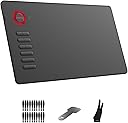
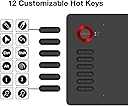
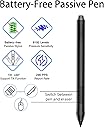
The VEIKK A15 is a versatile 10x6 inch drawing tablet featuring 8192 levels of pressure sensitivity and ยฑ60ยฐ tilt support for natural pen strokes. It includes 12 customizable shortcut keys to boost productivity and supports Windows, Mac, Linux, and Android devices. Equipped with a battery-free pen and a modern Type-C port, it offers plug-and-play convenience and a smooth, paper-like drawing surface, making it ideal for artists, designers, and digital creators seeking professional features at an affordable price.



| ASIN | B07NYQDZZL |
| Active Surface Area | 10 inches x 6 inches |
| Additional Features | 12 Shortcut Keys, 60ยฐ Tilt Support |
| Best Sellers Rank | #98 in Computer Graphics Tablets |
| Brand | VEIKK |
| Built-In Media | Digital Pen |
| Color | A15 Red |
| Compatible Devices | Desktop, Laptop, Smartphone with Android OS |
| Connectivity Technology | USB |
| Customer Reviews | 4.5 out of 5 stars 3,158 Reviews |
| Display Type | LCD |
| Item Dimensions L x W | 14"L x 7.8"W |
| Item Weight | 547 g |
| Manufacturer | VEIKK |
| Mfr Part Number | VK-A15 |
| Model Name | A15 |
| Model Number | A15 |
| Native Resolution | 5080 |
| Number of Items | 1 |
| Operating System | Android 6.0 or Later, Linux, Mac OS 10.12 or later, Windows 7 or later |
| Pressure Sensitivity | 8192 levels |
| Screen Size | 6 inches |
| Special Feature | 12 Shortcut Keys, 60ยฐ Tilt Support |
| Specific Uses For Product | Designing, Drawing, Gaming |
| Target Audience | Art Teacher and Student, Artist, Designer |
| UPC | 601707034543 601707035083 |
| Warranty Description | 1 year |
T**M
Great tablet for all artists at a very affordable price!
As someone who had been using Wacom tablets for over 15 years, I finally got frustrated enough with their constant driver issues and decided to try out a new type of tablet. The VEIKK A15 tablet stood out to me because of it's affordable price and sleek design. Of course I was hesitant to try out a new brand, but to my surprise I'm really enjoying it. Just as the description stated, the product came with the tablet, tablet pen (and sleeve for it), an artist glove, replacement nibs, nib remover, usb cable, and installation guide. Packaging was compact and no fuss to get to the product. We all have experienced receiving a product and it's just packaged with a ton of unnecessary filler. The VEIKK A15 had none of that. The first thing you see is the tablet and glove laid out in front of you and then the rest of the items underneath supported with a carboard piece. The installation process was actually fairly simple. I downloaded the driver, plugged in my new tablet, and it was ready to go! I had expected to run into driver complications, since I had issues with my Wacom Intuos Art on multiple occasions but so far nothing. Unfortunately I am unsure if others, who had other art tablet drivers installed, would have the same smooth experience as I did (I recently got a new computer so I didn't have my Wacom driver installed anymore), but the recommendation of uninstalling any previous tablet drivers is a fairly simple process so others shouldn't have much difficulties with that. Onto the tablet itself! So far I'm loving it. It's actually extremely light for it's size and I can comfortably carry it with one hand if needed. Since this tablet is a much larger size than my old one and it takes up a lot more space on my desk I have to move my keyboard around and therefore don't have access to my ctrl+z... and as you know as an artist having that undo is essential! Well, that's no problem since I can simply assign the undo to one of the 12 buttons to the left. It's super easy to customize your buttons too! Just open the VEIKK tablet settings and it's under the 'function' tab. Super easy. The pen is also very lightweight and has two buttons which you can also assign to any shortcut you want. I know most people would probably want to shortcut it to their undo, but since I'm used to an intuos pen I kept the first button as it's default right click. The texture of the tablet is very similar to my intuos art and so it gives a slight sense of you drawing on paper vs a glass screen like some other tablets have. I prefer the slight texture since that's what I'm used to so it works out perfectly for me. Overall? This tablet is a good for anyone, whether you're an artist who had been drawing for years or are just starting out. I would highly recommend this tablet to someone who is looking for a cheap, but good tablet to use.
A**R
Best Beginners Tablet Ever!
I've never owned or used a drawing tablet before so I was a bit nervous to try this out because I thought it might be too hard or complicated to setup and honestly I can say without a doubt this is one of the easiest to setup, very user-friendly and straightforward which is very good for anyone who may get confused easily like me. For drawing I used Autodesk Sketchbook to try it out on, I was able to complete a drawing without too much trouble and had fun doing so though I did have to get used to looking up at my laptop screen instead of looking down since this was my first time using one, it definitely got easier and easier to use once I got the hang of it. The pen felt very nice and natural for me and I really liked the two customizable buttons on it for easier undos and redos when drawing, not only that but the pen doesn't need to charge so you can spend countless hours drawing without having to stop. I also found the pressure sensitivity on the pen very cool and worked great when drawing long thick lines and long small skinny lines, sometimes it felt like drawing on paper thanks to the drawing glove that allows your hand to glide around the tablet surface easier. Installing the driver wasn't hard and the customizable buttons on the tablet helps alot when you just wanna use a shortcut quickly, I find myself using them alot and customizing them is super easy thanks to the driver. I honestly highly recommend this tablet for anyone just starting out and wanting to start drawing digitally. It's a great working tablet and it's very Budget friendly.
D**M
Good starter tablet
My order arrived quickly and was shipped to me with no damages and everything in the box was in perfect condition. One thing I was really appreciative of was they not only include a bunch of free pen nibs they also give you a drawing glove which is a nice surprise especially for artists who hate smearing their hands on their tablets. Installation was fine and easy enough but be sure to uninstall other drawing tablet drivers. After that the tablet works just fine. Drawing wise the tablet works just fine good size to move around the canvas, pen is very light which I found different from other tablet pens and is pretty comfy and easy to use. Pressure sensitivity is easy to adjust and you can tinker with it all you like to fit your style of drawing. I also enjoyed the texture of the tablet? Usually wacom and others I've used are smoother but this one was a little grainier and I found it was nice to draw on and sort of reminded me of when I draw with my iPad and bought a "paper texture" sheet to emulate just that feel. Overall this tablet is a good affordable tablet and I think perfect for anyone starting out in digital art! Real easy to use and get a handle of.
P**R
Customizable feature packed tablet with lots of options. Fantastic Buy.
I have been reviewing multiple tablets to help people get into digital art. I am very impressed with the A15 by VEIKK. I have never seen a tablet that has so many shortcut options! This tablet can come close to eliminating the need for your keyboard! TL;DR Pros: 12 Side by Side hot keys, large working space, 8k Pen pressure sensitivity, Ring color options, Light weight, 90 degree adapter, Glove, tons of nibs! Cons: No pen stand Wishlist: Tilt Detection. Picture 1 is the speed painting I did for this tablet. This is using Corel Painter 2019, and the Bob Ross mystic mountains brushes. I really enjoyed working with the A15 and it may be my favorite VEIKK tablet by far! The surface is just the right texture to get a nice almost paper feel with the stylus. The artist glove helps your hand glide across as you are working on it, to the point that you forget you are even working on a digital tablet. The glove is not necessary as it only detects the pen, and not your hand. A great advantage of this tablet is that it has indicator lights for each mode. Power, Pen touching tablet, and button pressed. This can be a huge boon for troubleshooting it's also great if you grab the WRONG STYLUS from your collection. (I can't confirm nor deny that this happened). The stylus that comes with the A15 is my favorite one thus far, it is larger than the ones included with some of their other tablets, and I prefer that. It has a really good feel closer to brush. It is not heavy, but has a good feel of heft. One of the absolute greatest things here is 12 side by side hot keys! Because they are side by side it is SUPER easy to map things like UNDO/REDO, Zoom on canvas, Brush Size adjustment etc. The other really neat feature of the VEIKK software is that you can set just about every option CUSTOM to the program you are working in. So if you have a certain set of shortcuts for photoshop, you can create a profile just for photoshop, then when you move to Painter or After Effects create diffrent profiles. The software is also smart enough to know when switch between them (Which you can also do as one of the shortcut keys if you want. You can pretty much map anything to these keys, mouse clicks, key strokes, multi-key strokes etc. Whilst it may seem like I am re-stating this so much, it is due to how much of a difference it makes for me. Even with my tablet that cost 10X this price, I still have to use my keyboard. There are entire companies that make third party hardware to add this kind of functionality to expensive tablets. Having all of this in one compact surface really saved me a lot of switching and I think it is great if you are a beginner or an experienced artist. The lack of a pen stand I think is one of the greatest areas where VEIKK could improve. This should not bar anyone from this tablet, because at this price point I don't think you can beat it, and you can always add one later. As I have said with other tablets, I do wish they could add tilt detection into their tablets, but I knew that it did not have it going in, and honestly you can make any adjustment you need to angle and brush strength in just about every art software out there. Also you can really tweak the settings inside the VEIKK app as well that this is a non-issue. In summary, this is a super versatile tablet that has so many customization options that it is one of the best digital art deals on amazon. If you are looking at tablets in this range (or even priced much higher) I would say go ahead and stop looking, and just figure out which color ring you want in the VEIKK A15. (I picked Red, it matches my computer accessories color scheme)
S**L
Great Drawing Tablet for Beginners and people on a budget.
At this point in time, Iโve used three different drawing tablets. The Wacom Intuos Draw [Small], VEIKK A30, and the VEIKK A15. I find that between the three, there are different advantages and disadvantages, so today Iโll be discussing the VEIKK A15. I was pleasantly surprised with the shipping speed for the A15 tablet! I actually got it overnight, which was wonderful because that meant I got to jump right into using it! The packaging for the A15 is very sleek and modern and judging by the interior, the tablet was well protected. Besides the tablet itself, the A15 tablet included: an artistsโ drawing glove, extra pen nibs, a nib remover, a cable to connect the tablet to the computer, a tablet pen, a pen pouch, and instructions! Setting up the driver was very easy, all I had to do was go to the website and download the driver. Now, onto the tablet. The tablet itself is a nice size for anyone who would prefer a bigger tablet to work on. The texture of the work area on the tablet was nice, especially for an artist looking to transition from traditional work to digital work. I enjoyed the way the tablet felt and the only negative comment I have about it is the stroking sound the tablet pen made while I was drawing on the tablet for the first few hours. It was a little bit irksome, but Iโm just sensitive to sound. Once my pen nib was slightly used, the sound went away. Otherwise, the tablet was nice to use. I really love the pen pressure on VEIKK tablets because it adds a soft and feathery feel to it, which Iโve been hoping to achieve since I became a digital artist. Overall, I think this tablet is a good tablet for beginner artists! Itโs easy to install and the sensitive pen pressure feels a bit like paper, which makes drawing easier. Itโs also quite affordable considering the size, so Iโd recommend it to any artist looking for an offscreen tablet!
L**G
Cheap tablet for beginners
I'm a professional artist and I've been using wacom products for as long as I can remember. With that said, I don't believe the kind of tablet you use would have a great impact on how well you draw. For beginners who are just dabbing in digital art, this is a nice, budget tablet to start off. It is however, in my opinion, nowhere near the quality of wacom tablets built for professional artists. (Yeah, I know, Wacom is like Adobe in the art world, we all complain about it but at the end of the day they are the professional standard.) Speaking of quality, this tablet screams cheap with flimsy plastic materials all around. On the bright side, it's super light weight. But it feels like it can break super easily. The tablet itself is thin and has a slick design to it, so I guess that's a plus. Coming from wacom it took me a while to get used to the extra wide drawing area. I use a small desk, and I have to suspend my hand to reach the corners of the screen because there's no room on the tablet itself to place my hand on. There wasn't any problem installing and getting the tablet to work. There's a lot of hotkeys, which may be a plus to some people. Unfortunately, I've never used any of the hotkey functions because I'm used to using my keyboard for them. Photoshop (CC2018) works well enough, SAI works well enough. Clip studio paint....not so much. I played around with the pressure curve on both the tablet and inside of CSP, but some brushes just refuse to work. See attached images: the pressure is just all over the place and impossible for me to control. It's hard to believe that the pressure sensitivity of this tablet is over 8000---my 4000 pressure sensitivity wacom tablet recognizes the pressure better than this. Even in PS and SAI, the two program that I could actually draw in, I feel that I have to press harder than I need to to make a proper line, and if I changed the pressure curve on the tablet, I can't make thin lines anymore. I think I'm going to go back to my wacom tablet and keep using it until it breaks. This one can be a backup until I get my next wacom tablet. I'll see if I can keep using it to get used to it a bit more, maybe my impression on it will change down the line. If you are just starting out in digital art, or if you just want a digital notepad, this is a pretty good option. But if you are serious about having a career as an artist, get a wacom. Sure, it's going to be at least triple the price of this one, but it'd be worth it. Pros: + Cheap + Lightweight + Slick design + Many hotkeys + Easy installation + Good starter tablet if you've never used a wacom product Cons: - Cheap quality - Pressure sensitivity is hard to adjust/control - There's no reason for me to choose this over a wacom tablet
P**Z
Great performance for a great price
For a point of reference, I'm familiar with Artist XP screen tablets and iPads for digital art purposes so it took a bit to readjust to a screenless tablet that has a rougher surface! That being said, that's really the only issue I had, I was really impressed! My first impression was that the tablet and pen were both very light and the tablet itself has a really comfortable amount of drawing space. I also really appreciated the amount of extra nibs they provide; I'm used to getting around 5 or 6 extra nibs with a tablet and you get a whopping 20 with this tablet. Setup was very simple and quick; the driver installed quickly and did require a quick restart to get started. Afterwards it's just plugging it in and getting started right away. The multiple hotkeys, mapping options, pen buttons, and pressure sensitivity settings were pretty streamlined and made customizing the tablet for my pipeline really quick. After testing out work in various programs (Clip Studio Paint, Photoshop, Paint Tool Sai), I really couldn't find any technical difficulties! I usually test around to make sure pen pressure is functional and consistent across apps and I found no issues there. Having had it for a week, I can't comment a lot on its durability, but I've had no issues maneuvering it around and it staying in tip top shape; I feel like this kind of durability is important for light tablets that are very portable. Between the simple setup, great UI, features, and performance, this is a pretty great tablet for a really great price! I'm reminded of the old Wacom Bamboo tablet I had that was smaller and about $30 more expensive. I'd really recommend this for artists that are looking for their first tablet or looking to replace an existing one with similar features.
C**N
Sleek, Customizable, and Beginner Friendly - with Pro Level Functionality
This tablet is sleek, lightweight, and perfect for both first-time digital artists and professionals. The slim profile of this tablet makes it wonderful for a minimalist or tiny desk setup, it sat beautifully in front of my keyboard without demanding extra space or forcing me to move things out of the way. This tablet would be absolutely fantastic for artists and other creatives on the go - even though itโs lightweight, it feels solid. I flexed it a bit to see how sturdy it would be, and there was no popping or warping of the shell at all. Iโd be 100% confident slipping this into my backpack and hopping on the subway with it in tow. The radial ring has a pleasant, banded-metal texture, so your finger glides over it smoothly and intuitively. The twelve function buttons are my favorite part. Iโm able to have all my hotkey and tool changes right there, at only the press of a button. The surface of the tablet, because it has edge to edge drawing, has a paper-like matte finish. Thankfully, the nib on the tabletโs pen is strong and isnโt chewed or even reduced by working on this surface. Iโve worked with tablets that have needed nib changes every other week because of how merciless the surface is on them, but not this one! I do want to note that I am not a heavy handed drawer, but I tested the pen with excessive pressure to see if it would be worn down. It wasnโt. Veikk also provides a drawing glove, which is made of a breathable black stretch material that covers the side of your palm, pinky, and ring finger. This is particularly nice as, over time, natural oils from the hand, lotions, and soaps can build up on the tablet surface and reduce the textured paper-like feeling. You can fix this by giving it a quick wipe, but itโs nice that the glove is included as it helps to reduce this happening. The glove also helps your hand to move smoothly and easily over the surface. I adore this tablet. Itโs solid and customizable, and itโs very simple and sleek in appearance. Thereโs no over-designing here, so it can blend in with your workspace super nicely. I would happily recommend this tablet to anyone seeking lots of customizability, something reliable, and affordably priced.
J**S
Buen producto
Buen producto
S**R
Highly recommended
I love this tablet, easy to manage, pen sensitivity is impressive given the price, as a digital artist i find it handy and efficient.
A**R
Veikk A15, An outstanding drawing tablet you shouldn't miss out on!
This will be my review of the Veikk A15 Tablet! Im glad that I gave this tablet a chance! I wasnt too sure if Id like the tablet given that it was from a brand I had never heard from before. But I can honestky say I had been pleasantly surprised and impressed by the tablet so far. Now on to the review! To give some context on my experience with digital drawing tablets, I have used Wacom, and the Huion brand before prior to using Veikk now. I had a Huion 1060 tablet, and Huion 950p. They have served me well in the years of digital painting and art Ive used it for, and for most of my time using it Ive had minor complaints First to explain what the tablet comes with! It is a drawing tablet with a working area of 10 by 6 inches with a wheel, and 12 programmable buttons. It came with a battery free pen and a handy dandy drawing glove, which makes drawing a much more seamless smooth experience! It makes dragging your hand over the tablet smooth and quick. Driver Installation: I installed and initially downloaded the drivers flawlessly. Although their site is down on my end, a quick consultation with the Veikk twitter had it easily resolved with a direct link to the tablet drivers. From there it was smooth sailing. The download and usage of the drivers were simple and easy to use. And aside from minor hiccups, a quick reinstall of the tablet drivers made it a quick fix. But forewarned, you must uninstall any previous tablet drivers you may have on your computer before installing and using the Veikk tablet drivers. It conflicts with each other. Aside from that you should have no problem at all with using and installing the drivers. My experience with this drawing tablet has been smooth and seamless. It certainly has met the high expectations Ive had of it! Im glad this drawing tablet has impressed me. After using Veikk and having it produce satisfying results, I will for sure take an interest in their other products in the future. Despite being a brand I have rarely if not ever heard of, it served to be a great alternative to the well known tablet brands such as Wacom and Huion that Ive used prior. Its quality nearly lives up to the quality that of the high quality wacom serves with its drawing tablets and devices. In my experience as a digital hobby artist, it is perfect for my use, and has been a perfect little device for what I intend to use it for. And Ive only used it for a couple of days, but its durability and easy accessibility has been a delight and a joy to use! The buttons on the side of the tablet are perfect for those that are still unaccustomed to keyboard shortcuts, and makes it very easy and simple to get right into drawing! I have used them for a bit and they served me just as well as the buttons on tablets Ive used before. Very clicky, and easy to use, I have no complaints! The pen is perfect for what Im looking for. Its battery free, and although it doesnt have an eraser on the back I find it much easier for the eraser to be a simple push of a button which is made easy by the capabilities of reprogrammble buttons. The pen took a bit to really get used to but it has ben a joy to use. Its not too heavy or too light for my liking and was well suited for my relatively smaller hands. It being battery free there was no hassle at all with trying to get it all charged up at all times or fear of it running out of charge at anytime. It was great all around and im glad that I dont have to horde more batteries incase it would to ever run out. Hassle free when it comes to all that which is a nice welcome change! It surprised me to find that it was battery free, but no complaints at all. This is a great feature. The one issue I had with this tablet is the drivers! It certainly works, but sometimes it wouldnt work on me. The simple solution however is a simple reinstall. So I dont have too much of a problem with it. The pressure sensitivity never faltered. I could truly feel and see all the levels of pressure presented. I really enjoyed playing around with all the 8000+ levels of pen pressure. And it was easily adjustable for how you enjoy to draw. I tend to draw with a more lighter hand so it was very easy to adjust it to myself and my drawing habits and Im sure that it will be very easily adjustable for you as well. Drawing in general was great. It was quick to get used to the grainy texture of the tablet surface. And having only used tablets that had smooth surfaces, the feedback of the texture of the tablet was a nice change. It truly replicated the experience of using a pencil and paper for me. With the additional gloves included in the package, I glided over the tablet while drawing with ease. To conclude! The Veikk tablet is a great affordable quality tablet that I have come to love and enjoy in my time of using it. I would happily recommend this to newer beginner artists that want to get into digital drawing! Its price is a great entry point into the realm of digital drawing and animation and is well worth its price. You're getting a seamless experience with this drawing tablet, and I would recommend this to pro artists and beginner artists easily! It was a joy having the opportunity to review this brand tablet. I guarantee you that I will be on the lookout for their tablets! Their tablets are a hidden gem and is very underrated! I hope you choose to pick up the Veikk for your drawing tablet needs. It for sure fulfilled mine and I could guarantee you that Veikk A15 did not disappoint and continues to surpass all the expectations Ive had! Thank you for taking the time to read my review, and I hope I was able to help you make your decision.
G**0
Impresiones
Funciona de manera correcta
A**N
Puede mejorar.
Es genial, sin embargo, mi hermana ha tenido problemas para conectarla a su dispositivo Apple. No da esos problemas con sistema operativo Windows.
Trustpilot
2 weeks ago
2 weeks ago