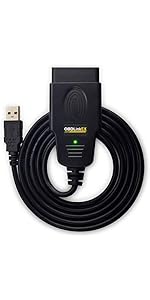
🔧 Own Your Garage: Pro-Level Diagnostics in Your Laptop
The OBDLink SX USB is a professional-grade OBD-II scan tool designed for Windows PCs, enabling DIY car and truck diagnostics. It supports all 1996 and newer gasoline vehicles sold in the USA, providing real-time engine data, trouble code reading and clearing, and includes lifetime software upgrades with OBDwiz. Ideal for millennial professionals who value saving money and gaining mechanical insight without relying on costly shop visits.


| ASIN | B005ZWM0R4 |
| Best Sellers Rank | #755,748 in Automotive ( See Top 100 in Automotive ) #2,195 in Code Readers & Scan Tools |
| Brand | OBDLink |
| Brand Name | OBDLink |
| Customer Reviews | 4.4 out of 5 stars 4,060 Reviews |
| Global Trade Identification Number | 00897155000005 |
| Included Components | Quick Start Guide, Scanner |
| Item Type Name | Diagnostic Scan Tool |
| Item Weight | 3.2 ounces |
| Manufacturer | OBD Solutions |
| Manufacturer Part Number | 425801 |
| Manufacturer Warranty Description | 3 Year Full Manufacturer's Warranty. Warranty does not apply for damages caused by owner abuse or alteration of the device. |
| Model Number | SX101 |
| Number of Items | 1 |
| Operating System | Windows |
| Power Source | Vehicle |
| UPC | 897155000005 |
A**W
You won't be disappointed!
I purchased this unit to diagnose a persnickety Check Engine light on my mother's '99 Oldsmobile Intrigue. The device, with its bundled software, allowed me to retrieve and erase saved and intermittent codes stored in the computer. I was able to successfully install the software on a Windows 7 64-bit laptop with no issues whatsoever. I have been able to also make a few bucks on the side diagnosing friends' cars, and to get a real-time look into sensor readings of used cars I've been looking at for purchase. (You'd be surprised how many people will hide a faulty sensor or "impending doom" by resetting the car's ECM before a buyer comes to look at it. If all emissions systems aren't "Ready," that's a red flag for a computer that's had codes reset or the battery disconnected.) It's a useful tool for not only the most basic of backyard mechanics (save $$$ by scanning codes yourself), but provides enough information for those handy under the hood to diagnose and repair without the added expense of a professional-level scan tool. It doesn't give you everything, as I was unable to access the stored codes in the Body Control Module or Antilock/Traction Control System, but the possibility may exist with different software or paying to unlock that feature. Honestly, I've only used it on a few occasions, my two cars are OBD-1 and not compatible with the module. Another handy feature is the ability to record and log realtime sensor output. This is vital for diagnosing intermittent problems, such as a failing sensor, as well as checking out those 0-60 runs to find out if your new K&N air filter really makes you go that 0.1 second faster. :-) The first time you use it, it pays for itself. A basic OBD-2 code reader (with far less capabilities) retails for nearly twice the price. My tools might get scattered in the garage, but I *ALWAYS* know where my laptop is, and I keep the scanner in my laptop bag. Between the convenience of having a scan tool at home, saving myself a 20-minute drive to the nearest auto parts box store for a free scan, and how useful it's been so far, this really is a no-brainer purchase. Bottom line: you can't beat this deal. It's easy to use, the software gives you plenty of information, and there are other free and paid software packages that might be a great thing to add in the future. A dealer or shop will usually charge you a pretty hefty price to find out that Check Engine light is from a loose fuel cap, and in this day and age, who doesn't like saving money?
C**N
This product works great with my windows 10 HP laptop
This product works great with my windows 10 HP laptop. With the included downloadable software and drivers this product will read not only active fault codes but stored fault codes as well. This product gives you the ability to delete active codes from your cars computer system as well as monitor and record your vehicle performance while driving. This ability allows you to diagnose the mystery problems that only occur under certain driving conditions. once a code is displayed on screen it is a simple point and click for the description of the fault along with links for manufacturer specifics as to what causes the code. for example instead of just telling you the cade is for a bad oxygen sensor in bank one it will tell you what the problems are with the censor (reading out of voltage range during these conditions) The virtual dash board is very informative giving you information such as exact water temperature, gallons per hour current being used (great for recognizing excessive gas consumption at idle). Speedometer and rpm gauge If you have a laptop that you don't care to use in the garage and are an at home mechanic that does not have hundreds or thousands to spend on a good scan computer I would recommend this product. It has a fair price with good features (Many I have yet to explore). The cord is long enough to set your laptop in your passenger seat and still be routed out of the way. Pros: Great features, sturdy construction, Fair price, cord length is sufficient for use. Cons: Would benefit greatly from a link to video instructions for use of the software (There may be a YouTube video out there but I have not had time to search for one)
D**E
Worked great for me!
worked great for me. For the price, you cant' beat it. Product came, I downloaded their software from their site, drivers loaded automatically (be within wifi when you first hook this up to your car!), and it all ran great! Google OBDWiz, their site is the first one, see what they have to offer. I exported the data to Open Office Calc (similar to MS Excel), and created the charts attached from the data. You need to be familiar with a spreadsheet software in order to do this! OBDWiz will show you instantaneous graphs while you are running the test, but if you want more than a few seconds worth of info, I don't think it will show you (I could be wrong, I just started playing with this) 2002 Subaru Outback 2.5 P0420 code "Catalyst System Efficiency Below Threshold" I just replaced my forward and back O2 sensors with Bosch three months ago, so I was pissed. I also just passed emmisions a couple weeks ago, so I was really baffled. First thing I always do on a P0420 is run two tanks of gas with fuel injector cleaner. It didn't help. This system allowed me to monitor my O2s and other systems. When I saw my fuel trim was running lean, I listened to my injectors (long screwdriver from injector to ear) more closely. While they are all working, one doesn't "click" nearly as loud as the others, so I am assuming it isn't closing properly, and therefor leaking gas into the cylinder. I picked up a used injector (c'mon, car has 230k miles on it, and I'm cheap), and will try that, and hopefully remember to update this review. UPDATE: I replaced the "quieter" injector with a used one, and the car ran terrible for the first 3-4 short and medium trips. I think this is the computer re-calibrating for the new operation of the car (fixed injector, correct amount of fuel). Then, it suddenly started running great, great power, smooth idle, I hadn't realized how poor it was before! So yeah, this tool helped me to identify a leaking injector, after injector treatment and O2 replacement failed to correct the problem. No more p0420 code, and no more smell (before, I had to disconnect the smoke alarm in my garage, cuz firing up my car would set it off). Definitely two thumbs up, more if I had them! Attached are graphs of my car after a week of operating with the new (used) injector (last three photos). I lost data contact between 100-300 seconds (my bad, I exited the car, and bumped the connector, didn't notice until I got back in), so ignore the flatlines there.
R**C
Excellent hardware and software ... once you're able to activate the license
I have a Can-Am Spyder that I was listening on the CANBUS to implement some courtesy lighting and other functions. A member of a Spyder forum asked about a head-up display. I suspected the Spyder was OBD-II compliant so ordered the OBDLink SX for a Win10Home laptop we use solely for SCTA roadster and dyno room data logging. The only time it was connected to the Internet was for a quick print job when we didn't use XPS. Everything else is downloaded to an Internet computer, copied to a USB drive and then loaded into the data logging laptop. The OBDLink SX adapter arrived in a simple package with a 5-step instruction sheet. The hardware looks very nice and sturdy. Started with Step 1 logged on in Administrator mode. Proceeded without difficulty to Step 5 which is start the OBDwiz software with the adapter plugged into the OBD port and the car running. USB connection and the car OBD version were recognized automatically. Hey this is great! Then I ran into the registration-required message which needed an Internet connection. Leaving the laptop running I disconnected the adapter and went into the house for the Internet connection (via WiFi). No joy. Tech Support (which is good) said TINA (There Is No Alternative) for an Internet connection while the adapter is plugged into the car and the ignition is turned on. Since the car is about 40 feet from the WiFi router I thought I'd give it a try. After creating about three user accounts (I lost track) I was able to activate OBDwiz and the $25 Professional Addons. Perhaps you park your car in the Living Room or maybe an attached garage. Not an option for me but was close enough for my router which has beamforming. And to add insult to injury, Microsoft took the opportunity to sneak in a series of updates that took over an hour to process. I haven't had a chance to check how much damage was done. I'm an unhappy camper about this. The OBDwiz software is very nice with a simple clean user interface and the ability to save the scan results in a variety of file formats. In summary, I scored the hardware and software +5 stars and the installation process -1 star for a total of 4. If you can park your car within range of your WiFi router I highly recommend this product.
A**E
Best cord for diagnostics and tuning programs
This cord is absolutely perfect for anyone who wants to do basic diagnostics and for people who'd like to dable in tuning for your car, I use this with pcmhammer and am able to read and write tunes to my car aswell as run diagnostic programs and run live data feeds for fuel trims etc, its compatible with most modern cars and laptops, this functions perfectly and would recommend anyone giving it a shot
S**F
Did exactly what I needed and a bit more
I did not have "Star Trek magic box that works perfectly all the time" expectations. Even though there are standards in the OBD arena not all vehicles are exactly the same, not all vhicle computers are exactly the same or even gather the same levels of detailed information, and not all manufacturers enable all the same options. I have a 2008 Honda Odyssey Touring minivan. It's on-board computer already displays MPG, instant MPG, trip A and B, and all that good stuff. My reasoning for the USB version of the Scantool is that all I really only wanted to see if there were errors and warnings, like from engine light events. No need to keep the dongle plugged in all the time. I followed the directions. The downloaded software and driver had no viruses at all and it was painless to download. They even have a download for the CD contents, which was not included in my shipment. I normally toss them out anyway. Didn't have to pay for the software/downloads and there were no weird download manager sign-up scams either. Nice and simple download what you want and be done with it. It worked without issues and was quite responsive. Not all of my vehicle sensors are turned on because not everything was available. However, the software dashboard was fully functional. The MPG was accurate and the instant MPG was exactly the same numbers as my van display. The dashboard also had a temperature reading (in F), engine load reading (in %), and hours per gallon of gas. Apparently my van burns half a gallon of gas per hour of idle. Nice to know! The error codes and such worked perfectly as well. Saved me a $140 diagnostic fee. Apparently the engine light on a Honda can come on if your gas cap is not providing the proper venting/vacuum. I reseated my gas cap, saw there were no actual engine problems, and I feel better. The vehicle computer also keeps a history of all the errors it's ever had and how many miles ago the error was. So I got to see the cylinder misfires 47,000 miles ago when Honda did a recall on the programming and fixed it as part of the warranty. No errors since.
B**A
$30 for a great quality scanner works with Android too!
This thing deserves 10 stars! Works great just *make sure you download the drivers* from the instructions. It's not plug and play. I was curious to see if it would work with my Google Pixel 2 XL with the OTG adapter and it worked with a few apps (works with:DashCommand and OBDlink so far that I found). The build quality is great feels very premium, feels like it shouldn't break on me. Cable is about 5ish feet. Have tested but if you look at the drivers theres software available on pretty much everything even Linux and osx. Worth the money $30 for a reliable obd2 reader, I spent $100 on the BlueDriver and I liked this one a lot more. I'd say it's better than those Bluetooth/WiFi devices because theres no lag or connection issues. *Though on the apps you do have to select on the app that you are using USB not Bluetooth* Overall best $30 I've every spent!
B**E
Worked Great in Domestic and Imported Cars, until it asks for a code that doesn't work.
Very simple universal general Diagnostic for the general public. With this software you can get some general information about codes, but cannot get very specific information. For the price it is acceptable. Use it in read mode only. This software isn’t safe to clear codes, because may create irreversible damage to the Engine Control Module (ECM). Update 3/4/2019 When I needed most the software refused to open, asking for a code that doesn't work. Trusting the company bought another one that worked only once. Be aware they trick you , after ask you to pay more for another key and so on and on. Trying to contact the company is as bad as going through a fire. Actually I have not one but 2 OBDLink SX X0004U2RZ3 PIN:425801 and many other Numbers and Codes just to convince you that they are serious. In fact any time that you run the program and hook it up to the vehicle, it stops working, and asking you to get new codes lurking you to pay more and more and more. The software, with a great display, it is dangerous for your car. During disconnection may affect the CPU and do not try to clear the codes, because can result in irreversible damage at CPU, EMC and ECU. Recycled both of them and the OBDLink SX stopped to ask my money. Bough a Multi-system Scanner i980 works great for Mercedis, Audis, BMW but and for American cars. No need for a computer, gets the faulty codes and if the car is ready for Emission Test the message is no faulty codes. My brothers in law 2006 Chrysler Town & Country misfired. Tested wth OBDLink SX and they refused to test asking for more codes (MONEY). Used i980, found misfire at cylinder # 4. Tested for spark and found faulty coil Pack. Bought a new one in the store , replaced same day and the next day he was ready to go to work. Dumped both OBDLink SX and forgot about of them once and forever. Finally the OBDLink SX cannot provide the temperature of transmission fluid mandatory to do a transmission fluid change.
D**S
Fonctionne très bien
Parfait fonctionne très bien.
W**K
WTulwin OBDLink SX
Witam OBDLink SX ScanTool USB bardzo dobry kabel działa z Renilink sprawdzony .
D**O
Obdlink SX
Oggetto molto valido, io l'ho preso perchè mi funziona benissimo con il software Multiecuscan, e con altri software dedicati. Il prezzo è un pò alto.
U**7
Good unit
Nice unit. My car is Honda city 2008. I didnt face any connectivity issue from phone. But the device when connected to PC failed in installing driver when connected. So i wasnt able to run from PC. I had used a Micro Usb adapter to connect to phone via Usb port of the device and by installing the app on my android phone. There is a lag of nearly one second when reading the live data. Overall the device is good and doesnt have any other issues.
L**A
Recommendation
Item was received as described and work good too, so I recommend .
Trustpilot
2 weeks ago
2 months ago