🚀 Unlock Turbocharged Storage Anywhere, Anytime!
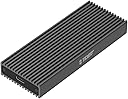
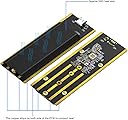
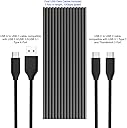
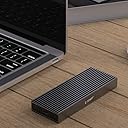
This M.2 NVMe SSD enclosure delivers ultra-fast 10Gbps USB 3.1 Gen 2 speeds with PCIe NVMe SSD support, housed in a sleek aluminum case with advanced heat dissipation. It fits both M-Key and B+M Key SSDs (2230-2280), includes versatile USB-C and USB-A cables, and works flawlessly across PCs, Macs, gaming consoles, and mobile devices—perfect for professionals demanding speed, reliability, and portability.


| ASIN | B07TJT6W8K |
| Brand | TDBT |
| Color | silver |
| Compatible Devices | Gaming Console, Laptop, Mac, Smartphone, Windowds PC, iPad Pro with USB-C |
| Connectivity Technology | USB |
| Customer Reviews | 4.5 out of 5 stars 1,210 Reviews |
| Data Transfer Rate | 10 gigabytes_per_second |
| Enclosure Material | Aluminum |
| Hard Disk Form Factor | 22 millimeters |
| Hardware Interface | USB 3.1 Type C |
| Hardware Platform | Mac/PC/Linux/Android, PlayStation/Xbox, iPad Pro with USB-C |
| Item Weight | 0.11 kg |
| Manufacturer | TDBT |
| Material | Aluminum |
| Memory Storage Capacity | 2 TB |
| Mfr Part Number | SUPERC |
| Model Number | SuperC |
| Number of Items | 1 |
| Supported Devices Quantity | 1 |
| UPC | 707918673493 |
| Unit Count | 1 Count |
A**Y
Good buy at a good price, better than Sabrent
UPDATE: The seller contacted me and after discussion sent me a replacement right away. The customer service was commendable. The replacement does NOT have any problem and is extremely stable and does not eject unless you manually do it. New benchmarks contain the word "NEW" all others are old benchmarks. The speeds are as expected around 750-800 MiB/s Read/Write speeds (the small 256GiB SSD might be limiting the enclosure to reach higher write speeds of 1000MiB/s). I would rate this as better than Sabrent enclosure had the instability problem even with the replacement item and the customer service was plain bad. Not to mention that it costs almost 70% more than this TDBT enclosure. --------------------------------------------------------------------------------------------------------------------------- ORIGINAL REVIEW: Physical Overview: The packaging was nice and minimal without any extravagant display of the superiority of the product (as shown in the photo). The edges are sharp (as shown in the photos) and I would definitely not be comfortable putting this enclosure in my backpack. The Sabrent enclosure is good one in this department as all its edges are smoothen. The enclosure does not feel heavy though unlike the Sabrent one, which feels heavy (probably due to the higher density due to smaller volume and a bit more weight). This enclosure is a bit different than all the other generic NVME enclosures in this range as this includes a small heat sink that actually make a contact with the NVME SSD and that heat sink in turn makes contact with the outer chassis (which helps in better dissipation of heat). Another thing that I noticed during the installation of the SSD in the enclosure is that the SSD does not make a contact with anything from the bottom side. The top side is in thermal contact with the small heat sink via the thermal pad, but from the bottom side of the SSD there is absolutely not contact (as seen in one of the photos). It would definitely help to cool the SSD if there was another thicker thermal pad which made contact with the bottom of the SSD. The length of the cable provided in the box was rather small, and it would be nice to include a bit longer one. But the cables themselves were working as expected and up to the specifications. Performance: Now coming to the main problem with this enclosure, which basically rendered it useless for me (not sure if the particular item that I received was faulty or it’s just how it was designed), the enclosure just does NOT work with USB 3.1 gen 2 port. It just gets stuck on 100% active time (In the task manager) and even my entire laptop becomes unresponsive until I physically disconnect the enclosure for the laptop. However, the enclosure seems to work with the USB 3.1 gen 1 port as well as the Thunderbolt 3 port (with some performance degradation). THUNDERBOLT 3 PORT : The read speeds were up to mark (around 840 Mib/sec), but the write speeds were substantially lower (around 275 MiB/sec) for the exact same SSD in the exact same condition when using the TDBT enclosure as compared to the Sabrent one (Read speed: 839.2 MiB/sec ,Write speed: 859.5 MiB/sec). USB 3.1 gen1 PORT: The read speeds were up to mark (around 417 Mib/sec), but the write speeds were substantially lower (around 251 MiB/sec) for the exact same SSD in the exact same condition when using the TDBT enclosure as compared to the Sabrent one (Read speed412 MiB/sec ,Write speed: 421 MiB/sec). This was surprising as this enclosure used the exact same NVME to USB bridge chip as the Sabrent enclosure (and pretty much all the other enclosures on the market) viz the “JMicron JMS583”. I believe this problem and the above problem are related and are just software issues which can be fixed by a change in the firmware by the manufacturer. However, I would like to make a note that, the even the Sabrent enclosure is not stable and randomly gets ejected and required you to physically disconnect and reconnect the enclosure to get it back up (which is not possible if you are running this as a game drive or an OS drive). Now coming to the thermal performance, due to the fins the temperature on the surface of the enclosure did not rise significantly. And it was definitely cooler than the Sabrent one (thanks to the fins and ever so slightly bigger size). Conclusion: All in all it would be hard to recommend this NVME enclosure with the current problems (mainly not responding with USB 3.1 gen 2 port and lower write speeds), however if the above two problems were solved this drive would make a good external drive for extended period of work (due to good thermals) and the lower price of this enclosure as compared to the Sabrent one (again!).
M**G
Fantastic quality/value!
This was a little more expensive than sata m.2 enclosures, but it was still cheap and you get a lot for what you pay. The enclosure itself needs to be assembled somewhat, which isn't too difficult. It comes with the screws you need to mount the SSD to the internal board, plus extras. It comes with a standoff, and an extra. It comes with a heatsink you can place atop the SSD, with an adhesive thermal pad (and extra). It comes with extra screws for the heatsink mount. It comes with a shock dampener (and extra) if you need it. It comes with extra screws for the faceplate. It comes with a screwdriver to put it all together. And it comes with not only a type-c to type-a cable, but also a type-c to type-c cable. They really did put everything you need in the box (except the SSD hehe). The outer casing will heat up and act as a large heatsink as well. I used this to clone my laptop drive (half-length 256GB sk hynix) onto a 970 evo. I did not put the heatsink or thermal pad on as I was going to swap the drives after, and the outer casing DID get quite hot. I assume that would have helped, but it was a temporary usecase. Afterwards, I put the 256GB drive into the enclosure (the pcb has screw holes for fullsize and half-length drives, too!) and because it's so small and a bit slower (and I didn't want to cut up a thermal pad), I didn't put the heatsink on with that one, either. It doesn't get too hot and it runs fine. Unfortunately I can only make use of USB 3.1 Gen 1 speeds, but this enclosure does seem to live up to that, at least. And cloning with Samsung Migration worked flawlessly, didn't need to preformat the drive or anything.
P**6
Exactly What I Needed
I was in the process of upgrading my Acer Predator G9-793's 512G OEM Samsung SSD to a 1T 970 EVO Plus SSD. Installation of the new drive was easy and I liked the addition of the heat sink although I have no plans to use this enclosure on a regular basis. I basically needed it to clone the old C drive onto the larger and newer 970 EVO Plus. Initially, I tried cloning using the free version of Macrium. I thought I did everything correctly, including resizing the partition that needed it. However, when swapping out the new drive, my laptop would not boot up from it. I know other reviewers said they had similar problems and suspected the enclosure was doing something to the drive to keep it from being recognized/booting, but this failure was probably down to user error (and not the software). I installed Samsung Migration (not Magician) and gave the cloning another shot. This went smoothly, Migration recognizing the SSD in the enclosure, and when I swapped out the drives, my laptop booted up flawlessly, expanded the correct partition and cloned the recovery partition as well. I then installed Samsung Magician and it can see, test and update the newly installed EVO Plus. While I cannot speak to this case's longevity or how the heat sink performs under heavy load, this enclosure did exactly what I needed it to do and makes a great case to keep my original C Drive safe.
R**S
Disconnects
TLTR: Bought this drive as a media expansion drive for working within Premiere Pro - it now disconnects randomly, crashing the program. I bought this enclosure to set up a media drive for Premiere Pro. I have a Dell XPS 13 with dual Thunderbolt ports. Again the purpose for using this enclosure to build a large expansion to my internal SSD on my laptop while working on videos within premier. I bought a (Western Digital 1TB WD Blue SN550 NVMe) to pair with this enclosure. As I’ll mention later, I intentionally didn’t buy the fastest drive since through my research I’ve seen that often the fast drives cause the most heat, often much more expensive, and considering my application of only needing a volume to pull media from I don’t need speed as much as I do size. The read and write speed of this drive is 2,400MB/s out of the box. I was fairly impressed with the packaging, and also the build quality of the enclosure. I love the gunmetal grey color and the design is very simple. I think the best design element is the integrated heat sink fins that makeup the metal case. The one ISSUE design wise I have is the port on the enclosure where you connect the thunderbolt/USB C cable…The port sits pretty flush with the metal of the case, but while the connector is inserted, the plug sticks out a bit. I feel like the plug should go in deeper to the port, and fit flush with the device. (Think of plugging a lightning cable into an Iphone and how that sits flush) I think this causes the drive to be a tad fragel and perhaps causes the problem I will later get into. Installation was easy and only took a few minutes, the supplied thermal pads and screws worked well. I think a lot of other reviews had mentioned questionable cables included with this kit. I'm pleased to report that the cables I received, both (male to male Thunderbolt 3 and Thunderbolt 3 to USB 3.0) look to be of high quality. This inclosure is rated for 10 ‘Giga bit’ speed. Something I glanced over - so when I initially ran benchmarks, I was disappointed in the performance loss of more than 50% - However, I now know that I’ve hit the max speed this enclosure can take. For this drive to operate at it’s full speed, I would need a 20Gb/s enclosure. Using crystal disc, I can clearly see that the drive does not do as well with larger file transfers. I have included two screenshots of my test results for 2 GB and 8 GB transfers - in general the read speeds hover at about 1,000 MB/s. However write speeds are severely affected when using larger file transfers. I do not think that this problem is from the drive, but instead from the enclosure. The drive was able to complete large write tests when plugged in natively within my main system. I will note that I conducted these tests outside while the ambient air temperature was around 72°F and my laptop was under power with no other applications running. I have taken the same Using this enclosure with the drive is still acceptable for my use within Premier Pro. However, after using it for a month, the drive now disconnects randomly. For those interested I have all my media linked from this drive in Premier where I then also created proxy files of the same media to be stored next to the originals on the drive. The proxy files are then used to edit within Premier. Performance was great - I’m mainly editing 4K 30P footage (sony a6400) and 4K 60 P footage from my Mavic air 2.. The proxy files are only 720 P, so you can imagine the bandwidth need isn't crazy. Additionally I store all the preview files within this drive. When working within Premier, with several layers, transitions, colored LUTs, I’m getting less than 100 MB/s of usage anyway. THE PROBLEM - is that after a month of use.. The drive randomly disconnects. This has happened when both using Premiere Pro, and while just having the drive connected. I’ve tried different thunderbolt cables, and the problem still persists. While it’s not frequent… When it happens, Premiere will crash and I will lose my work if not saved. Plus, I then have to reload the project file. It’s starting to become more and more annoying especially when exporting or rendering a project. I’ve also plugged the enclosure/drive into another system - I saw similar benchmarks in terms of speed.. Plus the disconnection problem still persists. For a sub $30 enclosure.. I’ll look past the flaws.. However, I’m looking to replace this ASAP.
M**S
A very nice enclosure
Update 9/28 ========== I plugged it into Thunderbolt port on iMac using provided USB-C to USB-C cable and re-tested. The speed went drastically up, much closer to the advertised speed. 910 MB/s read, 950 MB/s write. Or approximately 7.3 and 7.6 Gbps. Throughout the benchmark/stress test it remained cool/mildly warm to the touch. I also tried it on Raspberry Pi 3B and can confirm it works there as well. I could not boot the Pi from it, but that is the issue with the Pi and not with the enclosure or the SSD that's in it. I already gave it 5 out of 5 starts, but if I could, I would certainly gave it another star! ============================================ I tested it on Mac OS and Linux using the following setup: - Mac (Retina 5K, 27-inch, 2017) running Mac OS Catalina 10.15.7, USB 3.1 - Lenovo X201 laptop running Ubuntu 18. USB 2.0 - The enclosure was connected to the computers using provided USB-C to USB-A cable. - I used TEKQ PSE 12 NVMe SSD 240 GB, formatted with FAT32 file system (reason being compatibility between different operating systems). See attached results. Mac reported the enclosure as: JMS583 Product ID: 0x0562 Vendor ID: 0x152d (JMicron Technology Corp.) Version: 2.09 Speed: Up to 5 Gb/s The reported speed on Mac (not the tested speed) was up to 5 Gb/s, which is half what JMS583 bridge is advertised as being able to achieve. I have no explanation for this. The enclosure remained cool to mildly warm all the time, which is excellent. The build quality is superb and perfectly designed. Mac test results (USB 3.1): Read: 423 MB/s (approx. 3.4 Gbps) Write: 428 MB/s. (approx. 3.4 Gbps) Lenovo laptop test results (USB 2.0): Read: 39 MB/s Write: 25 MB/s Even though I did not achieve the maximum advertised speed when I tested it on Mac (USB 3.1), it is still a very, very fast enclosure. I would highly recommend it.
A**R
Successful SSD M.2 Upgrade for Laptop
I have an old HP Spectre and wanted to upgrade the factory provided 500GB M.2 SSD to a larger storage SSD. I purchased this TDBT enclosure/adapter along with Samsung (MZ-V7S1T0B/AM) 970 EVO Plus SSD 1TB - M.2 NVMe after reading many reviews that this adapter seemed to have worked to help facilitate the OS migration for that particular SSD. Enclosure itself was pretty straightforward to use and it did indeed come with a small screwdriver so didn't need any other tools to complete the job. Also came with USB-C to USB-C and USB-C to USB-A cables which makes it extremely versatile as it will be compatible with older machines as well as newer machines as more and more laptops begin to shift towards USB-C ports. Maybe because myold 500GB SSD was a Samsung SSD but the transfer was as smooth as I could have hoped for. I took the new 970 EVO that I purchased and plugged it into this adapter. Downloaded the Samsung Data Migration (not magician) software as well as the 970 EVO drivers from the Samsung website and started the transfer after consulting a couple of YouTube videos. Took about 30mins to transfer 450+GB of data to the the new 970 EVO and then the Data Migration software shut off my computer. Maybe I was in too much of a rush and should have just left it for a while but I turned on the computer and got multiple blue screens until my laptop failed to boot. I quickly unplugged the adapter and went to the motherboard startup menu and restarted the computer using that route. I also thought I would need to factory reset my entire computer, so thank goodness all my files are in the cloud storage. Breathed a sign of relief when my computer booted up. Shut the computer down, swapped out the old SSD with the new EVO since the Data Migration software did say the transfer completed successfully and held my breath as I started my computer up again. Success! It looks like it worked. I now have lots more space in my C: Drive. Here's hoping it stays that way and my inexperience didn't mess anything up too badly. I did notice that the enclosure getting a little warm when it was transferring over my OS, but this adapter did exactly what I wanted it to so 5-Stars from me. I put my old 500GB SSD into the enclosure and may format it to use as a normal memory drive in future, but for now I will keep it in the enclosure in case the EVO 970 fails me or if I find out I did something wrong during the upgrade. The reason I went into so much depth was to provide guidance to people who are in the same boat as I was, trying to upgrade my SSD without the faintest idea of whether I was doing it correctly the whole way through.
R**N
Flawless quality product
First off, im not even the type of person who writes reviews on here so the fact that Im sitting down and taking the time to write this says a lot. I was wanting to clone my ssd in my Razer laptop to a 2tb ssd. I had bought a different one of these SSD cloning adapters for about the same price that was just a USB stick looking thing, and it cooked itself from the heat almost immediately. Amazon did refund it thankfully. So when I saw this had a heat sink I thought, ok well the price is right I'll give it a shot. Honestly, I'm blown away. I had some software issues on my end basically because im a noob and ended up having to clone this SSD 6 times! The adapter worked great every single time. I assembeled and re-assembled this little thing so many times. Its a little tedious, theres 7 tiny little screws involved in the assembly if you actually use all of them as directed. But I only ended up using 3 in the end and it went fine. Although I don't recommend doing that or whatever, do what they say. I just got lazy. But yeah, great little product. Honestly, I would have paid double for the quality of what I got. Im super satisfied. They even give you some extra screws.
J**F
ABSOLUTELY A WINNER! LET'S HEAR IT FOR TDBT!
I am lost for words to describe this product... even though I am yet to test out the USB 3.2 Gen 2 speeds (1000Mbps), I am very impressed with the built, function and looks of this product. I have tested more than a handful of SATA3 and NVMe enclosures over the years and none have truly satisfied me until I stumbled across this item from TDBT. I never heard of the brand before but now that I have, I will be looking forward to bigger and better things from them. This is currently one of two NVMe enclosures (one has my Adata SX6000 Pro while the other, my Samsung SM 961 ) that actually ship with a heat sink included. I was skeptical about the heat sink initially, so I never bothered to install it. After using the ADATA SX6000 Pro in the enclosure for a few weeks, during my testing, the NVMe Drive got as hot as 60 Degrees C while in use. So I decided to install the heat sink but based on my knowledge of SSDs, even though they can get very hot under constant stress (writing huge GBs of data) its the controller that generates most of this heat and not the NAND cells themselves. If fact, NAND cells are "happier" being hot than cool. Its the controller that always needs to be regulated where heat is concerned. My mission was to cut the heat sink to fit over the controller and that I did with a hacksaw blade and then filled it (see photos) down for neatness. After installation, I was shocked! During my extensive testing, the same ADATA NVMe Drive never got more than 45 Degrees C with the heat sink on. Now that is impressive. The guys who designed this enclosure deserve an award... not only does the inner heat sink work but the outer shell acts as a secondary heat sink with fins on the top and bottom so there is always air flow around the entire enclosure. All I want from this company is for them to come up with a unit that can give you the full speed of the NVMe drive over USB, maybe when USB4 comes along and I would be extremely happy. I own two of these enclosures and I want more! Would I recommend it? Are you kidding? You shouldn't be considering anything else but TDBT's NVMe Enclosures.
T**M
Fast and easy to install
Fast and reliable, what else could I ask? I'm using it with a Samsung 970 Evo SSD, goodbye USB sticks.
P**.
la facilidad de convertir en un disco externo.
Carcasa muy buena me sirvió para adaptar una memoria y utilizarlo como disco externo. Buena velocidad para bajar fotos y archivos.
S**G
Good Quality easy to assemble
The enclosure is high quality aluminum. It was very easy to assemble. It comes with all the tools to assemble it. It also comes with heat sink and also cooling tape. Speed is not bad with usb c. A bit slower with usb 3.0. but over all it's a good sturdy device.
A**R
Works perfectly
Used with WD Black 1TB. Even boots the OS installed on it quickly. Use other partitions for data when OS isnt needed. Feels pretty rugged.
J**S
Excelente. Me funcionó perfecto para lo que necesitaba.
Muy buen producto. Por ser envío internacional, consideren de 10-12 días para su llegada a México, pero créanme que vale la pena. Lo compré puesto que necesitaba migrar mi OS de un M.2 que vino con una laptop a uno nuevo que compré. El contenido de la caja viene completo, con su instructivo sencillo de como instalar correctamente la M.2 (vale tanto para las M.2 cortas y largas). Vienen incluido los cables de USB-A a C y USB-C a C, así como un desarmador ensamble.
Trustpilot
1 month ago
1 day ago