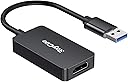
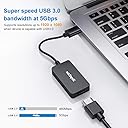
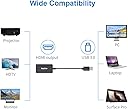


desertcart.com: USB to HDMI, USB 3.0 Adapter with HD 1080P, Video Audio Graphics Converter for Multiple Monitor, Support Windows XP/7/8/10 ใ NO MAC/Linux/Vista/Chrome/Firestickใ : Electronics Review: Was nervous based on some of the bad reviews but it worked great! - I bought this for my Lenovo Yoga laptop to connect via USB to a TV via HDMI. I was nervous after reading some of the bad reviews (some people said it doesn't work at all or didn't work after a few minutes). But I connected it via USB and immediately the driver install window popped up (next, next, next, finish), then I plugged the HDMI cable into it and immediately my screen was broadcasted to the TV. I had to give a big presentation in a public conference room where I didn't know the equipment set up. I brought it there, plugged in the HDMI cable and I was off and running again. My presentation was over 90 minutes and I had zero issues. I packed this little cable away for next time. Great value for the price and did exactly what I needed it to do. I felt compelled to write a review since the bad reviews scared me. Review: Perfect, Affordable Adapter - I am a student and since the colleges have changed to online classes, I have needed a second full size monitor. Since my laptop only has one HDMI plug, I was told that mu USB 3.0 outlet has capable to run another monitor with the right adapter. This is the right adapter. I plugged the adapter in, and it automatically opened a folder that gave me two types of software folders. I clicked on Windows 10 and it started installing the software. After it finished, I rebooted the computer to finish the installation. After it finished rebooting, I plugged my second monitor in and poof, I had a second monitor. I changed the display settings in Windows 10 to extend the screen and it was finished. Perfect picture. Great for the dollar.
| ASIN | B07VSPK9XJ |
| Brand | RayCue |
| Compatible Devices | Monitor |
| Connector Type | HDMI |
| Customer Reviews | 3.9 out of 5 stars 240 Reviews |
| Finish | Chrome,Hdmi |
| Finish Type | Chrome,Hdmi |
| Item Weight | 0.05 kg |
| Manufacturer | FlyLand |
| Number of Ports | 2 |
| Package Quantity | 1 |
| Specific Uses For Product | Monitor |
| Unit Count | 1 Count |
A**.
Was nervous based on some of the bad reviews but it worked great!
I bought this for my Lenovo Yoga laptop to connect via USB to a TV via HDMI. I was nervous after reading some of the bad reviews (some people said it doesn't work at all or didn't work after a few minutes). But I connected it via USB and immediately the driver install window popped up (next, next, next, finish), then I plugged the HDMI cable into it and immediately my screen was broadcasted to the TV. I had to give a big presentation in a public conference room where I didn't know the equipment set up. I brought it there, plugged in the HDMI cable and I was off and running again. My presentation was over 90 minutes and I had zero issues. I packed this little cable away for next time. Great value for the price and did exactly what I needed it to do. I felt compelled to write a review since the bad reviews scared me.
J**N
Perfect, Affordable Adapter
I am a student and since the colleges have changed to online classes, I have needed a second full size monitor. Since my laptop only has one HDMI plug, I was told that mu USB 3.0 outlet has capable to run another monitor with the right adapter. This is the right adapter. I plugged the adapter in, and it automatically opened a folder that gave me two types of software folders. I clicked on Windows 10 and it started installing the software. After it finished, I rebooted the computer to finish the installation. After it finished rebooting, I plugged my second monitor in and poof, I had a second monitor. I changed the display settings in Windows 10 to extend the screen and it was finished. Perfect picture. Great for the dollar.
D**L
BLACK OUTs about 10x per day
Update... Returned it. Tech support was taking way too long every time I spoke to them and was not providing a solution.. I'm thinking there is no soliciting and it has some design flaws... I also noticed that it slowed my computer down significantly in certain USB ports, though all my ports are USB 3... Furthermore, a coworker also purchased one of these, and with a different model computer, is having the same issues. There is clearly something not right about it's design. I spent the extra money and got a Startech dual 4k adapter, 60Hz, USB 3. Glad I did, I can use it on any port and have no issues with no slow downs; I've been using the Startech for over 2 months now. Original Review: I got this for a side monitor for having chat / communication windows up while working. Using a 1080p Dell monitor with it. It works 99% of the time. However, about 10x per day for no reason, the monitor goes black and turns back on after about 5 seconds. The Fresno Logic adapter is staying online in device manager, my applications are staying on in the monitor. I've had it twice black out indefinitely, where unplugging it and replugging in the USB (not the HDMI) cable brought it back on. There is clearly an issue with the adapter's internals. I'm currently engaged with Raycue tech support to see if they have a solution. Will update this if they can fix it.
S**.
Works as intended, just a bit tricky.
Does what it's supposed to. Got it because the HDMI port on my laptop mysteriously died. But it seems to behave totally different from my original HDMI port when trying to choose to display on only an external display. I can't remember if it acted like the second display is only an adjunct desktop, not the original desktop, so whenever I tried to open a program, it would open on the original, which wasn't displayed. Became very easy to "lose a program" when I opened it on one desktop, it would only display on that desktop until I manually moved it from the other desktop. Weird. Also, it's possible to have the original desktop displayed on my laptop, but if the adapter is plugged in with no HDMI cable plugged in, it will still act like another monitor is plugged in, and your mouse can get "lost" on the undisplayed desktop adjunct. I've had to keep moving my mouse over until it arrived on my screen. Got around that by telling my laptop only to display on 1 monitor, the original. A bit of a hassle. adapter also gets very warm
P**N
Its suitable for my TV. Easy to connect. Great price and fast delivery
This is a nice adapter, It is well packed and there is still a plastic wrap around the box. It delivers great video playback from laptops to TVs. The project works as described and provides instructions on how to properly operate the required drivers.Seller service is first class. They quickly answered questions and quickly followed up. I highly recommend buying their products.
A**L
Great quality and graphics for the bucks
I bought another product similar to this and was sorely disappointed by the graphic display and switched to RayCue due to many of the positive reviews. This adapter did not disappoint. Drivers were easy to install as described and graphics display was on par with HDMI displayed graphic. Perfect for gaming and no lags or graphic disruption was noticed (as of the time of this review). Highly recommend this product for such a price and quality.
R**R
Works with my projector but not my monitor
I got this so I could use both my projector and external monitor at the same time from my laptop that has only one HDMI port. The plan was to plug the projector in directly, and use this adapter for my monitor. But for the monitor, it doesn't work. It hooks up and acts as though it's connected. You can see it listed in display settings, and you can even drag windows over to where the screen should be. But it's just black. No image signal is actually getting through. Thankfully, this is not the case with my projector, so I just switched them around, plugged the monitor in directly, and am using the adapted for the projector. It's less optimal for the cable arrangement on my desk, but it works. It's worth noting that my monitor is a slightly older one, for which I'm already using an HDMI to DVI converter. So the issue may well be that the two adapters are not playing well together. I'm happy enough, as I got it working well enough. And I can't complain too much for the price. But it would be nicer if it just worked fully as desired.
T**E
Simple way to add a second display!
It worked very well, there is no problem at present, I hope it will be used more for a long time. I'm using this adapter to two touch monitors attached to my windows 7 laptop at work. This works great on both.My laptop does not have a HTMI port and I have been looking for a solution for protecting my laptop to a HD screen for my work.Then I tried this product (from USB to HDMI). The result is very positive.This product works really well with my TV. I can connect my laptop to the TVs HDMI and watch my favorite movie the TV. It also works with my computer.
Trustpilot
1 month ago
2 months ago