

🖐️ Elevate your workspace with precision touch—because your productivity deserves the best!
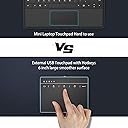
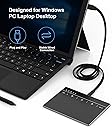
The Seenda Touchpad Trackpad is a high-precision external USB touchpad designed for Windows 7 and 10 devices. Featuring a large 6.3-inch ultra-slim metallic surface, it supports intuitive multi-touch gestures and 5 customizable hotkeys for enhanced navigation. Plug-and-play via USB-C ensures instant, stable connectivity without drivers. Built for professionals seeking a wired alternative to wireless trackpads, it combines durability, precision, and responsive customer support in one sleek package.




| ASIN | B07VBLLDXR |
| Best Sellers Rank | #255 in Computer Touch Pads |
| Customer Reviews | 3.2 3.2 out of 5 stars (278) |
| Date First Available | July 18, 2019 |
| Item Weight | 5.8 ounces |
| Item model number | IWG-CMO1-G-USA |
| Manufacturer | seenda |
| Product Dimensions | 5.4 x 4.1 x 0.13 inches |
K**Z
Recommended! Easy & works great
Just connected this to my Win10 PC today and it works great. I'm a Mac user at home with an original Magic Trackpad and wanted to recreate that interface on my work computer. But I wanted a wired option so I don't have to worry about batteries. The bonus is that it's cheaper than wireless. The first pic shows the ergonomics aren't great. I would have preferred more slope, but I'm sure I'll adjust. The second shows the size with some familiar items next to it: regular coffee mug and a Google Home Mini. If say the size is great! Nice and big which is great for my two monitor setup. Third pic shows the PC control panel and that it does show up as a touchpad. I did not have to install any drivers. I plugged it in and it worked immediately. Honestly, I didn't realize Windows had multi desktops so I'm very excited this new touchpad makes using them so easy! And the multitasking view is really cool, too. So easy to get to with this touchpad. So, I think it's clear I like this one and it's a keeper. If you're looking for a wired touchpad this one is great.
J**A
Sturdy Track pad. Great Customer Service!
Received this product a few weeks ago and it worked really really great! Built really strong, which it should be considering the price. Came with the 2 cables, 6ft and 3ft. Plugged it into a Windows 10 laptop and it worked right away! great usability with all of the functions. The only issue I have with track pads in general is that for work I have to "drag and drop" a lot and track pads are never that great at that so usually I just use a USB mouse. But this track pad has a button to click and hold so you can drag and drop which is a great feature to have. The sensitivity is great and is nice and smooth. Had an issue with Windows 7 and 8 in which is basically removed the drivers for the laptops keyboard and mouse and I was unable to use them at all. But it happened while I was updating Windows so maybe that was the problem. Contacted the company and they paid for my return shipping and sent me a new device within a week and it worked fine. Overall 4 stars for me because it didn't quite replace my use for the mouse, that's just my preference, but a great product nonetheless! Would definitely recommend. And customer service gets 5 stars because of how the issue was handled!
J**J
Lasted less than 2 months
This touchpad did not last. I get spontaneous right-button locks, as if I had tapped the right mouse button icon. Two-finger scrolling stops working. The whole device locks up and nothing works. I've sat and just watched the lights on this thing blink as if I was touching it. Unplugging and then replugging in the touchpad works... temporarily. The technical support here is just "try reinstalling the device." etc. level of support. The Seenda website does not have any information at all for this touchpad. Is this really a Seenda product? I have no idea, but one thing is sure: this touchpad is junk.
O**.
Annoying due to mouse button behavior
I bought this trackpad in hope that it would help with my Tennis elbow, which apparently is cuased/aggravated by extensive use of the mouse, in suboptimal positions. The trackpad itself works fine, although it took me a few minutes to reach that conclusion since BOTH of the cables that came in the package were faulty, and it was only when I tried it with another cable I had that it actually started working. The issues I have is with how the mouse buttons operate. And especially the left mouse key. My work requires a lot of "drag" type interactions, such as dragging across a couple lines of text to select them, or dragging a shape in a sketching software to place it where I want... How would you normally do that with a mouse? That's right, you'd hold down the left button while dragging the mouse in the direction you want to get. Once you've "reached your destination", you let go of the mouse button and the action is done. And with a regular trackpad (like on your laptop)? Again, you'd *hold down* a button (or, say, the lower left corner of the trackpad) and drag another finger across the pad to wherever you want to get. And how do you do this supposedly simple action with this trackpad? 1. Point the cursor to where you want to start your action 2. Tap the area where there's an icon of a left mouse button (no physical button, no tactile feedback, so you have to LOOK for it every time, at least in the 1st 20-30 times) 3. You are now in a sort of "left button mode", so wherever you now point, the "selection" would follow. (At least theoretically... it works for text selection, but not for drag and drop actions). 4. Once you finished, you need to tap again, to take the pad out of the "left button mode" and make it act like a pointing device again So now I have 2 additional steps EVERY TIME I want to highlight text. If if that doesn't sound annoying to you, multiply it by about 60-70 times a day, to get the idea... Well, half of it, anyway. Because as I said, this only works for text selection. If you want to drag objects around, there's a "slightly" different process that adds yet ANOTHER step, and also only works about half of the times... For the life of me, I can't understand why they had to do it like this. There's a convention to how drag and drop works. It works the same way on about 97% of the world's computers. Why come up with a new, decidedly WORSE way to do it? UPDATED: added a third star for customer service. They contacted me and offered a full refund without even asking for the product to be shipped back. They also notified me that they'll be looking into a solution for their next product. It's good to see companies taking customer feedback seriously. This product isn't for me, but I'd love to try their next one, given that the service is this good.
J**E
Super uncomfortable and hard to click and drag
After using this for like 2 weeks, I had enough with how uncomfortable it is and dragging objects were frustrating. I do a lot of work on my laptop and I wanted this to have a better reach and be more precise, but I had to have my palm hovering over and my wrist planted and it was so uncomfortable that I can still feel some pain in my wrist even though its been some time since I last used it. I cannot use the trackpad for more than 30 minutes until the wrist pain started to kick in. Dragging objects was also a pain, you need to touch the left-click hold button which you need to look down to find it and keep your finger on the trackpad throughout your text because if not, it would do some weird stuff. This just wastes a lot of time. The product worked perfectly, no issues, its just a bad design and I can see why it is difficult to find a variety of trackpads in this market. I went back to using my mouse and it never felt more comfortable. I'll be returning this product and use that money to buy a nice ergonomic mouse.
P**N
Most functionality works on Linux (Debian 12.) Zooming does not work, but this is application dependent. Build quality is ok, not that great. Overall, happy with the trackpad, hope it lasts.
K**R
Habe mir das Gerät für meinen Computer gekauft, auf dem Linux läuft Multitouch Gesten werden nicht unterstützt Lediglich scrollen kann man (relativ rucklich) und zoomen (wie Strg + Mausrad) Bin ziemlich enttäuscht, da in der Beschreibung als Betriebssystem Linux steht Das Trackpad selbst scheint gut verarbeitet zu sein, macht einen hochwertigen Eindruck. Ohne zusätzliche Software für Linux oder Mac ist das für mich aber nicht zu gebrauchen. Schade, da man hier echt noch einiges rausholen könnte aus dem Teil
C**Y
Unresponsive - total waste of money and no way to contact seller
と**助
2024年12月上旬に購入。 サクラチェッカーで最初に調べたとき、「危険」とあったが、その前評判に反して思っていた以上に使える。 当方の環境はwindows11でトラックパッドを接続してあっさりと使えた。 usb-Cであることはすごくありがたい。 ①製品の外観等 サイズは横136mm、縦101mm。上部はインジケーターやクリックやミュート、エンターの機能があるため、実際にタッチできる部分は縦75mmほど。質感は想像以上に良い。 ②操作感 タッチの追従性は申し分ない。有線接続のため遅延は感じられない。 2本タップで右クリックができるが、反応は悪くない。 2本での垂直スクロール操作について、マウスのホイールとは異なり、滑らかに画面がスクロールする。また、指を話した後も慣性が働いて少しだけスクロールする。←これは予想外。マウスのホイールのような感じと勝手に思っていた。 2本での水平スクロール操作も対応していた。Excelで水平スクロールすることができた。こちらも慣性が働いて、少し余韻がある。気が向いたら動画をアップしたい。 その他、ピンチイン、ピンチアウト、3本タップ、4本タップ等、とりあえず使えている。 使い始めなので耐久性が分からず、とりあえず評価4に。いきなり5じゃあやしいと思ったので。 12月14日 追記 ////////////// 職場のWindows10に接続していると、何もしていないのに「左クリック」のインジケーターが点灯し、左クリックをしている状態になる。この状態でタッチパッドを操作すると、当然のことながら「左クリック+カーソル移動」の操作になる。これを解消するために、1回タッチパッドをタップするか、左クリックボタンを押して解除する、または、しばらく待つ、のいずれかになる。seendaにメールをして問い合わせをしているので、返事待ち。初期不良なのか、それともそういう仕様なのか不明…。 評価★★★★☆ から 評価★★★☆☆ にとりあえず変更。問い合わせのメールが返ってこなかったらさらに下げようかな…。
M**.
Bir apple trackpad beklenmemesi gerekiyor. Ne yeterince duyarlı, ne de arkasında mac osx gibi bir yazılım desteği yok.
Trustpilot
2 months ago
2 weeks ago