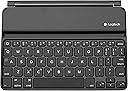
โจ๏ธ Elevate your iPad mini game with sleek style and powerhouse productivity!
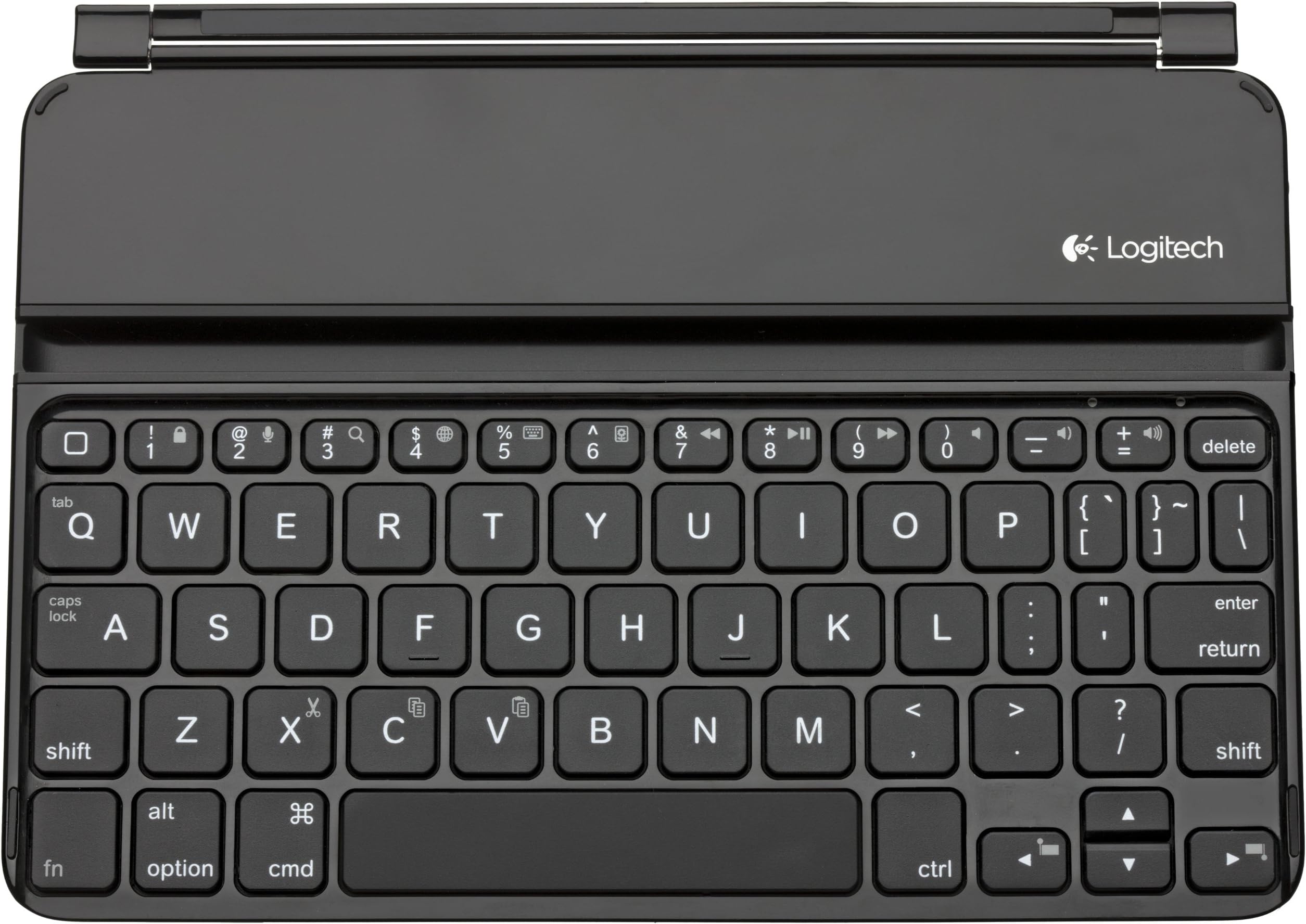
The Logitech Ultrathin Keyboard Cover for iPad mini combines a super-thin, durable aluminum cover with a built-in Bluetooth keyboard featuring traditional keys and iPad shortcuts. It magnetically attaches for perfect alignment, protects your touchscreen, doubles as a sturdy viewing stand, and offers up to six months of rechargeable battery life. Designed for on-the-go professionals who demand style and efficiency in one compact accessory.
| ASIN | B00BJVJV9A |
| Additional Features | Bluetooth |
| Best Sellers Rank | #4,122 in Tablet Keyboard Cases |
| Brand | Logitech |
| Built-In Media | USB Cable |
| Button Quantity | 72 |
| Color | Black |
| Compatible Devices | apple-ipad-mini-3 |
| Compatible Operating System Family | iOS |
| Compatible Tablet Computer Models | Apple iPad mini 3 |
| Connectivity Technology | Bluetooth, Mini USB |
| Customer Reviews | 4.1 out of 5 stars 1,142 Reviews |
| Enclosure Material | Acrylonitrile Butadiene Styrene |
| Global Trade Identification Number | 00978550940940 |
| Hand Orientation | Ambidextrous |
| Item Weight | 0.46 Pounds |
| Keyboard Description | Wireless |
| Keyboard Layout | QWERTY |
| Manufacturer | Logitech |
| Mechanical Keyboard Switch Model | Tactile Mechanical Switch |
| Mfr Part Number | 920-005021 |
| Minimum Required Operating System Version | iOS 13 |
| Model Name | Logitech Ultrathin Keyboard Cover |
| Model Number | 920-005021 |
| Number of Batteries Required | 2 |
| Number of Keys | 78 |
| Number of Sections | 3 |
| Power Source | Battery Powered |
| Special Feature | Bluetooth |
| Style Name | iPad Mini |
| Switch Type | Tactile |
| Theme | iPad Mini |
| UPC | 097855094094 |
.**.
Better than Expected
This device is insanely good. After reading the reviews, and considering the Fn + Q for the Tab key issue, I took a leap and bought it. This baby is amazing. Not only does it easily magnetically clip and unclip to the side of the unit, the hands-free angle slot is very snug in both portrait and landscape. And yes, this does double as a case as long as you don't plan on dropping the unit violently or stacking anything on top of it. Not a child-friendly case, but certainly a business friendly one. One spectacular side note. An iPad mini in with this attached keyboard WILL fit into the front pocket of a pair of Khaki pants or the back pocket of a pair of jeans. Just don't try to sit down like that. That means I can walk into a sales meeting with hands free to open doors, shake hands, hold a coat or hand over deliverables without having to hold onto the unit or have a strap over my shoulder. My suite pockets are large, so it will likely fit into that as well, but if you're wearing a suit, you'd probably not want to use that functionality... just because you can doesn't mean you should. The keyboard is actually very easy to adjust to. Aside from the number keys being right-shifted from 1 to 5 (at 6 it is exactly where you expect it). There's only one rule to follow that will make your life easier: Put your left hand down first pinky on the left edge and then lay your fingers down from there. You'll always land on the F - J index finger spots and you're good to go. I have found that by doing this, I can type on it in the dark - proof that it is a fully functional keyboard. I bought the black because I have the Space Gray mini. When open, the black material of this keyboard blends seamlessly with the mini; however, the backsides do not. The keyboard has a much darker charcoal / dark steel look, which I find better because scratches and grime tend to not show on this color as much as it does on the space gray. Also, you'll quickly know which side is up. Only complaint is the bluetooth button is a bit small and I haven't quite figured out how to get it to wake up and sleep on open/close yet, but that's probably because I haven't read up on the documentation. Sorry for not being able to confirm this feature. If you have a mini and need a keyboard. Quit looking and buy this one. Five stars, easy.
E**E
Throw Out Your Obsolete, Bulky Laptops
I bought one for our Ipad Mini and the other model for our Ipad2. I only tried the one for the Ipad Mini thus far. This keyboard quickly turns your tablet into a laptop. It uses a magnet in a groove to hold the tablet at a perfect angle for fun and/or productivity. It has another groove to put the tablet in at the hinged part on the long edge for when u are using it as a cover. It pairs up right away via Bluetooth with your Ipad Mini. It has an internal rechargeable battery and comes with the USB cord. The keys have a very high quality tactile feel to them. You can really type fast. Also when used as a cover it protects the screen well. But not the edges or the back of your Ipad. The back of the keyboard is a nice metal that really gives a quality feel. If you already have a cover for your Ipad you can simply use this as keyboard as it does not have to physically connected to the tablet. This keyboard/cover is a wonderful design and I highly recommend it. It gets 5 stars. 4 if a young child is using it because understand that as strong and impressive that the magnets are, they cannot hold the tablet in if you, for some strange reason, hold up the keyboard and let the tablet hang from it. I made the right choice buying these keyboards instead of wasting money on a laptop. I am in the industrial/commercial electronics business and I would be proud if this was one of our products.
A**R
Ok, but not great for carrying around
For the price, this is a very decent little keyboard. It works just like it is supposed to. I've been using it fairly regularly for about a month, and today am recharging it for the first time. Pros: * Looks good, nice feel to keys * With a few exceptions (number keys), you can type as normal on this thing * I like that it holds the iPad mini either a length-wise or height-wise. I like to read eBooks as a full long page and other holders often force you to have the iPad facing length-wise so that instead the book reads as a page split in half * Seems to hold battery charge well * Pretty sturdy. I've dropped it twice and had it slide across car a few times and it's holding up very well. Cons: * My single biggest gripe is that it is only usable when iPad is sitting in slot on a firm surface. There is no way to walk around with the iPad and use it with this keyboard. For instance, I was trying to look up reviews of baby swings online while standing in Target. I had to turn keyboard off and toss it in my purse, because otherwise there's no way to hold it against the iPad in one hand while you're operating iPad with the other hand. I would have gladly had the keyboard be just a tad big thicker to have the ability to attach it to bottom of iPad so you could keep them together but use iPad as touch screen. * I really hate the placement of the top left button - that sends iPad back to main screen. It is pretty much exactly where the number "1" is on a normal keyboard, so every time I am typing numbers I keep accidentally hitting that key and getting swept out of my application back to menu screen. That key should be shoved in by arrow keys on bottom right in my opinion. So - I like it. It works. It was a good value. But it is unfortunately useless and in the way when I want to use my iPad and I am not sitting at a table or desk - which is probably 80% of the time. Unless sitting at a table to use, it's just in the way and cannot be held with iPad in any reasonable way.
J**F
Almost perfect, but with one big design flaw.
Pros: it looks, works and integrates perfectly with the iPad Mini, it actually looks as if it was designed by Apple. The keyboard's battery charge lasts for several weeks, maybe even months. Cons: The keyboard is really too small, and after several months of using it I still make way too many mistakes when typing. When the iPad is placed in the keyboard stand (the typing position) its too close to the keyboard, so I end up touching the iPad's screen while typing, which moves the cursor away from where I was typing. This drives me crazy. But IMO the biggest flaw of this product is that the back of the keyboard has some flex, unlike the iPad which is more solid and doesn't flex. This flex looks harmless, but it causes that keys get pressed when I grab the keyboard and iPad, so the iPad wakes up from sleep, making the iPad battery charge last about half of what it usually lasts. It took me some time to figure out why my iPad's battery was always empty and why it was always awake after I was sure I had pressed the sleep button, and I had even checked that the iPad was asleep. So the only way to solve this is to manually turn the keyboard off when not using it.
M**K
Best of breed, but tortuous typing due to it's tiny size
After giving this a workout, I've come to the conclusion that there are limits to how much you can shrink a keyboard and still remain sane. For those of you with tiny hands and fingers who need an iPad Mini 1, 2, or 3 keyboard (the 4 won't fit properly), this and the Brydge are among the best: + Aluminum housing reduces flex, which is safer - the rechargeable lithium battery inside is unlikely to ever experience physical flexing. + No flex in the "deck" when pounding the keys. Decent keystroke travel, predictable actuation. Nice feel. + Same sensible key layout as on the other Logitech keyboards. (Except that CTL or Control is to the right of the space bar. + No keystroke lag, doesn't fall asleep when you take a normal typing break to browse, wakes from sleep fast if you go to lunch. + Main alphabet keys are larger sized, but about 70-80% of full sized keys - these are smaller than the old 10" Netbooks. - Some punctuation and function keys are half width - narrower - but standard height. It's usual for key downsizing for the top row function/media keys, but not in the lower rows like this. I think the compromises Logitech made make sense given the short width of the Mini iPad, but I don't like them. In a nutshell, this is far preferable to the onscreen keyboard, and much less frustrating for two-finger, hunt 'n' peck, credentials log-ins for banking etc. But for heaven's sake, please use a larger keyboard, even if you stick with the Mini iPad, if you are going to write a longer email or review or homework etc. I think Logitech did make one design mistake. Unlike the Ultra Thin for the iPad Air, this Mini iPad design does NOT have antislip rubber feet on the bottom side. So unless you bring some antislip solution or your own to your favorite cafe, this will slip and slide on a desk and make it harder to type than just the small keys and spacing.
V**E
Very disappointed in spacebar and Amazon delivery
Reviews for this keyboard placed it far above other keyboards for the iPad mini, so I ordered it. I am VERY disappointed, both in the keyboard and in Amazon's delivery: 1) Keyboard, limited as it is to the size of the iPad mini, is too small to type upon accurately. I realize that the iPad mini size constrains the keyboard size, and if this were the only problem, I'd be fine, as I expected this limit. But it isn't the only problem... 2) The spacebar does not insert a space if tapped within 1/2" of either end. If they could not make the entire length of the spacebar work, why not just shorten it? It would still be long enough. Right now, its length causes the expectation that one should be able to tap it anywhere, and when you can't, it causes frustration; 3) The autocorrect function does not work as well. For example, if I type "ipad" into the virtual touchscreen keyboard of my iPad mini, it corrects it to "iPad." However, if I type it into this keyboard, it remains as "ipad," though underlined indicating a possible spelling error; 4) This item is listed multiple times, at multiple prices, on Amazon's site. Several (more than one) of these listings indicate an affiliation with Amazon as supplier (e.g., "eligible for Amazon Prime.") My first order was to order the least expensive one. I then found it had both an extended delivery time (over two weeks!) and a delivery fee ($7 to $10... don't remember exactly). I cancelled that order. Then I ordered it from an entry that listed Amazon Prime and said Amazon was the supplier. It indicated it may take 1-2 days longer for delivery, but then quoted a delivery date again over 10 days away. Since I was using an Amazon gift card for a portion of the purchase, and each time I cancelled required me to make sure the gift card got restored, I just left the order stand. Amazon did, after about 4 days, proudly state that they were going to send it earlier than expected, so I got it I think within about a week of order. However, I am accustomed to using Amazon Prime all the time and getting two-day delivery. Since this item is widely available in stores (Apple, Best Buy, and others), I could not imagine why it took so long. 5) To top it off, the first time I was writing this review, I was using the keyboard and the iPad mini. The small keyboard caused me to hit some unknown button when the review was nearly done, and the review vanished (I was also using the Amazon iPad app, so there was no simple "back" arrow). I have resorted to a full-sized desk-top PC for this second attempt! 6) Unlike the iPad mini "Smart Cover," the magnet in this keyboard is not strong enough for its weight to allow you to fully fold the keyboard behind the mini, if you are choosing not to use it. You have to take it off and set it aside. The product doubles both the weight and the thickness of my iPad mini. In the words of the current Apple commercial, "Does it deserve to exist?" I would say NO. If it did not have the typing or mounting problems, I might accept its size as a fair penalty for a keyboard, but not with these problems. Oh I wish Apple would choose to make keyboard cases for its iPad mini! It did make a fabulous "keyboard dock" for the original iPad, so good that it has kept me from buying a newer full-sized iPad (because they don't make a corresponding keyboard dock for them). And I REALLY wish Amazon would simplify the ordering process for this item to have ONE Amazon-labeled listing, with two-day delivery for Amazon Prime members. Right now, if you had to have this keyboard, I would recommend you get it from a physical store such as Apple or Best Buy. You may pay more, but you will avoid a lot of nonsense.
M**A
Cool and useful gadget
I get so many questions and compliments when I'm out in public using this with my ipad mini. It looks like I'm using the tiniest lap top. It uses bluetooth to connect to my ipad mini. Set up was incredibly simple, just go to settings and turn on bluetooth, and they find each other. The keyboard is easy to use. You can put your ipad mini either horizontally or vertically (some programs won't let you change the orientation, so this is a really useful feature). The keyboard connects to the ipad mini with a magnetic strip in the back that acts like a hinge. Closed, it protects the ipad mini like a hardshelled case. No need for any additional case. I use it with Scott Paul Technologies e-Handle, for when I want to hold the ipad mini without the keyboard. Perfect combo. No more trying to peck out on the touch screen. This is a really keyboard. The keys are a little smaller and closer together than what you are used to on a full sized keyboard, but you get used to it quickly. Love it!
J**K
The only usable iPad mini keyboard
This is an absolutely outstanding keyboard cover: small, light, well-built, and critically, with an *actually usable keyboard*. I have tried a number of other iPad mini-sized keyboards, none of which are remotely usable for actual high-speed typing. This one is not only better-built, nicer-looking, nicer-feeling, and with a nicer magnetic cover attachment, it is actually quite usable as a keyboard. I was never a fan of keyboard covers for the full-sized iPad: they took something already on the upper limit of the size and weight I would want, and roughly doubled both. The SmartCover is the only thing that ever made sense for me with a full-sized iPad. The iPad mini is an entirely different story, however: it is so small that this keyboard cover gives you a combined device which is still extremely small and light, which being far more productive and ergonomic for long-form writing. If you write on an iPad mini, buy this. Period.
R**N
One Star
Please don't buy this disgusting thing for heavens sake
G**E
amazing product, great fit to ipad mini
amazing product,great fit to ipad mini. battery works well
J**O
No funciona!
Toda mi vida he comprado Logitech. Muy buenos productos..Por primera vez me quedaron mal. El teclado no funciona, no carga y no se empareja por Bluetooth. No sirve, una pena.
D**N
Logitech keyboard for iPad Mini.
Great delivery on a Sunday. Product is of great quality and works perfectly.
L**R
Perfect fit
Perfect in every way. It's easy to set up, and operate. You can tell when you push a letter because the keys on the keyboard are raised. When you close the keyboard and ipad together, they fit perfectly, and is not to bulky. And when closed, it is very protected. Oh! And... The stand works great, it never slips out, very sturdy, great slight angle.... Perfect in every way.... Love it!
Trustpilot
3 weeks ago
3 days ago