

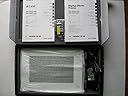

Sony DPF-V1000 10-Inch Digital Photo Frame
Product ID: 1654928
Details
- BrandSony
- ColorBlack
- Compatible DevicesSmartphone
- ResolutionSVGA
- Screen Size10 inches
📡Bluetooth wireless ready
📺10.2-inch WVGA LCD
🔋1GB internal memory (2000 photos)
🖼️ Elevate your space with Sony’s digital frame — where every photo tells a story in stunning clarity!
The Sony DPF-V1000 is a 10.2-inch digital photo frame featuring a sharp 1024x600 LCD display, 1GB internal memory capable of holding 2,000 photos, and versatile connectivity options including USB and optional Bluetooth. It supports HDMI output for Full HD viewing on compatible TVs and includes smart auto image correction features to enhance your photo display experience.
| ASIN | B001QXDWNW |
| Brand | Sony |
| Color | Black |
| Compatible Devices | Smartphone |
| Connectivity Technology | Wireless |
| Control Method | Remote |
| Customer Reviews | 3.2 out of 5 stars 36 Reviews |
| Display Size | 10 inches |
| Global Trade Identification Number | 00027242763357 |
| Item Weight | 2.7 pounds |
| Manufacturer | Sony |
| Manufacturer Part Number | DPF-V1000/B |
| Memory Storage Capacity | 1000 MB |
| Model Number | DPF-V1000/B |
| Power Source | Corded Electric |
| Resolution | SVGA |
| Screen Size | 10 inches |
| Touchscreen | Buttons |
| UPC | 027242763357 |
R**E
Best Digital Photo Frame
I tryed other frames and they don't compare to the Sony. Other frames darken at the sligest viewing angle and have very limited features. The Sony frame has it all. It works from wider viewing angles, has excellant resolution, many transitions from frame to frame, HDMI output, multi card reader, 1 GB memory built in, scrapbook features,index views, clocks, calendars and combinations. Printing can be imposed on photos. The frame is well built, has remote control and the remote pickup window on the frame is invisible not like an eye loking back at you like most other frames have. The Sony is a little more expensive than the other frames but it also looks better and has many more features on it. I like the size of this frame much better than the Sony 7" frame I have for viewing from accross the room. It doesn't have a way to view photos with a battery, but a battery probably may not be powerful enough for any viewing time on a large display. I also like the fact that it doesn't have a large frame and a mat around the photo that is useless and doesn't look as nice. I highly reccommend the Sony Frame.
T**;
Who knew?
I loaded the device with hundreds of jpgs for my wife (all pretty much from the same digital camera source) and the frame thought 1/4 of the images were corrupted or missing thumbnails, etc. Reformatted the memory card, tried again. Same issues. Downloaded a bunch of stock photos to the frame just to try "photos from something else". Same general problem. The manual says to mark them so they aren't displayed anymore. I have a better idea. How about displaying the damn photos (that my OTHER brand digital frame has NO issue with). In fact, i's amazing what this frame hasn't been able to read that everything else seems to. POS? Yep.
C**L
Get your photos out and show them.
Having upgraded from a smaller Philips digital photo frame, the Sony DPF-V1000 is a welcome surprise. Before getting in to the meat of the review, I feel it's worth pointing out a couple of improvements in the product right up front. A lot of reviews here complain about three common gripes: - the illuminated Sony logo on the frame - when you're in date/time mode, the frame only displays the date and time the photo was taken - non-camera images don't display I bought my frame on June 28th 2009 and all these items have either been fixed, or the other reviewers didn't read the manual far enough. The illuminated Sony logo can be turned off via the setup options now. There is a smorgasbord of date and time modes available too, most of which will display the current date and time rather than the date and time the photo was taken. And finally, the non-camera images problem seems vastly reduced now. I filled my frame with all sorts of images including straight-from-the-camera JPGs and ones that had been altered via Photoshop. Out of 400 images, only two didn't display, and they turned out to be TIFF images I'd put on by mistake. Otherwise, images taken from 8 or 9 different makes and models of camera all showed perfectly, as well as those taken from 5 different cellphone cameras. So on to the frame itself - what's it like. Oddly, bigger than you might think. OK so you can read the dimensions in the product specs but when it arrives, the box is huge, and the frame is much larger than you might imagine. The quality of the LCD panel seems to be top notch with a bright, clear display and a pretty wide viewing angle. The screw-in "foot" which makes up the frame's stand is quite long (for stability) which means that you can't push this frame up against a wall when placing it on furniture - it's going to stand out quite a way. You can hang it on the wall though - it has keyed notches in the back for that purpose. The frame can be oriented in landscape or portrait mode and it auto-rotates the pictures to suit. The picture display itself can be "original aspect" which shows the whole picture with black bars padding the screen where necessary, or it can be "zoom to fit" in which case the image is zoomed slightly to entirely fill the display. The frame comes with 1Gb of built-in memory as well as memory card slots for most types of card. There is one gotcha here though which isn't mentioned in the manual, and is buried deep in the product FAQ on Sony's website : when you connect this frame to your PC via USB, you can ONLY upload images to the frame's inbuilt memory. Any cards plugged in do not show up - you either need to load them up separately, or copy images to them using the frame's inbuilt copy tools. Whilst this isn't a biggie, if you don't have a separate card reader for your chosen type of memory card, it's a pain having to shuffle images everywhere. Having said that, 1Gb of onboard memory holds a respectable number of images - enough that you might not need an expansion card. Realistically, I think the card slots are there for straight-from-the-camera image viewing, rather than long-term storage. There are plenty of setup options to keep the both the nerdiest photo frame enthusiast and the absolute beginner happy. One thing I was pleased to see was the option to set the inbuilt clock to 24 hour mode. Why anyone still uses AM/PM in this day and age is a mystery to me, yet so many consumer electrical products insist on the 12 hour format. Not so in this case. As well as the clock, there's a calendar built in too, and in many of the display modes, you can show the clock and/or calendar along with the photo. Another nice feature here - you can set the date display to American or rest-of-world - ie. month-day-year or day-month-year respectively. The clock has an alarm mode which can be turned on or off using a slide switch on top of the frame. Seems a little pointless to me, but then I have a clock radio to wake me up in the morning. The included remote control is a nice feature. My old Philips frame had no remote so all changes needed to be done using the frame's hardware buttons. With the Sony remote, you can fiddle with the photo frame remotely, including all the setup and display features. It has hidden benefits too - for example if you've got the frame set to refresh every half hour and you decide you don't like the current picture, you don't need to wait - just click 'next' on the remote and on you go. As with most digiframes, this one has an auto on/off function where you can tell it when you want it to turn itself on and off. It has a simple and complex mode of operation for this feature. In simple mode, you just give it an on and off time and that's it. In complex mode (the default setting) you can set multiple on/off times for individual days of the week. A little too much gravy for a photo frame if you ask me. The slideshow modes have the usual array of fades and swipes, as well as sequenced or random image mode. For the most part, you'll typically end up in random picture mode, and random fade/swipe mode. The slideshow delay has several preset options from every 3 seconds right up to once a day for the picture change. Common choices like 5 minutes, 10 minutes and half an hour are all present and correct. You can do some rudimentary image editing in the frame although any serious amount of image touchup is out of the question. It has a scrapbook mode where you can frame the pictures with backgrounds and other add-on graphics although it does seem a bit pointless to buy a large digiframe and then deliberately shrink the images you're displaying on it .... In short - this frame has more than enough features for the technophile, whilst being pretty easy to just pick up and use for those who want to throw some photos on and be done with it. You can't argue with the clarity of the LCD panel either. All in all, a good choice if not a little pricey. Sure you're paying for the Sony name, but if they did an identical model with all the frills removed - ie. no touchup mode, no alarm, no scrapbook mode and no card slots, that would be a product with more mass-market appeal. That being said, I don't think you'll regret this purchase - it simply is that good. So why 4 stars and not 5? Well the internet is full of people who either think product X is the best thing since sliced bread, or have an axe to grind with the manufacturer. Those two review types account for 5-star and zero-star reviews. Very few products warrant a full-on 5-star review because most products have one or more features that a chunk of the buyers won't like. So 4 stars is my rating here - ie. it's a bloody good piece of kit but it's not perfect. I don't think the perfect 5-star digital photo frame exists yet.
G**S
Great gift for someone who is impossible to shop for.
We bought this picture frame for our grandparents who seem like they have everything and do not want anything. The picture frame was a hit with them! The screen is large and amazingly clear. There are plenty of picture viewing settings to play around with, but for our 85 year old grandparents, the simple ON/OFF button on the included remote was easy for them to use. The large internal memory is a plus and no software drivers are needed for picture transfers when connected to a computer via USB (the computer recognizes the internal picture frame memory as an external memory card). The only thing that we weren't completely satisfied with is that the stand for the frame is in an awkward spot on the back and makes the total depth of the frame quite large. However, in looking at the design of the frame, this may have been the only place the designers could put the screw-on picture frame stand (the frame is also wall mountable). Overall, this is a great digital frame with great picture quality and is definitely worth the price for all the features that are included.
D**Y
Not Satisfied
I had given it to my husband for Christmas. He loved it for the one day it worked. The second day he turned it on, only to see horizontal and vertical lines displayed. Powercycling it did not resolve the problem. Changing the memory card also did not fix it. The only option I was left with was to return it for a replacement. Now Amazon doesn't have the item available so I'm stuck waiting for a refund and then I will have to find a store locally that has it. I guess that is the downside to purchasing electronics on-line. I would suggest if you are looking at purchasing an electronic picture frame that you use a local retailer that will be able to handle a return/replacement if it doesn't work.
V**V
It's a graet picture frame
This is a graet product, I enjoy the quality of the picture and ease of use. I also like that it has internal memory and HDMI output. We have our frame on the wall, because have a 2yrs old daughter who likes to get her hands on anything. We also have a 5mnts old daughter, so I take lots of pictures on my Nikon D200 SLR camera of kids and showcase them on Sony picture frame> I mostly chose closeup shots because frame being on the wall about 10-12feet away, its hard to enjoy group shots. But this is when HDMI output comes in handy, we enjoy pictures on 42" plasma TV. I also chose this frame because of its classic design and it matches with my Panasonic plasma TV. Another great feature is that this frame is being used as clock, when we are not watching pictures. We have this product for a month now and we are very satisfied.Thank you Sony for another great innovation. June 2013--- Unfurtunatelly I have to report that my Sony picture frame stopped working recently, it has a black screen, no functions work.
B**E
Nice product, but there might be better ways
I purchased and returned a Sony DPF-V1000. Yes, it worked properly and did essentially what it's supposed to, but I just wasn't happy with the overall concept. For one thing, the device itself is larger than you might think, especially in depth. When I think of a photo frame, I think of something I could wall mount and almost mistake for a conventional picture. The Sony is more like a small flat-screen TV in form factor, and this brings me to my second complaint: the need for a power supply. If you intend to put the frame on a desk or table, this is no big deal - but again, for a wall-mounted application, you're going to need power, and this means wires and enough space for the AC adapter. This adds up to a cumbersome installation if you want an unobtrusive, wall mounted way to show off your digital pictures. Then there's the picture quality. I admit it - I'm spoiled...I have one of the newest Apple iMac computers, complete with the beautiful 27" display. Viewing and editing photos on this display, only to put them on the Sony DPF-V1000 is a bit of a disappointment. Yes, I'm sure the Sony meets its specs - but the image quality is just nowhere near where I hoped it might be. It's not just resolution...it's also stuff like viewing angle (you need to be pretty much head-on to view the Sony at its best). In the end, I found that my needs were met a completely different way. I purchased one of the smaller Panasonic Viera flat panel TVs (Amazon has some great prices) and had my local frame shop build a small custom wood frame and enclosure around it. It has the built-in capability of displaying photos from an SD card, so in effect, it came out like a digital frame on steroids. Being 1080p and so on, the image quality you get is in a whole different league. Yes, the installation was still cumbersome and expensive, but in the end I got image quality that I'm happy with - not to mention the flexibility to also display content from my iPod and PC, or to potentially watch TV on it. As the other reviewers write, the Sony DPF-V1000 is otherwise a high-quality, feature rich product and I'm sure it's more than competitive with the other things out there...just didn't do the trick for me.
O**Y
DPF-V1000: Great frame with some issues
This review is about DPF-V1000. Unfortunately, Amazon mixes all the Sony digital frame reviews together, so the star rating is pretty useless, since it is really an average of the ratings for all the Sony frames. Anyway, here's my review.... As of this writing, I've had the frame for about a week, and so far it's great. The frame looks very nice (I have the black one). The photos display clearly, and the frame fits nicely on our coffee table. I think a smaller frame would have been too small. So I am happy with the purchase. I only give it 4 stars, though, due to these notes. 1. Odd warning in the manual. The owner's manual says this: "Due to one of the characteristics of the internal memory device, images stored for a long time or read many times may be subject to data error when read too often." It has a similar warning about the memory card device. This is odd to me, because it essentially says if you look at the photos too much, the frame may not work right. I haven't encountered any problems yet, but, as I said, I've only had the frame for a week. Still, if this is a big enough issue to warrant these notes in the manual (you can find a .pdf of the manual on Sony's site), it makes me a bit nervous. I'm not sure I would have purchased the frame if I had seen this ahead of time, but since I haven't encountered a problem, I'm not going to return it. We'll see how it goes.... 2. Another note in the manual says that picture files edited on a computer may not display. I actually did have a problem there, because I touch up all my photos with Photoshop Elements then save them as JPGs. Some of those photos did not display. Sony tech support was of no help with this, but I did figure out a solution. So if you get this frame and plan on using Elements, here's an important note. When I do a "Save As..." in Elements 6 and select JPEG, a window comes up called JPEG options. This window has a radio button called Format Options. I had the radio button selected for "Progressive." Apparently, this does not save a file that conforms to Baseline JPEG 4:4:4, 4:2:2, or 4:2:0 format--which this frame requires, so photos saved this way did not display. So I tried saving again, this time selecting the JPEG Format radio button for "Baseline (Standard)." This worked. So make sure you pick that radio button option when saving JPEGs from Elements. So far, taking that approach, I have about 400 jpg photos on the frame, and they all display fine. 3. One small issue regarding folder management. You can have folders and sub-folders on your memory card, but in the frames folder filter mode, you can only select single folders to display. For instance, I have a folder called 2008. It has no photos in it. It does, however, have a bunch of subfolders that do have photos. I'd like to be able to pick the 2008 folder and have a slide show all the photos in the 2008 subfolders. However, the frame will not let me select 2008. I can only select a subfolder inside of 2008--and only one at a time. Note that you can display all photos on the card, so this comment only applies to the folder filter mode. So overall, I would recommend this frame--unless you found another that didn't have these issues. :) If I do run into problems at some point, I'll post a follow-up to this review.
Trustpilot
2 weeks ago
2 weeks ago