Buy anything from 5,000+ international stores. One checkout price. No surprise fees. Join 2M+ shoppers on Desertcart.
Desertcart purchases this item on your behalf and handles shipping, customs, and support to Slovakia.
๐จ Slide into creativity with Koalaโs crystal-clear waterslide decals!
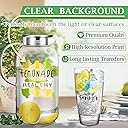
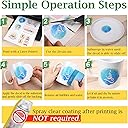
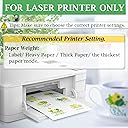
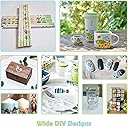
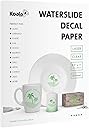
Koala Waterslide Decal Paper offers 25 sheets of premium clear, laser printer-compatible transfer paper sized 8.5x11 inches. Designed for effortless use without spray coating, it produces sharp, water-resistant decals ideal for customizing ceramics, glass, wood, metal, and plastic. Perfect for DIY enthusiasts and professionals seeking high-quality, versatile decal solutions.


| ASIN | B07Y4QJK3W |
| Best Sellers Rank | #14,431 in Office Products ( See Top 100 in Office Products ) #5 in Waterslide Decal Paper |
| Brand | KOALA PAPER |
| Brand Name | KOALA PAPER |
| Color | Clear |
| Customer Reviews | 4.3 out of 5 stars 633 Reviews |
| Item Dimensions L x W | 11"L x 8.5"W |
| Item Weight | 0.36 Kilograms |
| Manufacturer | KOALA PAPER |
| Material Features | Won't melt in water |
| Paper Finish | Coated |
| Paper Size | 8.5x11 Inches |
| Paper Weight | 67 |
| Sheet Count | 25 |
| Sheet Size | 8.5x11 Inches |
| Unit Count | 25 Count |
W**H
The decal paper worked perfectly
This paper was perfect. I used it to add a personal message to a guitar I built for my granddaughter. Added the decal before clear coat.
T**S
Easy to use!
I got a little VIA programmable macropad keypad to use for keyboard shortcuts. It comes with pretty lights and it works great and was pretty easy to program in VIA, but it came with white caps, which aren't really great for my aging memory to remember what I programmed the keys to do. Enter the Koala Waterslide Decal Paper for Laser Printer. Perfect solution! I made some themed keycaps from one of my favorite video games, printed them out from SVG format in Adobe Illustrator onto my cheap Brother laser printer, and stuck them on each keycap. They were easier to apply than I remember from my model-building days. When they dried and had a day or so to cure, I painted a couple coats of Liquitex matte varnish to protect them from being touched. Maybe not as sharp as a laser engraved keycap, but these have held up very well so far. (I'm sure a higher quality printer would also help.) All in all, a pretty fun little project for personalizing some gadgets!
O**R
The decals I made with this put lipstick on a pig
Back in August, I picked up a bike that looked like it had survived years in the hands of a trined circus bear who treated it like a stolen rental. Every decal had vanished except one, and that lone survivor looked like someone tried to scrape it off with a butter knife and a grudge. Since nobody in their right mind restores a Takara and Iโm clearly not operating in the realm of right mind, I went hunting for reproduction decals. They do not exist. But I can research, improvise, and occasionally problem solve, so I learned that inkjet water slide decals are a thing. Unfortunately, my inkjet printer decided to throw a tantrum after a firmware update and now refuses to print with aftermarket cartridges. Fine. Whatever. Enter this laser water slide paper. I had two big worries, smeared ink and the finished decals wrinkling up like the skin on my neck. Shockingly, neither happened. The ink stayed put, completely water fast, and the decals slid off the backing and onto the frame like bacon gliding across a nonstick skillet. Even the seat tube stripes, which I fully expected to behave like a rabid raccoon, went on perfectly like they knew theyโd get in trouble if they didnโt. I even printed two full sheets because I was bracing for disaster, but I didnโt need the backups. Everything worked better than I could have hoped. Since I have several other sheets of this paper, Iโm looking around the house for more things to put decals on.
T**N
Prints great! A little thick.
Works great but - a little thick! Make sure you set your printer to heavy weight cardstock or the ink will not stick. Also, the decals are much thicker than the waterslide decals that come with model cars or planes, which is good because it wonโt easily tear, but bad if youโre putting clear coat over. I used clear coat, and could tell it stopped sticking to the painted surface- so itโs just held on with the clearcoat.
D**T
Never knew this existed
Awesome product I used for Halloween for an artificial pumpkin.
T**D
Not worth it.
These do not stick well at all. When they dry they peel up. Micro Sol and Micro Set did not help.
A**S
This product worked really well for model building...
I was searching for a decal film to customize a model I was working on. In the past, when I made my own decals I struggled with getting the right about of clear acrylic to spray over the image to get the thickness and adhesion right. This time I decided to try to find one that didn't need spray. I have access to a color laser copier, and most business supply stores have them. I saw this one was designed for laser printing and required no spray so I picked it up. My first print failed miserably, but when all else fails, read the directions. YOU MUST SET THE MACHINE FOR THICK PAPER BEFORE PRINTING. Once I did that it printed beautifully. When I applied it the decal it laid down like a dream. Very smooth without a lot of work and the adhesion was wonderful as well. Now there are a few things to remember. If you look at my photo you can see I laid this decal over a yellow background, and that some of the yellow shows through. This is transparent film, so it will only really work over a light background. They do have a white background product as well, but with that product you will have to trim the decal very closely or the white will appear on the finished product. Also, and this should be needless to say, unlike the decals that come with a model kit, this is a whole sheet of decal film and it will come off the paper as one sheet, not individual decals. You have to trim around the individual decals closely before applying. The instructions on the Amazon page for this product speak to baking the decal after application. Needless to say that would be disastrous to a plastic model and you should not do that, not would it be necessary. When I finished applying the decals, I sprayed it with a clear coat of lacquer and they laid perfectly. I found this product great for model building and I think you will too.
S**2
Worked with black laser printer, easy to use.
I bought these to make decals for my woodworking router storage box so that each router bit has the shape it produces pictured next to where the bit is stored. The paper worked fine in my laser printer (black only so I don't know how it would do with color). They worked fine and if you want them to be more durable consider clear coating over them once applied.
ุง**ู
ูุฑู ู ุงุฆู
ุงููุฑู ูุงููุนูู ุชููู ู ูู ุตูุฑ
R**S
precio y calidad
buenos RESULTADOS
P**Y
Very unhappy
The product seems to bubble on polymer clay which is why I purchased it. It was very sticky after baking so I sealed the pieces but the imagines that I transferred still lifted.
K**R
Best Waterslide Paper
This waterslide paper is the best i've used, easy to replace, no tearing, no fading or distortion of print or decal. Worth the money
N**Y
This one and SunnyScopa are the ones to get.
If the Sunnyscopa equivalent isn't available, get this one, it's a perfectly suitable substitute and comparable quality. It's not quite as glossy of a surface as the Sunnyscopa, which means that the toner will have less of a tendency to flake or 'dropout' if your laser printer is of an older technology (but you might get some random toner flakes if your printer isn't properly clean). If you have a modern laser printer using LED technology (which is most mid-to-high end printers these days) these two are interchangeable. Very good quality decal paper. Highly recommended. Edited to Add: The paper backing of this decal paper is thinner than the Sunnyscopa, but the urethane membrane (the actual substrate that makes the decal itself) is perhaps slightly thicker - which can make installing the decals easier without as much fuss with peeling, air bubbles and wrinkles as the Sunnyscopa. Conversely, if you want a decal that is thinner, requiring less clear coat to bury the edges, the Sunnyscopa would be your better option. We are talking about a few micrometres difference, though.
Trustpilot
2 weeks ago
1 month ago