Buy anything from 5,000+ international stores. One checkout price. No surprise fees. Join 2M+ shoppers on Desertcart.
Desertcart purchases this item on your behalf and handles shipping, customs, and support to Slovakia.
🚀 Elevate your home network to pro-level speed and security — because buffering is so last decade!
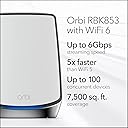
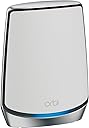
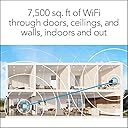
The NETGEAR Orbi RBK853 is a premium Tri-Band WiFi 6 mesh system designed for expansive coverage up to 7,500 sq.ft. and support for 100+ devices. Delivering ultra-fast AX6000 speeds up to 6Gbps, it ensures seamless 4K/8K streaming, gaming, and smart home connectivity. Equipped with advanced NETGEAR Armor security and easy app-based management, it’s the ultimate solution for professionals demanding reliable, secure, and high-performance home WiFi.


| ASIN | B082LZKYFL |
| Antenna Location | Gaming, Home, Security |
| Antenna Type | Internal |
| Best Sellers Rank | #19,843 in Computers & Accessories ( See Top 100 in Computers & Accessories ) #319 in Whole Home & Mesh Wi-Fi Systems |
| Brand | NETGEAR |
| Built-In Media | One (1) Orbi Router (RBR850), Two (2) Orbi Satellite (RBS850), One (1) 2m Ethernet cable, Three (3) 12V/3.5A power adapters, Quick start guide |
| Color | White |
| Compatible Devices | Gaming Console, Smart Television, Smartphone, Tablet |
| Connectivity Protocol | ethernet, wi-fi |
| Connectivity Range | 7500 Square Feet |
| Connectivity Technology | Ethernet, Wi-Fi |
| Control Method | App |
| Controller Type | amazon_alexa, vera |
| Coverage | 7,500 square feet |
| Customer Reviews | 4.2 out of 5 stars 1,279 Reviews |
| Data Transfer Rate | 6000 Megabits Per Second |
| Frequency | 2.4 GHz |
| Frequency Band Class | Tri-Band |
| Global Trade Identification Number | 00606449148220 |
| Has Internet Connectivity | Yes |
| Has Security Updates | Yes |
| Is Modem Compatible | Yes |
| Item Dimensions L x W x H | 7.5"L x 2.8"W x 10"H |
| Item Type Name | Wireless Router |
| Item Weight | 2.86 Pounds |
| LAN Port Bandwidth | 2.5 Gigabit Ethernet |
| Manufacturer | Netgear |
| Maximum Upstream Data Transfer Rate | 3000 Megabits Per Second |
| Mfr Part Number | RBK853-100NAS |
| Model Name | RBK853-100NAS |
| Model Number | AX6000 |
| Number of Antennas | 8 |
| Number of Ports | 13 |
| Operating System | RouterOS |
| Other Special Features of the Product | Internet Security, Parental Control, Remote Access |
| Router Firewall Security Level | basic |
| Router Network Type | Tri-Band |
| Security Protocol | WPA2-PSK |
| Smart Home Compatibility | Smart Home Compatible |
| Special Feature | Internet Security, Parental Control, Remote Access |
| UPC | 606449148220 |
| Unit Count | 3.0 Count |
| Voltage | 100240 Volts |
| Warranty Description | 1 year warranty |
| Wi-Fi Generation | Wi-Fi 6 |
| Wireless Communication Standard | 802.11ac, 802.11ax |
| Wireless Compability | 802.11ac, 802.11ax |
M**E
Better Than Nighthawk RAX80 and Extender
I was a previous nighthawk fan and still am but if you need great consistent coverage over a large area then ORBI is the way to go. It was pretty expensive and I was apprehensive at first but took the chance to see if it would solve my problem which is better whole home coverage AND covering the new guest house. It has exceeded my expectations in that regard. I also purchased it because it was marketed as being able to handle more smart devices and we have quite a few including some new security cams around the outside of the house and they work wonderfully as well. The negative reviews here I just don't understand. I wish them well but for me - the setup was super easy with clear directions. 5-10 minutes and you are up and running with blazing speed. It also creates one ssid and for some reason this feature didn't seem to work too well on my nighthawk. I tried it but then one of my computers could never get connected. Not so with ORBI. Whatever settings I may have made incorrectly ORBI dealt with. Their support is a bit slow to respond and they've designed a support structure so you once your warranty is up you can only really email the community so that is something I don't care for and their warranty support response is quite slow. Thankfully this product works so well and I don't have to deal with their slow support.
M**W
This is the Mesh System that really works!!!
I live on a small farm and I like to keep an eye around the property with Nest Cams. In the past I was using extenders which was such a pain. Each device had to be setup dedicated separately to each extender. And I'd always have to mess and reconnect them. But with the Orbi Mesh system I just have one setup for all my devices......no matter where they are located! I first bought the Orbi 750 series to begin with and had nothing but issues. I returned it and upgraded it to the Orbi 850 series and wow....a huge upgrade! The coverage area is amazing. I have livestock and like to keep an eye on them with my Nestcams. Even without the satellites I have great wifi out near my coup which has to go through the walls in my utility room and walls in my hallway and bedroom and then the walls in the coup. It even extends to my pump house are which is a good 100' away but was somewhat weak without the satalite. With the satellites I now have coverage around my property and blazing speed with my iPhone and iPad! Also the software that comes with the 850 is by far superior to that of the 750. You can easily do speed tests on the modem and keep track what devices are connected to the satellites.
D**.
Really fast, but far from being ready for prime time
Pros: - Speed, speed, speed. Best WiFi speeds I've ever experienced, I routinely hit peaks at 800MBps+ (see pic) => +5 stars Cons: - Web interface is excruciatingly slow, counter-intuitive and cumbersome. The previous Orbi generation web interface was already pretty bad, but this is worse, the new Orbi supposedly comes with a much snappier CPU and should run the webserver a lot faster, but it doesn't. To add insult to injury, Netgear removed a ton of options readily available in the Orbi first generation => -1 star - Security is not implemented well, the thing leaks like a sieve (see picture, you absolutely don't want the blue squares). I would caution against connecting the router directly to your provider's WAN, you might want to leave a gateway or a cheap yet capable router in the way. That's using the latest firmware available (V3.2.9.2_1.2.4), and with the firewall settings on ("Disable Port Scan and DoS Protection" is off, it makes no difference on or off anyway, I tried both) => -2 stars I own the previous generation of Orbi router/satellites, they are far from perfect, but they are rock solid and reliable when it comes to security. This new product was obviously rushed to market, and consumers are essentially being used as beta testers. Given the amount of similar reviews all over the interwebs, I'm surprised Netgear is not stepping up, the firmware in its current state is either going to lead to extremely negative headlines when someone manages to exploit the security holes on the WAN side, or to a class action lawsuit for selling an unfinished product and not implementing what their website says they did. Netgear keeps saying here in the comments they provide high security and point to their website security "good practices", but they haven't even implemented the first "security measure" listed on their site. I'll come back and update my review as they make progress, in the meantime, I'm putting my RBR850 behind an el-cheapo router with a standard firewall stack (it doesn't take much effort to implement, but I guess it's too much to ask from Netgear for now). This is disappointing to say the least, especially when you have to drop a grand to get a router and 2 satellites. *** 2/24/2020 update *** I did submit a case on the Netgear support website (per their request in the comments), and also pointed out the security issues on their forum. No peep from Netgear, so that's another star that's gone. Some forum users acknowledged they saw similar issues with the built-in firewall, but Netgear reps never took the time to look/respond at the forum either. I gave up and bought an Edgerouter 4 from Ubiquiti and switched the Orbi to AP mode (access point only). The Edgerouter proved to be rock solid and secure, though if you plan to make a similar move, make sure to triple-check your firewall rules on he router before you make the switch. It's unfortunate I had to spend another $200 to get basic security that was available in the previous Orbi generation. One positive note: the guest network in AP mode still works, it has its own subnet and dhcp, I was actually surprised moving to AP mode didn't screw that up (one can argue since guest devices are on a different subnet with its own dhcp, they're effectively being route, so it's not true AP mode for them, but that's the way it should be designed to keep the guest network isolated). *** 3/1/2020 update *** I keep finding new bugs on a regular basis. Latest one: if you plan to use the router in AP mode and plan to use a fixed IP address for the router instead of DHCP, the router will not connect to NTP servers to get the correct time, even if you try to use a third party server and not Netgear’s. Why does it matter? Many devices will not properly connect to WiFi guest due to the fact that the guest network has its own DHCP server (it’s on its own VLAN), I suspect the leases are out of whack due to the time discrepancy between the router and the devices. *** 3/18/2020 update *** Netgear pushed a broken firmware last week and essentially bricked many Orbi's in the process. See Netgear forums, lots of unhappy users over there. We're well into negative stars territory at this point. *** 4/1/2020 update *** Well, I really gave it the old college try, but I eventually gave up and put the thing for sale on fleabay. The hardware is great, but the software is simply not mature enough, and I have better things to do than debug the damn thing on behalf of Netgear. I switched to the Amplifi Alien and things have been rock solid since then. YMMV.
D**B
Blazing Fast!
I don't ordinarily write reviews but this product rocks. I have a ~6000 SF home and my previous system had a wireless access point generating a 2.4 and 5 band signal from a Comcast stock modem/router combo. Due to how far my router was from my wireless access point I needed multiple range extenders creating SIX separate wifi networks (standard 2.4 and 5, extended/repeated #1 2.4 and 5, and extended #2 2.4 and 5). This was painful as you moved about the house. Switching over to the Orbi mesh system was a gamechanger. I purchased this system (RBK853 router + 2 satellites) along with two additional satellites and now I get full signal on ONE (not 6) wifi 6 network everywhere in the house. I purchased a standalone Nighthawk 1150CV cable modem (not modem/router combo). Total all-in investment was $2,500 +/- which is quite a bit but worth every penny when every device gets full signal everywhere in the house, garage, and outdoor patio (based on how I positioned the satellites) with a signal that flawlessly streams 4K/UHD wherever I go. Amazing. If you are willing to spend to achieve maximum coverage on one single mesh network without multiple repeated signals, this is a fabulous system. My only comment towards the negative on the product would be that it does not come with a setup guide other than a one cardboard cutout sheet with 3 diagrams. It promises easy setup through the mobile app but doesn't explain that you should set up the router first, then each satellite INDIVIDUALLY rather than all at once so you can "name" them in your app (i.e. Satellite - Master Bedroom). Otherwise you get multiple cloned satellites without knowing which one is which. It's a lot of self-learning/diagnosing during the setup--not complex--but for a product this costly it should be absolutely dummy-proof.
D**G
Update — Orbi not perfect, but Spectrum mostly to blame for my previous issues
UPDATE 8/26/21 — I know a lot of people report firmware problems with the Orbi, and it seemed like what I was experiencing was exactly what they described. However, I eventually tried the Eero Pro 6 mesh instead which did NOT fix the problem, nor did another standalone router. I assumed I was having router problems, because my Spectrum modem was NOT showing that it was off-line when the router was going out. A spectrum technician eventually figured out that I was having upload failures due to overuse of the nearby node, and I also had a slightly faulty line to my house (squirrel damage). Because I was never fully losing the download component, but my upload speed was bogging down to almost 0, the Spectrum modem kept showing online but the router could detect there was a problem so it would show off-line. If I rebooted either the modem or the router, it seemed to fix my problem temporarily, which was weird, but I was having to reset some piece of equipment about 5-10 times every day. I had spectrum drop a new line from the pole to my house, which has partly resolved my problem, but my specific issue will continue until they build out their network better in my suburban area. The Orbi does not seem to get the advertised speeds once you get 20-30 feet from a unit (drops from 900 to 450ish), but it had better speeds compared to the Eero Pro 6 by a large margin (600 near router, 150 farther away). DO NOT BUY! This thing has been a monstrous pain, which is super annoying because I paid almost $1000 for the three pack (router plus 2 satellites) and it has been consistently unstable. I’ve spent dozens of hours messing with this thing and reading forums since I got it in April, and it just will not hold a stable connection. I have Spectrum gigabit Internet service which is blazing fast, and I test in the 600-900+ Mbps download speed range depending on time of day. The Orby does disseminate the Wi-Fi signal across my old house and through plaster walls and what not, with every part of my house getting at least 200 Mbps. HOWEVER, the stupid Orbi loses the connection 3-5 times per day, or more, where I can see on my modem that my Internet is stably connected but the Orbi has the magenta light and my wifi is down. This is a HUGE problem because it cuts off my computer when I’m doing work, and cuts off all my Ring cameras if I’m not home and I can’t be around to reset the router. I’m currently using all the standard settings on the Orbi, but I have tried just about every trick I can find on every forum from Google some point or another, and nothing fixes the problem. It’s not like I’m some idiot, I’m a reasonably tech savvy physician in my 30s that ought to be able to troubleshoot the stuff, but you have to be an IT engineer or something to fix this. A quick Google search will show you that there are MANY people having this problem, and there is basically no suggested fix. NETGEAR needs to fix this with a firmware update, no excuses. Seems the issue has something to do with bad DHCP protocols, inability to have separate SSID for 2.4/5 GHz channels (Which people actually figured out how to work around, then Netgear did a firmware update to purposely block the workaround!), terrible firmware updates since 12/2019 that have only worsened matters, etc. and that should NOT be the end-user’s problem. Honestly I’m nauseated but I wasted the money and it has been such a bad product. It makes me sick, I’ll probably eventually buy a Google nest, because although I wanted the speed that Orbi promised, NETGEAR failed with this one bigtime.
G**.
High performing internet!!
This Orbi mesh system has been a game-changer in my home. Setup took some fiddling (it’s worth double-checking a few details during installation), but once it was up and running, the performance was incredible. I’ve got around 80 devices connected—phones, tablets, smart lights—and I haven’t had a single drop since I switched. The WiFi feels rock-solid and lightning fast, and coverage reaches every corner of my house. I was especially relieved that it worked flawlessly with my CenturyLink fiber or whatever ISP you have. Plus, with three ethernet ports on both the router and satellite, I could hook up wired devices too. Honestly, it’s been more reliable than the others I’ve tried and offers great range and speed. Definitely glad I chose it!
S**S
I will never try another brand router other than Netgear Orbi
I had an old Orbi mesh router that finally gave out after almost 10 years of use. I was looking at the newer Orbi's and they were very expensive so I looked at other options. I bought the TP Deco BE11000 from Costco. Setup is pretty easy through the app. The app is very intuitive. I could not get the router to connect to my computer via Ethernet cable. I tried EVERYTHING. I eventually went through three TP Deco's before I finally decided to scrap it and buy this Orbi. Set it up in 10 minutes and ethernet works perfectly right out of the box. Works just as seamlessly as my previous Orbi and have zero issues. Faster Wifi and better coverage. What's not to like. Price point was higher than the TP Deco, but it works and at the end of the day that is what counts. I will never buy another brand router other than Netgear Orbi. It just works.
C**T
From Nighthawk X8 to this and.... WOW!!!!
I read a lot of reviews and in reading many of the reviews on this I was still not finding anything that directly answerd the main question I had, which was should I go with a mesh system or just one large high powered router/access point. My old router/access point was an AC standard Nighthawk X8 which still today is considered an expensive and high powered router. My issue was that the the device has to be in the far lower corner of my home as that is where the connections come in, it has a lot of devices connected to it, and with streaming to several 4K Tv's, security cameras, multiple phones, laptops, etc., the bandwidth (even with tri-band) was not keeping up with the demand, especially at points furthest away from the router/access point. In the middle of my home my speedtest results ranged from under 10mbps to no higher than 50mbps depending on what devices were using bandwidth at the time. I knew I'd get higher bandwidth capacity with a new standard wifi 6 router/access point, but really could not find any information as to if using one high powered device (possibly a newer version of the Nighthawk) or going with a mesh system would be better. I took a chance and went with the mesh system. I'm glad I did! I purchased the RBK853 with the two satellites. The setup through the app was a bit more challenging than I thought it would be, as it would go through the setup process and then all of a sudden not have a connection. Not sure why, but finally I got it to work and the rest of the setup was easy. One incredibly nice feature is that the SSID is the same throughout the home, and regardless of the frequency used, 5ghz or 2ghz. With my old Nighthawk it would broadcast three separate SSID's; one for each frequency and you'd have to select what frequency you wanted to use. With the Orbi system you only see one SSID and it automatically picks the most appropriate frequency for the device. I've connected over 20 devices and it has picked the right one each time! You won't fully appreciate the ease of this feature until you actually use it. Now my speedtest results (under the same conditions as tested above) are over 400mbps; about a 10X improvement. The buffering issues I was having when watching TV are gone, my security cameras never lose a signal now, and the signal strength is amazing all throughout the home! I could not be happier with this purchase!
Y**F
الجهد الكهربائي
المنتج لايتوافق مع التردد بالسعوديه إضافه الى ذالك مكتوب يدعم تردد 110/220 وطلع يدعم 110/120 وهاذا لايتناسب مع الجهد سوء التعامل حيث ان الشحنه متوقفه في الجمارك 8 ايام وتم التواصل مع خدمه العملاء بلى فائده ولم يتم حل المشكله انصح بعدم الشراء هاذا المنتج اخر مره اشتري من امازن أمريكا
S**A
Signals are weak
Product signals are weak and unstable are not covering my entire home Good for smaller homes in same floor levels using mainly 5G signals 2.4G signals are weaker
A**D
Very bad compared to the previous version
I bought this as an upgrade but it is not working well. I bought it a year a go and it keeps failing from time to time and i need to reconfigure it. Never had to do this with the previous model.
S**L
Hardware Failure / Technical Support
The product failed during the initial setup.I reached out to the technical support over the phone and they were very kind enough to trouble shoot the problem . Unfortunately the product was declared as Hardware failure by the Technical support team after spending nearly half day trouble shooting with multiple attempt and method. I was having a very high expectation on Netgear products , unfortunately it failed with me .Looks like its my bad luck i had to return the product.
Trustpilot
1 week ago
1 month ago