Desertcart purchases this item on your behalf and handles shipping, customs, and support to Slovakia.
🔥 Dominate your game with zero delay and endless customization 🎯
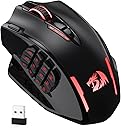
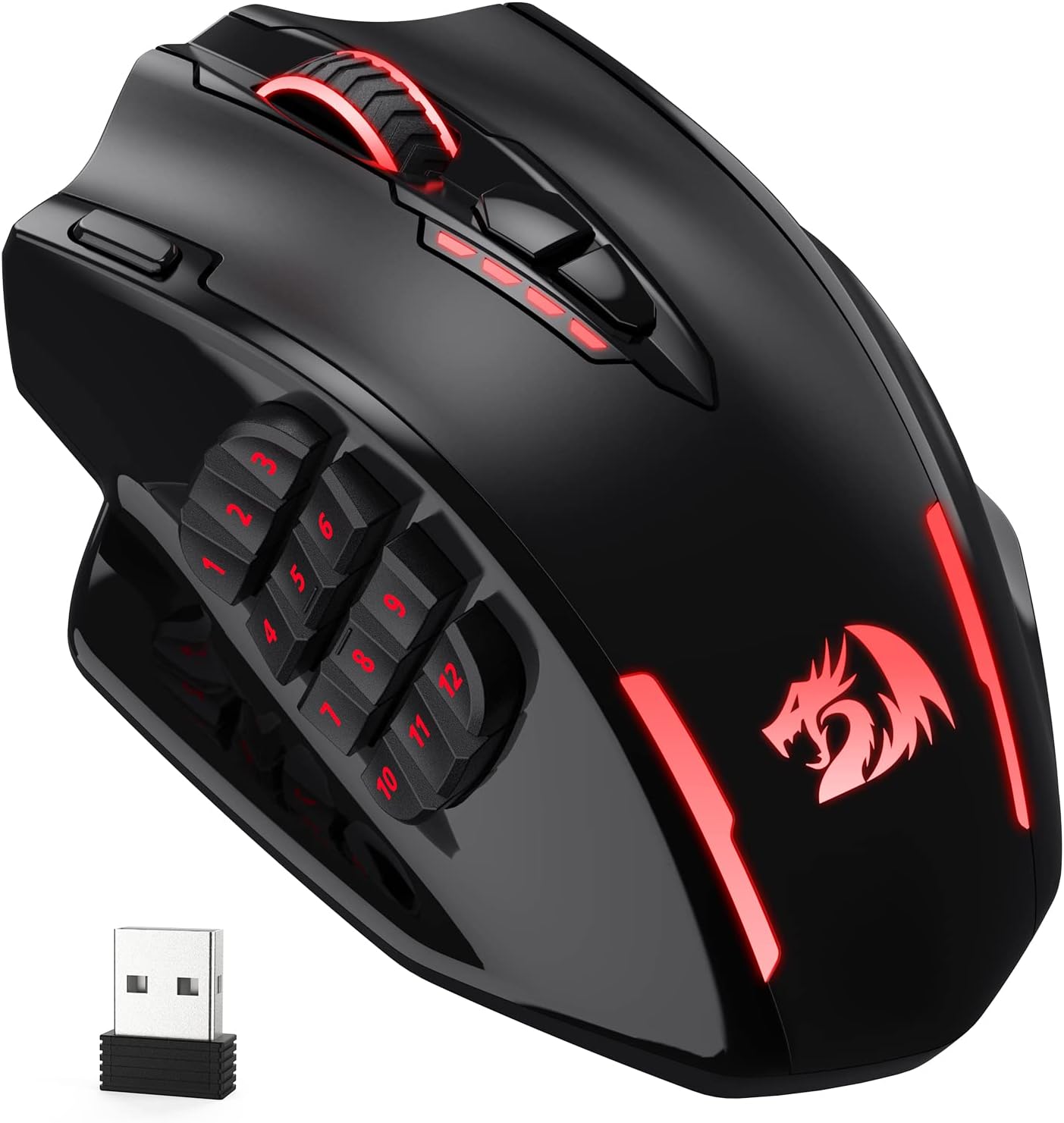
The Redragon M913 Wireless RGB MMO Gaming Mouse delivers pro-grade performance with 16 programmable buttons, a cutting-edge 1ms optical Pixart 3335 sensor, and dual wireless/wired connectivity. Designed for MMO and FPS gamers, it offers up to 80 hours of battery life with eco mode, customizable RGB lighting, and ergonomic comfort to keep you winning through marathon sessions.


| Additional Features | Programmable Buttons, Wireless |
| Antenna Location | Indoor/Outdoor |
| Asin | B088B3ZM76 |
| Battery Average Life | 45 hours |
| Best Sellers Rank | #115 in Video Games (See Top 100 in Video Games) #14 in PC Gaming Mice |
| Brand | Redragon |
| Button Quantity | 16 |
| Color | Black |
| Compatible Devices | Personal Computer |
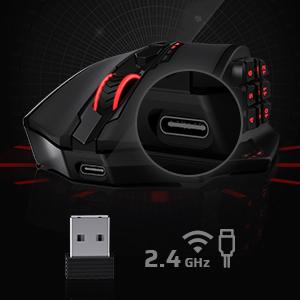
| Connectivity Technology | 2.4Ghz Wireless, USB-C |
| Customer Reviews | 4.3 4.3 out of 5 stars (7,066) 4.3 out of 5 stars |
| Embellishment Feature | RGB |
| Enclosure Material | ABS |
| Finish | Matte |
| Hand Orientation | Right |
| Hardware Platform | PC, Laptop, Tablet |
| Included Components | [USB cable, wireless receiver, RGB lighting] |
| Item Dimensions L X W | 6.89"L x 4.53"W |
| Item Weight | 132 g |
| Manufacturer | Redragon |
| Mfr Part Number | 507611201 |
| Model Name | Impact Elite |
| Model Number | M913 |
| Mouse Maximum Sensitivity | 16000 dots_per_inch |
| Movement Detection | Optical |
| Number Of Batteries | 1 Lithium Polymer batteries required. |
| Operating System | PC/Mac/Linux/Unix |
| Power Source | Battery Powered |
| Range | 10 meters |
| Style Name | Wireless M913 |
| Theme | Video Game |
| Unit Count | 1 Count |
| Warranty Description | 1 year |
User
Good Gaming Mouse
This mouse has covered all of my expectations, and beyond! You can customise the rgb lighting on the Redragon app you have to install. The quality is pretty good, and it maintained itself under good care for 4 years now. It’s pretty light, and easy to get used to. It’s very comfortable and ergonomic, and fits right under your hand. Has good precision, and connects either wirelessly or wired via usb. Really good choice, worth the buy. Has 12 number buttons for your thumb.
User
So far, the best MMO mouse I've ever used in over a decade
It's been about a month since I've had this mouse, and it's dang near perfect for me. If you're into MMO type mice, I would highly suggest giving this one a try.I'll start off with my gripes that keep this mouse from being absolutely a 10/10. The mouse has a glossy type finish which makes the mouse a slight bit slippery. Which takes some getting used to and is easily fixed in several ways. Could use some textured tapes, could sand it, or wait for it to be worn in.Outside of that, I wish there was linux support for the software. The mouse works perfectly as describe, but I like having only one DPI setting on my mouse, and enjoying having it breathe green.Going onto the pros, the mouse itself has memory so if you do get the software you can change things how you want. Which is what I did, one DPI setting and made it breathe green.It's very responsive on both the wired and wireless connection, and it's quick to switch as well. I have mine around 1,800 DPI I think, which is perfect for me in terms of just using it on my desktop and web browsing and stuff. And I believe it's a 1,000hz polling rate, and this is the more important number. And whether I'm gaming with it wirelessly or wired, I never feel like there's any lag or delay.The battery life is great as well. I only ever charge it maybe twice a week. I'm sure I could go a few weeks on eco mode but I do enjoy the RGB lights on it.The most important feature to me though, the scroll wheel has been holding up quite nicely. This mouse has been the first one in a decade to last more than a month for me. I hope it continues to hold up, but it's very promising so far.The numpad on the side is also very tactile, not the best i've used but very usable. I have large hands so I do wish it was pushed forward a little and the buttons wider. Nothing that learned muscle memory can't fix.Edit: 7 Months in and the polish on the plastic has worn in and it's not so slippery. The scroll wheel still acts as if it's brand new. The battery is still great. You can't go wrong with this mouse.
User
an excellent mouse
I've ordered 6 of these mice over several years. Excellent build quality and functions very well. Nice packaging, arrived fast.. to me this is one of the best mice I've owned and is great for any PC usage youre into ( editing, gaming, general PC desktop control.. ) Good weight in hand. Love it.
User
An excellent MMO gaming mouse with poor battery life if you go fully wireless
Summary: M913 is essentially a standard mouse with a 12-key mini keyboard (keypad) and an option to go wireless. It is an EXCELLENT mouse for playing mobile/online games. Not designed for FPS, but can be used for playing FPS if its size & fixed weight feel comfortable to you. All keys/buttons can be remapped and your custom settings are saved in the mouse (meaning: you won't lose your settings if you use the same mouse on different computers). Major downside: poor battery life.Details: I have a Logitech PRO X Superlight mouse (which is arguably the very best mouse for FPS and/or similar computer games). However, nowadays mobile games are ported to PC (instead of PC games ported to consoles). For fully enjoying certain mobile games on PC (such as Diablo Immortal), a mouse with a mini keyboard may be needed. This way, when you rely on your left hand for controlling a character's movement (using WSDA), you don't have to also rely on the same hand for aiming, attacking, and/or performing various other actions. This emulates the way how a typical mobile game is designed to be played on a typical mobile device: You control movement using your left hand (thumb) while simultaneously issuing commands using your right hand (thumb). On PC, a standard mouse can't generate key strokes but has a cursor that these games don't have on a mobile device. So, with a standard mouse, you typically have to control both movement and actions using just your left hand, and you don't use the mouse cursor to select commands. Depending on which games you play, for certain games and/or characters (e.g., a Demon Hunter in Diablo Immortal), you may quickly feel frustrated with the fact that you most likely have to stop moving in order to press keys for issuing various commands. Your left hand can be quickly overwhelmed with the burden that it has to cycle through more than a few keys quickly and simultaneously.M913 is a mouse that enables your right right to offload the workload of your left hand. It lets you play mobile/MMO games with your left hand controlling movement and your right hand issuing commands, which is how these games are designed to be played on mobile devices. It's almost a perfect mouse for playing mobile/MMO games on PC.So far, the only major downside I have found are: 1) poor battery life, especially if you prefer the keys be lit all the time. Generally, if you go fully wireless, you should always recharge it at the end of each and every day (otherwise you'd have to recharge it during the day), even if you minimize the light brightness or turn RGB off. 2) while being recharged, the entire mouse keeps flashing - uncontrollably - unless all RGB lights (except for an DPI indicator light) are turned off - very annoying, and I have to try to live with the flashing.
User
Look no further
This mouse is awesome. The packageing was a solid plastic water proof box with firm plastic clips on all 4 corners and the internal packaging held the mouse securely in place with confidence that it would not damage in shipping. Per usual with Redragon it has a USB c cable, a USB 2.4g connector, option for Bluetooth connectivity. What surprised me is this has 2 modes! A game mode and a standard mode. All it takes is a simple press of a button on the bottom with a nice sharp click and it will instantly program those settings. That was a nice feature.A quick Google search to the website and typing in the mouse produc code and 5 mins I had the software downloaded. All I can say is wow. There is so much programmability with this mouse. You can do DPI adjustments but no lock option, however with the way you can program the level of its 5 dpi settings it doesn't matter. You can program key strokes, command prompts, make custom commands and much much more. For around 30-40 dollar the value is far beyond what I was expecting.The mouse does not have adjustable weights but it felt just about right with its large internal battery capacity. And after about 30 mins of playing with the settings I had a great set up for fps games and was quickly performing at the top of my game like it's second nature. The buttons have nice definition where I could comfortably tell where I was and knew where I was pressing and each button had a lovely mechanical clock to let me know what I pressed. The LMB and RMB has around. 3-4mm of play so it's not hair trigger for gaming mouse but definitely spamable and with the option to program a rapid clock button just to the left of the LMB it doesn't matter. I have currently recommended this mouse to my gaming friends as this just make a big difference to my gaming efficiency. I recommend this for all genres of games and can definitely seeing this being useful for professional use like with data analyst or editing or coding.
User
Spectacular mouse would reccomend
the mouse works great very smooth use and the number buttons just make gaming very easy for me scrolling works great too and the mouse has a great grip on it especially for me when my hands sweat sometimes overall 10/10
User
Good mouse
I have had mine for about 5-6 years and its only until now its finally giving me issues. For the price that is definitely worth it. It last a long time, ive never had issues with it working, the accessible buttons is an amazing convenience, and quite comfortable to use. It has just started having charging issues which is why I am now replacing it with another one. Dont go get an overpriced mouse when you got this great one right here.
User
I Thought It Was Amazing for the Price I paid, but...
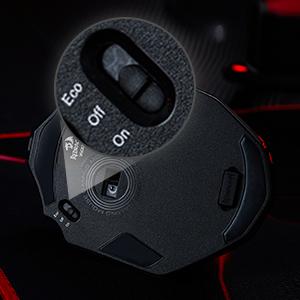
UPDATE 5/20/24: Yeah okay, this mouse is too janky to be worth keeping it long term as my main device. I'll be replacing it with a Corsair Scimitar ASAP. In addition to the fact that the software resets my macros every time I click the "apply" button to change ANY other setting (as documented below when I thought it was just lighting), today it flat refused to connect to my PC after a reboot.I had to physically plug it in over USB cable, just so I could use it long enough to go into Windows settings > Devices and select "Remove Device" on both the wireless dongle and the mouse, then unplug both, turn the mouse off, turn it back on, and then plug the wireless dongle back in. It took me a good 20 minutes to figure out this order of steps. Buyer beware.I left my original review below because, when it's working, it's not bad. Emphasis on "when it's working"Okay, bottom line: if ALL you need is the extra 12 buttons, and you don't care about having multiple profiles per appolication or game (e.g. one set of binds for Premiere Pro, another for Final Fantasy 14 raid night), then go ahead and pick this up. Otherwise, keep reading, after the important information section of this review (It's short, I promise!)Important information:1) the software is unsigned, so you're going to get a warning from Windows telling you it may be unsafe. *As far as I can tell* it's okay to run. It's just configuration software. It doesn't run in the background, or mine for crypto or anything sketchy. But if you're worried about it, then you may want to look elsewhere.2) For the M913 specifically, there's a recessed switch on the bottom of the mouse to change between Off, Bluetooth, and Wireless 2.4ghz mode. There's also a sync button on the other side. You're welcome :)Okay, still with me? Awesome! So basically, my Corsair Scimitar just crapped out on me after about 2 1/2 years of normal use. I was not about to pay $120 to replace the damned thing though, and this was the first result that came up, and it was on Lightning Deal too, so I only paid $30 for the M913 wireless version. I figured if I hate it, I'll at least have a decent backup mouse for when I find a better permanent option.The good: first of all, I have long, slender fingers, and this mouse just fits my hand like a glove. The smooth finish is going to take some getting used to after using the Corsair with its textured finish, but it's not a big deal for me.The numbered keys on the side are angled so that your thumb can fit snugly into and against them, making the 1-6 keys particularly easy to access, and they have a nice, mechanical tactile click and feel to them, taking a tiny bit more force than the Scimitar's, so it's harder to fatfinger them than the more expensive mouse's (in my opinion).It comes pre-set with the keys bound to 1 through 0, with 11 and 12 set to numpad - and +, and BASIC changes to the key mapping are easy. You can even remap the traditionally unremappable buttons like left/right/middle/DPI and the "rapid fire" button (three rapid clicks) if you really want to.The Bad:The software has a bit of a learning curve to it, but it's honestly not nearly as bad as Logitech's software was just a few years ago. If you have a basic concept of how macros work (keydown, keyup, delay) then you should have little problem setting up any more advanced macros you might want. I'm putting this in "The Bad" because I found that while simple key combinations worked using just the "Key combination" dropdown, I could not, for the life of me, get modifier keys to work.Aesthetically, the software has an odd choice of color scheme at times, where if you highlight an item, instead of contrasting text, it's black text on a red background, so it might be a bit hard to see for some people, especially if your monitor is already dark. This is a minor issue at best, just mentioning it for the sake of completeness.The ugly:You knew this was coming. Luckily, I only have one entry for this one. After spending about 20 minutes writing a handful of custom macros, I saved them, I applied them (Always click "Apply" after every change!), I went to change the lighting from "Rainbow puke" to something less like an LSD trip. After changing the lighting and saving, my macros were instantly broke.So, maybe change your lighting preferences first, and THEN set up any complicated macros afterwards.Overall? For $30 I think I could've done a LOT worse. It's comfortable, easy to use, I like the default DPI options, heck you can even change the polling rate in the main section, which I believe is a setting Corsair buries just a little bit, under Advanced settings (Oh, but there are plenty of advanced settings to tweak, too). So long as you don't need multiple profiles, you might like it. Just be aware that there are compromises for saving $50-$75. I can 100% live with them, myself.
User
A must have for any MMO gamer
I very rarely post reviews on products but I have to for this one. I'm a big MMO player, so I've been looking for a good MMO mouse for years. I've tried everything from Razer Naga (3 of them lol), Corsair Scimitar and Steel Series, and they all ended up failing pretty quickly. Battery wasn't the best, connectivity was crap with a lot of them, and the buttons would degrade after a while. Also I couldn't find a good white MMO mouse to fit my setup.I decided to give this one a go, didn't have high hopes and it's ended up being the best purchased I've ever made on Amazon. I haven't had one connectivity issue with this mouse since I bought it nearly a year ago, no button issues, its comfortable in the hand and looks good. I did start off using the RGB, but the battery life really degrades tbh, so I turned off the RGB and I can last a whole month without having to charge it.I honestly can't recommend this enough.
User
Great but the middle button is broken
Yeah the mouse is really wonderfulThis is my forth product from Red Dragon, my first was this same mouse but wired, i used it for over six years then the middle button gave its life and wouldn’t work again.This mouse is wonderful if you are looking for multitasking since it has many “configurable” buttons and you can use it as a numpadThe main problem is again the middle button, the mouse wheel to be exact, it just broke with no reason at all, now whenever i press it i pray that it work and to be honest my whole work involves using this mouse wheel so yes it had an affect on my work
User
Legit
Excellent
User
Reasonable Priced and Good Quality
A very reasonable priced substitute for Razer mouse. Dongle is magnetically captured at bottom of mouse to prevent unintentional loss. Would definitely buy another for my friends in the near future.
User
A Wireless Gaming Mouse That Will Make You Feel Like an Elite
I bought this wireless gaming mouse to improve my performance and comfort in MMO games. I was looking for a mouse that had a lot of buttons, a good battery life, and a reliable wireless connection. I chose the Redragon M913 Impact Elite Wireless Gaming Mouse because it had good ratings and a reasonable price. Here are some of the pros and cons of this mouse:One of the pros of this mouse is that it has 16 programmable buttons, including 12 side buttons that are easy to access and customize. You can assign different functions, macros, or shortcuts to each button using the Redragon software or other compatible software from your game or system. This gives you a lot of flexibility and control over your gameplay.Another pro of this mouse is that it has a long battery life and a low-consumption mode. The mouse comes with a 1000mAh rechargeable battery that can last up to 45 hours with RGB lighting on or up to 80 hours with RGB lighting off. You can also switch to eco mode by pressing the DPI button for three seconds, which reduces the usage of backlit and extends the battery life even more.A third pro of this mouse is that it has a fast and stable wireless connection with low latency. The mouse uses a 2.4GHz wireless nano receiver that plugs into your PC or laptop’s USB port. The wireless click latency is only around 1ms, which is very impressive for a wireless mouse. You can also use the mouse wired with its detachable USB-C cable if you prefer.One of the cons of this mouse is that it is quite heavy and bulky compared to other gaming mice. The mouse weighs 171g without any weights added, which might be too much for some people who prefer lighter mice or have smaller hands. The mouse is also quite large, measuring 123mm long, 92mm wide, and 42mm tall.Another con of this mouse is that it might not be compatible with some older motherboards or BIOS versions, as it requires support for USB-C ports and XMP profiles. You might need to update your BIOS or tweak some settings manually to get the best performance out of this mouse.A third con of this mouse is that it might not work well with some games or software that do not support multiple buttons or customisation options. You might have some issues mapping all the buttons or getting them recognised by your game or system.Overall, I think this is a wireless gaming mouse that will make you feel like an elite if you play MMO games or need a lot of buttons on your mouse. It’s not the lightest or the most compatible option out there, but it’s definitely one of the most versatile and reliable ones.(Sorry if this was a bit geeky) >.<If this product was helpful, please press the helpful button below!
Trustpilot
1 month ago
2 weeks ago