Desertcart purchases this item on your behalf and handles shipping, customs, and support to Slovakia.
โก Power your space with gigabit speedโno wires, no limits!
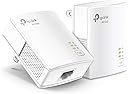
The TP-Link AV1000 Powerline Ethernet Adapter KIT leverages HomePlug AV2 technology to extend your wired internet connection through your home's electrical wiring, delivering gigabit speeds up to 1000 Mbps over distances up to 750 feet. Its compact nano size fits discreetly into any environment, while plug-and-play setup requires no additional wiring or configuration. Ideal for overcoming Wi-Fi dead zones and thick walls, it provides a secure, reliable Ethernet connection for desktops, smart TVs, and gaming consoles. With built-in power saving mode and compliance with advanced cybersecurity standards, itโs a smart, eco-conscious choice for professional-grade home networking.


| ASIN | B084CZMYNM |
| Best Sellers Rank | #1 in Powerline Network Adapters |
| Brand | TP-Link |
| Built-In Media | 6.5 ft. (2 m) Ethernet cable (RJ45), Powerline Ethernet Adapter, Quick Installation Guide |
| Color | white |
| Compatible Devices | Desktop, Laptop |
| Customer Reviews | 4.2 out of 5 stars 7,703 Reviews |
| Data Link Protocol | Ethernet |
| Data Transfer Rate | 1000 megabits_per_second |
| Hardware Interface | Ethernet |
| Item Dimensions L x W x H | 2.56"L x 2.05"W x 1.12"H |
| Item Weight | 13.6 ounces |
| Manufacturer | TP-LINK |
| Mfr Part Number | TL-PA7017 KIT |
| Model Number | TL-PA7017 KIT |
| Number of Items | 1 |
| Number of Packs | 2 |
| Product Dimensions | 2.56"L x 2.05"W x 1.12"H |
| UPC | 845973089054 840460605908 |
| Unit Count | 1 Count |
| Warranty Description | 2 year manufacturer |
B**N
Decent alternative to ethernet
Simple solution between wifi and ethernet. Rather than running wires, you plug 1 unit into the wall and your router, then the other unit to your computer/console. Since these are single port units I'll explain this: 2 units will provide internet to 1 device, 3 units will provide for 2 devices. If you get a 2 port unit it WILL work with these. As for use, downloads will be slower, but the ping is faster. For example the game 'street fighter' runs better. But a larger game like battlefield you won't feel a difference, but the consistency of ping will be better.
I**N
Solves the wired connection problem, just know these two things first
I needed a reliable wired connection in a room too far from the router to run a long ethernet cable, and this handled it well. Setup was simple, plug one adapter into the outlet near your router and connect it with an ethernet cable, then plug the second adapter into an outlet in the other room and run a cable to your device. No pairing needed, it connected on its own within a minute. Once it was running, a speed test on the wired connection showed 26.3 Mbps download, 16.7 Mbps upload, and 26 ms latency, which matched what my internet plan allows. The only downside was the first outlet I tried was on a different circuit than the router, and it simply wouldn't connect until I moved it to an outlet on the same circuit. Once I did that, it worked without issue. Two things to know before buying. First, this is ethernet only, it will not boost or extend your wifi, so it's not the fix if weak wireless signal is your problem. Second, both adapters need to be plugged straight into the wall on the same electrical circuit, never into a power strip or surge protector, or they won't communicate properly. If you need a stable wired line for a TV, console, or work setup and don't want to run cable through your walls, this gets the job done.
B**.
Great for those desperate for stable connections
Must have if you canโt run ethernet through your house. I get about 100 MBP/s with this. Easy to setup up as one end connects to your router and another into your computer or console. Speeds may not be the fastest but it provides stability
C**N
Easy setup
Solid product great instructions very easy to set up. Got it working right out of box. Unfortunately my home wiring must not be good enough because I could not get speeds greater than 20Mbps. Modem/router is pumping out ~300Mbps but at the end of the line with this device that speed was much less.
M**K
A worthwhile upgrade!
I had an older version of the TPlink that worked great. It was still functioning at the time of this review. It had older ethernet data port which capped the data rate at 100Mbps. Fiber service offered more speed than that older model could deliver. The newer AV1000 doubled my speed in comparison to the previous modules. I was up and running in under 10 minutes. One module in basement, one in the top of barn. Time is minimal if you have identified which outlets/circuits work as a pair. Tip***Try pairing both modules in the same room first. It's possible that the room may have multiple circuits that do not talk to each other. if they don't pair, move ONE module to another outlet and try to pair again. if not successful just repeat the pattern, different outlet, maybe different room. Due to the various ages of home and electrical wiring from old handymen to to Professionals following codes for wiring, your outcome may vary.
M**K
Barely works
Bought this to connect from my router in one room to my computer in the next room. Did not want to run a long cable around the wall, thru the door, and back to the computer. Also did not want to drill a hole through the wall. Seemed like it should work. Everything on the same network - in fact, two outlets on the opposite sides of the same wall. Hooked up, and it connected immediately. Problem is that I am getting 600Mb out of the router, but only 40 Mb out of the powerline and to my computer. I checked through their FAQ's and online docs, and they say I should get up to about 200Mb. Nothing remotely like the 1000 or 1GB numbers they show in their advertisements. Even when I plugged both powerlines into the same outlet I could only get a little over 200Mb. So, basically, it works, but not well enough to be useful. Sending it back.
G**R
It does work, but do your research.
Do some research before purchasing. I ended up returning this unit, as it did not fit my needs. I moved into a rental that did not have Ethernet or coax ran to any bedrooms. I tried this out, and while it DOES work, it DOES NOT seem to work well with the wiring configuration in my home. The pre-ran router is located on a separate breaker than the room my desktop is in. The latency was not feasible for my needs.
T**T
275-315 Mbps
TL;DR: You don't need to read past the title. Long version: I've been using powerline Ethernet for ten or fifteen years. My existing adapters were purchased at a time when having gigabit Ethernet ports on the adapters was prohibitively expensive. Download speeds have been 94 Mbps consistently, so it seemed likely that performance was being capped by the 10/100 Ethernet ports on my old adapters. I saw these TP Link adapters and decided to give them a try. Physically, the layout of my house presents the best possible scenario for Ethernet over powerline. The power outlets that I'm using are directly above and below each other on the two floors. They are on the same wire without any other outlets or junction boxes between them. So, no more than ten feet of house wiring between the outlets. On the downside, the downstairs power outlet is shared with a television and a UPS, while the upstairs power outlet is shared with a laser printer and a second UPS. TP Link has self-rated the AV1000 at 1 Gbps based solely on the speed of its Ethernet jack. That's somewhat deceptive. You need to run the TP Link app to determine the connection speed between the two adapters over the house wiring. TP Link calls that the "powerline rate". Mine varies with time and is generally around 750 Mbps. Actual throughput is expected to be considerably less than the powerline rate. My Xfinity internet service delivers 550 Mbps down and 41 Mbps up with a 100 foot Ethernet cable connecting the upstairs computer directly to the Xfinity cable modem/router downstairs. I use the online Ookla Speedtest app. Over the AV1000 powerline, download speeds from the upstairs computer hit 250 Mbps instantly, then climb slowly to end at 275-315 Mbps. Ping time from my computer to a server in Boston and back is generally 20 ms. The upload speed is consistently 41 Mbps, the same as it was on my old powerline adapters. You can encrypt the signal between the adapters, but encryption is only necessary if you live in an apartment building. It's highly unlikely that you could establish a connection with a neighbor's house even if you wanted to. I found that using encryption lowered throughput by about 5%. The numbers I've cited in this review are without encryption. There's a little more to know about my house's wiring. The house was built around 1914 and uses knob and tube wiring between the two power outlets. Clearly, the knob and tube isn't a detriment in itself. It might even be an advantage. The conductors in modern Romex are about one-half inch apart, versus about three inches for knob and tube. It's possible that I'm doing much better than most reviewers because there's less cross talk between the conductors. The problem with the knob and tube is that it doesn't use a separate ground wire, so I can't use a three prong powerline adapter with 2 X 2 MIMO technology like the AV2000. My only dissatisfaction is that these supposedly new TP Link AV1000 powerline adapters came to me in very used condition. I may keep them based on measured performance, or I may return and rebuy them just out of principle.
Trustpilot
2 weeks ago
2 months ago