


Desertcart purchases this item on your behalf and handles shipping, customs, and support to Slovakia.
💾 Upgrade your vintage gear with GoTEK — floppy disks, reinvented for the USB era!
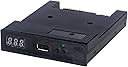
The GoTEK SFR1M44-U100 is a 3.5-inch USB floppy drive emulator designed to replace traditional 1.44MB floppy disks with USB flash drives. Featuring a 34-pin floppy interface and 5V power supply, it supports up to 1000 partitions on a USB drive, offers a 500 kbps data transfer rate, and includes an intuitive control panel for easy partition management. Ideal for legacy industrial, embroidery, CNC, and music equipment, it delivers reliable, plug-and-play performance in a compact, portable form factor.
| ASIN | B088ZT7J7G |
| Additional Features | Portable |
| Best Sellers Rank | #12 in Floppy & Tape Drives |
| Brand | GoTEK |
| Built-In Media | SFR1M44-U100 3.5 Inch 1.44MB USB SSD Floppy Drive Emulator Black |
| Cache Memory Installed Size | 1.44 |
| Color | Black |
| Compatible Devices | Desktop |
| Connectivity Technology | USB |
| Customer Package Type | Standard Packaging |
| Customer Reviews | 4.3 out of 5 stars 238 Reviews |
| Data Transfer Rate | 0.63 megabytes_per_second |
| Enclosure Material | ABS |
| Form Factor | 3.5-inch |
| Hard Disk Description | Usb |
| Hard Disk Form Factor | 3.5 inches |
| Hard Disk Interface | USB 1.1 |
| Hard-Drive Size | 1.44 MB |
| Hardware Connectivity | USB |
| Hardware Platform | PC |
| Installation Type | External Hard Drive |
| Manufacturer | Gotek |
| Media Speed | 0.05 megabytes_per_second |
| Mfr Part Number | SFR1M44-U100K |
| Model Name | SFR1M44-U100 |
| Model Number | SFR1M44-U100K |
| Number of Items | 1 |
| Read Speed | 0.05 megabytes_per_second |
| Special Feature | Portable |
| Specific Uses For Product | storage |
| UPC | 631384623709 |
H**Y
This work great in my Haas CNC machine
The first thing I will tell you is this was absolutely Plug and Play for my Haas CNC Milling machine. I'm literally took it out of the box plugged it in mounted it up and it started working like a champ. Even worked with the old brackets. If you have an older CNC machine that still uses floppies 100% go out and buy several of these and put them on your shelf. They're a great price point and they work like a champ. If you need a decent manual or don't already have an innate understanding of how this ancient technology works you might be in trouble and need to rely on the web for support. It does have a single slip sheet manual and is good for a minimal amount of troubleshooting but that's it. If you have a non-standard application then you might be in trouble or need some additional help because the manual absolutely sucks. As far as being a trouble-free install I give it 100% five stars.
T**T
Life saver for a Korg Trinity owner with shoddy, ancient floppy disks
Easy to install. I opened the bottom of the korg trinity and slid the floppy drive out. The GOTEK fits in perfectly into the slot, connects to power and ribbon cable easily, and works well out of the box with a 2GB+ usb key. You can format the disk by either pressing both buttons as you boot the korg, or by using their windows software. It's far superior to floppy disks, but there are a few minor drawbacks you should be aware of: 1) The windows software only formats 100 disk partitions, not 1000 2) Does not work well under linux, Linux can only mount disk 000, the remaining disk partitions are invisible as they're coded in some proprietary format that only the GOTEK windows software can read. 3) switching disks while using the korg doesn't always work easily. Sometimes I change disk numbers, re-press the screen, and the light shows like it's reading, but it just sits there with the list of the former disk's files. I have to round robin the disk number and try again, and again, and again, until it finally takes and mounts the disk I want. It can take anywhere from 1 to 6 tries. It's the most annoying bug in the device. In spite of the few issues, this tool is infinitely superior to floppies and I'm extremely grateful it was made and sold. I'm considering writing some linux software to mount all 100 disks in linux if I can get my hands on the format spec.
A**S
Yamaha DGX-500
I used this product to replace the floppy disc drive on my old Yamaha DGX-500 Portable Grand keyboard. Took some time to get used to it and figure out how to use it, but installation was simple, and after you figure out how to use it it's a very cool upgrade to the old floppy drive. As someone else mentioned, install was just plug and play, and the flash drive if it's too long will be in front of some keys, but slim flash drives are pretty cheap now, so that problem is easily remedied. If you've got some patience, and the skills to install, this is a great cheap product that works well. Cost about the same as a pack of floppy discs on Amazon, and gives a ton more functionality than a floppy would in today's world.
J**F
Works with a firmware upgrade
As others have pointed out, the stock firmware doesn't work in every machine. Had to buy a USB A to USB A cable, install a jumper, and flash the open source FlashFloppy firmware on it. Worked like a charm afterwards. Not for the non-technies.
M**R
This purchased save me $$$$$$$$$
I bought this because the floppy drive went dead on my 25 year old Yamaha PSR 640. This product for $35 worked as well as the one advertised for the PSR 640 that sold for over $200. Very pleased with this purchase. Price gouging is so common among businesses in America. This purchase was not the case.
T**S
Got old AT32F415 stock — beware!
Advertised as new but I received old stock with the AT32F415 MCU. This chip replaced the original STM32F105 back in Spring 2021, but it only has 32kB SRAM which makes track formatting and writing high-density HFE images unreliable (depends heavily on USB stick). The much better AT32F435 model has since replaced the 415 — always confirm with the seller which MCU you're actually getting. Very frustrated.
J**E
MPC repair made easy
Used this to update/repair an MPC2000. The process was fairly simple, requires delicate handling and following EXACT instructions, but this gotek drive greatly improved the unit. It's lightweight, very bright, and super quiet. Formatting is a little slow, but simple. Definitely a solid option for repairing older floppy drive equipment. Highly recommend.
T**.
Ditch the Chinesium, and they work well!
The firmware, documentation, tools, and support for these is typical Chinese -> Complete and utter crap! Incoherent docs written by someone who does not know english, tools that are only in Chinese (or barely work), and overall poor function. The hardware, however, does work well, and build quality is decent. Load one of the far more sophisticated, supported, and functional firmare packages on a Gotek and it becomes a very useful tool. $5 mlre and add a graphic display, and you can select your floppy image by name, instead of having to remember an arbitrary number between 1 and 1000 . . . Oh, and with the non-Chinese firmware, you can mount the USB stick to your computer and load it directly . . . Yes, more work, but the best solutio for the price, and something you won't be embarrassed to either use or show others!
R**R
instructions
The only issue was no instructions, so it took a number of searches on You Tube to get it working. (Playing Midi files on a Yamaha PSR 640)
D**H
Retro
Great item highly recommended
S**H
Cheating
Don't buy this item
A**.
Funcional ahorra mucho tiempo y no tienes que almacenar diskettes de 3.5
La instale en una máquina fresadora bridgeport discovery torq cut 22 CNC, utilice primero un USB de 32 GB, pero no la reconoció para formatearla, utilice una USB viejita de 2 Mb y de 8 Mb y formateo sin mayor problema, ya pude hacer respaldo de programas e incluso una USB de respaldo de todo el sistema...... Muy buen producto funcional y rápido!!
P**M
Work in Yamaha ClaviNova, no need for special software.
Lots of options are available for this product. Choose this one because other reviews indicated it worked with a Yamaha ClaviNova, which it does. Hardest part of the installation was opening the ClaviNova, which had me stumped for a bit. The pictures show how it is done. The ClaviNova can format a USB drive as a single floppy using this emulator. There is no need to use special Windows software, unless you want multiple emulated floppy drives on one USB stick. The emulator formats the USB drive as FAT12, readable by any Windows computer. However, any new ClaviNova that uses USB drives directly will not read the FAT12 format. Files will need transferring to a USB drive formatted in FAT32 on a windows computer. Sorry I have no experience using FAT12 formatted drives in a MAC.
Trustpilot
2 weeks ago
3 days ago