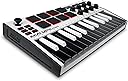
๐ถ Your studioโs secret weapon for instant music magic
The Akai Professional MPK Mini MK3 is a compact, USB-powered 25-key MIDI controller designed for music producers on the go. Featuring 8 velocity-sensitive backlit drum pads, 8 assignable knobs, a 4-way joystick for pitch and modulation, and built-in arpeggiator, it offers total control over virtual instruments and DAWs. With Native Kontrol Standard (NKS) integration and a choice of exclusive Komplete 15 Select sound bundles, it delivers professional-grade production tools in a sleek, travel-friendly package.


| ASIN | B08874YDB4 |
| Additional Features | Backlit Drum Pad, Compact, Digital Display, Integrated Effect, Portable, Programmable, Touch Sensitive Pad |
| Best Sellers Rank | #166 in Musical Instruments ( See Top 100 in Musical Instruments ) #1 in Computer Recording MIDI Controllers |
| Brand | Akai Professional |
| Brand Name | Akai Professional |
| Color | White |
| Compatible Devices | Devices with USB connectivity (such as laptops, computers, and certain tablets smartphones) |
| Connectivity Technology | USB, 1/4" (6.35mm) TS input for sustain pedal Input |
| Connector Type | USB 2.0 Type B, |
| Control Method | Touch |
| Control Type | Keyboard Controller, Drum Pads Joystick Knobs Controller |
| Customer Reviews | 4.6 out of 5 stars 31,168 Reviews |
| Hardware Interface | USB |
| Hardware Platform | Windows, Mac |
| Human Interface Input | Keyboard |
| Included Components | MPK mini, USB Cable, Software Download Card, Quickstart Guide, Safety & Warranty Manual |
| Instrument | Keyboard |
| Instrument Key | Any |
| Item Dimensions D x W x H | 7.1"D x 12.5"W x 1.9"H |
| Item Type Name | MPK Mini MK3, 25 Key USB MIDI Keyboard Controller With 8 Backlit Drum Pads, 8 Knobs and Music Production Software Included (White) |
| Item Weight | 0.9 Kilograms |
| Keyboard Description | Ergonomic |
| Manufacturer | inMusic Brands Inc. |
| Manufacturer Part Number | MPKMINI3W |
| Material Type | Durable High-Grade Plastic |
| Model Name | MPKMINI3W |
| Model Number | MPKMINI3 |
| Model Year | 2020 |
| Noise Control | None |
| Number of Keys | 25 |
| Platform | Windows |
| Product Dimensions | 7.1"D x 12.5"W x 1.9"H |
| Product Style | MPK Mini MK3 |
| Size | 25 Key |
| Special Feature | Backlit Drum Pad, Compact, Digital Display, Integrated Effect, Portable, Programmable, Touch Sensitive Pad Special Feature Backlit Drum Pad, Compact, Digital Display, Integrated Effect, Portable, Programmable, Touch Sensitive Pad See more |
| Supported Software | Ableton Live and/or Avid Pro Tools and/or FL Studio |
| Total USB 2.0 Ports | 1 |
| Total USB Ports | 1 |
| UPC | 694318024928 759589586725 |
| Unit Count | 1.0 Count |
| Warranty Description | 1 year manufacturer. |
J**R
Super worth the money, and very good quality
Pad quality is outstanding, seems very easy to bring around with you. (haven't done it yet) Sounds perfect all inputs are correct, setup was VERY easy (Youtube is amazing lol) if you know basic chords then this should bring up your music production to a whole new level. probably one of the best things i've bought of Amazon!!
R**.
"Exceptional Value and Performance
I've been using the AKAI Professional MPK Mini MK3 for a few months now, and I must say, it has exceeded my expectations in many ways. As a clinical laboratory scientist with a passion for music production, finding the right MIDI keyboard was crucial for my creative process. Firstly, the quality of materials and build is impressive. The keyboard feels solid and durable, with keys that are responsive and smooth to the touch. The pads are firm yet sensitive, making it easy to achieve the perfect velocity for drumming and sampling. It's clear that AKAI put a lot of thought into the design, ensuring that every component feels premium and built to last. The seamless connection is another standout feature. I use it with various DAWs, and it has never failed to integrate flawlessly. Whether I'm plugging it into my laptop for some late-night sessions or setting it up in my home studio, the MPK Mini MK3 connects instantly without any hassle. The plug-and-play functionality is a lifesaver, allowing me to dive straight into my music without dealing with tedious setup processes. Finally, the price point is fantastic. Given the high quality and robust features, it's hard to believe how affordable this keyboard is. It offers incredible value for money, making it accessible for both beginners and more experienced producers. I've tried other MIDI keyboards in the same price range, and none come close to the performance and reliability of the MPK Mini MK3. Overall, the AKAI Professional MPK Mini MK3 is a superb MIDI keyboard that combines quality materials, seamless connectivity, and affordability. It's been an essential tool in my music production journey, and I highly recommend it to anyone looking for a reliable and versatile MIDI controller.
A**R
Great midi board
Easy to set-up with a lot of features great starter midi board for beginners and those trying to get back in the game
D**H
WHAT NO ONE TELLS YOU! READ BEFORE BUYING for complete noobs like me
WE are brand new to music making. I got this for my son who is 11 but likes to randomly beat box and I think he has a good ear for music (he also takes drum lessons). I wanted to get him involved in something more productive and creative than video games which he can spend 12 hours a day on if I don't unplug them.... 1. This thing does not have a speaker 2. It's NOT plug and play: it requires a computer or tablet for power and that is where your audio will come from unless you use headphones, it has a jack in the back maybe for external speakers or headphones? 3. Super cheap right?! WRONG: you have to LOAD different sound packs (different beats/ instruments) but the best ones are in their store and can add up easily to hundreds of dollars...that is probably where they make most of their money, not from this little device 4. Installation was a PAIN!!! My son has a windows PC (i use a mac) so I really couldn't stand figuring out how to install first the software that manages plug ins and packs and then the ACTUAL MUSIC MAKING software called MPC beats 5. This thing does work with different audio programs besides the one Akai makes so you just have to do some research 6. We learned A LOT FROM YOUTUBE !!!! They have their own youtube as well but many people post tutorials which help a lot. 7. Using a tablet (like an ipad mini) does not give the device any power so you have to get external power for it if you want to use it with certain tablets 8. They have their own beats academy but the links don't work so we resorted to youtube, plenty of good tutorials 9. The square buttons (pads) have to be programmed to different sounds / instruments / packs. We couldn't get any sound to come out of this thing and didn't understand it until we watched a bunch of videos that you have to really customize it (in the MPC beats program) 10. My son didn't want to deal with all this he just wanted to play and very quickly told me he hates it and to return it. I told him we have 30 days lets at least make the effort to figure it out. I found a bunch of tutorials on youtube and sent them to him to watch. I said watch them and do everything they tell you. Only if u STILL can't figure it out or if the thing doesn't work we can then assume it's broken.... 11. After he watched some tutorials, he very quickly figured a lot of stuff out and FINALLY I WAS HEARING SOME BEATS!!! he learned how to record and we are currently figuring out how to load / program the pads to different sounds and trying to see if we can find any good free packs or if we should buy some.... 12. My son definitely spent some time playing around with sounds even after I told him we can finish the rest tomorrow and he can go play his games. 13. BE PATIENT, WATCH TUTORIALS once you do all that it will be worth it. 14. Be ready to invest some money into expansion packs on their website / explore other software 15. Great way to get your kids to feel like they are playing / gaming without them wasting their life away on gaming. My son also likes to code where he imports music from youtube and now he can make his own music for his coding projects so it's a win/win. 4 stars only because it was quite complex to install and learn there was no easy instructions included I had to google everything. They should include a video tutorial QR code
M**E
Best starter controller I've come across
Been producing on and off for a couple years and finally picked up a dedicated controller. The MPK Mini punches well above its size. 25 keys is limiting for full playing but for production work โ laying down melodies, triggering samples, tweaking parameters โ it covers everything I need without taking up half my desk. The MPC pads are responsive and have enough sensitivity to actually play dynamically rather than just tapping on buttons. The 360ยฐ knobs feel solid and map easily to most DAWs without much setup. Pitch and mod wheels are a nice inclusion at this price point. Small but functional and they don't feel like an afterthought. USB-C is the right call. Plug in, recognized instantly, no driver headaches. The bundled software and Native Instruments sound package give you enough to start making music immediately without spending more on plugins right away. Compact, well-built, and genuinely useful whether you're just starting out or need a portable controller to travel with. Hard to beat at this price.
F**K
Must have midi
Excellent Midi controller, great construction. Compact size. I use to make all my music with. Pairs instantly with Ableton Live.
W**R
Akai MPK Mini 4 MIDI Keyboard Controller Is Built and Performs Great
The Akai MPK Mini 4 MIDI Keyboard Controller is a well constructed unit with a nice feel to the keys (unweighted), drum pads, pitch bend wheel, modulation wheel and control knobs. The Akai MPK Mini 4 allows you to easily edit the controls and pads from the front panel without a need for software. Just enter into the edit mode and setup the pads and controls the way you want and save the setup to user locations 4 through 14. There are four preset configuration locations 1-4 that are used for popular DAW software and one plugin setup. Most of the control buttons and pads are labeled with a function and the "Shift" key allows for a second set of system editing operations which are labeled under each button and pads. The setups are quick and easy, just look at the clearly written owners manual for the steps to follow. The Akai MPK Mini 4 also comes bundled with production software and 1,000 free sound and loops. There are also links to the Akai store where you can purchase extra sound and loop bundles in various genres of music. I also appreciate the Akai MPK Mini 4 provides a 1/4 inch sustain pedal jack and full sized Midi output jack to connect directly to professional and older Midi keyboards and drum machines. That Midi output jack makes it possible to control an older keyboard or drum machine that may have worn out buttons and knobs that don't work any more from the Akai MPK Mini 4 keyboard controller with a custom setup that can be saved to a memory location in the Akai MPK Mini 4. I have just one complaint about the Akai MPK Mini 4 because it will not allow you to hear the sounds you assign to the trigger pads while in edit mode. You can use a General Midi drum map to assign note numbers to the pads with ease but you can not hear the sounds being triggered until you save the edited setup. So technically my star rating would be a 4.5 Stars but Amazon does not do half star ratings. I did some research and it seem that not being able to hear the sounds as you edit the trigger pads is actually a manufacturers choice/preference and is a simple firmware setup issue. Making a midi controller that allows you to hear the sounds of the edits as you make them is a very helpful feature that I hope Akai will address in a future Firmware update. But, the Akai MPK Mini 4 is still a great controller.
R**A
Don't let the color fool you; this is an incredible instrument
I waited a couple of months before writing this review. There's a lot to dive in and I wanted to write a review short enough to read that contains everything you need to know. For your money you get two things, the hardware (the MK3) and some free software, MPC Beats. The MK3 is a 25-key USB MIDI keyboard. In addition to the 25 keys, there are selection buttons on the left and right, a joystick/knob, 8 drum pads, 8 knobs, and a teeny-tiny LCD for younger users with better eyeballs than mine. They keyboard has a tiny bit of weight to it, but you won't mistake it for a paperweight. Keep in mind that on its own, the keyboard does nothing, It only works when plugged into a computer, running software. The free DAW software Akai provides is MPC Beats. MPC Beats has approximately 9 million buttons and options, so don't expect to figure it out in an hour or even a day. There are so, so many features. You can of course make tracks, loops, patterns, and so on. There are tons and tons of free instruments available. It can get confusing as to which can be assigned to the keys and which are assigned to the drum pads. Fortunately there are tons of video MPC Beats tutorials online, which can teach you the ropes. The free version of MPC Beats has one major limitation in that songs are limited to 8 MIDI tracks and 2 "audio" tracks (which could be used for vocals or samples). If you're just wanting to create loop based music, 8 tracks are actually quite a bit. If you do eventually outgrow MPC Beats, you can upgrade to the pay version, MPC 2.0, which allows 128 tracks, all of which can be MIDI or digital audio. So, what's to say? There's a bit of a learning curve with the software and figuring out what all the buttons on the keyboard do. It has been a while since I played around with a DAW and so it took me a couple of days to wrap my head around everything. Again, there are lots of YT tutorials out there that will point you in the right direction, and the more you play around with things, the better you'll get. Physically the keyboard's looks may not impress your studio friends, but there's no reason why you couldn't create a hit song with this thing.
Q**K
Akai Professional MPK Mini
An excellent little controller that punches well above its price point. Easy to set up and use straight out of the box, it performs exactly as expected with no complaints. Highly recommended.
V**N
Best
Good value for mony
D**N
USB C powered.
Takes a little setting up (run a script) for GarageBand. Works well!
A**R
Great entry level MIDI controller
I was really surprised at the quality of this MIDI controller for the price. It seems well made and has a ton of functions but all useful ones that efficiently use the space. USB-C connectivity is also a huge plus as not many other MIDI controllers have adopted that standard yet. It also comes with an excellent bundle of software that includes everything you'll need to start making music. All around an excellent purchase I would highly recomend
P**N
Easy to setup and use. To become a Tardis of exploration and creativity โค๏ธ
Been wanting a mini synth for years. Never had the spare dosh to purchase one. Along came another birthday and instead of spending it on the usual, purchased something for me. Oh boy so glad I did. Although I've still a lot to learn, each time I have a bit of me time I discover another gem sound or technique on this incredible unit (For the money it absolutely brilliant) The software it comes with is also great - especially like the customisability of synth sounds and been able to tweak them. I know a year on I've still barely scratched the surface of what this can do, but it brings a smile to my face every time I plug it in, and away I go ๐น๐ถ Happiness is
Trustpilot
2 months ago
1 week ago