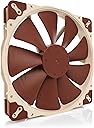
NF-A20 PWM Quiet 200mm Fan
Product ID: 223038355
Details
- BrandNoctua
- Cooling MethodAir
- Power Connector Type3-Pin
- Product Dimensions20L x 3W x 20H
- Voltage12 Volts
⏳>150,000 h MTTF
🔇18.1 dB(A) Noise Level
🌪️146.9 CMPH Airflow
€ 162.81
1
Sold byAmazon SlovakiaDelivered byDesertcartCustomer service byDesertcartReturns14 days · 30 with PRO
Buyer Protection · Full refund if your order doesn't arrive as described.
Desertcart purchases this item on your behalf and handles shipping, customs, and support to Slovakia.
Secure transaction
Details
- BrandNoctua
- Cooling MethodAir
- Power Connector Type3-Pin
Description
🌌 Silence is Golden: Elevate Your Cooling Game!
- AWARD WINNING DESIGN - Engineered for excellence in cooling.
- HIGH AIRFLOW EFFICIENCY - Maximize performance with minimal sound.
- VERSATILE COMPATIBILITY - Fits a variety of setups effortlessly.
- WHISPER QUIET OPERATION - Experience cooling without the noise.
- COMPLETE INSTALLATION KIT - Everything you need for a seamless setup.
The Noctua NF-A20 PWM Quiet 200mm Fan is a premium cooling solution designed for optimal airflow and minimal noise. With a maximum rotational speed of 800 RPM and a noise level of just 18.1 dB(A), this fan is perfect for gaming consoles, desktops, and servers. Its award-winning design features Flow Acceleration Channels and an Advanced Acoustic Optimisation frame, ensuring superior performance. The fan comes with an installation kit, including anti-vibration mounts and a 3:4-pin adaptor, making it easy to integrate into your system.

Specifications
| ASIN | B071SLFBNY |
| Air Flow Capacity | 146.9 Cubic Meters Per Hour |
| Best Sellers Rank | #166,522 in Computers & Accessories ( See Top 100 in Computers & Accessories ) #955 in Case Fans |
| Brand Name | Noctua |
| Compatible Devices | Desktop, Gaming Console, Server |
| Cooling Method | Air |
| Customer Reviews | 4.8 4.8 out of 5 stars (1,809) |
| Global Trade Identification Number | 09010018100013 |
| Item Dimensions L x W x H | 20L x 3W x 20H Centimeters |
| Item Weight | 0.71 Kilograms |
| Manufacturer | Noctua |
| Max Rotational Speed | 800 RPM |
| Model Number | NF-A20PWM |
| Noise Level | 18.1 Decibels |
| Number of Items | 1 |
| Number of Packs | 1 |
| Part Number | NF-A20PWM |
| Power Connector Type | 3-Pin |
| UPC | 841501110016 |
| Unit Count | 1.0 Count |
| Voltage | 12 Volts |
Common Questions
Yes, all products are sourced directly from authorized retailers in the US, UK, UAE and India. We maintain strict quality control processes and verify each product before shipping. All items come with applicable manufacturer warranties and are covered by our standard return policy.
Delivery times vary by destination country, typically ranging from 3-9 business days. Each order is fully trackable through our system. We handle all customs clearance and use reliable courier partners for last-mile delivery. You'll receive regular updates about your order status via email and our app.
Desertcart is an international e-commerce platform operating since 2014. We securely process thousands of orders globally each day. Every product goes through our quality verification process before delivery, and we provide end-to-end order tracking, 24/7 customer support, and a comprehensive returns policy to ensure a safe shopping experience.
Our prices include the product cost, international shipping, import duties, customs clearance, and local delivery charges. We handle all customs and import procedures, ensuring there are no hidden fees upon delivery. PRO members receive additional benefits including free shipping.
Trustpilot
TrustScore 4.5 | 7,300+ reviews
Shop Global, Save with Desertcart
Value for Money
Competitive prices on a vast range of products
Shop Globally
Serving millions of shoppers across more than 100 countries
Enhanced Protection
Trusted payment options loved by worldwide shoppers
Customer Assurance
Trusted payment options loved by worldwide shoppers.
Desertcart App
Shop on the go, anytime, anywhere.