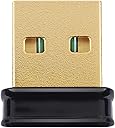
Desertcart purchases this item on your behalf and handles shipping, customs, and support to Slovakia.
๐ Tiny dongle, massive Wi-Fi power โ stay connected, stay ahead!
The Edimax EW-7811Un V2 is a cutting-edge nano-sized Wi-Fi 4 USB adapter delivering up to 150Mbps on 2.4GHz. Designed for professionals who demand seamless connectivity, it supports plug-n-play across Windows 11, MacOS, and Linux (Kernel 5.15+). Its ultra-compact form factor minimizes desk clutter while advanced WPA3 security ensures your network stays safe. Perfect for upgrading legacy PCs or adding reliable wireless to compact setups, this adapter combines trusted Edimax engineering with modern wireless standards for hassle-free, high-speed internet access.


| ASIN | B08F2ZNC6J |
| Best Sellers Rank | #146 in USB Computer Network Adapters |
| Brand | Edimax |
| Built-In Media | 1 USB Adaptor |
| Color | Black |
| Compatible Devices | Desktop |
| Compatible Operating System Family | Linux, MacOS, Windows |
| Customer Reviews | 4.4 out of 5 stars 622 Reviews |
| Data Link Protocol | Wi-Fi 4 |
| Data Transfer Rate | 150 megabits_per_second |
| Hardware Interface | USB |
| Item Weight | 2 g |
| Manufacturer | Edimax |
| Mfr Part Number | EW-7811Un V2 |
| Minimum Required Operating System Version | Mac OS 12 Monterey, Windows 11 |
| Model Number | EW-7811Un V2 |
| Number of Items | 1 |
| Number of Packs | 1 |
| UPC | 649659025479 |
| Warranty Description | Manufacturer Warranty |
D**R
It's the service
I was refurbishing an old Dell desktop Windown 7 pc which had plenty of life left in it, but it could only communicate with the outside world via wired LAN connection. So I went looking for a reliable, economical wireless wi-fi USB connection, and found this Edimax on Amazon. It was to arrive the next day which gave me time to make a bootable USB drive to install the newly released Ubuntu 24.04 to replace Windows 7. The next day the Edimax wi-fi adapter arrived. I plugged it in and booted into Ubuntu. No wi-fi! I grabbed a older Netgear wi-fi usb drive from another pc to finish with the Ubuntu installation. So, rather than return the Edimax, I tried the help chat. We exchanged a few screen shots of my system using the terminal in Ubuntu, and ran a few commands. In just a few exchanges, she had my system up and running, fully connected to the internet. I'm no systems guy so I don't know why what she did worked, but it did. I'm completely satisfied with the adapter and even more so with the woman who got it running. Ta.
M**N
Good little device that works as expected.
I use this with a 1u server running OpnSense. OpnSense is an open source router software. It has been very reliable. I have not tested the range and I am usually close to the system when I connect. I have not had any trouble. I did not have to install any drivers. I have tested it on my Linux (Debian 12) laptop and it works well.
F**K
Back on the Web!!
The Edimax USB Wi-Fi 802.11n Adapter worked perfectly on my aging laptop after the internal wifi card 'bit-the-dust' - NOTE: The Edimax wifi adapter ONLY provides 2.4 g connectivity, NO 5g available. It's Plug and Play for Linux - fully supported by all Linux kernals.
M**W
Works best in 2.0 USB ports.
I bought four of these adapters for computers running Windows 10 in a senior living facility for residents who donโt have easy access to Ethernet connections, and theyโve worked perfectly. There was no software installation requiredโjust plug them into the USB 2.0 ports, and they connected right away! The compact size is fantastic, with no bulky antenna sticking out, making them discreet and easy to use. The connection is fast and reliable, meeting the internet needs of the residents without any issues. A hassle-free, plug-and-play solution that exceeded all expectations!
J**N
Does the job, with a few quirks
It's Linux compatible, I didn't have to do anything special to get it working with Garuda, but Linux Mint needed a kernel driver... fortunately I had a VM that I could patch one into under Windows and get it going, but once I changed to a more up-to-date (indeed, rolling) distro (Garuda) it wasn't necessary. Their website claims to only support up to Linux kernel 5.13 but that is inaccurate, as I'm running it with a 6.8.9 kernel currently. Now let's talk about speed. AC1200 mathematically is more bandwidth than a USB 2.0 port will handle; those are limited to 480MBps. I don't know who made the decision to not go with USB 3.0 on this device but they need to have their heads examined. That being said, it works, though it could probably be a whole lot faster if it weren't designed by someone who can't do math. I'm currently connected to my WiFi router which is across the width (and through a wall) of the apartment at 175.6Mbps. Not exactly stellar, but it is what it is. I think we only have 400Mbps service anyway, so I guess that's good enough for me. My roommate needs some bandwidth, too, so yeah, it's fine. Also, reliability (or lack thereof). Occasionally a couple of weeks ago (not so much lately) it would get hot and stop working. Unplugging, letting it cool for a minute, and replugging it resolved the issue. Maybe there's such a thing as "too small" and instead maybe a bit of bulk (and copper) would allow for better heat dissipation. But that would cost money, of course. Overall, it's an acceptable product with just a couple of flaws. If they would address those, it would be perfect. As it stands, I would probably repurchase from their brand if I ever needed another one for another system, especially if I couldn't put a PCIe or m.2 card in, instead. I can't say anything about their tech support as I'm an advanced user and don't care about calling tech support (I probably know more than they do so they would just frustrate me with their accent). So they'll get my default 3 stars because their website is adequate.
P**M
Excellent for Linux, BSD and Embedded Applications
It can be frustrating to buy a computer and try to run non-Windows software on it, only to find out that the wireless doesn't work due to proprietary drivers. Or maybe you have an embedded computer that doesn't have wireless. If you don't have connectivity you can't even download anything - you have to put it on a disk and load it. In late 2025 it seems that Linux, NetBSD and OpenBSD work with the Edimax Nano out-of-the-box!
K**S
Died after about 7 minutes of use
Was plug and play with an up to date Ubuntu laptop, so that was nice. As I needed to plug it into there first to get it's MAC Address. So only had it plugged in there for like 2 minutes. Then I plugged it into an older Raspberry Pi zero with a micro USB to female USB to add to a project I was working on that needed to have an IP reservation from my router. Don't know if it was plug and play for the Pi. As in the about 5 minutes before I even got to check if it was online. This was while I was adding the IP reservation. The Edimax got insanely hot, like too hot to even touch without it burning ya. If I had left it in any longer I'm certain it would have started a fire. Or if the wire was laying on fabric and not a table. Suspect I must have gotten a bad one. Issue was 100% the adapter and not the micro USB cable. As the cable was in use for months previous with an ethernet USB adapter and still worked just fine when I went back to the ethernet adapter instead. Can't be 100% certain what happened but that's what I get for buying the cheapest Linux Wi-Fi Adapter I could find. Just tossed it in the trash rather then bother getting my $10 back and to make sure no one else gets hurt by trying to use it.
D**Y
Highly Doubt 150 Mbps; Cell gets 95 Mbps, but ony 45 Mbps Max For This!
I'm torn between only 2 and 3 stars (which I gave it for price and usability in a pinch). The title should definitely be changed to "possibly UP TO 150 Mbps". But I have no way of knowing if that's possible, since I NEVER got more than only 40-45 Mbps maximum!! And usually as low as only 12-29 Mpbs!! My phone is always 95 Mbps. This was under Linux MINT (Xfce); title says: "Linux: Ubuntu/Mint Plug-n-Play for Kernel 5.15 and Above" the main reason I purchased it! Well, it took time in the Terminal and a few reboots until it finally functioned under Mint! The package had also been previously opened; probably by someone else returning it.
A**G
xxx
It does what it says on the tin.
T**.
For Presonus AI suite devices
Works perfectly with Presonus RM16/32 AI for wireless config.
P**O
Efficient
At fast i thought it was a west of time and money but when i started using it it did amplify/simplify my work and the network aswell
J**S
NO LINUX SUPPORT DO NOT BUY
This is the V2 edition of the edimax wifi adaptor and it barely supports any Linux distros unless you plan to compile a driver yourself.
Z**A
Great reccomend
Great signal amazing quality high speed and nice to have wifi on desktop without wires or falling over asus adapters
Trustpilot
5 days ago
1 week ago