Buy anything from 5,000+ international stores. One checkout price. No surprise fees. Join 2M+ shoppers on Desertcart.
Desertcart purchases this item on your behalf and handles shipping, customs, and support to Slovakia.
🎯 Master multitasking with the ultimate dual-PC command center!
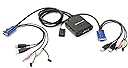
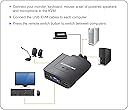
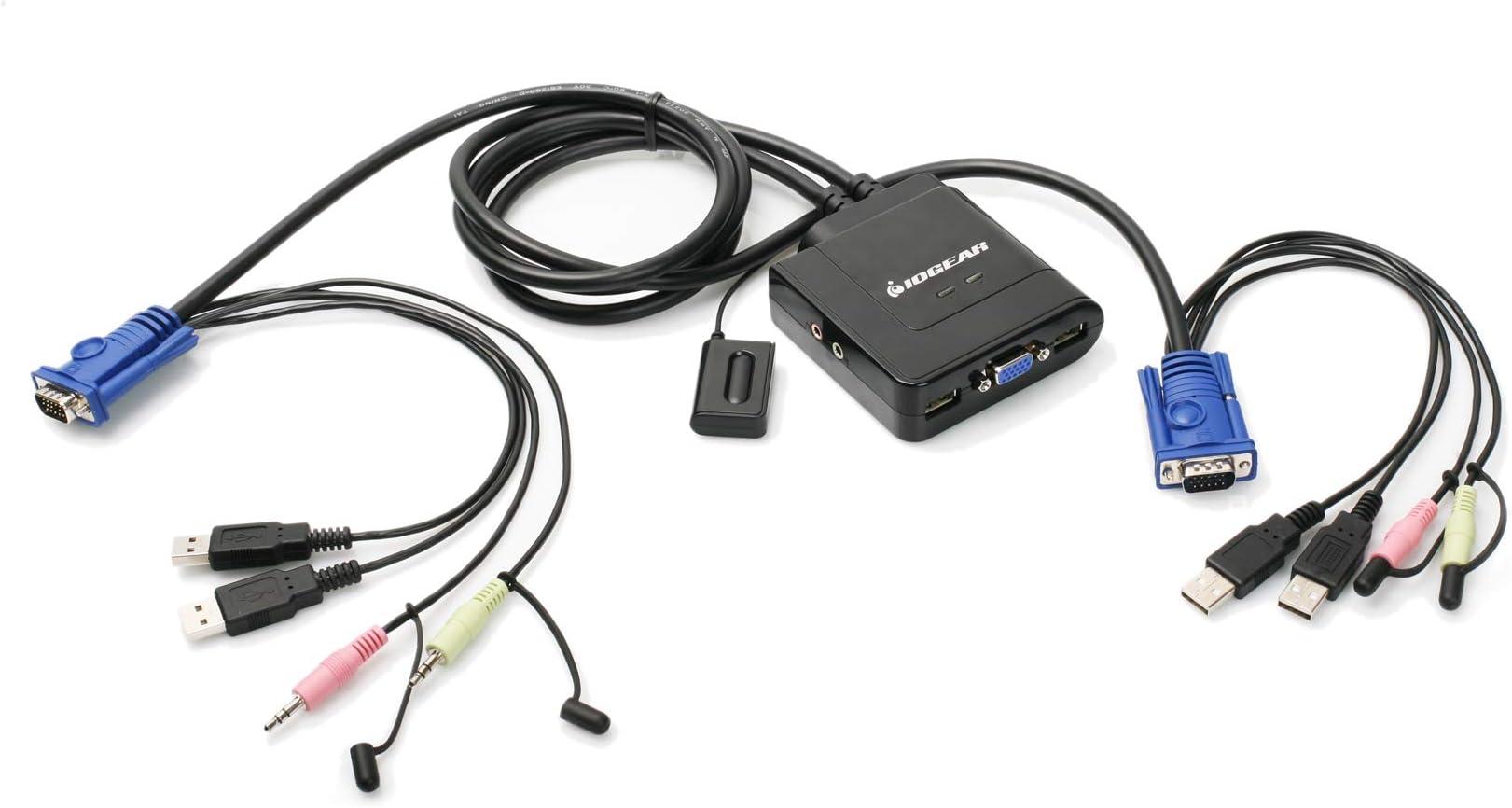
The IOGEAR 2-Port USB VGA KVM Switch (GCS72U) empowers professionals to control two computers using a single USB keyboard, mouse, and VGA monitor with up to 2048x1536 resolution. Featuring plug-and-play setup, integrated 2.1 stereo audio and microphone support, and a convenient wired push-button switch, it’s compatible across PC, Mac, and Sun platforms. Ideal for streamlined workflows, it requires no additional software or power adapters and comes backed by a 3-year warranty and lifetime tech support.


| ASIN | B002K0TU2C |
| Audio Output Mode | Stereo with Subwoofer |
| Best Sellers Rank | #30 in KVM Switches |
| Brand | IOGEAR |
| Built-In Media | GCS72U, Manual, Warranty Card |
| Cable Type | VGA |
| Color | Black |
| Compatible Devices | Linux, PC, USB Supported Systems, Windows, macOS |
| Connector Type | Vga, Usb |
| Connector Type Used on Cable | Vga, Usb |
| Customer Reviews | 4.3 out of 5 stars 1,469 Reviews |
| Global Trade Identification Number | 00881317504036 |
| Item Weight | 0.82 Pounds |
| Manufacturer | IOGEAR |
| Mfr Part Number | GCS72U |
| Model Number | GCS72U |
| Number of Ports | 2 |
| Power Source | USB |
| Smart Home Compatibility | Not Smart Home Compatible |
| UPC | 071030042797 080850176551 230494831112 851905132637 881317504036 898029639796 999992674378 015438158339 159389692266 807030488040 168141485879 521227104956 172304248720 809385658529 803982753496 777786314019 172302707960 843024387555 763615872553 191120077758 086000400330 021111274616 |
| Unit Count | 1.0 Count |
| Warranty Description | 3 Years |
B**T
Great KVM switch. Recommended.
I use this KVM switch for a home lab setup which often changes both hardware and OS configurations. Presently, it is connected to two CentOS 7 servers (linux). In summary, I am very pleased with the product overall. Details follow. Packaging was good. I appreciate the informative, properly sized box IOGear uses for this switch. No hard-to-open plastic molded shells here. One minor problem was the actual wrapping of the many cables that make up this product. Count on about 5-10 minutes to unravel and untangle all the cords. The printed Quick Start Guide is easy to read and installation is clear and simple. I had the KVM switch hooked up to both my computers in about 5 minutes. My computers are close in proximity, so length of cables was fine (3ft each). If you have computers that are not near one another, I recommend you consider cable lengths before purchase. All cable moldings and insulation seem top rate. The one exception may be the button switch cable which is very thin and several feet long. Be careful not to pull this one or crimp it under a heavy computer case--it probably could be damaged easily. The KVM center hub, which is where all the cables plug into and originate from, is made of sturdy plastic. Again, all connection ports seem high quality and spaced properly for easy of use. There is a green LED which illuminates on the hub to designate which connection is active. Unfortunately, these two LEDs are not labeled, other than a "braille-like" pip under each. One pip for one connection, two pips for the second connection. It would have been nice for the manufacture to label that better, but this is not critical to the operation of the product. For my particular setup, I had to use a DVI-VGA converter on one of the cables. This is because my video card on that server had only DVI video ports. Also, I did not use the audio cables for this particular setup, so I cannot review that feature at this time. Be aware that if your computer requires a keyboard during the power on sequence, be sure to toggle the switch to be active on that server when you turn it on. This is because the switch does not maintain any sort of heartbeat on the inactive connection (some higher end KVM switches will do this). In addition, even if the OS boots properly without an active video connection, you will likely have a low resolution (640x480) when you do switch to it. Therefore, I recommend booting one computer, then switching to the other computer and boot that one. Switching is instantaneous and I experienced no failures after several hours of using the switch. I also was pleased to see that desktop session timeouts (where the desktop blanks the screen after several minutes of inactivity) did not confuse the KVM switch either. Overall, I am very happy with this product.
D**W
Best KVM Switch!!!!
I love this switch! It was super easy to install and works perfectly! I love the fact that is uses the little remote control (over keyboard shortcuts) since keyboard shortcuts can act funky with USB desktops and sometimes newer keyboards do not have Scroll Lock (at least one of my keyboards do not). The device is installed and works perfectly. I have a 21" (1920 x 1080) monitor, JBL Speaker, Microsoft USB Desktop (Mouse and Keyboard all in one), and iPhone cable hooked to the unit. Both computers are running Windows 7 x64 and look great on the monitor and sound great over the speaker. The monitors full resolution is running perfectly on both computers through the KVM switch. I have had IOGear KVM switches in the past (but they only had PS2 and not USB). The only issue I had (which is my own problem) is that I am hooking up to a desktop and a laptop that uses a HP docking station (one cable to the laptop and all the rest [USB, VGA, Audio...] hook to the docking unit). The desktop hooked up perfectly, however, the laptop docking station had an issue due to the size of the audio cable on the switch. The VGA cable is on one end of the docking station and the audio on the other. There was not enough cable length to go from one end to the other, you will have to get a extender for the audio (or VGA) cable to get this to fit. -- Just FYI in case you are using a docking station. In all, I LOVE this docking station. It was easy to install, small enough not to be in the way and simplistic enough for everyone in the house to take advantage of the computers. I highly recommend this for the price and the brand IOGear is great!!! I have never had a problem with any of the items I have bought in the past that were IOGear brand!!!
T**Y
Great device, especially for the money.
This is my first KVM switch and overall this unit does the trick quite well, with a few notes - keep in mind, I've never had one before when you read this. First off, no power supply required for this, which is nice and the button to switch over is subtle and has plenty of cord. The unit itself is small and seems pretty well built. The actual switching mechanism works very well and quickly. The notes: 1. The maximum wing span of this units cables seems to be about 6 feet, if you have a large desk and are on opposite ends as I am, it's quite a stretch. Seems all signals run through (what seems to be) a VGA/D-Sub cable, but it's unclear if you can extend this with a standard VGA cable or not. 2. The microphone port is not powered, if you want powered (as is required for some mics) you may need both sides (PC1 and PC2) to be powered ports - thus my mic would not work on this setup. 3. This unit requires 2 USB connections on both side, not clear to me why this is needed, if one side is laptop, your options could be limited. 4. For USB HUBS, I would suggest you connect your devices to a POWERED hub (unpowered may give you errors for high draw devices like a keyboard). The hub will help, because you can keep your wireless transceivers close to your devices. Sounds switch is perfect, no feedback or odd noises, works great. Video quality of course is solid, but do remember to order a DVI to VGA adapter if your PC is DVI - I had to roll back to my 2nd video card. Overall, I would buy again for the price and still a very good device, but for
T**.
Switch time takes a couple of seconds but I especially like the fact that it also includes speaker/mic connections for ...
For what it costs and what it does it's hard to beat! I realize that it doesn't have keyboard hot-keys for switching but the cord on the switching button is long enough that it can be placed close ebough to or even directly onto some leyboards to just reach over and press to switch between the 2 PC's as needed. Switch time takes a couple of seconds but I especially like the fact that it also includes speaker/mic connections for both PC's to use one keyboard, mouse, monitor, microphone, and speakers. I'm running 1920x1080 through its' VGA port on my 27" Samsung monitor (this KVM does not do DVI or HDMI) and it still looks beautiful. I've seen how crappy some monitors are and how some KVM switches inject noise/lines/etc into the video at high resolutions but I'm not having any display issues at all with this KVM. If I boot a PC while not switched to it, especially if I don't switch before it gets to the Windows 10 desktop, windows sometimes reverts to a much lower resolution (800x600 I think) as it occasionally doesn't detect the proper EDID due to not being routed to the actual monitor while booting into Windows but a right click to get into the windows display settings menu and a click of the "identify" button and windows figures it out and goes right back to full resolution. It doesn't have all the extra deluxe bells 'n whistles but for what it does for the price it costs and the fact that all the cables are built in instead of having to be purchased separately and that the scroll wheel function of the mouse stays working after switching PC's, among other things, I'd say it's definitely not junk, it works really well overall for what it is, runs off the USB ports for power so it doesn't need a separate power supply unit, and don't let the fact that it's "just" VGA, not DVI or HDMI turn you away...
C**1
Simple, Effective
Up front, I have not used the video, or the audio. I came to the conclusion after researching KVM switches that if i wanted a DVI/HDMI switchable element, I would have to pay more than I could afford. In addition, since I only wanted to avoid having to drag out my second keyboard and mouse (i'm only slightly lazy), I think this product works well. This Unit is simple and effective in its operation and construction, and price is on point. Switching between my work machine, while using my two computers takes a few seconds to work, approximately 3 seconds I believe. No light or indication is allowed to let you know which you have active, though with only two computers, this is usually easy to resolve. When one machine is disabled while having the focus, it is still necessary to swap back to the other machine. For the price, this is not an issue though. I was concerned with the construction of the tether to the controller, which is fairly small, with a thin cord, but it had held up, despite being squeezed between the wall and my desk edge. The button itself is easily clickable, though sometimes hard to find under all my desk clutter. Another thing I was worried about was the length from one device to the other. The listed I think 6ft or so was only slightly exaggerated, and I am pleased to report that I was able to snake the entire assembly from my desktop on the floor about a foot away from my left leg, all the way to a laptop that sits to my right side about a foot away from my right arm. The cords for the most part were able to be stowed using cable ties and velcro fairly well, though I cant help but think it does look at times a bit clunky. Overall, very well done, solidly executed product. Running for awhile now, and still works fine.
R**R
Works OK, but not perfect.
I have an older XP machine and a Windows 8 machine. When I first connected, the windows 8 view was fine, but the XP view had the "jitters", and the screen size would be too small. Restarted, reconnected, made sure drivers were up to date, etc. The only way it seemed to work (for the monitors) was to finally hook up the XP machine by itself, then connect the Windows 8 machine. Another reviewer stated that the icons got placed differently on one of his machines, and this happens on my XP machine on restart, cannot seem to keep them the way I want it. Very scant documentation was included with the device, and the online support searching was not helpful in my opinion. You have the option of searching generally under "kvm", but not by the specific model number. When I searched by the specific model number, I did not see this model listed, only 725 results, and after reading several of the documents did not see any that pertained to this model. It appears from several searches that if your search does not find anything specific, it still shows 725 results. According to a rep during chat, found out that there is no manual besides the Quick Start manual. From reading the reviews, probably works fine with two newer machines. If the screen size jitters and resizing shows up again, I will update this review. UPDATE: The jitters/flickering did not return PROVIDED that the monitors are set at specific resolutions. In my case, the resolution settings on the monitors were not the same. I had to keep adjusting the resolutions until I found the ones that worked. Once I found the combination, things seemed to work fine. POWER SETTINGS: If your computers go into sleep mode as a result of your Power settings, you will probably have to restart them, depending on which computer went into sleep first. I just set both never to turn off the monitor or hard disks, since these are not computers that are on all the time, so a little extra power usage is not a problem. There are versions of these devices that have a battery backup for power, but these only have PS2 connections. I could not find an inexpensive USB KVM with a battery or AC backup.
C**D
Great Product
This is a great product. I made a mistake of trying to buy a cheap product from a noname company, but I had a lot of issues with that product. After returning it, I did a little research and found that Amazon sold a great two port USB KVM. This product does what the other wasn't able to. My Logitech G11 keyboard and MX518 mouse both work perfectly and are picked up instantly upon switching machines (including being able to use the macro buttons on my G11). The headphone audio also works great. I haven't tried using the microphone channel yet, but I'm guessing it would work just fine too. The switch included on the machine has such a long cord on it that I put the KVM at the back of my desk, as you only need to touch the small switch to change which machine the KVM is currently controlling, saving me a bunch of space. The best thing is that this product is able to swap between my PC installed with Microsoft Vista to my Mac mini with no real issue. I've only ran across two little "problems" (I wouldn't even call them problems because I've learned to live with the little quirks) a) If the KVM isn't set to the PC machine before I boot it up, the screen resolution is stuck at a max of 1680x1050 resolution when I normally use 1920x1080. For some reason with current ATI drivers I'm unable to select my normal resolution without a restart. If the KVM is set to the PC's channel then the machine boots up into the correct resolution with no problem. b) When my G11 keyboard is set to the brightest backlit keyboard setting there is a slight static on the headphone audio channel. Turning the backlight off removes the noise. I'm going to recommend this product to anyone who asks me about setting up their home office, or who needs to command two computers from a single terminal (as I'm often the go to guy when tech problems come up). I'm also going to be sticking with IOGear KVMs for quite a while. Quality is top notch. Only thing I could think to improve on the product would be to fix the two small problems I found, and then maybe making the cords provided with the KVM a little bit longer, as if your machines are pretty far apart, the cords might not reach them. For me though, the cords were plenty long. In closing, have no fear when buying this product if you own Logitech gear, as I've had perfect compatibility across multiple operating systems.
W**T
My Last IOGear Product
I recently purchased this switch to replace and older model w/o audio/mic input. The switch works ok until a computer goes to sleep. Once asleep, the switch won't wake the computer when moving the mouse/keyboard (a problem I didn't have on my previous device). I'll just share with you my lousy IO tech support conversation, copied & pasted verbatim: -------------------------------------------------------------------------------------------------------------------------------------------------------------------------------------------------- Customer By Email (Walt) 09/14/2015 07:16 AM Hello: I recently replaced and older KVM switch with a newer model (GCS72U), which includes audio/mic support. The problem is getting the computer to wake from sleep after I switch to it. I'll put one computer to sleep or be away from it for an extended amount of time (1 day), and they try to get it to respond. I end up having to manually power down the computer and then the switch will work. I didn't have this issue with my older IO switch. Can you offer a solution? >>> Response Via Email (Stephanie) 09/16/2015 09:22 AM Walt, Unfortunately is not an issue associated with the kvm but related to the display settings or sleep settings on your pc. I do not have a solution at this time except to check your settings for sleep and energy on the pc in question. Thank You, Stephanie IOGEAR Technical Support >>> Customer By Email (Walt ) 09/16/2015 11:16 AM Why would one KVM switch work correctly and not the other? My old one worked fine, and no changes in settings. I simply replaced it with a new switch because the new one has audio/mic connections. >>> Response Via Email (Stephanie) 09/18/2015 10:09 AM Walt, Each kvm is different. Simply because a prevous model work does not mean a new on but a different model will. Thank You, Stephanie IOGEAR Technical Support >>> I won't copy/paste the last message I sent to dear "Stephanie," suffice it to say, this is my last IOGear product purchase.
R**R
Nice product
Best
G**G
I looked at the manual but it's pretty easy to figure out
Wunderbar. I looked at the manual but it's pretty easy to figure out. The switch works well, no issues except one computer seems to change the screen resolution settings if you switch back to the other computer before it finishes loading properly. Ok, one other minor quibble. One of the pins bent on the graphics port. I don't know if it's because I pushed too hard, or the metal was softer than I'm used to. Thankfully it didn't break, so push the connections together gently. Perhaps the newer stuff isn't as hardy as my usual monitor connector.
J**O
Funciona con Solaris/Linux/Windows perfectamente
En combinación con el teclado "Perixx PERIBOARD-407B ES, Mini teclado con cable - Interfaz USB" funciona perfectamente con cualquier combinación de plataformas Solaris/Linux/Windows.
D**E
Works without VGA too!
I have a gaming PC and a Mac that I need connected to the same monitor, but these will be connected with Dual Link DVI and DisplayPort respectively. I will control the input on the monitor manually, but required a switch for audio, keyboard and mouse only. This is a product that seemingly doesn't exist, so I went for this, hoping that it would work without anything connected to VGA. It arrived today and, while I don't have the monitor yet, I have been able to test the switch and it works very well. The cables for each computer are bundled together as a single wire when leaving the switching block, making it much easier to manage cabling and avoid the spaghetti disaster that normally comes with a more complicated setup. Another feature that helps keep cabling hidden is the remote control switch. This operates on a toggle basis so is only one buttons and attached to the switching block with a good length of cable so this can be conveniently located at the side of a desk or wherever else you wish it to go. I'd recommend buying some cable tacks to keep this tidy, and perhaps some double sided adhesive if you plan to fix the button to the underside or side of a desk. The build quality seems good and the connections are well fitting and secure. The switching time is very fast (not too important for me as I'll be changing monitor inputs too) and as long as one of the computers is on power is maintained to these USB devices which might be important if your keyboard has some advanced features involving temporary memory. All in all this seems like a great product and, crucially for me, works without the VGA connections being in use. I can't actually think of any way this product could be improved!
J**Z
excelente
excelente
Trustpilot
1 week ago
1 month ago