Buy anything from 5,000+ international stores. One checkout price. No surprise fees. Join 2M+ shoppers on Desertcart.
Desertcart purchases this item on your behalf and handles shipping, customs, and support to Slovakia.
๐ Unlock lightning-fast, universal storage with style and cool confidence!
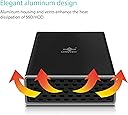
The Vantec USA NexStar CX 2.5-Inch SATA to USB 3.0 External Hard Drive Enclosure supports all 2.5" hard drives and SSDs, delivering blazing data transfer speeds up to 5 Gbps via USB 3.0. Its durable aluminum casing ensures efficient cooling and vibration reduction, while the blue LED indicator provides clear power and activity status. Compatible with Windows and Mac OS, this lightweight, plug-and-play enclosure is the perfect upgrade for professionals seeking reliable, high-performance external storage.


| ASIN | B074NM3ZXS |
| Best Sellers Rank | #247 in Enclosures |
| Brand | Vantec |
| Built-In Media | NexStar GX USB 3. |
| Color | Black |
| Compatible Devices | Laptop |
| Connectivity Technology | usb |
| Customer Reviews | 3.9 out of 5 stars 304 Reviews |
| Data Transfer Rate | 5000 Megabits Per Second |
| Enclosure Material | Aluminum Casing with ABS tray |
| Global Trade Identification Number | 00844767022710 |
| Hard Disk Form Factor | 2.5 Inches |
| Hardware Interface | USB 3.0 |
| Hardware Platform | PC;Mac;Linux |
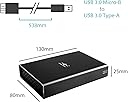
| Item Dimensions L x W x H | 4.72"L x 3.15"W x 0.98"H |
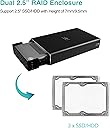
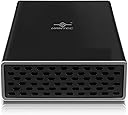
| Item Type Name | Vantec Nexstar GX USB 3.0 Dual 2.5" SATA SSD/HDD RAID Enclosure, Black (NST-272S3-BK) |
| Item Weight | 10.56 ounces |
| Manufacturer | Vantec USA |
| Material | Aluminum Casing with ABS tray |
| Memory Storage Capacity | 2 TB |
| Mfr Part Number | NST-272S3-BK |
| Model Number | NST-272S3-BK |
| Product Dimensions | 4.72"L x 3.15"W x 0.98"H |
| Supported Devices Quantity | 2 |
| UPC | 844767022710 |
| Unit Count | 1.0 Count |
| Warranty Description | 1 year parts and labor |
R**C
Fantastic value, immaculate product, and great for ps4
Amazon did not email me asking me to leave a review on this product in return for discounts, which is the only reason I have ever left reviews previously. I came here on my own accord to praise this absolute miracle of a disk enclosure. This review will be pretty lengthy in order to tell the whole story of my adventure with this product, so bear with me. I recently purchased the dual drive RAID enclosure (type A, I believe.) First, some preamble. A couple years ago I decided to put a hybrid drive in my ps4 pro. It worked very well, and I also used an enclosure to use the original 1tb toshiba hdd that came in the console as external storage. Well recently, I decided it was time to update and purchased a 1tb ssd for an internal drive. Which left me with a conundrum (or so I thought.) Ps4 only let's you connect one external storage device to the console at a time, so what to do with the other drive? Then by some stroke of luck, I came across this device. I could combine two drives and have it recognized as one? On a playstation? I didnt believe it, but worst case scenario I could sell it to a more technologically inclined friend or hold onto it until I found some other use for it. Lo and behold with a few hours on google (the lengthy amount of time it took was entirely my own fault, as I'll explain in a moment) I managed to get a 1tb seagate firecuda and a 1tb toshiba hdd recognized as one drive (as well as formatted correctly for ps4 external storage.) In addition to working perfectly, this thing gets better read and write speeds through the ps4s usb 3.0 port than the firecuda did on the internal sata III connection and that's without utilizing the firecuda drives 8gb flash cache, which is what makes the firecuda sshd a faster drive than a lot of other 2.5 inch 5400 rpm hdds. The flash memory cache in an sshd resets once power stops going to the drive, and data is only added to the cache after that data has been accessed several times (I think I've read 5 times?) on the same power cycle. So once power stops being supplied to the sshd, it performs the same as any other 5400 rpm hdd until you can open something enough times to get data back into the flash memory. But enough about the firecuda, this enclosure is absolutely spectacular. So as I stated previously, it took me a long time to set this drive up, but this was ENTIRELY due to user error on my part. There are switches on the enclosure that let you choose between JBoD, RAID0, and RAID1, as well as a reset button. I wrongly assumed that disconnecting, flipping the switches to the desired configuration, and reconnecting the drive to my laptop while setting it up would make my computer recognize the drive in my chosen configuration. It took me a long time to figure this part out, but listen to me when I tell you; YOU CAN ONLY RECONFIGURE THE DRIVE BY PRESSING THE RESET BUTTON. NOT DISCONNECTING THE DRIVE. NOT EVEN REMOVING THE HARD DISKS/SSD DRIVES THEMSELVES FROM THE UNIT. YOU NEED TO USE THE RESET BUTTON PROVIDED TO YOU ON THE ENCLOSURE. That's right. I spent almost 2 hours on google just to find out that all I had to do was press a stinking button. Boy was I mad at myself once I finally tried pressing the button and noticed that my computer recognized it as a RAID0 drive pretty much instantly. In summation; Vantec Nexstar GX Enclosure: 10/10, runs faster on 5gbps usb 3.0 than either HDD inside of it does on 6gbps SATA III My own technological prowess(in this instance, at least): 0/10, I ignored the instructions and paid the price, taking almost 2 hours of google searching to realize that I just needed to press a button (which the instructions clearly state needs to be pressed *facepalm*)
D**.
Keeps flaking out...
I bought this and 2 new Kingston drives to use as a RAID 1 music streamer. I could not get it to stay working long enough to use it even once. Would lock up randomly even during formatting. No errors it would just freeze. I used the included power adapter. I tried using just one drive. I also tried using a WD drive I already had and same problem every time. I tried it with both Windows 10 and MacOSX. The one time I got it to where I could copy files to it after just a couple of minutes it just froze and was no longer seen by the OS. Had to unplug it and plug back in but ended up with a corrupted file it froze on. All 3 drives work perfectly when mounted in a single bay USB enclosure I also have. I was drawn to this model as it is one of the few that can be powered separately instead of stealing power from pc or laptop. Build quality is ok for the price but would be nice if it worked. Guess I got a defective one. Returning for refund and will try a different brand. Update: Checked it one last time before returning. If I format an SSD in my single bay enclosure and put files on it then place the SSD in this unit you can access it just fine to read it. If you try to write something to it large files freeze every time. Small files seem to write to it ok. If you try to formal the drive in this unit it always freeezes part way through and all the data that was on it is still there. So it seems to read ok but has problems writing to drives.
M**Y
What a premium 2.5 SATA enclosure
What a premium enclosure. This enclosure is rock solid. I had my drive installed in seconds and I was able to run the drive just by plugging it into my USB without having to use the separate power cable. The device has two LED lights that show disk activity. On the back side it has air holes to disburse heat. it also has a clip on stand which is certainly a nice add-on. Anyone looking for an enclosure for 2.5 SATA drives will be VERY happy if they order one of these.
G**S
Works well, but beware the setup instructions!
(Note: This review is specifically for the Nexstar GX USB 3.0 Dual 2.5", Model# NST-272S3-BK) I've bought a couple of these now, and will probably get a couple more. Among other things, these are a great way to repurpose older, smaller-capacity drives, especially since they come with their own supplementary power supply if your HDDs pull more current than your USB port can supply on its own. (If you're only connecting to computers with USB3 ports, or using SSDs rather than HDDs, you generally don't need the extra power, but it's handy to have the option.) Assembly is easy; the drives just slide in to their respective bays, and one screw in each corner holds them in place. Note that the package comes with two short screws, and two longer ones -- and what's not immediately obvious from the instruction sheet is that it's the *longer* screws which are used to secure the drives to the plastic carrier tray, and the *short* ones that are then used to secure the carrier into the outer metal shell. Once assembled, it's a compact and solid little device; the sturdy metal shell is a welcome change from the usual flimsy plastic a lot of external USB cases use. The only two issues I've found so far, are these: First, I have to agree with some previous reviewers about the status LEDs; they're really not in the best position for visibility when the drive is in use, being located on the side of the unit and well towards the "back" where the connectors are, and recessed below the surface of the drive enclosure. They're more visible if you use the unit in the vertical "stand-up" position with the little plastic stand, but when it's lying flat on the desk, they're very hard to see. The other issue is first-time setup. The manual really should caution you not to connect the device to your PC until *after* you've powered up the enclosure and pressed the "reset" button to reinitialize the enclosure and set the desired RAID mode -- otherwise, Windows seems to get confused when it finds the drives, and then they abruptly disappear when you reset the enclosure, and you may have to restart Windows entirely to make it recognize the new array again. If you do your first-time setup by powering it from the USB power supply, reset the enclosure, *then* connect it to the PC, it gets recognized right away. That minor annoyance aside, it's always nice to find a product that just *works* and does what it's supposed to. :-) Recommended.
M**.
Compact and easy to assemble,great for Xbox series x
This is a solid built compact raid enclosure . It was easy to assemble . I bought this to make an external drive for my Xbox series X using two 1 TB SSD's. It did take a bit to get it to work but since then it has been issue free. In order to make it work you need to configure it on a PC before attaching to the console. First and most important only plug into the motherboard not a case USB or USB hub( this was 90% of my issues it would recognize the drive and then randomly disconnect ,as soon as I tried using mobo USB no issues) second ...most drives are not formatted out of the box .If you do not have the ability to initialize before installing into the case ,install one and initialize and remove it and do the second ,then remove from USB and install both drives and reconnect and it should work from there . It took a bit to figure it out but was worth it two 1tb SSD's striping are a must for the Xbox series x .I transferred a 133 gb game in about 6 minutes where it would take 20+ on a conventional and about 5 mins between the internal and additional storage on the console...it's a must have if you as me.Now if you don't use the console for a week or so it will turn off the drive and you will need to plug and unplug it to turn back on,and as far as being used on the console the power cord is optional as the USB will power it.
S**N
Excellent product
Been flawless. I get about 250 MB/s write over USB 3.0 with the supplied cable. Have two 8 TB SSDs in striping configuration. Sturdy well-ventilated case. Love that it operates off the USB power only, though not all USB 3 ports are powered like this; check your different ports. Also, it's very sensitive to the quality of the cable, so if you can't use the supplied cable, get a good substitute.
R**L
Failed after 3 months, lost all data. Stay Away!
At 1st I really liked this device. The concept of taking 2 identical HDDs or SSDs and combining them into a RAID0 single drive at twice the transfer speeds seemed fantastic. In fact after buying one, I purchased 2 more. Then one day after 3 months of owning 3 of these Vantec cases configured in RAID0, I noticed one of my drives was no longer showing up. Spent hours trouble shooting. Ended up pulling the drives and putting them in a different case and they worked fine but all my data was now lost. Tried it again in Vantec case, but still no go. I further tested it out with 2 separate identical Sandisk SSD drives. You plug it in, it recognizes the drives but drives can not be formatted. The thing just stopped working after 3 months causing me to lose all the data stored on the drives. Luckily for me, my intent was to use the drive as a data backup, so I still have all the data, just now I'm looking for a replacement backup storage solution case for my drives. The other 2 Vantec dual drive cases I purchased are still working but I certainly don't feel confident they won't fail just like the other. I also own multiple other dual RAID0 cases made by Oyen Digital, Cable Matters and MediaTek. Those all have worked flawlessly where it seems other than the obvious failure of one of my Vantec cases, I am constantly having to disconnect and reconnect the Vantec cases which still work due to them periodically just not showing up on my system unexpectedly. Stay away from this case. My favorite is the Oyen Digital, yes costs a bit more but they have worked flawlessly and have been reliably and most importantly feel I can rely on them to not lose my data. Review Update 9/28/22 (Vantec Warranty): I ended up contacting Vantec to make a warranty claim since I was still well within the "1 year" warranty they provide. Their support link through Amazon was not working, so had to go search for it on their website. They required me to ship the device back to them, where they expect you to pay for the shipping, so they could keep me waiting while I wait for shipping back to them and they can perform their analysis. Then after all that was complete, they would get back to me to confirm their device failed. I'm 100% certain their device failed because I purchased 3 of these boxes and did a part swap to isolate the failure to this particular unit. But hey! They have to follow their defined process without common sense coming into play, that for a device which cost me $30, it is just not worth the customer hassle to go through all that. Totally unpleasant customer experience. This was my 1st and last purchase for anything which has the name Vantec on it.
M**O
RAID over USB slow unless you update drivers! MUST check optional updates!!
First, how to configure: 1. insert your drives and select raid mode using dip switches 2. plug in the drive, but ONLY the power. Do not connect to your PC yet 3. press and hold the reset button to configure the controller into the mode you selected. You have to press and hold for some time. If it doesn't work, unplug and try again. 4. Connect to PC and format drives 5. Install drivers & restart Initially, I got a paltry 40mbps over usb3.0. Sad! I was JUST about to return it when I thought about drivers. Checking device manager didn't yield anything, but when I went to windows update I found an optional USB driver update. My speeds increased by almost 10X after the driver! I'm happy with it now. It's almost 4x faster than a cheap USB3.0 to SATA adapter that I have!
J**R
Excellent product!
Jobs or Raid 1 or Raid 0, they all work perfectly! Easy to install, I put 2 500gb drives and am currently using them as Raid0, very fast drive...
F**Z
SUPER PRODUCTO
ESTE PRODUCT ES SIMPELMENTE ESPACTCULA CON UN RENDIMIENTO SUPER BUENO
M**G
Works better than expected.
I connected 2 ssd drives, different sizes and they went in easily. Connected them to my smart TV, worked first-time! I'd worried about if they needed a power supply. It came with a US style 2 prong mains plug. Useless in the UK, I'd need an adaptor. But the tv's USB socket is powered so no need for an external power supply after all. Great! Super! This cheap setup replaces a non-functioning ยฃ200 media box connected to my TV. Very happy customer. Don't use the RAID facility.
M**Y
Works great BUT...
Works great but you can't just throw two drives in this and expect it to do the rest. Both drives must be formatted BEFORE installing in the enclosure and both drives must match if you wish to use RAID 0. I actually formatted one and forgot to format the other and the formatted one showed up while the other didn't. Solid performance in RAID 0 with two 256GB SSDs. Getting approx 400mb/s read and write. The enclosure is decent aesthetically. I believe it's aluminum and is about the size of a 3.5" HDD. Hopefully it holds up over the long term.
P**G
Great for mounting 2 X 2.5" hard drives or SSD.
I bought this to mount 2 X SSDs for a NAS based on the Raspberry Pi 4. Very handy for keeping the drives in one enclosure. The pre-drilled screw holes make it easy to mount in a standard 3.5" drive rack, or mount to other types of frames.
Trustpilot
2 days ago
3 weeks ago