Desertcart purchases this item on your behalf and handles shipping, customs, and support to Slovakia.
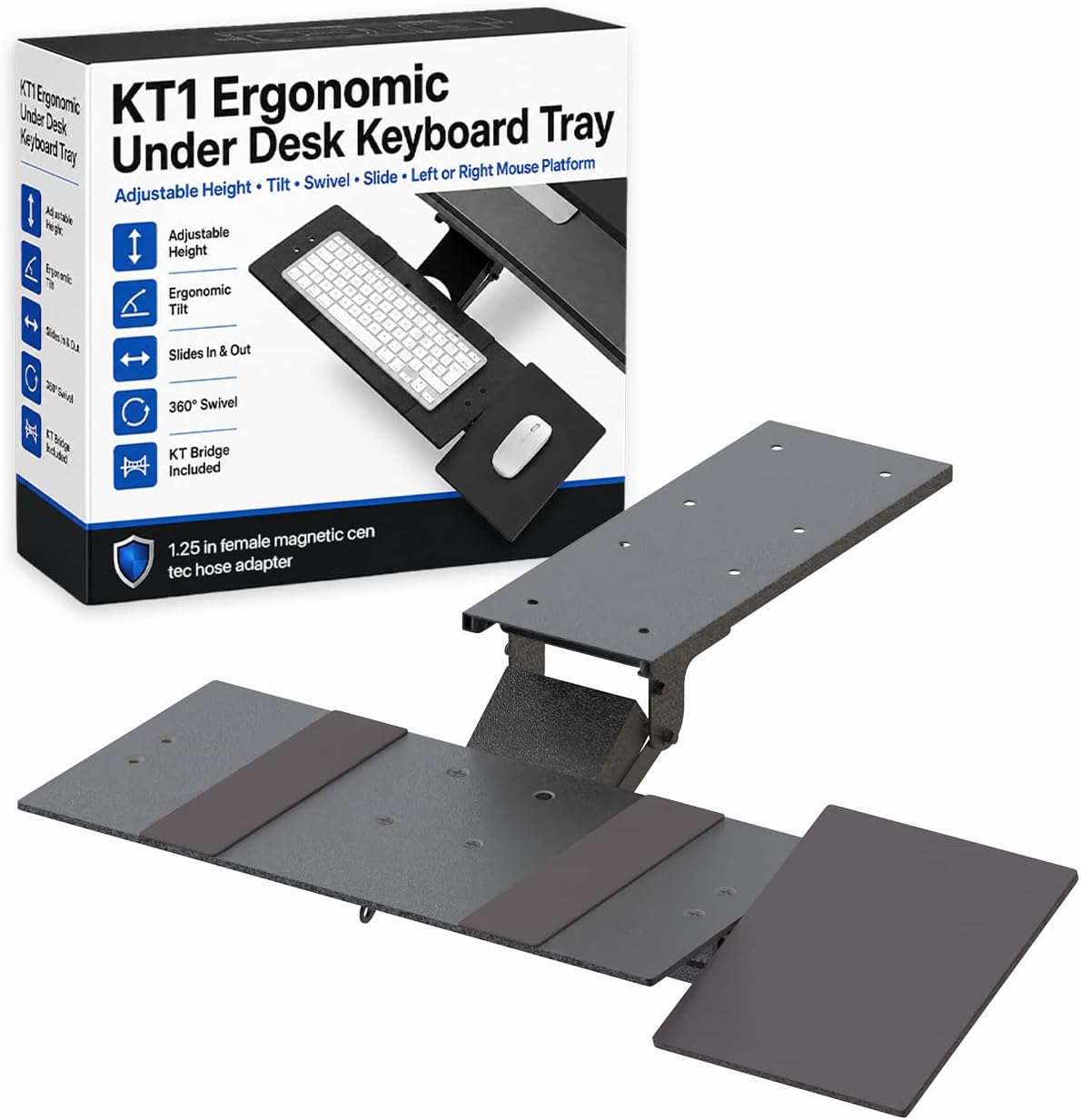
↕️🔄 Elevate your desk game with ergonomic precision and swivel freedom!
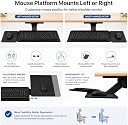
The KT1 Ergonomic Keyboard Tray by Uncaged Ergonomics features adjustable height and negative tilt for optimal wrist comfort, a smooth 360-degree swivel mechanism for flexible positioning, and an adjustable mouse pad attachment. Crafted from durable alloy steel, it mounts securely under your desk to save space and enhance your professional workspace ergonomics.


| ASIN | B01BRKH090 |
| Best Sellers Rank | #316,419 in Office Products ( See Top 100 in Office Products ) #351 in Keyboard Drawers & Keyboard Platforms |
| Brand | Uncaged Ergonomics |
| Color | Black |
| Customer Reviews | 3.7 3.7 out of 5 stars (1,226) |
| Date First Available | February 14, 2016 |
| Item Weight | 10.12 pounds |
| Item model number | KT1-b |
| Manufacturer | Uncaged Ergonomics |
| Manufacturer Part Number | KT1-b |
| Material Type | Alloy Steel |
| Number of Items | 1 |
| Product Dimensions | 19 x 5 x 10 inches |
| Size | 18.5 (L) x 8.75 (W |
N**R
EXACTLY the kind of thing I was looking for!
Wow, this keyboard tray is awesome! If you need a keyboard tray, especially for a desk that has a metal support rail set about 2 inches back from the edge on the bottom making it tough to find something that can both clear that and still be used at a comfortable ergonomic height when extended and in use. This fit the application extremely well! Observations when assembling/installing: The mouse mounting bracket did *seem* to be crossthreading when I put the screws in, but with the proper size Phillips screw driver its more of a built in lock washer effect when screwed completely in, just without the washer. I actually ended up using the washers on another project since it doesn't seem like they are needed for either the KB/mouse trays or the fasteners that screw in to the desk. Ill be shocked if any of them get loose as it IS a keyboard tray and not a jungle gym. Final impressions: Super solid construction provided you don't mount it on a 50 year old folding card table! I didn't think I would use the mouse tray, but I went ahead and put it on to check it out and its definitely staying. The single adjustment 'bike seat' lever makes it easy to move it down far enough to slide it under the desk when its not being used and is just as easy to slide back out and up to the height of my chair arms. This makes it super comfortable to rest your forearms on the chair while using both the keyboard and mouse. As an unexpected bonus they even included a mouse pad in the box cut to size, a nice addition to include as my washable fabric razor gaming mat is a bit too big for the area. ------------------------------------------------------------------------------------------------------------------------ My thoughts on other reviewers and their insane ramblings start here: I was kinda wondering if I had made the right purchase here after scanning through some of the reviews. Then I looked a bit closer and saw titles like "Dssign needs improvement" I had to do a double take based on nothing but the spelling alone. This particular reviewer went on to say the following: "Someone has to crawl under the desk and drill holes in the underside after holding the entire thing up to position it. Once you figure out where to position the plate that attaches to the desk, you have to disconnect the plate from the keyboard platform in order to screw it into the desk." Yeah dude, that's how these things get done.... what exactly did you expect? Did you really expect it to jump out of the box and magically mount itself while you fit in your afternoon nap? I assembled and installed it in less than 10 minutes with no help, and using nothing more than a hand screwdriver and a pair of pliers to hold the nuts on the bottom of the KB tray while tightening the screws. Then I held it up where I wanted it and marked one of the screw holes in the middle of the slide with a marker, then set the assembly down while I took my hand screw driver and put one screw in on the sharpie mark I had made. After that it was easy to just remove that screw, hold it up with one hand, and replace the screw which easily held it up while I was finishing the 7 others. I'm thinking some of these reviewers are JUST MENTALLY SLOW, because that was actually easier than I had anticipated! Before receiving and inspecting it I was sure it would need to be disassembled before mounting, but nope! This mental midget of a product connoisseur/reviewer goes on: "I don't know what other reviewers mean by 'easy installation.' It's NOT." LOL! They keep going on and on about how pathetically weak and clumsy they are, then proceed to speculate on what will happen when the rubber material 'wears off' (rips off because they are clumsy and whatever the opposite of intelligent is...): "the adjustment levers are tight and difficult to adjust." "And there is no lip around the mouse platform to keep the mouse from sliding off, which it does on a regular basis." "there is no lip on the keyboard tray either so it may slide off once the rubberized strips get worn down." LMAO!!! I can't even. Some people amirite? Talk about a total deficit of practical knowledge and skill. Too bad it seems to be more common lately... I wonder what happens when this individual gets a flat tire and no one is around to sing a soothing tune while changing it for them. I'd guess someone finds them in the fetal position in the back seat of their vehicle a couple days later muttering something about lug nuts and too tight... HAHA
F**6
A very good choice!
I purchased this as an open box. In spite of it stating it may be missing parts, it had them all. Very happy about that. The install was quick and easy. Tools used: 10mm wrench and a 10mm socket and ratchet, or cordless drill, a Phillips head screwdriver, a small 1/8th inch drill bit to make pilot holes for the screws, and lastly double-sided tape. To start, I removed two of the screws from the main body on one end. This allowed me to remove the sliding section and support mechanism. The reason for that is to make installing it more accessible. Next, I disassembled the sliding mechanism to make the task of attaching the support to the keyboard tray easier, too. I then reassembled the sliding tray and adjusting the mechanism with the attached keyboard tray. Be sure not to lose any of the clear washers. There are six of them in all. After carefully putting all the parts back together, I tested it to be sure I had it set up correctly. Note: I screwed up and had to undo and reattach it. I failed to get the two slotted arms in place. The next thing I did was to attach the mouse tray attachment to the keyboard tray. You may have noticed in other reviews that the holes are not properly aligned. This is true. I had to use a small file to give me the necessary room to get the screw to fit properly. It didn't take much work. I took out less than a millimeter of material. Once that was done, I inserted both screws and tightened them down starting with the one in the hole I did not modify. This ensured that one of them would fully seat itself. The other one I tightened as much as possible and it is rock steady. To mount the body under my desk, I used the two-sided tape to hold it in place. Then, I drilled the pilot holes. Once the pilot holes were drilled (they only need to be a couple of mm deep), I firmly attached it with all eight screws. This baby is not coming off! The next part was the most difficult. The sliding mechanism is made up of two pieces of purpose formed plastic attached to each side of the main mechanism. It is a tight fit and took a bit of effort to get it in place. Once that was done, I took the two short bolts and the plastic pieces that I initially removed, and put them back in place. Lastly, I attached the mouse tray. There is one knob-wheel to adjust the left and right position of the mouse tray. This one works just fine. The one on the tray itself to hold it from rocking back and forth, once you have it where you want is a joke. It holds but not really well. I'm going to see about adding a lever to it for better torque. The images are there to show the parts and the position of various items and where they belong. The video is to show the whole once it was installed. I am very happy with this product, in spite of the two little issues of needing to expand the mounting hole and the inability of the mouse tray to be more firmly tightened. I would highly suggest this to anyone looking for one of these. The price is good and it is solid enough. Of course, it helps if the person installing it is handy with tools and making minor modifications.
L**N
Dssign needs improvement
Pros: Allows me to position the keyboard at a comfortable position. Sturdy. Doesn't wobble. Cons: Difficult to install. It's very heavy, which is good for sturdiness,. But it's bulky and hard to support the weight while positioning it and installing it. IT takes two people to install it. Someone has to crawl under the desk and drill holes in the underside after holding the entire thing up to position it. Once you figure out where to position the plate that attaches to the desk, you have to disconnect the plate from the keyboard platform in order to screw it into the desk. I don't know what other reviewers mean by "easy installation." It's NOT. The adjustment levers are tight and difficult to adjust. I suggest finding your sweet spot and leaving it there. The mouse tray can be moved sideways or tilted front to back, but it cannot be moved in up or back, only in line with the keyboard platform. And there is no lip around the mouse platform to keep the mouse from sliding off, which it does on a regular basis. I don't know how many more times the mouse will survive its frequent crash to the floor. The mouse pad that comes with the platform slides off too. Very poor design. The keyboard platform has rubberized strips that mostly hold the keyboard in place. But there's nothing but a flat piece of metal to hold the mouse. BTW, there is no lip on the keyboard tray either so it may slide off once the rubberized strips get worn down. Overall, the design sounds better in the description than it is in reality. I'm not completely happy with it, but I'll keep it and see if I can figure out how to mitigate its faults.
J**R
Better than I expected
I had my doubts with this product but because I'm a disabled individual and spend most my day in a recliner in front of my computer, this has given me the extra read needed to pull out and put away my keyboard. It's very sturdy. Nothing is completely perfect.. So here are my gripes. The underside of the keyboard arm is rigid vertical slats instead of a smooth horizonal surface. This makes it dig into the lap when trying to bring the keyboard all the way down to lap level. I have resorted to leaving it just above the lap in mid air, but the bulky underside still hits my knees when pushing back under the desk. The mouse arm is a bit too heavy. This causes the keyboard to tilt toward the mouse when your hand is resting on the mouse. It's a slight tilt, but noticeable. There needs to be a counter weight on the opposite side that offsets the weight of the mouse and hand. There are mounting holes on both sides so it can be used by either handed individuals. So it would be a simple matter to attach a counter wait on the opposite side to offset the tilt. The keyboard mount point is also fixed in place and doesn't rotate itself. The product only rotates on the back end of the armature, which very useful. However, adding support for turning the keyboard at the keyboard mount point would go along way to making this item near perfect for my needs. All in all, a very satisfied customer and I have recommended it to others.
M**N
DO NOT BUY THIS
Where to even begin? Its the heaviest SOB and even mounting it under the desk was a bit of a chore. If you were hoping to get the cheapest screws and hardware you've ever seen, congrats, you're in luck! I stripped 4 screws and 3 bolts just trying to get it assembled. They included a few extra, but it didn't matter, it was still impossible. The holes in the metal that were pre-drilled did not really fit the screws, so a huge part of the problem was only being able to put the screw in part of the way before it started to strip, and if you're not careful, you'll end up with a completely stripped screw that is halfway in and jiggling around, and impossible to get out. Once I bought more screws and finally got it assembled, it was heavy but somehow felt cheap, the mouse pad insert was leaning down and away from me and unable to be corrected. After literally troubleshooting and buying more stuff just to make this product work the way it was designed to work, it still didn't work. Pulling the tray out is not smooth, the mouse pad insert was completely useless and hard to configure. I bought this because it looked heavy duty and well made. Boy was I surprised. Returning this immediately and ordering one that works.
E**D
Very nice!
I bought this as an upgrade to a very cheap (but functional) under-the-table mount for working at home. This one is much more sturdy, and much more adjustable to my needs. The previous one just slid out horizontally. This one slides out and then easily adjusts height, and the important part of that for me is that it allows me to put the keyboard higher than table top so I can easily fit my legs under the table. That makes it perfect for me. I found it quite easy to install, but I have a drill and the table was easy access. Installation absolutely requires a rill, but I can't think of any better alternative so I still gave "Easy to Install" a '4'. NOTE: I read a few of the reviews from a few years back, and I'd have to say that the product must have been updated since then. To comment on a few negative points I read... 1, There was certainly no need to make the mounting holes larger. 2. The mouse tray has two level settings, one puts the mouse tray horizontally at the same level as the keyboard. 3. It is quite sturdy overall; however I can't disagree that the adjustment mechanism for the mouse tray could be friendlier.
A**W
Has potential, but left me disappointed
I wish I could like this keyboard tray. It's made from good materials, but suffers from fit and finish issues: • Nice nylon sliders that work reasonably smoothly, but they're not fitted right so the tray has sloppy side-to-side motion. This isn't a killer issue; when you're tying it's reasonably stable. • During installation I had to enlarge the size of the mount holes to accept the correct screw, and the holes to the front of the tray really should be moved backward and out of the way of the stabilizing bar underneath; it's more challenging to get the nut to thread on the screw than it should be. • There's two high quality rubber strips applied across the tray, about 2" wide and 1/16" thick. This might be lovely if you have a large keyboard that's completely covering the tray, but mine is small and my wrists are hitting this stuff, it's totally in my way and very difficult to remove. It would be MUCH better if they included this for the end user to apply if they wanted it. • The mouse pad tray has an adjustable angle, and the fastener isn't a quick-release as on the keyboard angle (it definitely should be a quick release — this is a significant oversight). What is supplied is a screw with a hex head, and that size hex hex wrench isn't supplied. I'm mentioning this because there's another set of screws with a smaller hex head and a wrench is supplied. But the real issue I've got is that the mouse tray is elevated from the keyboard tray by about 1.5 inches. No mater how you tilt it, there's no way to get it to be flush with the keyboard tray. That's not explained anywhere and isn't visually obvious in the photos — you can see it tilt, but I was certainly assuming you could have it not tilt and it would flush with the tray. Not the case. I called the customer service line (they're competent and nice) and the CSR explained that they're going to have a fix out for this in a few months, but right now there's nothing available. I'm going to have to return this, which is really disappointing. I thought I'd found a reasonably priced keyboard tray; looks like I'm going to have to spring for one that's twice what this costs. That said, this may be perfect for you. I'd keep it if the mouse tray was able to flush with the main tray; I was able to resolve all the other issues I pointed out.
A**R
THE only real ergonomic keyboard tray
This is the ergonomic tray everyone should get. First off, it actually has negative tilt! A must for me. Second, the mouse pad tray can have a different separate tilt and can be attached at 2 different levels. This is a must for me as my keyboard is about 2 inches thick and I want the mouse in line with the keys. This gets it pretty close. Aspects that need to be improved and thus you must make adjustments, but not bad enough not to use this item: there are non slip grips to keep keyboard in place. One strip doesn't line up with my ergonomic keyboard which bends upwards and thus doesn't touch. I have to put something on the end to keep keyboard from moving. And there's no nonslip aspect to mouse pad tray, so mouse pad slips all over. I will be taping it down and that should work. My large keyboard in negative tilt position will not fit completely under desk when sliding under. Sticking out a bit is fine for me, or I can change the tilt angle and it will be fine...but that means always adjusting it. I attached this to an adjustable height desk. This does not account for the bar that runs across the under side of desk...hence the track sticks out 3/4 inch on my desk. Again, not a deal breaker for me. The first one I got did not sit level. I contact them and they sent me a new track with keyboard arm as soon as I provided proof of purchase. The new arm sits level but my mouse pad tray currently still sits crooked with the original hardware I received, so I have contacted them again regarding that. I return to work in a couple weeks and will now be working from home and so I had to create a whole new set up. I ordered a tray from another company that said they have negative tilt, but they didn't, nor did they have the option for the mouse to be at a different angle or height. This is seriously the most actual ergonomic slide out tray available, and its almost perfect.
A**E
Tres bien
Installation assez rapide, le produit semble très solide. je cherchait une tablette pour clavier ergonomique à hauteur variable pour une position de travail optimisée, le produit y répond, pivote ou coulisse pour pouvoir le ranger. Les fixations sont solides, tout peut s'adapter à volonté : hauteur profondeur inclinaison - bon matériel. Un peu cher mais la qualité est bonne et semble justifier le prix.
K**G
GREAT STUFF!!
REALLY EASY TO INSTALL, Ive installed MANY under desk drawers, they usually are awkward and difficult to install. Usually other draws require you to accurately install 4 drawer slide mounts, which is really difficult, seeing as you are doing it upside down into rock hard Chipboard. This only has 1 flat mounting plate to install, making it much easier. What I did was mount Gorilla Grip double sided tape to hold the bracket in place, then it was easy to screw into. Reports of this being a bit wiggly are true, but ALL under desk keyboard drawers are a bit wiggly...its the nature of the beast. Having a independent mouse pad mount is also great, and was required by my Chiropractor.
C**N
Se obtiene lo que vale
Por 90€ es un cajón abatible que hace lo que dice. Al contrario que el comentario de 1 estrella, a mí me vino sin marcas ni golpes, completamente nuevo, no es de segunda mano. Eso sí, es un metal bastante sucio, pero con un paño mojado se limpia fácilmente. Bueno: - Fácil montaje. Los raíles no sufren del peso alejado con el teclado. - No se tambalea al teclar. - La cantidad de movimientos disponibles: sacar/meter, subir/bajar, girar, etc. - Se puede ajustar la dureza de las resistencias/bloqueos en las artículaciones. Al principio pensaba que la palanca para bloquear la elevación de la bandeja era demasiado blanda, pero girándola se aumenta o disminuye la tensión ejercida. Malo: - La bandeja del ratón provoca mayor peso en uno de los dos lados de la bandeja del teclado, por lo que está ligeramente inclinado. Poco perceptible, pero está ahí.
J**.
solid product with great build quality
Needed a keyboard tray that fitted under the dimensions of my desk but also had the ability to rise, tilt, and swivel. As this was the only one I could find that met my requirements and wasn’t massive I ordered it. Being a UK customer it took a while to arrive from New York but when it came I was very impressed with the solid build quality of the product, a lot heavier than I expected. Does everything I would like it to do, and the fact the mouse holder is an optional extra is another bonus. The only negative I must point out is that some moving parts where a bit stiff when they arrived but a quick spray with some WD 40 fixed these.
S**Y
固定式と思ったら
テーブルに固定して利用するタイプかと思ったら、レールで移動するタイプでした。レール(145mm×400mm)を設置するスペースが無いと固定できません。 作りが少し雑な部分があったため、自分でネジ穴を修正する(スパイラルタップ)必要がありました。これは当たりはずれがあるかもしれませんが、このような製品を個人で取り付けようと思っている人なら、問題ないレベルかもしれません。
Trustpilot
2 months ago
2 months ago