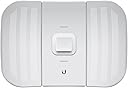
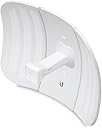
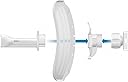
🚀 Elevate your network—connect beyond limits with LiteBeam M5!
The Ubiquiti LiteBeam M5 23dBi is a pre-configured, ultra-lightweight outdoor CPE operating on the 5 GHz license-free band, delivering high-performance wireless broadband bridging up to 10+ km. Designed for easy pole mounting and reliable long-range connectivity, it offers an unbeatable cost-to-performance ratio for professional-grade outdoor networking.
| Asin | B0166YREMK |
| Best Sellers Rank | #952 in Computer Networking Antennas |
| Brand | Ubiquiti Networks |
| Color | White |
| Customer Reviews | 4.3 4.3 out of 5 stars (305) 4.3 out of 5 stars |
| Date First Available | November 14, 2015 |
| Item Dimensions Lxwxh | 19.69 x 19.69 x 11.02 inches |
| Item Model Number | LBE-M5-23X2 |
| Item Weight | 2.73 pounds |
| Manufacturer | UBNT Systems |
| Product Dimensions | 19.69 x 19.69 x 11.02 inches |
| Wireless Type | 5 GHz Radio Frequency |
D**E
Top notch!
Excellent well priced solution that increased the speed of our M2 Loco Ubiquity connection from around 5 Mbs to 65 Mbs over a line of sight .2 mile link. Can’t beat the effect of a 23 dbi gain parabolic antenna! Have had excellent results over the years with several different Ubiquity products. I am an independent IT contractor and have had 1 ubiquity product out of about 100 over the years fail and that was due to storm based electrical surge here in Florida. The setup is not overly complicated but also not a completely consumer friendly event either. However there are so many Youtube and various sources for walkthroughs on setup that most people should have little issue with configuring . While setup is a bit challenging for the novice, the upside is that once complete it is a set and forget experience. You likely never need to revisit on the lifetime of the product.
O**R
Reliable way to connect networks over long distance
been using this for 5 years with no downtime, works solid very reliable. I use it to get house internet to barn over 100 meters away.
G**Y
Amazing technology!! I wish I could give it 10 stars!!
I needed to send internet to my shop from the office. 200yds away clocking 100mbs+ even when it's rainy. Cable company wanted to charge me for a second line, router, modem and so on. This bridge was a 1 time purchase and works way better than I thought it would. Setup is tricky but there are plenty of YouTube videos to teach how. Once done I'm happy as a tornado in a trailer park.
J**R
Works great so far
I have a steel outbuilding that needs network connectivity. The old solution (old Linksys with hacked firmware) had become unstable so I decided to give this a try. The outbuilding is only about 200' from the house. I set up the house antenna in the window of a room we use as an office. The other antenna got mounted on the steel building. I just eyeballed it to aim them at each other and I'm getting 91 Mbps down and 68 Mbps up. Left a star off because the instruction aren't great. They describe the basic function of each setting in the control panel. But there are several different ways this system can be used and you're totally on your own in terms of what you need to set to configure it to work as a bridge instead of an access point etc. I found a youtube clip or two that helped a little, but in the end I just set up both antenna in the house and messed with it for a few hours until it I got it working. They're working great so far but I've only had them going for a few days. I'll update this if anything changes over the next few months.
K**N
Exceded expectations
I set this up in conjunction with the cheapest WiFi unit I could find to use in a building about 1200ft from the house. I get the same speed in the out building as I do in the house. Everyone can connect to WiFi when visiting. We have very poor cell coverage in this area, so WiFi is a real life saver for calls, texts, and Internet.
C**D
Unreliable and questionable.
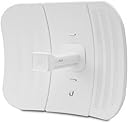
Update again After buying more Ubiqui devices since they were highly recommended by a friend of a friend, I decided to buy other devices for my home network. Today they decided to basically jam the network and prevent everything from working. If you can avoid these products, do so. They are questionable, sketchy to interact with and unreliable. Updating as I finally got it working, skip to the bottom for how to set this up because the instructions, website and other documentation aren't terribly helpful. I'm keeping this one star not for it's function, but by how absolutely stupid this thing has been to set up, how unhelpful the set up documentation is, how obtuse the phone app is to set up point to point and how many other people seem to have the same problem as I have. I have never had to try and hook up two like devices that were so insistent to not talking to one another in my life. And I had to hook up mixed devices for the military, fix bantam cables and a lot of cable making and set up for a lot of one off devices. I can't call myself an expert. I've handled Cisco devices, done a few hundred installs and device set ups with all kinds of military and civilian equipment, had to do a lot of cross patching but I'm a bit rusty on some of this stuff and this has told me I need a big refresher. I have reset these to factory default multiple times, followed the instructions and the app's scan and set up option and now I'm basically succumbing to youtube the depths of technical pages and youtube videos that blast obnoxious music spoken by someone I don't understand to try and get this to work. I now know far more about this device than I ever wanted to know. Here's been my story thus far. Get the boxes, great. The physical devices feel well made, light and like they should do their job. Thinking this is an established IT company I assumed plug and play features using the app. So like an idiot I physically set them up point to point to service a distant location and gets started. Remember that app and thinking these would be plug and play? Nope. The app turns them into a paperweight. I'm not joking. It'll auto config an IP and password and says it's sending a signal but that's a lie. The app is actually really impressive. connecting to this I can see a whole range of frequencies for potential connections. Want to know what it doesn't see? The other dish. Yes they are both broadcasting and they simply refuse to see it. Oh and the router at the distant end? Doesn't like talking to it with the WAN port. Cool. Okay so I gotta figure out what I'm doing wrong here. Instructions aren't helpful either as they direct me to do pretty much what the app does and turn it into an expensive connected paperweight. So I take them down, put them in a room, face one another, factory reset them both, access them to figure out what settings needs to be established to get them to see and talk to one another. It's amazing how many times these will just decide sop and need to be reset once again. Even if I wasn't configuring that device, it'll just decide to stay on but not let me connect or do anything but be a small heater. Why did I get this? Well I had a point to point set up using another device that worked pretty much out of the box. Plugged it in, quick set up, they talked, no problems. Except for some reason Zoom has issues with it. Configuration changes and trying to prioritize traffic didn't help with the constant cut outs so this was recommended by an far better IT guy than I am. Anyway here's hoping I can get these set up. I know I'm doing something wrong, the biggest complaint I have is that the directions an app don't seem to have any of the answers and looking online and finding similar people with similar problems feels pretty damning, especially since this comes so incredibly highly rated. Oh and just to add icing on the cake here, one of them claims to be sending and receiving 6mb of data from the distant end but the other end doesn't even display the signal or MAC. ||||||||||||||||||||||||||||||||||||||||||||||||||||||||||||| HOW TO SET THIS UP ||||||||||||||||||||||||||||||||||||||||||||||||||||||||||||| How to set this up, point to point with a home station sending data to a distant router as easy as possible. This should be good for you hooking up a shed or whatever from your house to somewhere on your property or distant point. 1. If using a phone, Download the app. 2. Unpack and set up the two devices, connect them on the same network so you can access them both for set up. I kid you not you can't connect to them using the app at the distant end if you have it set up right. That means no, you can't use the app to use it to align the dish except by connecting to the AP. 3. Use the app to connect to one, set as AP (Access Point). This is going to be where it connects to the internet. Go to settings, name the SSID (I did a name then PtP as Point to Point as an identifier), change the password to a nice, long sentence with numbers and whatever. 4. Name the other one Station and set it in the config as station. Using the app, use the three dots on the top right to select Site Survey. This will show you a list of signals that update every second. I can't find a way to get the updates to slow down so be ready to watch what you want to connect to bounce around like a game of ping pong. 5. Select the SSID named signal, select connect. Go down, double check to make sure the password updated, if not, type in the password. This will be the last time you will connect to this device for some reason. Why? I don't know. That's just how it is. 6. Unplug and set these up how you will have them. Now you can connect the Station to the WAN port of the distant end router. Note: If you have to set up the station on the distant end, you can't connect through the WAN port of your router or you won't be able to access the device. Connect it to a port and go to step 4. Once done, disconnect from the LAN port and into the WAN port. That should do it. Good luck!
B**H
a bit of setup but worth it
I had some ueevii radios that worked about 8 months and have up. I think they were fighting with my other wifi devices and the radios burned up. On the suggestion of a friend, I'm trying these guys. Took about 30 minutes to program a setup but they've been working great for a month so far. Will update after a while.
P**E
Works great!
I needed Internet service to a detached garage and this did the trick. I tried two different Ethernet over power (EOP) style extenders and those worked just fine around the main house (great choice if they work for you), but the 'distance' (all the wire and various breakers) between the main house and garage was too much and neither could reach that far. This wireless bridge worked perfectly. The only issue for me was that the setup instructions, while technically precise, are not very clear on the actual process to set these up. A quick search and YouTube came through with a video providing a good explanation of the process so I did not deduct from rating on that basis. Setup does take a modest degree of technical savvy, but not too bad.
X**O
Perfecta compra
Perfecta compra. Perfecta marca. Perfecta sincronía a la primera. Funcionando ya 6 meses y ni un fallo. 100% fiable y funcionalidad asegurada
O**E
Works great
Have been in use for about a year and no problems with them. We did not have to cover a long distance, just had to get across a parking lot. I have always found Ubiquiti to have good products.
A**R
Worth it👍👍
Great product, and very cooperative customer service by the seller👍👍
M**O
link wifi
Prodotto veramente valido ho effettuato un link a 1,2 Km con ottime prestazioni
E**S
Hay que saber un poco que TI y leer para su instalacion
Para su instalación es fácil cuando ya lo hace. 1.- Requieres dos routers, uno para enviar la señal y otro para recibirla. 2.- Al punto A lo que es el router es el que envía la señal a la antena, esta la colocas en cualquier puerto RJ45 posteriormente configuras tu equipo con las IP del dispositivo claro esta no igual, pero sí en el mismo segmento de red al igual al punto B, pero al punto B lo vas a configurar como estación. 3.- Al punto B de la antena se debe de conectar en puerto de llegada al router, por lo regular es azul no en el amarillo para que ese router tenga capacidad de transmitir la información en el otro extremo de la red..
Trustpilot
2 weeks ago
1 month ago