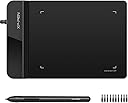
🎨 Small tablet, huge creative impact — never miss a stroke!
The XPPen G430S OSU is an ultra-thin, compact graphic tablet designed for gamers, artists, and professionals seeking precision and portability. Featuring 8192 levels of pen pressure sensitivity, a battery-free stylus, and a 4 x 3 inch active area, it delivers smooth, accurate input with a rapid 266 RPS report rate. Compatible with Windows and Mac systems (adapter may be required), it supports OSU! gameplay, digital drawing, online teaching, and e-signatures. Its ambidextrous design and plug-and-play ease make it a versatile tool for creative and professional use.


| ASIN | B01BA6XQI0 |
| Best Sellers Rank | #6 in Computer Graphics Tablets |
| Customer Reviews | 4.2 4.2 out of 5 stars (9,804) |
| Date First Available | January 31, 2016 |
| Is Discontinued By Manufacturer | No |
| Item Weight | 8.8 ounces |
| Item model number | StarG430 |
| Manufacturer | XP-PEN |
| Product Dimensions | 8.66 x 4.84 x 1.38 inches |
C**B
Small and mighty: very responsive, no batteries, no BS!
I had no idea if this would work for the application I had intended it for. That is, being a mechanical designer, sometimes advantageous to mark something up on screen by hand in a natural fashion. As it turns out, it worked perfectly and continues to do so no matter what application I use it with. You can even use it as an extremely precise mouse if you want to, hovering the stylus over the pad. It’s small enough at 4 x 6“, to easily get stashed somewhere when you’re not using it and not have it take up half an acre of desk space. And I really like the little things that went into the design and function such as it knows immediately when you pull the stylist out and self activates ready to use. I also really like the fact that it comes with probably half a dozen stylist tips doesn’t use those tiny quadruple-A batteries that are in some Bluetooth stylus pens, and has all kinds of customizable function buttons and so forth that I could probably burn more time than I care to consider tailoring them if I want to. If like me, and you don’t need a full a size or bigger surface to draw on, this is ideal. It has an app interface that allows you to customize all different kinds of things, including stylus, pressure and angle, and on, and on and on, and probably most important of all at least for me it works, and it works well. I didn’t have to break the bank getting something bigger or more than I needed, and was able to blindly pick and win the lottery for exactly what I need. Probably the most difficult thing from starting out and it’s normal I expect, is tailoring the sensitivity and so forth to your writing style. Hand position, elevation of the stylus on the pad, stylus angle and pressure. It is extremely sensitive, which I think is fantastic, but it will take a little bit of getting used to and adjusting, so you’re not over or under correcting. Zero regrets: I should’ve gotten something like this years ago.
T**K
Reliable, easy to use, sturdy and no software, drivers or registration required!
For such a cheap price, this is a really nice pen tablet to write or control the pointer with. And what is also nice is that you don't' need any software like Gameon or Wacom to update with for compatibility. Another brand requires you to register it from China every time you try to use it from a start up of your computer. I don't want to register the product and don't trust a product that requires it, so that is why this XPPen G430S OSU product is much less restrictive in that way and doesn't require any tracking of your product. It's also immediately more responsive than my Wacom tablet, which now has issues with delayed feedback. But this is instant and responds right away. No delays. It's a tiny pad but covers the entire screen. Just that you'll have a little less space to test it, but there is a larger version I'll consider if this continues to operate so well over the months, years. So far though, it's good and I really like it. This also gives you 10 replacement tips if they eventually wear down. That's very generous compared to other brands. This pen is also very nice and for a larger hand, it's comfortable and the tab buttons near the tip are very well placed and responsive. No issues and a nice click to them. Only limitations would be the pad, as far as I can see, doesn't offer a way to have the corded side face left OR right, and so the corded side always faces left on my Mac computer. Being right handed, I would've preferred the cord to face and hang off to the right as my keyboard is on the left. But not a big deal. This cord is part of the pad too, so if the cord ever had issues, there's no way to replace it as with other brand pads. And because there is no software, there is no way to change the orientation of the pad. But not a big deal and I can handle it. Overall, I really like this small pen tablet so far. The pad is light but has nice grips to keep it from sliding on a smooth surface. My Wacom tablet's underpads already wore out so this is much nicer and seems like it'll last longer to stay put from sliding while writing or moving the pen. Recommended.
N**E
Easy to set up and works well for a beginner
I bought this drawing pad as I like to create drawings online (mostly Canva). I am a total beginner and mainly use it for a hobby. I thought it may be easier and more realistic to use a drawing pad rather than a mouse to make drawings. The pad was easy to set up on my computer and each time I want to use it, I just plug it in. The pen works great as a mouse and is easy to hold. I do not think this works better than my mouse. It may be that I am just more used to my mouse but every time I have used the pen, it does not create straight lines when I draw down. I thought maybe I am shaky or that the program I use is funny (both could still be true) but I have not been able to get a straight line. Pros: - Easy to set up - Easy to use and the pen feels realistic - Lots of back up pen tips Cons: - Small pad drawing space (you can adjust the screen size on the app) - It will not allow me to draw a straight line down, it is always squiggly
P**T
Great! Wish it were wireless though
Works perfectly. The pen is responsive and feels smooth. The tabs on the top of the tablet are convenient and don't interfere with the writing surface. The only bummer for me is the cord. I wish I had purchased a wireless drawing tablet. Though the cord is long enough and fits well, it gets in my way. It's a personal preference and doesn't diminish the product's value.
J**Z
my opinion since i use stylus like a mouse - 1 yr later
great for the price. i preferred to use this over a mouse since my hands and wrist cramp easy in the normal mouse position but im still trying to figure out the technique in basic commands so it's a little frustrating. occasional lag but other than that, i enjoy it. no one comes to touch my desk area as the stylus is intimidating to them *insert evil laugh* connects well without software, pressure sensitivity is solid and there are too options in size for those who are actually using the pad for artistic methods.
I**M
very small
F**O
Es perfecta en cuanto a portabilidad, pequeña y ultra delgada para poder llevarla donde sea. Se recomienda instalar el driver de la página oficial ya que agrega funciones como la presión y además mejora la respuesta al movimiento. Se siente de muy buena calidad y el lapiz viene con muchas puntas (como 10)
L**G
Work with Microsoft Word flawlessly. I use this for Chinese text input. Way faster and accurate than using mouse.
S**I
Happy for my girl
A**M
ممتازة جدا، ويأتي معها سيريال نمبر لبرنامج ArtRage Lite تحصل عليه من خلال موقعهم الرسمي بإدخال سريال نمر الجهاز (خلف الجهاز) ينصح بتحميل البرنامج الرسمي للمنتج بالبحث في الموقع عن اسم الجهاز وتحميل البرنامج الخاص به (يأتي الجهاز بكتيب ينصح بقرائته به كل التعليمات)
Trustpilot
2 days ago
1 month ago