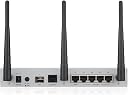
![ZyXEL Next Generation VPN Firewall with 1 WAN, 1 SFP, 4 LAN/DMZ Gigabit Ports and 802.11ac/n WiFi [USG20W-VPN]](https://m.media-amazon.com/images/I/517bi-2Tz+S._AC_SL3840_.jpg)




Desertcart purchases this item on your behalf and handles shipping, customs, and support to Slovakia.
๐ Secure your office, empower your team, and never miss a beat with ZyXELโs next-gen VPN firewall!
The ZyXEL USG20W-VPN is a next-generation unified security gateway combining high-speed gigabit wired ports, fiber SFP WAN support, and dual-band 802.11ac WiFi. It delivers up to 90Mbps encrypted VPN throughput supporting up to 15 concurrent connections, ideal for small offices under 10 users. Its fanless design ensures silent operation, while advanced firewall capabilities protect against threats with up to 350Mbps Stateful Packet Inspection and 20,000 concurrent TCP sessions. Easy browser-based configuration and VPN wizards simplify setup, making it a robust, secure, and user-friendly networking solution.
| ASIN | B01E1DSIMI |
| Antenna Location | Home, Office |
| Antenna Type | Retractable |
| Best Sellers Rank | #856 in Powerline Network Adapters |
| Brand | ZYXEL |
| Built-In Media | VoIP Phone and Devices^VOIP Telephone Routers |
| Compatible Devices | Personal Computer |
| Connectivity Protocol | Wi-Fi, Ethernet, Fiber optic |
| Connectivity Technology | sfp, wired, wireless |
| Control Method | Touch |
| Controller Type | Browser-based Configuration |
| Coverage | Up to 15 concurrent VPN connections |
| Customer Reviews | 4.2 out of 5 stars 68 Reviews |
| Data Transfer Rate | 350 megabits_per_second |
| Frequency | 2.4 GHz |
| Frequency Band Class | Dual-Band |
| Global Trade Identification Number | 00760559123659 |
| Item Type Name | ZyXEL Communications USG20WVPN Next Generation USG 20W VPN |
| Item Weight | 3.3 pounds |
| LAN Port Bandwidth | 1000 Mbps |
| Manufacturer | ZyXel |
| Maximum Upstream Data Transfer Rate | 90 megabits_per_second |
| Mfr Part Number | USG20W-VPN |
| Model Name | Zyxel USG20W-VPN |
| Model Number | USG20W-VPN |
| Number of Antennas | 3 |
| Number of Ports | 9 |
| Operating System | ZyNOS |
| Other Special Features of the Product | WPS |
| Router Firewall Security Level | Advanced |
| Router Network Type | hybrid |
| Security Protocol | WPA, WPA2 |
| Special Feature | WPS |
| UPC | 760559123659 |
| Voltage | 12 volts |
| Warranty Description | ... |
| Wireless Communication Standard | 802.11ac |
| Wireless Compability | 802.11ac |
V**C
Great features for a low price
We bought one of these to setup a site to site VPN. It does everything we need it to do and more. Easy interface and good instructions online. Includes wifi which was a big plus for us so we wouldn't need another device. We've had no issues with speed or drop outs.
A**X
Router with Some Very Good Features
The ZyXEL router was recommended by the company providing my VOIP telephone service. It is a full featured router with WiFi that received very positive reviews and was a router that was priced competitively in the recommended list. Installation of the router required the assistance of my VOIP provider to properly set up the features. It was not something I could have done as a computer novice. After installing, I had a message that a firmware update was present. The update was something I had my IT person perform and it was not an easy task as instructions were not clear. The router has a built in VPN, but we are unsure if it is active or how to activate it if not active.
P**.
MAC Address Filtering Work-Around
I had just bought and set up the wired USG20 router and the dashboard for the USG20W is very similar. I had done my setups from the LAN ports, but I imagine the accompanying USB/RS-232 cable could be used for setup and avoid conflicts when redesignating the assignments for the port you are connected to. I solved that by either connecting with a different port than the one I needed to change the assignment, or by simply rebooting the router once I made the change on the connected port. In years past, I have had neighbors that de-encrypted my WiFi password and sat on my WiFi account stealing bandwidth. This may not now be such of an issue because I offer a ZyXEL_Guest_WiFi account anyway. But, I could not find any specific MAC address filtering available to exclude unwanted use of the WiFi access point and my personal network. There is IP/MAC address binding, so it could likely be possible to tie up and assign all of the available IP address range to the designated MAC addresses. Doing that would make the MAC filtering for a broader range of open IP addresses unnecessary.
J**S
Fast delivery
still exploring the product
J**J
Content filter is almost useless
I bought this unit for the content filter subscription. I was able to configure the content filter, but to my great disappointment it does not inspect HTTPS:// sites. So if you plan to protect your family from inappropriate websites this is not the best product since most of these sites are HTTPS. Seriously considering returning the product.
P**A
Great VoIP call quaity
Using the ZyXEL Next Generation VPN Firewall as our VoIP telephone router for phones hardwired to the connected switch and one over Wi-Fi. The call quality has improved dramatically over the old unit that it replaced. We are very satisficed.
J**T
Lots of functionality for the money
So far so good. It is taking a little time to get used to the Zyxel nomenclature, but I really like the device a lot so far. For what you get for the money, this is a very good value.
B**D
It's not just difficult to configure - the IPSec configuration page is broken. But hey, the 802.11ac is blazingly fast.
The firmware is hopelessly broken in the IPSec configuration page. Versions 4.20 and 4.25, despite enabling Java and opening up Safari, Internet Explorer, and Chrome (on macOS and Windows 10) to the widest possible security settings, fail to load the page to even allow me to input settings. I spent 6 hours combing Zyxel's knowledge base, resetting the router, and attempting every configuration permutation I could imagine. Perhaps Zyxel expects me to brush up on their proprietary command-line syntax. While its advertised features are powerful and exactly what I need, I can't even access the means of configuring them. Maybe this will meet my needs: TP-Link SafeStream TL-ER604W Wireless N300 Gigabit Broadband Desktop VPN Router, 120M NAT throughput, 10k Concurrent Sessions, 256 DHCP Clients, 20 VPN Tunnels
Trustpilot
3 days ago
1 month ago