Buy anything from 5,000+ international stores. One checkout price. No surprise fees. Join 2M+ shoppers on Desertcart.
Desertcart purchases this item on your behalf and handles shipping, customs, and support to Slovakia.
๐ Elevate your desk game with silent power and vibrant style!
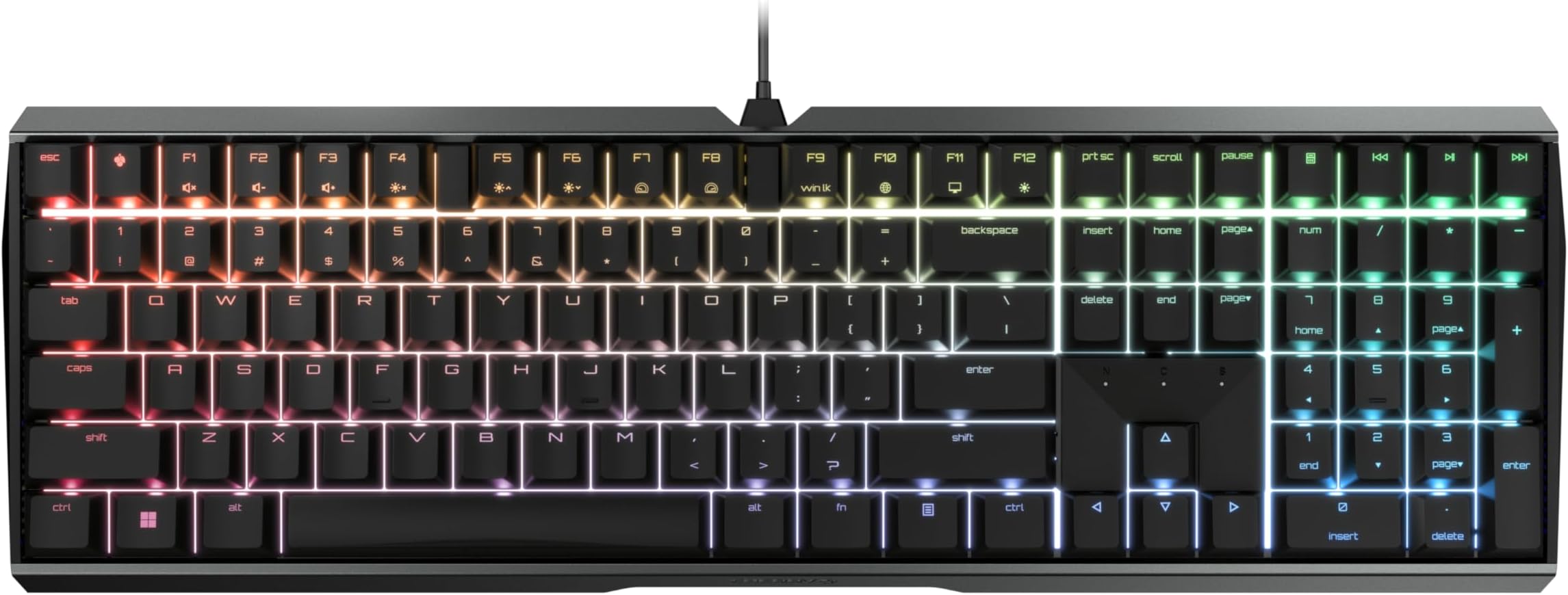
The Cherry MX 3.0S is a high-performance wired mechanical keyboard featuring ultra-durable MX2A Silent RED linear switches rated for over 50 million keystrokes. Its robust extruded aluminum housing offers a premium, screw-free design that stays firmly in place during intense use. With full N-key rollover and anti-ghosting, every keypress is flawlessly registered. The keyboard boasts customizable RGB backlighting with over 16 million colors and programmable effects, perfect for gamers and professionals seeking both style and precision. A detachable USB-A to micro-USB cable ensures easy connectivity and portability, making it ideal for gaming, office, and creative workflows.


| ASIN | B08YRRLV25 |
| Additional Features | Backlit |
| Antenna Location | Gaming, Home Office, Office, Programming |
| Best Sellers Rank | #2,407 in Video Games ( See Top 100 in Video Games ) #220 in PC Gaming Keyboards |
| Brand | Cherry |
| Built-In Media | USB Cable |
| Button Quantity | 109 |
| Color | Black |
| Compatible Devices | PC |
| Compatible Operating System Family | Windows |
| Connectivity Technology | USB-A |
| Customer Reviews | 4.5 out of 5 stars 334 Reviews |
| Enclosure Material | Extruded Aluminum |
| Generation | 3rd Generation |
| Hand Orientation | Ambidextrous |
| Item Dimensions L x W x H | 16.93"L x 5.51"W x 1.42"H |
| Item Type Name | Mechanical Gaming Keyboard |
| Item Weight | 2.26 Pounds |
| Keyboard Backlighting Color Support | RGB |
| Keyboard Description | Gaming |
| Keyboard Layout | QWERTY |
| Manufacturer | CHERRY |
| Mfr Part Number | G80-3874LWAUS-2 |
| Minimum Required Operating System Version | Windows 1 |
| Model Name | CHERRY MX BOARD 3.0 S |
| Model Number | G80-3874LWAUS-2 |
| Number of Keys | 109 |
| Number of Sections | 7 |
| Power Source | Corded Electric |
| Processor Count | 1 |
| Recommended Uses For Product | Gaming, Home Office, Office, Programming |
| Special Feature | Backlit |
| Style Name | Classic |
| Switch Type | Linear |
| Theme | E-Sports |
| Unit Count | 1.0 Count |
| Warranty Description | 2 Years |
I**N
Most luxurious keyboard I've ever owned!
I broke down and bought this keyboard because three low-end models in a row had been pieces of crap, and this model was rated #1 on a "best of 2023" list for silent keyboards. So far, I love it, but it's taking some getting used to. All keyboards are slightly different, but the font on the letter keys is a sort of "NASA" space style font which is a little harder to read than your standard sans-serif keyboard letters. Even more different are the numbers and symbols on the number keys being reversed, so the symbols on each (! on the 1 key, @ on the 2 key, etc) are below the numbers rather than above. There are indicator lights for caps lock, scroll lock and number lock, but talk about subtle--I just found them! But I love the feel, I love the solid construction, I love how quiet the keys are, and I can type really fast on it. It's heavy and it doesn't slip or move while you work. I'm not using it for gaming, but I'm a writer and publisher, so I really need a good keyboard. The keyboard not only glows in rainbow colors, the colors continuously cycle in a slow pulse, which is definitely funky. When I get stuck on writing something I can take a break and watch the keyboard change colors while I think. :-) It works fine with my older Lenovo desktop, I just plugged it into an USB expander and zoom, it was good to go. The delivery was blindingly fast, it arrived the next day. The packaging...not so great. The keyboard had just been tossed into quite a large box with a couple of packing pillows. It arrived just fine (it didn't spend very long in transit!) but the manufacturers might want to know that Amazon is being a bit casual with their product.
B**N
Greatness in a keyboard
I absolutely love this thing. It's got a great spring-back but is easy enough to press down that I can type really fast. It's the quietest keyboard I've ever had. The colors are really nice, too. My ONLY feedback for the creators would be: -Please make the font bigger on the keys, including the symbols -Make the home key nubs a smidge...nubbier In no way do these detract from the quality, but I WFH as well as run a business and am on the keyboard 60+ hours per week, large fonts and good home nubs are a must. These nubs are just good enough, and the font is just large enough, but if they could add those in that would be amazing. Still 5+ stars for the product. It's solid, non slip, quiet, nice and heavy, and I really like the amphitheater style curvature. It's a subtle curve, but nice and unique to my previous keyboards.
D**S
Cherry MX 3.0 S: Robust, Solid, StableโฆQuiet, But Not Quite โSilentโ
My taste in keyboard feel runs toward mechanical key switches with a distinct tactile bump-through and an audible click, as with the Cherry MX Greens and Blues โ but that click is for home, not for the office, where a good neighbor doesnโt use a clicky keyboard. Good office neighbors choose quiet key switches. So I used to use the rubber-dome-type keyboards, the best of which, in my experience, was the Logitech K740, quiet and with adequate tactile feel. But rubber-dome keys wear out (Iโve had three of those boards), and the K740 is now a collectorโs item. Hence, I looked around for a mechanical keyboard using the Cherry MX Silent Red switches. In the good old days, I would have ordered a custom board from WASD Keyboards, but those folks, sadly, appear to be out of business. There are good-quality boards from many brands using other Cherry switches, but darned if I could find any others with the Silent Reds โ the regular Reds, yes, but the Silent Reds are rare. Thatโs why I bought this board, one of Cherryโs own, and using the Silent Reds. (Itโs available with other Cherry switches, too.) About these switches: I am informed that โlinearโ switches โ no tactile bump, just a smooth swish to the bottom of travel โ are preferred by many gamers. Thatโs not what I am, and as above, I like a tactile bump on the way down. But one learns by trying, so Iโm getting used to the linear feel of these keys. How is the board otherwise? Itโs metal-bodied, heavy, solid, and stays put. If one is used to relatively flat rubber-dome keyboards or laptop keys, one might want to add a wrist rest to use with this โtallerโ board, and if so, thatโs easy. The board comes with optional screw-in metal feet to raise the rear edge slightly, if desired. But then thereโs the blaring, candy-colored rainbow backlighting in the product descriptionโs photos. In action, this actually moves, and itโs the out-of-the-box default. If youโre a kid trying to impress other kids, okay, thatโll do it. If youโre an adult and trying to concentrate on work, youโll want to turn this into something else. Fortunately, the documentation explains that with a simple key combo you can cycle through many variants of colors and moving patterns, two of which, thankfully, are โoffโ and โjust constant white backlighting, please.โ Iโve included a couple photos of the keyboard with the latter turned on, and thatโs how I run it at work. Reminds me of my WASD Code Mechanical board at home. (In the first photo, taken from directly above, some red is โleakingโ around some of the keys. This seems odd, but it isnโt a factor when working with the keyboard from oneโs normal viewing angle, as seen in the second photo.) Finally, are the Cherry Silent Red key switches actually silent? Well, no. When a key hits bottom thereโs a subtle thump, and the keys have the usual mechanical freeplay. Office neighbors close by will know when youโre in action, albeit only if they are themselves bored. Suffice it to say that these Silent Reds are more quiet than other mechanical keys, even regular Reds or the stiffer Blacks, and also more quiet than the tactile-bump non-clickers such as the MX Browns. I should add that one can download some optional Cherry software that makes a wide range of customization possible. But that isnโt necessary for simply changing the color scheme, and I havenโt any use for customization, because I use several other machines and keyboards and so must be satisfied with the standard layout and function. So to sum up, this is a robust and solid board with mechanical key switches that, unlike rubber-dome types, will never wear out. The key feel is consistent across the board, every press the same. The key action is smooth andโฆalmost Silent.
A**R
Strong, durable, and satisfying.
This keyboard is beautiful. It has a very tough metal chassis which feels very high quality. The keys are super satisfying to press. I got the red key version so they arenโt as clicky and I love it. Extremely good value for the money, in my opinion.
M**N
Quiet, responsive, great for gaming
I've always hated the aggressively clicky sound of mechanical keyboards, to the point where I eschewed them for membrane keyboards, despite knowing that those tend to be less responsive than mechanical ones. Well, cue my surprise when I learned that silent switches exist. Obviously, I knew that they wouldn't be truly silent and would still make noise, but if they were comparable to the noise level of membrane keyboards, that would be sufficient for me. I'd say these are indeed about as loud as a membrane, albeit with a different type of sound - more snappy than the mushy sort of sound that membrane keyboards generate. Sometimes, I can hear a spring being released after a keypress, but it's really not loud at all. Regardless, the Cherry MX Silent Red switches definitely have a pleasantly subdued volume, so I'm totally happy about my purchase already. But perhaps more importantly, is the performance good? Absolutely! It's very responsive and has NKRO, making it a worthy fit for gaming (I've been playing a lot of sidescrolling platformers, and it works great). Cherry's software is also thankfully very unobtrusive, and gives you control over the keyboard's functions and RGB (I always turn it off, haha). I suppose some people might not like the futuristic sort of font on the keys, but I don't really pay attention to that kind of stuff.
J**N
Feels AMAZING
Just received it and have been using it for 3 days. I have used many other keyboards with Cherry MX Red switches and NONE of them felt nearly as good as this Cherry keyboard. I know this one has the cherry silent red switches, but still, it feels WAY better than any corsair/hyperx, gaming keyboard I've ever used. The typing feels super comfortable ( Ive never felt a keyboard that's ACTUALLY comfy before). They key spacing is perfect, it makes typing just a joy. Gaming on this is perfection. The over all keyboard is nice and heavy made of full aluminum for a hefty, made-with-quality feel. There's plenty of RGB lighting profiles if you are so inclined. I use the white lighting with red WASD keys. Glad I found this keyboard, i will be going with Cherry keyboards for the rest of my life! Did I mention this keyboard is the most comfortable typing keyboard ever? The only gripe is , no removable USB type-C cord. I think the cord is the antiquated micro USB. But that's the only downside to this keyboard.
J**G
First "premium" keyboard - very impressive.
Ok, i have not used this much yet, but the jump in quality from what i am used to is incredible. Smooth, quiet keys. The build quality feels very premium all around. It is heavy enough to not move around easily, and it feels like it will last for a long time. I do wish the backlighting was a bit brighter.
I**S
Comfortable, luxurious, top-notch keyboard. Only problem -- CORD SUCKS!
I've been using this keyboard for over a year now, and it's the best-feeling keyboard I've used to-date. The lights are individually customizable, the software is easy to use, you can even reprogram any key on the keyboard to be another (including their little Cherry button in between ESC and F1.) After 3 months of using it, the cord started to break and only work at specific angles. I messaged Cherry's USA branch for help and they sent an entire keyboard as a replacement for just the cord (as it's a proprietary micro-usb that they don't resell, I couldn't just replace it or order a new one.) As grateful as I was, it was short-lived as less than a year later I started to have the same problems again. The cord started working only at an angle, which makes it impossible to use this gaming keyboard for any real gaming. TL;DR -- Keyboard is great, both cords I've had for it have broken though. I recommend it unless you're bad with keeping your cords tidy.
B**E
Awesome keyboard. Best value for the price hands down.
If you like quiet, linear switches with a tight, high-quality feel, you won't do any better than this at the price point.
G**J
The type for me
The keyboard is sturdy and easy to use. Would recommend.
M**G
MX Red --> Silent <-- Switches, different from MX Red Switches
pros: - as the name advertised, very quiet keyboard, the linear key switch does not make noise when fingers touch the surface; this mechanical keyboard makes less noise than Cherry's own membrane version - the linear switches have right amount of resistant, do not require too much force to press down - fancy key labels, they look too pretty that I don't want to use customised key caps, but a few of them are not aligned very well (e.g.: brightness up and down, not sure if that's intentional but very ugly) - backlight, and fancy reflection of RGB LEDs from each key to the aluminum frame having a cyber feeling - full sized arrow keys - wired! keyboard (and the USB head has a keyboard mark to distinguish this device without tracing the wire) - wired keyboard with onboard memory! -- both backlights and key maps are stored onboard, persistently -- backlight setting can be configured without software -- the Cherry Utility Software ONLY changes the onboard memory configuration, no Windows background process nor registry alternation (however, the software cannot load the onboard memory, meaning if you delete the software, or running the first time, it will overwrite the existing configuration) - having all these features I care, this keyboard is surprisingly cheap cons: - minimum brightness is still too high; it's possible to use the software to change the HSV to dimmer the colour, but the main problem is the gap between key caps - there is a lighting mode called Single key, which turned off all backlight, and light up whenever a key is pressed, meaning the hardware is capable to adjust each key's brightness, instead of only the HSV value; also wish there is a mode works similar but keep all keys light up but changing their HSV or even only the brightness on press - pretty much the only real annoyance of this keyboard is the Cherry key's location -- between ESC and F1. My left hand looks up F2 and F4 by searching the gap between ESC and F1, so this was almost a blocker issue, but I found three workarounds: -- 1. first I take the Cherry key's cap off and mounted it upside down, so my finger can recognise it, downside of this method is there are more light leaking from the other side of key cap -- 2. mod the keys so Cherry key can act as F1, then F2 ...... but then there is no gap between ESC and F1 -- 3. good thing the Cherry key switches support key caps customisation, a low profile cap can help my finger to navigate around that area, and still keep the functionality of that key neutral: - there are 3 very bright LED indicators (for CapLock, ScrollLock, NumLock), located between DELETE END PAGE and arrow keys, cannot be disabled, cannot adjust brightness; I have to tape them to save my eyes, but to be fair, most keyboards have these annoying indicators - rectangular RETURN; and the label is just an arrow, how can we tell which one is RETURN which one is ENTER? - FN key is not at left bottom, but right to ALT key; mixing feeling of: volume controls are F1&F2&F3 (cannot mute with a single hand for average people), but CTRL is the left bottom as it should be; I mod the key right above NUM to mute and unmute(no idea that label meant for and don't care losing that function), so it's acceptable - the alternative function of keys are labelled counterintuitive (! is below 1, ; and : on the same line, where is the ? mark) - profile linking with applications does not work very well and require the software being running, I rather to manually switch profile than having a hidden Windows process
A**0
Feels like a quality keyboard
I really like the quality of the build. My only complaint is the ping noise I hear when typing.
J**R
It just works. No BS software or gimmicks
As a previous owner of multiple Razer, Steelseries and Corsair keyboards, this thing is like a breath of fresh air. The cherry red switches are as quiet as a membrane keyboard and I find myself making far less typos while speeding through typing. I honestly didn't think I would be nearly as impressed as I am with this little keyboard. No extra software, macro keys or any of that nonsense. Plug and play. The way it should be
Trustpilot
1 month ago
2 months ago