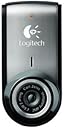
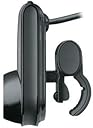
🎥 Stay sharp, sound clear, and connected everywhere you go!
The Logitech 720p Webcam C905 combines 2MP Carl Zeiss optics with advanced RightLight2 and RightSound2 technologies to deliver crisp HD video and crystal-clear audio. Designed for professionals on the move, it includes versatile mounting options and a travel case, plus Logitech Vid software for effortless video calls—making remote collaboration and staying in touch easier than ever.
| ASIN | B000RZNI4S |
| Customer Reviews | 3.9 3.9 out of 5 stars (436) |
| Date First Available | June 14, 2007 |
| Is Discontinued By Manufacturer | No |
| Item Weight | 0.96 ounces |
| Item model number | 960-000045 |
| Language | English |
| Manufacturer | Logitech |
| Product Dimensions | 8.27 x 2.87 x 7.09 inches |
E**T
Unbelievably easy to use, high quality too, and very small
If I could give this product six stars, I would. I've purchased a couple of webcams over the years. All turned out to be just hard enough to use and just low enough quality that they eventually went in a drawer. Then, three weeks ago, before a trip to India and China, I decided to give webcams another try so that I could stay in touch with home. Based on Amazon reviews and previous good experiences with other Logitech products, I purchased a Logitech QuickCam Pro for Notebooks for my laptop and a Logitech QuickCam Pro 9000 for the home computer. Both cameras are beautifully designed. The notebook version is very small (even smaller than it looks in the picture) and takes up about as much space than my mobile phone in my briefcase. Both units fit onto the monitors very easily (the Notebook version clips on, while the 9000 just sits on top of the monitor with a counterweight in the back). Installation of the software was a breeze -- took just a few minutes and installed without a hitch. The real news for me, though, is the Logitech Vid software. At first, I didn't load the software, because it wasn't on the CD (I had to download it). However, after trying video chat on gmail (which was a bit confusing and kept crashing my computer), I downloaded the Logitech Vid software on both my laptop and my home computer. It's incredibly easy to use. All I had to do was register an email address on each computer, after which call from system to system was as easy as clicking on the picture of the person on the other system. No exaggeration, it was easier than dialing a phone number. For the last two weeks, I used the Logitech Quickcam to call home nightly from both India and China, using the regular internet access from the hotels. The process was incredibly simple -- a few seconds after clicking on the icon for the other computer, I was connected with home. The video quality was excellent, even in very poor lighting conditions, and the autofocus worked very well to keep us both sharp. The audio quality was also very clear; in fact, it was clearer than phone calls back to the States. Given that calls back to the States normally cost $1 to $3 a minute from Asia, I figure I made back the cost of the cameras in a single trip. Since the video calls involved no incremental cost, I was able to talk as long as I wanted. Also, being able to see the family, rather than just hear them, was huge. In a nutshell, I couldn't be more pleased. I promptly bought two more cameras for someone who works for me and also travels a lot internationally. I'll soon be ordering a camera for the grandparents; installation and use was simple enough that I'm confident my 80-something parents will have no problem setting it up and using it. As I mentioned at the outset, I've tried webcams several times before, without success. Maybe they've simply gotten better since the last time I tried, or maybe Logitech finally cracked the code of extreme ease-of-use combined with very high picture and sound quality. In any case, the outcome was a true blessing for me when traveling internationally. I highly, highly recommend this camera to anyone who wants to stay in touch with family and friends who are far away and who wants a solution that's as easy as (or actually easier than) a phone call. I couldn't be more pleased with this product.
K**N
Great Little Webcam
This is the perfect webcam for using with a laptop. The image quality is outstanding and works well even in low light. The cord is just long enough to connect up to a USB port without getting in the way and saves space when packed up in the tiny neoprene case that's included. Logitech even thought to include a handy mini velcro strap on the USB cord to keep things organized. There's a small and quite adequate microphone with the camera. The stand that is included with the camera breaks apart into three smaller pieces so it can also easily fit in one's gear bag. I'm a bit concerned it's not quite sturdy enough for constant assembly-and-disassembly. I can see using the stand quite a bit when attending lectures because it isolates the microphone from the sound of keyboard typing. I also own an Quick Cam Ultra Vision on a workstation at work. All in all, I'd say that this tiny webcam gives the huge Ultra Vision a good run for it's money on image quality and features, but is much more convenient for the road warrior. Logitech is obviously taking web cams seriously-- these are the two best webcams I have ever seen. They suddenly make video conferencing, video Skype, and OneNote video notes a must have.
A**H
Worst webcam
This is both the worst and unfortunately most expensive webcam I have ever purchased, About a year ago, I bought it for around 70 dollars from Amazon, not the 150 they're charging now. Now let me tell you the consistent problems I have had with this product. Right from the start as I was playing around with the exposure,gain, blur, etc settings I decided to update my driver from the one that installs when you plug in the device. When I did, the blur setting I set became permanent. I could not undo this because the most current driver for the C905 does not have this setting and evidently it does not reset it from the previous driver. So now my camera is slightly blurry all the time no matter how much I uninstall and reinstall the drivers, reboot, etc. No my camera lens isn't dirty. I tried cleaning it, too. That is problem number 1. Problem 2 is worse and has gotten progressively worse over time. I am forced to use their "RightLight" setting which is not terrible but the lighting in my room changes throughout the day so I like changing the exposure and gain. The reason I am forced to is because the exposure setting I set resets itself every couple of minutes. Initially it was once a day but it's increased in frequency. Additionally during the night the RightLight feature makes my camera constantly turn up the exposure and turn down the exposure every. damn. second. Please save your money and research a better webcam and perhaps a better company who doesn't make buggy drivers. I will never EVER be purchasing from Logitech again!
Trustpilot
5 days ago
2 weeks ago