Buy anything from 5,000+ international stores. One checkout price. No surprise fees. Join 2M+ shoppers on Desertcart.
Desertcart purchases this item on your behalf and handles shipping, customs, and support to Slovakia.
💧 Stay dry, stay worry-free — the smart shield your home deserves!
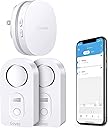
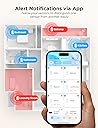
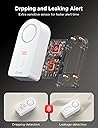
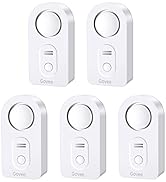
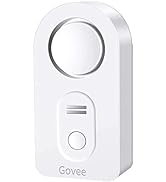
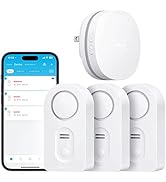
The Govee WiFi Water Sensor 2 Pack offers professional-grade water leak detection with instant app and email alerts, a powerful 100dB alarm, and the ability to connect up to 20 sensors via a dedicated WiFi gateway. Designed for home and basement use, it features adjustable alarm volume, easy installation, and long-lasting battery power, ensuring you never miss a drip or leak—even when you're away.


| ASIN | B095STF6FG |
| Audible Noise | 100 Decibels |
| Battery Description | Alkaline |
| Best Sellers Rank | #12,560 in Tools & Home Improvement ( See Top 100 in Tools & Home Improvement ) #15 in Water Detectors & Alarms |
| Brand | Govee |
| Color | White |
| Compatible Devices | Smartphone |
| Control Method | App |
| Customer Reviews | 4.3 out of 5 stars 15,016 Reviews |
| Item Dimensions L x W x H | 3.66"L x 2.2"W x 5.12"H |
| Manufacturer | Govee |
| Mfr Part Number | B5040109 |
| Model Number | H5040+H5054 |
| Mounting Type | Wall Mount |
| Number of Batteries | 4 AAA batteries required. (included) |
| Power Source | Battery Powered |
| Product Dimensions | 3.66"L x 2.2"W x 5.12"H |
| Sensor Technology | Contact Sensor |
| Smart Home Compatibility | Smart Home Compatible |
| Unit Count | 2.0 Count |
L**D
Works like a tank.
I bought this six years ago. I’ve changed the batteries two or three times. It’s saved my hide a couple times. Yesterday morning, I was changing the battery for one of my alarms next to my sump pump as I was replacing it I couldn’t see very well, and I dropped the alarm into the sump pit on accident. I heard the “kerplink” of the alarm splashing into the water… And then a muffled alarm. I was all the way dressed and late for work, so I did what anybody else would do – I pretended I didn’t do it and walked away! I figured I would just let it break – the thing certainly wouldn’t last more than a few minutes fully submerged, right? Then came the alarms on my cell phone. And the emails over and over again, it was incredibly annoying and interrupted my day. I had to shut off my phone during important meetings and confess to coworkers what I had done earlier that day. Over and over again, it didn’t stop. 12 hours later after I put the kids in bed, I went back to my basement and fetched the alarm out of the water, fully submerged. The battery was still at maximum level, it was still screaming, and alarm both audibly, through email, and incessant notifications. EXACTLY ITS JOB. Perfect! But this little bugger with six year old technology did its job all day long, fully submersed, and didn’t give up. THATS AMAZING! I set up my hub once six years ago and it’s easy as can be. I’ve changed wifi equipment and it all transferred. I’ve had trouble with other hubs but not this one. THIS IS A TANK! So far, im more thankful for this than my fire alarm!
P**E
Your piece of mind is worth this little gadget
I have been struggling with an undiagnosed and intermittent leak from my dishwasher. We are leaving for vacation and I was stressed. What if?! I found this Govee Wifi Water Detector and thought I would give it a try. Installation and Connecting to the Hub: No brainer. Similar to other connected home devices so the process should be familiar to you. Don't over think it and it works great. I downloaded the Govee Home app to my Pixel 6 and it worked as expected. Relatively intuitive. I have no issues with the interface nor the included printed instructions. Functionality: I needed to KNOW that these worked (I got two) so I tested both of them. I even took my phone off of my home wifi network when I tested the alerts. I put a small amount of water under the probes and an alarm sounded. Instantaneously I received an alert on my phone via the mobile network. If I am away from home, good to go! Just don't forget to leave a key for your friend to get in and address the water issue. The audible alarm is plenty loud at the high setting (default). Leave it there. Shuts off temporarily when the button on the face of the device is pushed. Remove it from the water source and dry and no more alarm. Proximity to the hub seems very reasonable. I plugged the hub in closer to my router and there are at least four walls and a floor between the hub and one of the devices. No issue. Price: Well worth it. It is going to cost me several hundred to repair the few flooring planks so this is much cheaper. Things to Consider 1. Get the wifi version with the hub. What is the point if you are not home when the washer hose breaks? 2. To my knowledge this does not integrate with Google Home or Alexa. These connected home devices should really be universal in their integration with at least those platforms. 3. My purchase had two leak detecting units only identifed by their model number and four more digits. I triggered each one individually and saw which was which by the notification. Small inconvenience and easily solved. I renamed them for their location. Overall, super happy.
G**E
Impressive, would buy again. (Take time to read other reviews to make your installation easier.)
We bought this sensor kit with some extra sensors two weeks ago to help monitor the house while we were on vacation. Setup was easy after an hour of unnecessarily confusion. Included batteries worked fine, it's a new installation so I cannot comment on battery life. The manufacture's directions are unclear ... THANK YOU to the Amazon reviewers who wrote terrific explanations to help the rest of us. How well does the Govee app protect privacy? This is not an accusation, it's just an unknown. So I didn't want it installed on the phone I use everyday. Here's an option that also makes it easy to connect to the required 2.4 GHz wifi: I installed the app on an old iPhone that's connected to our router's 2.4GHz "guest WiFi". Using the old phone, and after struggling with the unclear directions, the Gateway connected to guest WiFi and all six detectors paired to their gateway. I also assigned the detectors to location names (e.g. "Water Heater"), so any alerts would immediately direct me to the problem. Then I tested one detector; SUCCESS!!! The audible alarm sounded immediately. Then, within a minute this email arrived: "Your "H5054_48C5" has detected water leakage. Check the area soon to avoid water damage." Glad that the alert system works, I know there's a problem somewhere, but that cryptic serial number doesn't help to find it. Suggest that Govee add "location" to their alert messages. So I like this product. If Govee adds clarity to the installation directions and alert messages they would fully earn a five-star rating! ****
D**T
Protection from water leaks
The device took me a while to get it connected! I didn’t think the sensors had connected to the gateway BUT I found out I just needed to be more patient. Everything got connected. I tested the sensors. The alarm on each sensor went off as required and I’m very pleased.
B**S
A Lifesaver for Every Home - Govee WiFi Water Sensor 3 Pack Review
I recently purchased the Govee WiFi Water Sensor 3 Pack, and I can confidently say that it's one of the best investments I've made for my home. These little devices are absolute lifesavers when it comes to protecting your property from water damage. Installation was a breeze - just a matter of connecting them to my 2.4GHz WiFi network (note: they don't support 5G WiFi). Once set up, they worked seamlessly with the Govee Home app, allowing me to monitor the status of each sensor from my phone. The 100dB adjustable alarm is loud enough to get your attention, even in a large house. It's a reassuring feature knowing that you'll be alerted immediately if there's even a hint of water where it shouldn't be. The fact that you can customize the sensitivity level ensures that false alarms are kept to a minimum. But what truly sets the Govee WiFi Water Sensor apart is its ability to send email alerts. This means you're not reliant solely on the app - you'll receive a notification even if you're away from your phone. This level of responsiveness is crucial for avoiding major water damage incidents. The sensors themselves are well-built and feel durable. They're compact enough to be discreet, yet sturdy enough to handle any potential moisture. I placed one in my basement, another in the laundry room, and the third under the kitchen sink - all high-risk areas for leaks and water damage. Since installing these sensors, I've had a couple of instances where they detected water where it shouldn't have been. In both cases, I was able to address the issue before any serious damage occurred. It's incredible how much peace of mind these sensors provide. The battery life is impressive. I've had them for several months now, and they're still going strong. The low battery alerts are another thoughtful feature, ensuring that you're never caught off guard. In terms of value for money, this pack of three sensors is reasonably priced considering the level of protection they offer. When you compare it to the potential cost of water damage repairs, it's a small price to pay for such a valuable safeguard. In conclusion, the Govee WiFi Water Sensor 3 Pack is a must-have for any homeowner. It's reliable, easy to install, and provides an extra layer of security against water damage. Don't wait until it's too late - invest in these sensors and save yourself from potential headaches and costly repairs down the line. I highly recommend them to anyone looking to protect their home and belongings.
C**S
SECURITY RISK. CAN'T RECOMMEND AT THIS TIME.
Update 10/7 Govee got back to me. If this Support Engineer's description and troubleshooting steps are right, no one should buy this kit at this time. First off, if you use an Eero, as I said before, it won't work out of the box and it requires a support call to them to disable 5GHz (shame on you Eero for not making that a user toggle, BTW). But here's the issue -- look at #6(A). The password recommendation is 8 characters, numbers and letters only. From what I can tell so far, that isn't a temporary thing. If you want Govee to stay on your network, you have to basically give your WiFi the security of a piece of Swiss cheese. No WiFi password in this day and age should be 8 characters. With access to a botnet or AWS instance farm, a WarDriver or your neighborhood script kiddie will have it cracked in minutes, or in the best case for them, a couple of days. This is unacceptable and I don't know how this could have scored an 'Amazon's Choice' banner with that level of insecurity. I've responded asking if there is a way to reload the firmware on the device and if they have anything in a Beta stage that could be tested to resolve these issues. If not, this is getting returned. Here are Govee's troubleshooting steps and notes: If the gateway is unable to connect to WiFi, please follow this troubleshooting: (1) If the mobile phone WLAN/Wi-Fi switch is not turned on during setup, there is no WiFi list selection, please go to the phone settings page to re-open the mobile phone WLAN/Wi-Fi until the prompt disappears. (2) In the WiFi setting interface of the APP, please fill in the your home WiFi account and password correctly. If you need to switch WiFi, please do not choose the WiFi named "Govee_gateway_XXXX"; (3) Please check if the network standard is 5G network, please switch to 2.4G network standard and restart the router. (No supports 5G) If the router supports dual-frecuency, please turn off 5GHz before connecting:) (4) Please check if the WiFi network is normal. Please use the mobile phone to connect to the WiFi network to confirm that the network communication is normal. (5) Please check if the WiFi network account and password are correct or not, and enter the correct account and password to reconnect. (6) If the WiFi account number and password are not compatible, please mo-dify them to a simple (number and letter combination) account and password before connecting. A. The password length is recommended to be 8 digits. There can't be any special symbols (eg: '=&<>"" {}) in the WIFI name and password. B. If the router has the anti-mite network function enabled, please disable it. C.Please chan-ge the encryption method in the router settings to TKIP&AES; D. Due to the difference of routers, if the above methods can not solve the problem, please restart the router or chan-ge a router to have a try; (7) When APP prompts you to connect a WiFi starting with Govee_gateway_XXXX, and you can't find it in the WLAN setting, please check if the light on the gateway is flashing slowly blue or not. If not, press long the WiFi pairing key for 3 seconds until the blue indicator light flashes slowly. (8) If the router is not compatible with the device, please use the mobile phone hotspot to connect. (9) Please turn on GPS/location and Bluetooth. (10) Please log in to the router and enter its security settings interface to disable Mac address filtering. (11) As for IOS, please note that there will be an extra blank, please de-lete it when you enter WIFI password, thank you! (12) One example from our customer: complete setup if I disabled mobile data connection on my phone. Gateway to WIFI: https://youtu.be/m_A_4Fg0Jd0 Update 10/4 I spent over an hour on the phone with Eero Support working through this and they turned off the 5GHz band completely, and the gateway still wouldn't connect, and they never saw it try to connect during the setup process. Still haven't heard back from Govee despite two requests within the app and multiple emails directly to Support. About to return this. I had high hopes for this little kit, and it looked like it was precisely what I needed. I read the reviews and ignored the negatives thinking 'surely, in a network as well built and modern as mine, there won't be issues, after all, I've not had any problems with other 2.4GHz only devices'. Don't make that mistake. It seems that this system works if you have a 1994 WiFi setup with horrible security, no band steering and don't use a mesh of any sort. If your WiFi setup is in any wise modern, don't bother. I don't generally say flat-out to not buy a product, but I have yet to get something even close to working or get a response from the company. I run an Eero Pro configuration and have terrific WiFi throughout the house. The system supports both 2.4GHz and 5GHz bands simultaneously, with band steering technology in place. The WiFi 5040 gateway Govee has built simply will NOT connect to it, no matter what I do. I have other 2.4GHz only devices, some of them pretty old, that work flawlessly with Eero. I don't think it's an AP/Mesh problem, it looks to be a client problem entirely. I thought it was the password being too complex, based on some reviews that said simplifying their password helped. Turned on Guest access with a horrific password, and it didn't make any difference. Thought maybe the beta band steering I have enabled was causing an issue, so I turned that off and started again. Nope, no dice. I happen to have a mobile hotspot that operates in a fixed 2.4GHz band for WiFi, still wouldn't connect to that, though I'm still suspecting that connection issue is related to the complex password I have on that device, but it's too troublesome to change that for me to keep troubleshooting. Support? They don't reply if I log a problem via the app or an email, so I can't really say they have good or bad support, because from my perspective they have NO support. What's so painful to me is I'd be willing to help them figure out what's going on if they'd only respond. I work in the tech space, and troubleshooting these sorts of things is something I do all the time. As it is I'm going to have to explore other solutions.
T**R
Reliable, works well
been using this for several months now and it works as advertised. The BT to WIFI controller seems to be reliable as well, haven't missed an incident so far.
R**S
So Close to Being Great
Had I written this review when I first purchased the product (last October), I would have rated it 5 stars. It installed quickly and easily, when I tested it by placing it in water, the sensor alarmed loudly and I promptly got an alert on my phone via the wifi bridge. I loved it. Like other Govee products, I felt it was well engineered, well built, and just worked. With the benefit of having used this for almost a year now, it's not everything I thought it was, because of one big issue. A couple of weeks ago, I came home to a small puddle of water on the floor by the basement freezer. One of the kids had come downstairs to get out ice cream or something and didn't snugly shut the door. Most everything in there was ruined and melted and the water leak detector was sitting in a puddle of water. The device wasn't alarming - I thought maybe it had been chirping all day and the battery had run out. Maybe the wifi somehow disconnected and I missed an alert or something? I went to the app, to see if it had alarmed and I had somehow missed it or what happened. The app showed the last alarm was months ago and the device had 1 bar of battery left. As I explored further though... while the app shows the current status of the wifi bridge, it doesn't show anything about the devices. I mean, the device is there reporting 1 bar of battery but... since when? I changed the batteries and it worked again so it wasn't a problem with the device. The problem was - as best I can figure - that the batteries died, the app didn't report it, and there's nothing in the app that shows the actual "status" of the lead detectors. It doesn't say they're online or connected or that the battery status is current as of XYZ date, nothing. The leak detectors only report the last leak. When I reached out to tech support to inquire, they informed me that had the batteries died that the app would show battery dead - but it didn't. It still showed 1 bar of battery remaining. When I inquired how I could test to ensure that the other leak detectors were working, they told me to put them in water to force them to alarm. As I continued digging around in the app, I saw that all 3 leak detectors were showing up but I only remembered having used 2 of them. After finding the box, the 3rd leak detector was still in the box with the little tab inserted that prevents the battery connection. I had NEVER used it. But it shows up in the app with full battery life. I assume they pre-connected it to the wifi bridge prior to my purchase? Which on one hand is great but the fact that I've never used it and it's still showing up with full battery is just... wrong. Govee - please, please, please add something to the app that shows status? If I can see that the devices aren't connected or haven't connected recently, I can be more aware there's an issue. This current situation has led to some serious issues and frankly, I just don't feel like I can trust the devices right now. I'm looking for a similar replacement that will just allow me to confirm that the leak detectors are online and working. Something your leak detectors should already be doing for me.
M**G
Productazo!!!!
Resolvio todos mis problemas con fugas avisandome en tiempo real cualquier accidente
F**A
No warranty
After 9 months of use, the gateway keeps on disconnecting without connecting back to the WiFi. Became useless. Contacted the seller for warranty. Was told to contact Govee directly, who said this seller isn’t an authorised one and warranty is void... A joke... Avoid this seller by all means. The product itself is nice. Buy directly from Govee and you’ll be on the safe side.
L**Y
Cost-effective excellent Wi-Fi enabled water leak detectors
Govee WiFi Water Sensor 3 Pack, Water Leak Detector 100dB Adjustable Alarm and App Alerts, Leak and Drip Alert with Email, Wireless Detector for Home, Basement(Not Support 5G WiFi) These are cost-effective Wi-Fi enabled water leak sensor devices. This pack comes with three wireless sensors that check in to a single Wi-Fi plug-in hub. This type of design allows you to buy many sensors for a cost-effective price. There are other water leak sensors that have Wi-Fi built into the leak sensor itself however the obvious trade-off here is that each of those are typically 40 to $70. With this type of design each water sensor uses a 433 MHz RF signal to the central hub. And the hub itself connects to Wi-Fi using 2.4 GHz Wi-Fi. Because of the low RF range it is quite capable to be placed pretty much anywhere in your house and reach the Wi-Fi hub. The water detection is very quick and it notifies your phone and sends an email. Within 10 seconds of detection you will get a phone app notification as well as an email and obviously you will hear the siren go off loudly. The water leak sensors have three volume levels for the siren. Basically you would want to set this to the high level. Each of these sensors uses two AAA batteries. The anxiety that one day you will run out of batteries on a sensor is eliminated by the fact that it checks into the app and your phone app displays the battery level of each sensor independently. Each sensor can be labeled to however you want to be descriptive. In order to figure out which sensor is which, you basically trigger the water sensor and the app tells you which one is firing and from that point on you know which sensor to label. This is a very nice water leak detection system not only because it works quickly, but it being wifi enabled to your phone with minimal notification delay, is just invaluable. Disclosure: I own a few dlink water sensors which are all stand alone wifi enabled detectors and they cost 70$ each!!! Quite frankly this govee system works better and notifies you quicker even! I also own non connected water detection sirens..they work great too , you just never know when the battery is dead ... And you never know if it's going off when you're not home. I recommend this over D-Link and any other non wifi enabled devices. . Hope this helps
A**H
A Must-Have for Home Protection
One of the best features of this detector is its seamless integration with the Govee app. The app is intuitive and easy to use, providing instant notifications directly to your phone when a water leak is detected. Whether you’re at home, at work, or on vacation, you’ll always be informed of any potential issues. For times when you’re at home, the device has a loud built-in alarm that immediately alerts you to the presence of water. The sound is sharp and effective, ensuring you can quickly take action to prevent any damage. The setup process is straightforward, and the sensor itself is compact and durable. It can be placed in key areas prone to leaks, such as under sinks, near washing machines, or in basements. With its excellent sensitivity, it detects even small amounts of water, offering an early warning system that could save you from costly repairs.
A**.
Good Value but Room for Improvement
Overall, these are good value with lots of nice features. But there is one really glaring missing feature that Govee needs to add if they want a full 5/5 rating: The android app does not show sensor signal strength to gateway, nor does it show status. So the app shows all the sensors regardless if the gateway sees it or not. So if a sensor is in a puddle of water but the signal is not getting through, you have no way of knowing there is no signal, and of course it does not signal that it detects water. So it creates a false sense of security. I have sent the suggestion to Govee support but no answer. I suggested showing signal strength for each sensor, status of each sensor, and an alarm option if a sensor drops off. I am hopeful they see the logic and add this feature to the app. After final placement of the gateway, I tested each sensor with a plate of water, at the sensor location, to make sure each has a proper signal where they are placed. A painfully tedious process to make sure each is within range, which could be avoided if I had some way of knowing the sensors have adequate signal strength. But even with that precaution, I have no way of knowing if there is a sensor barely within signal range. It is unfortunate that such a overall good system has such a glaring flaw. Otherwise I think it is a pretty good system. Instructions are quite good, so setup was quite simple. And I overall like how the alarm is audible, goes to your phone, and sends an email. Normally I would give a 3/5 rating for such a big flaw, but it is overall a pretty nice package so I give it 4/5. I am sure I am not the only one requesting these additional features, so I am hoping that Govee listens and adds the features in a future update.
Trustpilot
1 month ago
3 weeks ago