
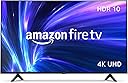


Amazon Fire TV 55" 4-Series 4K UHD smart TV with Alexa Voice Remote Enhanced, stream live TV without cable
Product ID: 356286663
🎤Alexa Voice Control
📺4K UHD Resolution
🔌4 HDMI Ports
🎉 Elevate Your Viewing Experience with Alexa at Your Command!
The Amazon Fire TV 55" 4-Series 4K UHD Smart TV offers an immersive viewing experience with stunning 4K resolution, HDR support, and a user-friendly Alexa Voice Remote. Stream over 1.5 million movies and shows, connect multiple devices effortlessly, and enjoy continuous software updates for a future-proof entertainment solution.
| Resolution | 3840 x 2160 |
| Display Resolution | 4K UHD |
| High Dynamic Range (HDR) format | HDR 10, HLG |
| Backlight type | Direct LED |
| Refresh rate | 60 Hz |
| Screen size | 55” |
| Viewable display size | 54.6” |
| HDMI ports | 3 HDMI 2.0 + 1 HDMI 2.1 with eARC |
| Ethernet | 1 Ethernet port |
| USB | 1 USB port |
| IR device control with included Alexa Voice Remote Enhanced | The included Alexa Voice Remote Enhanced can control certain functions, such as power and volume, on a wide range of compatible IR-enabled devices, soundbars, and A/V receivers. Note: Certain functions may not be available on some IR-enabled devices. |
| Voice support | Yes, with Alexa Voice Remote Enhanced (included) or the free Fire TV app (available for download on Fire OS, Android, and iOS). |
| Audio support | Dolby Digital Plus with passthrough of Dolby-encoded audio |
| Audio power | 8W + 8W |
| OS | Fire TV OS |
| Product size without stand | 48.7” x 28.3” x 3.5” |
| Weight (without stand) | 25 (lb) |
| Bezel size (mm) | 10.9 mm |
| Front finish | Black plastic |
| Distance between TV legs | 39.6” |
| SKU number | 4K55N400A |
| VESA Wall Mount Standard | 300 mm x 300 mm |
| Accessibility features | VoiceView screen reader enables access to the vast majority of Fire TV features for users who are blind or visually impaired. Screen magnifier enables viewers to zoom in and out, and pan around the screen. Text Banner consolidates onscreen text into a compact, customizable banner that appears on the screen. Watch videos and TV shows with closed captioning displayed. Use Audio Description for verbal descriptions of what is happening on the screen, including physical actions, facial expressions and scene changes. Captions and audio descriptions are not available for all content. Fire TV 2-Series, Fire TV 4-Series, Fire TV Omni Series, and Fire TV Omni QLED Series support audio streaming for select compatible Bluetooth hearing aids and devices for a private listening experience. You can also listen to Fire TV with compatible Bluetooth headphones. Learn more about accessibility for Fire TV. Note: “Hearing aids” refers to compatible Bluetooth hearing devices such as traditional hearing aids, cochlear implants, and bone conduction hearing devices. |
| Content availability | Certain apps and services are subject to change or withdrawal at any time, may not be available in all areas and languages, and may require separate subscriptions. |
| Connectivity | Wifi or Ethernet |
| Digital Optical Audio Output | 1 Digital Optical Audio Port |
| Warranty and service | 1-year limited warranty and service included. Optional 3-Year and 4-Year Extended Warranty available for U.S. customers sold separately. Use of Fire TV is subject to the terms found here. |
| Included in the box | Fire TV 4-Series 55”, Alexa Voice Remote Enhanced, power cord, 2 AAA batteries, 4 screws, TV stand (2 legs), Quick Start Guide ([PDF] https://d1ergij2b6wmg5.cloudfront.net/Amazon+Fire+TV+User+Guides/Amazon+Smart+TV+Documentation/FireTV_4-Series_Online_QSG_US.pdf) / Accessible HTML) |
| Software security updates | This device receives guaranteed software security updates until at least four years after the device is last available for purchase as a new unit on our websites. Learn more about these software security updates. If you already own a Fire TV, visit Manage Your Content and Devices for information specific to your device. |
| Support | Explore the User Manual to view more information about Fire TV 4-Series. |
| Size | 38.2 x 157.7 x 17.1 mm |
| Weight | 51 g (without batteries) |
| Batteries | 2 AAA required (included) |
| Technology | Bluetooth 5.0 |
| Compatibility | Compatible with Amazon Fire TV smart TVs: Fire TV 2-Series, Fire TV 4-Series, Fire TV Omni Series, Fire TV Omni QLED Series, Fire TV Cube (3rd Gen) |
J**N
Also Works Great as a Computer Monitor!!
I have two of these TVs - the 43" and a 50". The 43" I have on my kitchen table. I was curious as to how this TV works as a computer monitor. I have an old Dell XPS 8900 from 2016 that I recently replaced as my main computer. But, the XPS still works well, so I thought I'd hook it up to the TV in the kitchen for some work from home tasks. Honestly, I wasn't expecting much given the age of the computer. I was NOT expecting 4K on the TV. Lo and behold...WOW! The Series 4 works fantastic as a computer monitor! Incredibly, I get 4K - 3840 x 2160 at 60hz using a cheap $5 4K HDMI cable. And it's beautiful!! Which makes this TV a superb value!! Text is very clear and crisp, even though it supposedly doesn't do 4:4:4 chroma. However, don't use the PC picture mode. I am using Vivid, and it's awesome. PC picture mode is dark and I just didn't like it. All I can say is that this really made the purchase worth it. Picture quality for a TV is definitely good - for the price point, of course. And the fact that updates from Amazon is frequent, bugs should be fixed quite timely. I have not had any problems with the batteries in the remote draining fast, or poor sound. Not sure why there's so many of those complaints. Again, great TV - for the price point, of course. For a "budget" television, it's well worth it!
K**T
Liking it so far!
Mounting it was extremely easy (although I had my dad do it but he’s got all the carpenter’s tools; a stud finder, power drill and socket wrench set will do that). It’s very light for such a large TV but still pretty sturdy and well designed. It has more HDMI ports than most newer TVs out there, big bonus, as well as optical, USB and Ethernet ports. As far as interface, super easy. I used Roku previously and this was not a huge leap. It connected to my Amazon account automatically and I had my three other streaming accounts hooked up in minutes. But it walks you though the usual setup the first time you power it on: language, all first time updates, a choice of apps or TV channel searching (can be skipped then added later) and then goes directly to the Home Screen where you can add what you like. Very simple and easy to understand. It doesn’t take forever to load when switching apps; it almost instantly just takes you to where you left off when switching between them. Absolutely love that feature. It does power down when idling on still screens too long but waking and resuming is quick too. The picture and audio settings are a breeze to tweak through the remote. The sound and picture are just right as well; the sound is crisp and balanced and the picture has easy defaults or can be customized. I always turn down the backlight because they always tend to be brighter than i like but it was simple to find. Switching to inputs or new apps is one-button; you don’t have to keep backing out to get to another quickly. Honestly very impressed. I don’t need a lot of bells and whistles so I like when the things I do need a TV for are simple and seamless. It’s super easy switching between TV and three gaming consoles. Easy to add a HTML splitter and take advantage of more devices on one input if needed. I’m the first person I know to get a Fire TV so it was a gamble, but it definitely paid off. Very worthwhile to get a mount if you feel confident installing it (you can always pay for installation if not). It’s a great TV to take advantage of newer game consoles. Personally, the Omni series had a bunch of stuff I didn’t need, so if you just need a TV for streaming and gaming, the 4-Series doesn’t disappoint. On a side note, I saw some reviews about a ‘bright blue standby light’ that no longer exists as of this review. It’s a softer whitish light and not very bright. If a standby light does bother you at night, invest in black electrical tape. I’m not sure why people drop so many stars over minor personal issues. If you do happen to have pet peeves about electronics, it’s always best to research before you buy! And yes, companies do read reviews and see customer suggestions so nitpick away to improve their products. Either way, I have no complaints on what I ended up with.
C**N
Great as a Fire TV, good as a computer monitor (for non-gamers)
Overall, I like this. This may be the same model I've already purchased two of, but not reviewed, or a close "variant". I love my Fire TVs though I felt that the earlier ones lacked enough space for applications. This is one I purchased for a different reason. I'm using it as a computer monitor. You have to be careful on this and if you're one who plays games, this might not be for you. It's absolutely NOT snappy fast as game players need, but for me doing my usual academic work (i.e. -grading) and setting up virtual machines and such, it's absolutely fine. I will say that I made the decision to buy it based on another user's review that it was suitable as a computer monitor and handled text well enough, which not all smart televisions can do when being used as a monitor. Pros Easy setup Has a nice picture, and adds HDR when being used as a computer monitor Has ample storage to add apps (around 12 GB) Cons It can get a little strange as a computer display. You might find your scaling changed, may find you need to modify your refresh. Don't try and overdo it even if it's got refresh rate above 60 Hz, as mine showed. In my own tests, it appears to cause the screen to periodically blank out. Overall, I like it and I'd recommend it. The photo shown is me using it as a computer monitor.
B**L
Nice but not the best viewing angles
UPDATE: Updated to 4 stars. Maybe 4.5 considering the value price. Turning off HDR on both TV and Roku, plus turning off dynamic brightness on TV ended up helping a lot. Realize this TV has video profiles for each input so i had to change on each. No the picture and viewing angles don't compare to our 55" TCL QLED which has incredible viewing angles but that TV was kind 3x as expensive too. Plus apps seem to be optimizing quality as i use the TV more which helped a lot too. I debated editing my review but think it's still useful for others and Amazon to show a real world experience including the frustrations. A new issue I'm seeing is audio cutting out entirely during transitions between shows & ads that didn't happen on our old TV but thinking it's an app specific issue not the TV So our old 1080 48" HD TV was finally on its last legs and we love our TCL Roku TV we use in the living room so i was ready to buy 55" Roku brand TV and happened upon this 55" FireTV with basically the same specs but almost 100 bucks cheaper so it was tough to justify buying the Roku TV especially since we have a Roku soundbar so don't really need a smart TV let alone built in Roku so i bit and ordered the FireTV. First impression wasn't great in that it took over an hour to do the initial setup thanks to all the updates that seemed to be in SV endless loop as they'd finish then low and behold it was doing more! eventually i got to actually try the TV.. at first it was very impressive and clearly better picture than our old HD TV. of course that was just menus as ran thru installing apps which took forever in part because they'd stick at 'installing' FOR HOURS.. i mean i only did 5 or 10 as i was finding the ones we use on Roku but it's ridiculous it should take hours to install the apps on our broadband connection. i think it was hung up because i restarted the FireTV and at first it seemed they were still stuck but then boom they all finished within seconds. no idea what the issue was but our Internet was definitely working. once apps were usable i sat down to watch a few things and things were washed out. I'd switch to other apps thinking it was just a particular one but everything was washed out. i tried adjusting video settings. i tried the Roku thru hdmi4. washed out. then i happened to stand up and the picture was better. not much but noticeable. i tried multiple apps while standing and indeed they all were better. then i stood directly in front of it dead center and the picture was incredible! if i duck down 2 feet or so and picture gets a little washed out but the big one is not being directly in front of the TV.. as i step sideways i can see tht picture wash out. and no not at 170 degrees but like 15 or 20. it reminds me of very early LCD flat panel TV's where you have to sit in front not off to side at all. i did find turning off HDR on FireTV and on the Roku it helped some (especially how dark things were) but really it depends more on what's being watched and the contrast of what's shown. I took video clip of paused Disney+ on Roku at 4k with HDR off to show an example even if it's not the worst of what I've seen in testing. Watch how the colors change even just moving a few feet to side and back to center. I do like the quick switch previous app option that Roku doesn't have though. Very handy feature I'll keep testing but honestly at the angle of my favorite chair (roughly 15 degrees down and 30 degrees left) it looks so bad trying to watch even just the news I'm not sure I'm keeping this TV..
R**.
Good 4K picture for the price
4K content looks sharp and the HDR handling is decent for this price range. Setup and the Alexa remote work the same as on the smaller models. Enough ports for a console and a soundbar.
B**D
Nicely Delightful
I must say this is a great TV. I ordered a 55" and it has been one of the best TVs I have had in terms of visual quality. The TV is paired wirelessly with an Amazon Fire Sound Bar, which is definitely a nice enhancement for sound quality. Like most Amazon Fire TVs, it is overloaded with way too many streaming apps, which clutter the home screen. Most of which I do not use. In reality, I use only five apps, three of them are music apps. I find it useful to use the Alexa feature to control the TV so you can go directly to the app you want to use. TV has never had any issues downloading anything, no problems powering up or shutting off either. This particular TV can be controlled in many different ways, which is awesome. I recommend downloading the Amazon Fire app to your tablet and/or phone (use Amazon Fire app, not the Amazon Fire Remote app, they are different). For a 55", it is easy to move around, and easy to transport. It does not put out of a lot of weight for its size. The remote is fairly easy to use. The set up for the TV was painless, and it is easy to find settings and change them if necessary. Sound quality without the sound bar is adequate. However, I put heavy hours on the TV each day, most of which is from music so I wanted the bar. The TV cooperates with wall mounting, never had any issues with it. Only con with the TV is the excessive apps menu on home screen, and ads. However, the ads can be removed by a setting on the TV. I hope this TV lasts a long time. Recommended.
S**H
Where there's smoke, there's a Fire TV.
I think they took the name a little too seriously. I wish they'd take my return request more seriously. I've had this TV for 2 short months. It got light use... maybe 5-6 hours per day. We've got some TVs here in this house, Samsung, Vizio, TCL, that stay on 24/7 in some cases. My new fire TV had been on for about an hour when the screen suddenly went dark. I tried the old IT trick of 'turning it off and back on again' ... nothing. I turned it back off and let it sit off for a few minutes and when I tried again, the screen 'backlight' came on, but no image. I tried pressing different app buttons & home button etc. on the remote to no avail. I then went to remove the power cable thinking if I left if off power for a minute, maybe I could get it to 'reset' and then power it back up ... when I reached for the cable on the back, I could smell that burnt PCB smell ... If you've worked in electronics, you know what a charred SMD (surface mount device) smells like.. I had been sitting in the dark watching the TV so when I quickly turned on the light I was surprised to see a small haze of smoke still hanging above the TV. I reported this 2 days ago and was told immediately that it was under warranty, but they couldn't process a return for me... What?! They wanted to forward me to another tech support group. I thought .. OK, the TV fried... I'd want to know why myself, so I can understand pushing my ticket to another department. Then a day later I was contacted by someone asking for pictures of the sides, front, and back ... so I immediately took pictures and sent them over. Today I've called to inquire about the status of my return, and was told "They are still reviewing your device" ... How are they reviewing something that is unplugged and sitting on my table? The pictures?! How long does it take to look at 4 pictures? I'm truly bummed about this too ... The TV had an amazing picture. The 4K UHD screen was about as crisp as I could have hoped for. The internal audio (usually not ideal on a flat panel) was really good and full. This TV had impressed me more than any TV I'd bought in the last 15 years. ...and then the smoke came out. 2 months TV rental for $200 is not worth it ... I understand that things fail. Stuff breaks... I get it. But stand behind your policy and product. If it broke under normal use then replace it quickly so the customer isn't without the product for which they paid. Within minutes of writing this review I was contacted by Customer Service again... They offered me a UPS shipping label and instructed me to bring it to my local UPS store. I informed the customer svc rep, Luis, that I did not have the original box to use for shipping. He told me this wasn't a problem, and that UPS would take care of the packaging/boxing for me. Upon arriving at UPS and wasting another 20 minutes of my time standing in line, I was surprised to hear from the UPS rep that I would be responsible for the shipping costs and that the return process with Amazon would not include the price of packaging/boxing. Don't buy this. Don't waste your time. Spend the extra few bucks and go to your local store. Go to a mom & pop Tv store if any still exist in your area. At least you'll have somewhere to bring it should it fail.
S**N
Amazon Fire TV 55"
I recently purchased the Amazon Fire TV 55' 4-Series 4K UHD smart TV and I have to say, I am beyond impressed with its performance. One of the main reasons I decided to buy this TV was because it offers the ability to stream live TV without the need for cable. As someone who was looking to cut the cord and save money, this feature was a game changer for me. The set-up process was incredibly easy and user-friendly. It only took a few minutes to connect to my WiFi and download all of my favorite streaming apps, like Netflix, Hulu, and of course Amazon Prime Video. The interface is also very intuitive and easy to navigate, making it a breeze to switch between different apps and channels. What really stands out about this TV is its picture quality. The 4K UHD resolution is crystal clear and the colors are vibrant and true to life. Whether I am streaming a live sports game or watching a movie, the visuals are stunning. It also has HDR10 support which enhances the contrast and colors even more. I was pleasantly surprised by the built-in Alexa feature. With just the sound of my voice, I can control the TV, search for content, and even adjust the volume. It's like having a personal assistant right in my living room. Another great aspect of this TV is the variety of available content. The Fire TV platform offers a wide selection of streaming apps, including some that are exclusive to Amazon. I also love that I can access live TV channels through Amazon's Prime Video Channels. One thing to note is that the remote does not have number buttons, so it takes a bit of getting used to when inputting channels. But with the Alexa voice control, I haven't found this to be much of an issue. Overall, I am extremely satisfied with my purchase of the Amazon Fire TV 55' 4-Series 4K UHD smart TV. It has exceeded my expectations in terms of picture quality, user-friendly interface, and the ability to stream live TV without cable. I would highly recommend this TV to anyone looking for a high-quality, affordable option for cutting the cord.
Trustpilot
3 days ago
2 months ago