
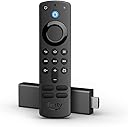


Amazon Fire TV Stick 4K, brilliant 4K streaming quality, TV and smart home controls, free and live TV
Product ID: 364774501
🌐Dual-band WiFi
🎶Dolby Atmos Audio
📺4K Ultra HD
🎉 Elevate Your Viewing Game with Fire TV Stick 4K!
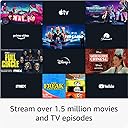
The Amazon Fire TV Stick 4K offers a stunning 4K streaming experience with support for Dolby Vision and HDR, access to over 1.5 million movies and TV episodes, and seamless integration with Alexa for voice control and smart home management. Compact and easy to set up, it’s the ultimate entertainment hub for any modern home.
| Size | 99 mm x 30 mm x 14 mm (only housing) | 108 mm x 30 mm x 14 mm (including the connector) |
| Weight | 53.6 g |
| Processor | Quad-core 1.7 GHz |
| GPU | IMG GE8300 |
| Storage | 8 GB |
| Wifi | Dual-band, dual-antenna wifi (MIMO) for faster streaming and fewer dropped connections than standard wifi. Supports 802.11a/b/g/n/ac wifi networks. |
| Bluetooth | Bluetooth 5.0 + LE. Pair with compatible Bluetooth speakers, headphones, video game controllers, and more. |
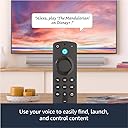
| Voice support | Yes, with the Alexa Voice Remote (included) or free Fire TV app (available for download on Fire OS, Android, and iOS) |
| IR Device Control with included Alexa Voice remote | The included Alexa Voice Remote can control the Fire TV Stick 4K and certain functions (such as power and volume) on a wide range of compatible IR-enabled devices, including TVs, soundbars and A/V receivers. Note: Certain functions may not be available on some IR-enabled devices. |
| Cloud storage | Free cloud storage for digital content purchased from Amazon |
| Ports | HDMI output, micro-USB for power only. |
| Audio support | Dolby Atmos, 7.1 surround sound, 2-channel stereo, and HDMI audio pass through up to 5.1. |
| 4K support | To watch movies and TV shows in 4K Ultra HD, you need a compatible Ultra HD TV. All services may not be available in 4K/HDR. Certain services are subject to change at any time, may not be available in all areas, or in 4K/HDR, and may require separate subscriptions. Learn more about services. |
| Content formats supported | Video: Dolby Vision, HDR 10, HDR10+, HLG, H.265, H.264, VP9 Audio: AAC-LC, AC3, eAC3 (Dolby Digital Plus), FLAC, MP3, PCM/Wave, Vorbis, Dolby Atmos (EC3_JOC), Photo: JPEG, PNG, GIF, BMP |
| Output resolution supported | 2160p, 1080p and 720p up to 60 fps |
| System requirements | High-definition television with available high-speed HDMI input, high-speed internet connection via wifi |
| TV compatibility | TV must support minimum HDCP requirements for protected content playback. Compatible with 1) 4K ultra high-definition TVs with HDMI capable of 2160p at 24/25/30/50/60 Hz and HDCP 2.2, or 2) high-definition TVs with HDMI capable of 1080p or 720p at 50/60 Hz. |
| Warranty and service | 1-year limited warranty and service included. Optional 2-year and 3-year extended warranty available for U.S. customers sold separately. Use of Fire TV is subject to these terms. |
| Content availability | Certain apps and services are subject to change or withdrawal at any time, may not be available in all areas and languages, and may require separate subscriptions. |
| Accessibility features | VoiceView screen reader enables access to the vast majority of Fire TV features for users who are blind or visually impaired. Screen magnifier enables viewers to zoom in and out, and pan around the screen. Text Banner consolidates onscreen text into a compact, customizable banner that appears on the screen. Watch videos and TV shows with closed captioning displayed. Use Audio Description for verbal descriptions of what is happening on the screen, including physical actions, facial expressions and scene changes. Captions and audio descriptions are not available for all content. You can also listen to Fire TV with compatible Bluetooth headphones. Learn more about accessibility for Fire TV. |
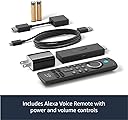
| Included in the box | Fire TV Stick 4K, Alexa Voice Remote (3rd Gen), USB cable and power adapter, HDMI extender cable for Fire TV Stick 4K, 2 AAA batteries, Quick Start Guide. |
| Software Security Updates | This device receives guaranteed software security updates until at least four years after the device is last available for purchase as a new unit on our websites. Learn more about these software security updates. If you already own a Fire TV, visit Manage Your Content and Devices for information specific to your device. |
| Size | 38 mm x 142 mm x 16 mm |
| Weight | 43.4 g (without batteries) |
| Batteries | 2 AAA required (included) |
| Technology | Bluetooth and infrared |
| Compatibility | Fire TV Stick 4K, Fire TV Stick 4K Max, Fire TV Stick (3rd Gen) |
User
Unleash the Power of 4K Streaming with the Fire TV Stick 4K
The Fire TV Stick 4K has taken my streaming experience to new heights with its exceptional 4K Ultra HD streaming quality. This compact device packs a punch, delivering stunning visuals, smooth performance, and a vast library of content, making it an absolute must-have for any home entertainment setup.The standout feature of the Fire TV Stick 4K is its ability to stream in 4K Ultra HD resolution. The picture quality is truly remarkable, with vivid colors, sharp details, and enhanced contrast that bring every scene to life. Whether I'm watching movies, TV shows, or even sporting events, the visual experience is immersive and captivating. The support for HDR10 and Dolby Vision ensures a wider range of colors and deeper blacks, further enhancing the viewing experience.Performance-wise, the Fire TV Stick 4K doesn't disappoint. It features a quad-core processor and 2GB of RAM, ensuring smooth and responsive navigation. Launching apps, browsing through menus, and switching between content is snappy and seamless. I no longer experience frustrating lag or buffering, allowing me to enjoy uninterrupted streaming.The device offers a vast selection of streaming services and apps, ensuring there's always something to watch. From popular platforms like Netflix, Prime Video, and Hulu to niche content providers, the options are virtually limitless. The user-friendly interface makes it easy to discover new content through personalized recommendations, trending categories, and curated collections. With access to thousands of movies, TV shows, and even live TV channels, I'm spoiled for choice.One of the key advantages of the Fire TV Stick 4K is its integration with Alexa. The included Alexa Voice Remote allows for effortless voice control, enabling me to search for content, control playback, and even interact with compatible smart home devices. The voice recognition is highly accurate, understanding my commands even in noisy environments. It's incredibly convenient to simply ask Alexa to play my favorite shows, skip ahead, or adjust the volume, making the viewing experience even more enjoyable.Setting up the Fire TV Stick 4K is a breeze. It plugs into any HDMI port on your TV, and the on-screen instructions guide you through the process in a matter of minutes. The device's compact size ensures it blends seamlessly with your entertainment setup, and the included remote control offers a familiar and intuitive experience.In conclusion, the Fire TV Stick 4K is a game-changer for 4K streaming. Its brilliant picture quality, powerful performance, extensive content library, and seamless integration with Alexa make it an essential device for any entertainment enthusiast. With its user-friendly interface and impressive features, the Fire TV Stick 4K has transformed my streaming experience. If you're looking to unlock the full potential of 4K Ultra HD content, I highly recommend the Fire TV Stick 4K as a worthy addition to your home entertainment setup.
User
A perfect device for my needs! Great quality!
I had a 1st Gen Fire TV stick years ago. This new Fire TV stick 4K with Alexa Voice Remote is a marvel by comparison!(Skip to the next paragraph if you want to get right to the product itself...lol)I was having issues with my bedroom TV. It's a Vizio "Smart" 4K tv and recently it has been freezing up when using certain apps. The Netflix app was the biggest offender. It would freeze up, no remote function worked and I'd have to get up, physically unplug the tv and plug it back in just to reboot it. Apparently, this is a common issue with app incompatability with the Vizio and certain apps. Even with all of the apps and the TV's software and firmware up-to-date, the problem persisted. I decided the best work-around was to take the TV's software out of the picture and let the Fire TV Stick be the "Smart" part of my "Smart TV" setup. And it's awesome!The first thing I noticed was how easy the setup was. It paired effortlessly with my tv, Echo Dot Speaker w/Alexa and even my Blink cameras. Sure, you have to go through all of the usual stuff like download the streaming apps that you use that aren't pre-loaded and sign in to them all, but that's an expected pain in the butt and I only had 2 that weren't already there.The voice commands are also very intuitive. Whether I'm using the remote, my Echo Dot or the app on my phone, I get what I'm looking for.What I wasn't expecting was the much better picture quality! I have a Vizio 4K Ultra TV and I've noticed some of what I watch the quality is definitely not 4K but that's more to do with the quality of the content not being 4k (like my live TV streams using YouTube TV for instance....I don't pay for the 4K option). As soon as I got the Fire TV stick up and running, I noticed a much sharper picture (even the YouTube TV). I'm not a techie or videophile by any stretch of the imagination, but I'm guessing there are a few factors at play that contribute to the better image quality: Fewer resources being used by the TV itself having to run the apps whereas the Fire Stick has ample memory and fast processor to handle the bandwidth better, and there might even be some "upscaling" being done by the Fire to emulate 4K. Not true 4K but sharpened to nearly mimic the end result. Whatever it is, I was actually expecting a drop in quality so an increase isn't an optical illusion on my part. lolAfter a few days, I decided that I needed one thing that this was lacking....a remote with back-lit buttons. I've become spoiled by my universal remote with buttons I can see at night in my bedroom (and the remote is now defunct because it's infrared and doesn't work with the Fire Stick).So I threw down $34.99 for the Alexa Voice Remote Pro. Yes, I paid more for a new remote than I did for the Fire TV Stick and remote just to have lighted buttons. LOL BUT the remote has a bunch of other features that make it a little more useful and some features are just cool (you can use both remotes so I have a backup now). It has a "Find my remote" feature, additional, programmable buttons that are super easy, etc. so I'm in Fire TV Stick heaven with this remote plus the Fire TV Stick 4k.I highly recommend this Fire TV Stick. I considered getting the 4K MAX even though I don't have the latest wifi system that it takes advantage of, but I don't think I'll miss it even if my ISP upgrades it's service
User
Lifesaver
Perfect fits in all my tv’s great streaming device! Works great never a problem.Would highly recommend.
User
Exceptional streaming device that delivers incredible value and performance!
This Amazon Fire TV Stick 4K has been absolutely amazing and completely upgraded our entire home entertainment experience - the quality is outstanding with brilliant 4K streaming that delivers crystal-clear picture quality and vibrant colors that make every movie and show look stunning on our TV, far superior to our old cable box or built-in smart TV apps that were constantly glitchy and slow. The functionality is incredible as it provides seamless access to all our favorite streaming services while the intuitive interface makes finding content effortless, and I love how the smart home controls let me manage our Alexa-enabled devices right from the remote without having to use separate apps or voice commands for everything. It looks great with its compact, unobtrusive design that hides perfectly behind our TV while delivering premium performance, and the setup was remarkably simple - just plug it in and follow the straightforward on-screen instructions to be streaming within minutes. At this price point, it's incredible value considering the vast library of free and live content it provides along with access to premium services, essentially replacing expensive cable subscriptions while giving us more viewing options and better performance - this device has saved us hundreds of dollars annually while actually improving our entertainment experience with faster loading times, better picture quality, and more content variety, and the reliability has been flawless with consistent performance that makes streaming feel effortless and enjoyable every single time we use it, making this one of the best technology investments we've made for our home.
User
Nice addition to our Vizio Smart TV 2017 model D32
We like this Firestick, and the operation of it. My only complaint is lack of instructions. Apparently it is assumed you have a newer TV, but nothing for setting this up on older smart tv's such as we have, which is a 2017 Vizion model D32 with HDMI port.Took me about half hour to finally figure out how to get the Firestick and our HDMI to find each other. I finally realized with our TV, you have to set your input...in this case input was HDMI...but for some reason it synced up with HDMI2 connection. I didn't understand it, but it is working well, after I figured out why I was seeing nothing about Firestick.In any case, after it did a software update, and finally booted up, worked well. Takes some time to find your way around and navigate, but this is a very clever nice addition to any Smart TV, especially older ones. I unplug the Firestick every night before we stop watching TV, you don't have too, but we do.A lot to watch that is included with Prime, as well as a lot through IMDBTv that has ads, but still a good selection of shows. The ads on IMDBTv are not too intrusive or long, it is just nice to be able to catch some shows we like and older shows.If you have a newer smart TV, I am sure it is easier to setup, but do not expect to be presented with many instructions, what you get is ok, but no addressing older TV's or any models in particular. You are on your own with that, but the instructions themselves are ok...just not any help for connecting to various TV's.Nice unit, worth the 29.99 we paid for it, and we love Prime too!
User
Minor issues, but for the price, extraordinary
I’ve had a few Fire TV sticks over the years, and generally I love them. For this model, the first one I got was a dud. It died in 2 days. Amazon took me through some reasonable troubleshooting steps, then replaced it quickly and easily. The second one is a lot better.In general, I find the remote has a weird tendency to, I guess “rot” is the word. The case starts to feel like it’s covered in a sticky mess. I don’t know why. I guess that’s why the remote covers are so popular. Not a stopping point – they still work – just a point of note. The optional game controllers do not have this issue.There are ample streaming options. I’ve yet to look for something, even less common things like Wonderium and Funimation, and not find it. The UI is easy to navigate. The device is responsive. I put it through a 7.1 sound system and it can handle that no problem.A few things to note, not exactly faults of the product, but faults you will encounter while using the product.For the Disney+ login, the trick of using the phone just errors out and asks to re-authenticate over and over. If you use a strong password, that can be a pain. Once it works, it’s fine, just a pain to set up.For the Ubisoft+ integration, for many of the games it starts to load then fails. I don’t see the same issue on the same games on PC, so it’s probably related to the app. This was the primary purpose for which I bought the device, so it is a bit of a disappointment. Also note, you need the Luna service for this, which is totally worth it on its own, by the way. Also, at least for me, while the video streaming was fine over WiFi, the gaming required the Ethernet adapter.It’s not perfect, but it’s outstanding for such a low price. I often use it rather than power up my PS5 to watch Netflix because it is so much more convenient, and of identical quality.
User
Love my Fire Sticks!
The Fire TV Stick 4K is a brilliant streaming device that offers brilliant 4K streaming quality, TV and smart home controls, free and live TV. It's a great way to upgrade your TV and access all your favorite streaming content.Here are some of the things I like about the Fire TV Stick 4K:Brilliant 4K streaming quality: The Fire TV Stick 4K can stream 4K Ultra HD content with HDR10 and Dolby Vision. This means you can enjoy your favorite movies and TV shows in stunning clarity and detail.TV and smart home controls: The Fire TV Stick 4K comes with a voice-activated remote that lets you control your TV and smart home devices with your voice. This is a great way to control your entertainment without having to fumble with remote controls.Free and live TV: The Fire TV Stick 4K also gives you access to free and live TV channels. This means you can watch your favorite shows without having to subscribe to a cable or satellite TV service.Overall, I highly recommend the Fire TV Stick 4K. It's a great way to upgrade your TV and access all your favorite streaming content.Here are some additional benefits of using the Fire TV Stick 4K:It can help you save money on your cable or satellite TV bill.It can give you access to a wider variety of streaming content.It can make your TV more versatile and user-friendly.If you're looking for a great way to upgrade your TV and access all your favorite streaming content, I highly recommend the Fire TV Stick 4K.Pros:Brilliant 4K streaming qualityTV and smart home controlsFree and live TVVoice-activated remoteWide variety of streaming appsEasy to set up and useThe only reason I keep rebuying these is because my dog loves to eat them, haha.
User
Superb and a total replacement for cable or satellite!
I was a bit dubious about streaming everything, having always had cable or satellite over the decades. But we can't get cable at our new, rural house, and Dish Networks came out and complained about getting the dish mounted up where I wanted it. After enough of their sniveling, I told them that I'd find some other alternative.A friend has an earlier version of this Fire Stick, and he showed us the interface and the many options for connecting to various streaming services (even beyond Prime). Very intuitive interface, and the controller is ridiculously simple to use.Fast forward a bit, and we've been using this exclusively for two months now. LOVE it! We pay for a couple of premium streams, and we end up with more channels than we would have had through Dish Networks at a significantly lower price (like 50% less)! We get 4K streams for almost everything. It's really a "game changer" (pun intended) to watch football at 4K on an 85-inch TV with crystal clarity.We've had fewer "glitches" in the stream than we've had with satellite and cable TV in the past. And the controller is really easy for my elderly in-laws to use, which could not be said for the alternatives. It took just minutes to have the controller controlling my receiver and TV as well. So it's one-click to turn the system on, and the controller handles volume for the receiver. Just plain easy!We don't use the voice commands hardly ever, so I can't rate that, but it's worked when we've tried it. I really appreciate that the controller only starts listening when you press a dedicated button. So it's not like Amazon is listening in on you all the time.I have literally nothing negative to say about the whole experience thus far. This is a far-superior replacement of the traditional alternatives, and you can roll-your-own streams from various providers and thereby get exactly the content you want at the price you are willing to pay.
Trustpilot
1 month ago
2 months ago