Desertcart purchases this item on your behalf and handles shipping, customs, and support to Slovakia.
⚡ Elevate your home network to pro-level speed and security — don’t get left buffering!
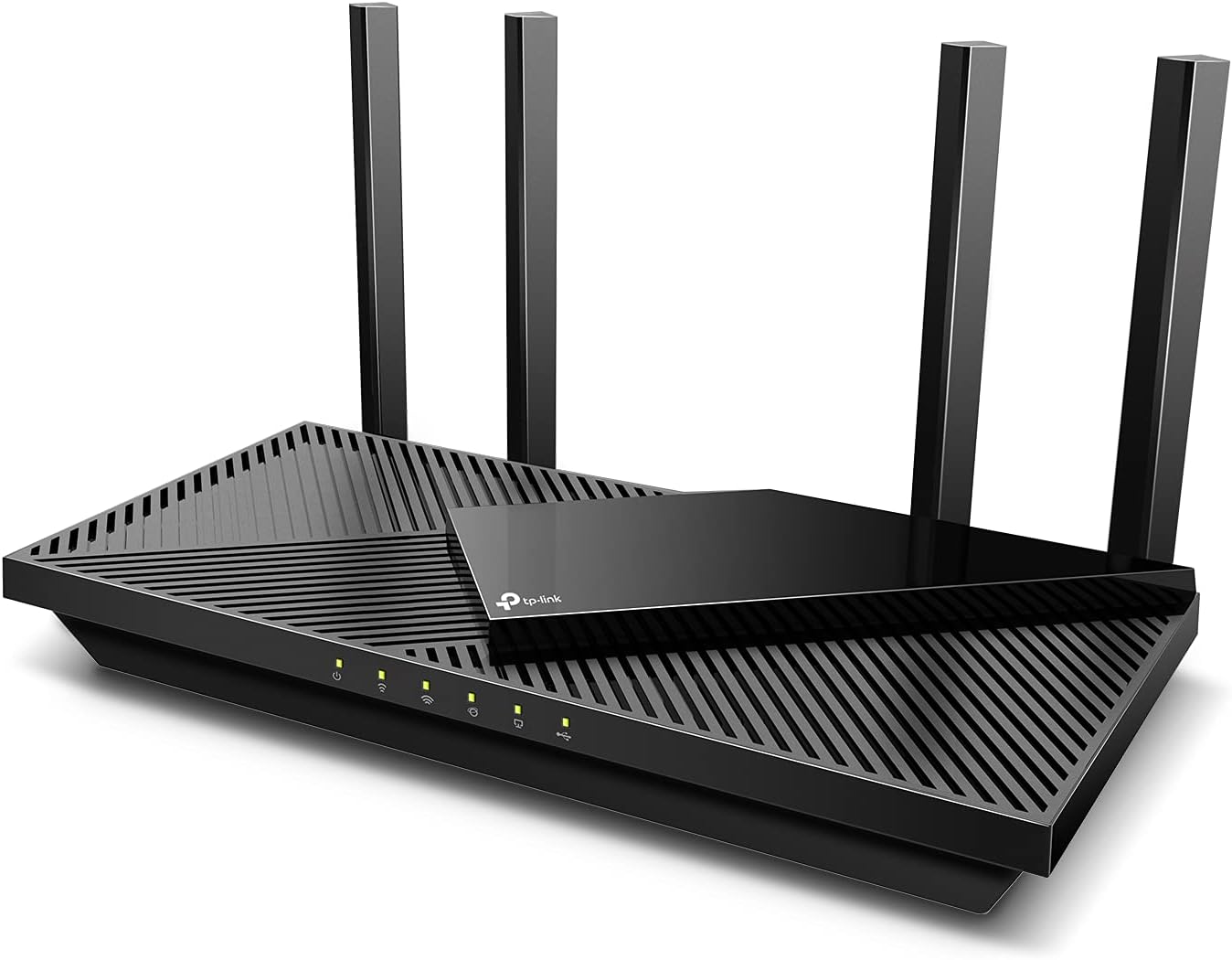
The TP-Link Archer AX55 is a Wi-Fi 6 dual-band router delivering up to 2976 Mbps combined speeds with 4 external antennas and beamforming for extended coverage. It supports advanced WPA3 security, VPN server/client functionality, and smart voice control via Alexa. Designed for seamless streaming, gaming, and smart home connectivity, it ensures low latency and efficient device power management with Target Wake Time.


| Antenna Location | Gaming, Home |
| Antenna Type | Fixed |
| Asin | B09G5W9R6R |
| Best Sellers Rank | #212 in Computers (See Top 100 in Computers) #2 in Routers |
| Brand | TP-Link |
| Built In Media | Power Adapter, Quick Installation Guide, RJ45 Ethernet Cable, Wi-Fi Router Archer AX55 |
| Color | Black |
| Compatible Devices | VPN-enabled Devices, Smart Home IoT Devices |
| Connectivity Protocol | Wi-Fi |
| Connectivity Technology | Ethernet, USB, Wi-Fi |
| Control Method | App |
| Controller Type | App Control |
| Coverage | Strong, reliable Wi-Fi coverage |
| Customer Reviews | 4.4 4.4 out of 5 stars (10,466) 4.4 out of 5 stars |
| Data Transfer Rate | 2976 Megabits Per Second |
| Frequency | 5 GHz |
| Frequency Band Class | Dual-Band |
| Global Trade Identification Number | 00840030703041 |
| Has Internet Connectivity | Yes |
| Has Security Updates | Yes |
| Is Electric | Yes |
| Is Modem Compatible | No |
| Item Dimensions L X W X H | 33L x 24W x 7.3H centimeters |
| Item Type Name | WiFi 6 Router |
| Item Weight | 1.66 Pounds |
| Lan Port Bandwidth | 1000 Mbps |
| Manufacturer | TP-Link |
| Maximum Upstream Data Transfer Rate | 2402 Megabits Per Second |
| Mfr Part Number | Archer AX55 |
| Model Name | Archer AX55 |
| Model Number | Archer AX55 |
| Number Of Antennas | 4 |
| Number Of Items | 1 |
| Number Of Ports | 5 |
| Operating System | RouterOS |
| Other Special Features Of The Product | Guest Mode |
| Ram Memory Installed | 512 MB |
| Router Firewall Security Level | High |
| Router Network Type | dual-band, Wi-Fi 6 |
| Security Protocol | WPA3 |
| Unit Count | 1 Count |
| Upc | 840030703041 |
| Voltage | 240 Volts |
| Wi Fi Generation | Wi-Fi 6 |
| Wireless Compability | 802.11ac, 802.11ax, 802.11b, 802.11g, 802.11n |
User
This gotta be the best value for money Wi-Fi 6 router
This router performs extremely well and coverage seems really good even across 2 walls. Provided ofcourse you set the router at an ideal location. Works excellent with etisalat eLife, just make sure to call etisaalt and request to disable PnP router. Once done you can use it with no problem and ipv6 too works. The interface is easy so is the tether app
User
WiFi 6, Fast, Long reach, Easy setup, Single SSID for 2.4 and 5G
Setting up the router was easy:start with admin password change/set new passwordconfigure name for SSID and choose to leave both separate or combine to smart switch. I selected smart optionsetup internet connection or skip. I choose to skip so I could copy info from my old routerlogged in to my old router from another device & setup internet side by sidesBandwidth, Speed, Coverage:wow it had long range with good bandwidth. I curranty had one main router and an extender as the main router could not cover my full house. I just replaced both with this one single router.even to the ends of my house I get 40-50MB bandwidth, which is like 2-3 walls behind.Multiple Network for isolation and protection plus Mesh:the router can be configured with network separation for more security.each network has 2.4 or 5G optionYour home privet network can be combined with Smart option which broadcasts s single SSID but switched devices between 2.4 or 5G based on coverage or reachThere are 4 network options and all can be managed or kept separateHome/privet network, IoT device network, guest network and LAN network (via cable)you can easily setup one mesh by adding more LP-Link mesh devices to extend you network if required (support only TP-link devices)Security option, Parental control and Tether app:the router comes inbuilt with basic security that checks for your router configuration if weekor if you have a less secure configuration or password for your Wi-Finetwork isolation, where you can isolate IoT devices from your home networkit has paid upgrade to prevent intrusion, web filter and IOT device protection (monthly or yearly plan)the router can be managed over the internet via the tether app, you need to link it to your account to use it.parental control creates separate profiles per home user so you can add all their devices to their own profile & configure it separately.allow or block access using Tether app made easy.Over this router is a great option if you are looking for an upgrade with wifi 6 with inbuilt basic security options.
User
Powerhouse Router
Really fast and furious does wonders for so less price , im able to stream 4k , 8k videos without any lag and smooth gaming on ps5. Much recommended for streamers and gamers. Speedtest results is astonishingly remarkable
User
Genuine Product. Worth the money
This router does what has been advertised. Nothing more nothing less. Product is genuine, easy to set up, wireless coverage is good. Features for network support are good. Delivery was as promised. Packaging was good.
User
ممتاز
ممتاز
User
Excellent
Excellent... Does what it promised but don't expect a miracle in speed n wifi, it's fast specially it can handle extention loads to keep a stable speed to all.. I recommend because of its affordable price.
User
Faulty and defective!
Issue with wifi broadcast! The wifi signal is not constant and devices lose connection from time to time.Waste of money..Do not buy!!!
User
working good so far
the speeds are good and wifi 6 working, the coverage of wifi is also good
User
The WiFi 6 technology makes a big difference
I’ve been using the TP-Link AX3000 WiFi 6 Router (Archer AX55) for a while now, and I’m really impressed with its performance. The WiFi coverage is strong and stable throughout my home — even in areas where my old router struggled.The WiFi 6 technology makes a big difference — faster speeds, smoother streaming, and no lag even when multiple devices are connected. The setup was super easy using the TP-Link Tether app, and it supports OneMesh, which means I can easily extend coverage in the future if needed.I also like the built-in VPN support and the robust security features, which give me peace of mind. The router looks sleek, runs cool, and has been very reliable with no drops or restarts needed.Overall, it’s a fantastic router for the price — perfect for gaming, streaming, and work-from-home use. Highly recommended!
User
Ótimo Roteador
Recebi muito rápido, roteador superou as expectativas.
User
Everything I could have asked for in a router.
This router is the end of my long journey down a rabbit hole of trying to find a solution of "adding" more storage to an Android device that I felt does not have enough free space. My router before this in terms of wireless coverage wasn't bad, and its internet speed tests were usually 'fine'. However, the issue I realize it had was when I began to set up networked storage in my home and its local file transfer speeds over Wi-Fi were abysmal.After dealing with numerous settings on that router, going through two TP-Link extenders that ultimately did not resolve the issue, I ended up just getting this router instead. And I have to say, this fully solved my issue and easily surpassed all expectations that I had. For starters, my previous Wi-Fi 6 router only managed around 30Mbps when doing a wireless-to-wireless local file transfer between two devices. Whether doing a local speed test or deploying an SMB share. This router? Easily managed between 750-850Mbps, entirely over wireless. It was such an unbelievable increase in performance that that alone makes this worth it for me.Setup is as simple as any other router can be, possibly even easier with the ability to set it up with the mobile app that guides you through the entire process if you don't want to set it up via a computer with a web browser. Giving it the same SSID and password as my prior network allowed all of my devices to reconnect to the network as if nothing happened.Wi-Fi 6, 160MHz channel support, QoS, built in SMB, VPN, Access Control, ability to set it up as an AP, IoT isolation, this router has SO many features for its price, it's insane. The mobile app is great but you do need to go into the gateway on a browser to access its full host of features. There are new features being added to the router still in the form of firmware updates, that the router is still seemingly frequently receiving.This completely solved my goal of wanting to add networked storage in my home. It's so nice to be able to transfer files between all of my devices without ever needing to physically connect them again. Transferring files completely saturates the 1GbE NIC whether wireless or wired on all of my devices, and still leaves plenty of bandwidth on the router itself to allow other devices to function normally.There's not even much to say about its internet performance, it's great, of course. If you have a gigabit internet plan, you will have nothing to complain about whether wired or wireless utilizing this router. There are no less than a combination of 15 wired/wireless devices connected to this router and none of them experiencing any issues. I am very happy with this router!
User
Excelente router 100%recomendado
Excelente producto nomas que no tiene la tecnología de repetidor
User
Nice modern router/wifi/switch for speed, IOT security, and versatility.
It has dim green LED's, which is a GREAT feature. I am tired of bright blue LED's that blind me at night.You can buy extenders for it if you have a dark spot that you have difficulties getting signal to, but I didn't need these.It is a WIFI 6 Mesh router, so passoff between a router and an extender is seamless.Support for VPN's is nice at the router level, so all your communications over the Internet are secure at a network level. Of course, you have to be connecting to hosts (web sites, etc) that are secure as well. At least this keeps the network secure.Tons of features. If you are like me, your old TP Router still works, but you needed more features.I have had great luck with TP-Link (Kasa) routers, IOT electrical outlets, IOT electric wall switches.I would have reviewed their technical support, but I never needed it.The only problem on initial install was the Ring Pro Chime wouldn't connect, but even though I didn't call tech support about it (I have other things in my life...), they came out with a firmware upgrade to resolve the issue within a week. They fixed the problem before I ever got to technical support.It pays to read the release notes on the firmware versions, to see what the upgrade fixes or adds.I am very happy with my choice. My old TP-Link router works as well, and I left the configuration on it, so if I ever had a problem, I could go back to my previous router, plug it in, and not have to bother with reconfiguring it. The old router sits in a box, waiting vigilantly if it is needed again.Also, if my broadband provider tells me my router is the problem in future tech support calls, I can just switch the router with the old one, and either verify their claim, or disprove it. Astound broadband told me the problem was with my router. It wasn't, they had a network outage that their tech support team had no knowledge of. Astound evidently doesn't have Openview (to show them if their network is functioning), a working Change Control System, or anything else I consider critical for a network provider. If they had Change Control, Astound's tech support centre would have been notified. That's why PROFESSIONAL network providers use a network status monitoring product., and have a Change Control process before field technicians are allowed to do routine maintenance. Before they fixed the broadband network, I ordered this TP-Link router and liked it so much, I kept it. Dim, but visible green LED's. Sounds silly, but I do a lot of work at night. It really is nice to not be blinded by BRIGHT BLUE LED's like I see on other computing/networking products.If you have the money, having a second configured router for the home is a really good idea. Do you really want to spend the time to go out and buy a router, and having your streaming and internet services down while you wait/get the router, configure it, and get back to working. If you work at home, having a second configured router ready to go is always a good idea.At this point, the router is 3 years old from the time I bought this model, and I still believe it is a good, reliable router. The only gotcha I found is that if you use the vpn directly on the router, meaning the router itself is connecting to the vpn, rather than your workstations, I had a 50% performance drop on my network from having no vpn, so I run vpn clients on my hosts and workstations, and leave the router to just route the traffic. I don't run my ISP over Gig internet, but at subgig and > 100 Mb, which is my ISP connection, it essentially works at line speed.
Trustpilot
2 weeks ago
5 days ago