


Desertcart purchases this item on your behalf and handles shipping, customs, and support to Slovakia.
⚡ Upgrade Your Network, Upgrade Your Game
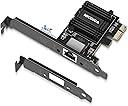
The NICGIGA 2.5G Base-T PCIe Network Adapter leverages the Realtek RTL8125B chipset to deliver up to 2.5Gbps Ethernet speeds, tripling standard gigabit performance. Compatible with PCIe slots x1 through x16, it supports Windows, Linux, and Mac OS with minimal driver setup. Designed for gamers and professionals demanding stable, high-bandwidth connections, it features a dual-bracket design and heat sink for versatile installation and reliable cooling. This adapter is a cost-effective upgrade for anyone looking to future-proof their wired network with multi-gigabit speed.


| ASIN | B09HGRK5XB |
| Best Sellers Rank | #16 in Internal Computer Networking Cards |
| Brand | NICGIGA |
| Color | black |
| Compatible Devices | Desktop |
| Customer Reviews | 4.4 out of 5 stars 725 Reviews |
| Data Link Protocol | Ethernet |
| Data Transfer Rate | 2500 megabits_per_second |
| Hardware Interface | Ethernet, PCI |
| Item Dimensions L x W x H | 3.94"L x 2.36"W x 0.79"H |
| Item Weight | 0.09 kg |
| Manufacturer | NICGIGA |
| Mfr Part Number | NIC-2.5G |
| Model Number | NIC-2.5G |
| Number of Items | 1 |
| Product Dimensions | 3.94"L x 2.36"W x 0.79"H |
| UPC | 756166630512 |
| Unit Count | 1 Count |
| Warranty Description | 1 Year Manufacturer |
B**.
Solid Budget 10GbE NIC (AQC113) – Works Great with Full Line-Speed
⭐️ Solid Budget 10GbE NIC (AQC113) – Works Great with Full Line-Speed I picked up this NICGIGA 10G Base-T PCIe card (Marvell AQC113 controller) for a 10Gb direct link setup, and overall it’s been a great value. ## 👍 What works well * **Full 10Gb performance** I’m consistently hitting ~9.8–9.9 Gbps with `iperf3`, which is basically line rate for 10Gb. * **Stable connection** Once configured, it’s rock solid. No drops, no renegotiation issues. * **Multi-gig support** Handles 2.5 / 5 / 10 Gb speeds properly with auto-negotiation. * **Standard drivers (Windows/Linux)** Works out of the box on Windows 10/11 and modern Linux kernels (AQC113 support is built in). * **Great for direct attach** I’m using it NIC-to-NIC (no switch), and latency is extremely low (~0.2 ms). --- ## ⚠️ Things to know * **Runs warm** Like most 10Gb cards, it gets hot. Make sure you have airflow. * **Driver quirks on niche systems** Works great on standard PCs, but on locked-down systems (like Synology DSM) you may need manual driver binding. * **Cable quality matters** For 10Gb, use good Cat6a or better. Lower-quality cables can limit speed. --- ## 💡 My setup * Direct 10Gb link between PC and NAS * MTU 9000 (jumbo frames enabled) * Dedicated subnet (no gateway) Result: * ~9.9 Gbps throughput * ~0.2 ms latency --- ## 🚀 Performance note If you’re not seeing full speed, it’s usually not the NIC—it’s: * disk speed (HDD RAID will bottleneck) * SMB/file copy limitations * CPU or driver settings The NIC itself is capable of full throughput. --- ## 👍 Final verdict **Pros** * Excellent performance for the price * Reliable once set up * Works well on modern systems **Cons** * Needs decent cooling * Not truly plug-and-play on every platform --- ## 🧾 Bottom line If you want an affordable 10GbE upgrade and are comfortable with basic setup/tuning, this card delivers full performance and is a great buy. For plug-and-play enterprise environments, you might look at Intel/Mellanox—but for most setups, this does the job perfectly.
J**N
It's a Little inconsistent
Out of the box this was not running at the 2.5Gb speeds (even though Windows reported it as running 2.5Gb) it was staying around 900mb with iperf3 test between 2 other machines on network that both have 2.5Gb NICs. Using the QNAP 2.5Gbe unmanaged switch for 3 PCs that all have 2.5Gbe NICs. They are segmented on their own VLAN coming from pfsense firewall appliance which also has 2.5Gbe. After updating the drivers from the Realtek site as per the pamphlet that came in the box along with a small form factor screw driver and 2 screws (using case screw to match black aesthetic) and the 2 I/O plates, then it unlocked the full menu in the interface's controller properties. Also was getting closer to the 2.5Gb speeds on local network, RDP feels smoother and stable connections without drops. There is some irregularity in the iperf3 tests though. Not getting the irregularities from 3rd PC to main PC so not sure if it's driver related or just an issue with the Realtek chipset of this card. Overall though satisfied with the price to performance and hope there will be future driver updates, not counting on it though. For what I need it to do, be a stable RDP connection it seems to be holding strong and helps not feel laggy like it did with the default 1Gb port on the X370 Taichi Mobo. This is an improvement. If you do want a blacked out PCB and the bright green LED isn't visible while doing work then this is a good 2.5Gbe card. Also make sure you get the latest driver from Realtek, out of the box is not fully unlocked. Happy packets :)
L**Z
Great Adapter!
Great little card with excellent build quality and driver support.
P**4
Wild name, but a decent and inexpensive 10GbE card
I bought this as a replacement after the built-in 10GbE card on my Asus ProArt motherboard failed (a frustrating, known issue). While it wasn't strictly plug-and-play, grabbing the driver from Intel's website was simple enough and hardly a dealbreaker. I did have to install it manually via Device Manager because the Intel setup wizard failed for some reason, but it wasn't too difficult. My only real complaint is that it doesn't seem quite as fast as my motherboard's original 10GbE port. I'm averaging about 600 up and down, whereas I was getting closer to 900 with the built-in card. That said, for the price, it's a great fix. It runs cool, feels rock-solid, and has been completely reliable. It got my workstation back up and running without breaking the bank.
J**Y
Nice upgrade!
Bought two of these. One for my gaming PC and one for my Server. Paired with a fast modem I have no complaints. Essential for large file transfers and backups. Even accessing my server remotely is quick.
C**C
Worked great for my Windows 11 PC with an x1 PCIe slot, will get another one soon!
This review is for the 10G PCIe x1 NIC. I installed this in two different machines and had two different results. The computer with Windows 11 (W11Px64) loaded a driver automatically and was ready after just a few minutes, and it was installed in a x1 PCIe 3.0 slot. The throughput to my server was about 560MB/sec (limited by my server RAID). But I tried this on an older W10Px64 machine and it did not find a driver, and I downloaded the one from the Marvell "public" site. It loaded and the NIC ran, but not faster than a 1GB speed. I am not sure if it was a driver issue or a limit of that PC.
Z**N
False Advertisement
This is NOT compatible with Windows 11 as advertised, and is NOT plugged and play.
J**N
runs cool
works as expected win11
C**N
Perfecto
Instalar y utilizar. 0 problemas y tasa de transferencia sostenida.
N**O
Does what you want it to do.
This runs perfect in my pc. My internet connection is stable and runs at full speed. I even get the 2,5gbs intranet connexion from my router. My internet plan is only 100mbs so that doesn't benefit of the full 2.5gbs obviously but maybe in few years I'll get an optic fiber connection that will take advantage of that pciE card. This was easy to install and has no Cons or whatsoever.
J**P
Good product that solved Asus motherboard problem
In case you don't want to read the full review the short version is: Good card, worth the money, fully recommended. The problem: The first picture shows the problem: a 1Gbps connection that only reaches just over 300Mbps, with a wired connection. Having checked every piece of equipment between modem and motherboard, including running a CAT 7 cable directly between the two the problem was finally identified as a dodgy Intel chipset on the ASUS B550-F motherboard. In other words the onboard LAN was just unable to deliver the full broadband speed - and had been delivering substandard speeds for some time. The solution: pictures 2-4: a NICGIGA 2.5Gbps PCI-E card with a Realtek chipset. Why this card? Well, simply put, it has a black backplate that fits in with the motherboard's black backplates. I know, not the best reason but it also has a known chipset, a decent heatsink on the main chip, an handle over the 1Gbps bandwidth, future-proofs to a certain extent and is at good price point. (A quick note about the future-proofing: a 1 Gigabit connection can potentially deliver over 1Gbps - up to 1.3Gbps - whereas a 1Gbps card stops at 1Gbps. This card is 2.5Gbps and so will handle over 1Gbps and provides some future-proofing for when the next major speed increase comes in.) Install: was really simple: unscrew a backplate, install the card, screw in the card, close the case and plug in a CAT 7 cable bought at the same time - KINBETA high speed 10Gbps 2 metre CAT 7 flat braided cable - and switch on PC. See pictures 6-8. The result: picture 9 shows the result. As soon as the PC started the card was recognised, no driver download was needed. The download speed jumped from 321.5Mbps to 925Mbps (picture 9) solving the problem in a most elegant way. It is interesting to note that the ping was 9ms both before and after upgrading the NIC and upload also remained the same - the 52Mbps which was the expected speed and initially highlighted the problem. For those with a small form factor PC it is worth noting that a smaller backplate is provided (see picture 5) as well as a screwdriver and two screws. Overall very happy with this purchase it solved the problem at a reasonable cost and I can feel the difference the higher speed connection makes. Definitely recommend this card.
H**.
Parfait
Fait ce qui est ecrit et atein bien le 5g
C**Y
Bon débit
Une bonne carte qui fait bien son boulot
Trustpilot
2 months ago
1 month ago