⚡ Command your smart space with a tap — never miss a beat!
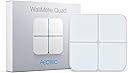
The AEOTEC WallMote Quad is a sleek, battery-powered Z-Wave Plus enabled smart switch featuring 4 programmable buttons capable of controlling up to 16 scenes. Compatible with major Z-Wave hubs like SmartThings and Hubitat, it offers versatile wireless control for your smart home or office, all packed into a compact 3-inch square design with easy installation accessories included.
| ASIN | B01NCEJAOD |
| Best Sellers Rank | #761,464 in Tools & Home Improvement ( See Top 100 in Tools & Home Improvement ) #1,778 in Electrical Light Switches |
| Brand | AEOTEC |
| Built-In Media | Back-Mount plate, Double-Sided tape, Micro USB cable, WallMote Quad |
| Button Quantity | 4 |
| Color | white |
| Compatible Devices | Z-Wave Devices |
| Connectivity Technology | Radio Frequency |
| Controller Type | SmartThings, Wink |
| Customer Reviews | 4.0 out of 5 stars 286 Reviews |
| Item Type Name | WallMote Quad |
| Item Weight | 2.08 ounces |
| Manufacturer | Aeon Labs LLC |
| Max Number of Supported Devices | 8 |
| Maximum Number of Supported Devices | 8 |
| Maximum Range | 120 meters |
| Mfr Part Number | ZW129-A |
| Model Name | ZW130-A |
| Model Number | ZW130-A |
| Number of Batteries | 1 Lithium Ion batteries required. (included) |
| Number of Buttons | 4 |
| Number of Items | 1 |
| UPC | 810667023553 810667023515 |
| Unit Count | 1 Count |
| Warranty Description | 1 year warranty against manufacturer defects |
A**N
Wallmote Quad - 5 years and still a joy to use
I bought the Wallmote Quad and the Nanomote Quad five years ago 🤯 and the Wallmote Quad has been in use the entire time. I have only charged it three or four times which is a bit of a disappointment because it looks really cool while it's charging. In Hubitat, the main functionality of the Wallmote is available. The ability to slide your finger up or down is so limited that I never attempted to configure it; however, being able to short press and long press each of the four quadrants has provided sufficient functionality so sliding has never been needed. I really like the way the Wallmote provides haptic feedback with the long press as I have it configured. I think it could also beep but the vibration under my finger is just enough for me to confirm the command was sent. The Wallmote Quad is great. It costs more than it did 5 years ago, too. That's not the way tech prices are supposed to go!
J**N
Cool Remote, Difficult Setup
* I use this with SmartThings I use this as a switch to control my fan, dehumidifier, light, etc. for my kitchen for quick access while cooking. It works great, but the setup is not for a beginner. I can’t remember everything I had to do to get it all set up, but it did involve resetting the remote a few times. You’ll need to use your phone and the desktop site to add the correct edge driver from Aeotec. You can google “aeotec quad remote edge driver” to find where to download. After confirming I had it working, adding rules and devices to control was pretty simple. The touch, and touch and hold functions fine, but the slider function does not work. There isn’t even an option in SmartThings to set it up. It wasn’t anything I needed anyway. I feel the setup should have been a lot more seamless since it’s made from the same manufacturer. Overall useage is great though. No connection issues and the battery life seems great! I’ve had it for about four months and only needed to charge it once, and I didn’t fully charge it to begin with. Charging can take some time, but you can keep up with the percentage in the SmartThings app. The light on the remote won’t change when it’s completely charged. **ONLY BUY THIS IF YOU KNOW FOR SURE IT WORKS WITH YOUR HUB. Other hubs may find it, but it won’t work as a remote and your hub will throw up errors. This won’t work with 2gig hubs as I checked, but SmartThings definitely supports it (with the difficult setup I mentioned).
A**E
Favorite Remote Switches
These work perfectly with Home Seer. Two I stuck on the wall on either side of our bed to allow easy reach to control lights. One I stuck on my office desk for the same reason, as I have four automated lighting modes I like to switch between depending on the task. The last one was placed in the living room for scene control from next to the couch. The batteries lasts a long time. Many, many months depending on how often you use them. The magnetic mounting plate mean you can keep them off tables and on the wall so they don't get in the way or lost, yet you can still optionally use them off the wall if desired. It also makes for easy charging. There's good feedback when pressing buttons, as they can beep and flash an easy to see lighting effect. They are very responsive. The only thing I would change is to use USB-C instead of Micro-USB for charging. All in all my favorite z-wave remote controls.
D**A
Great little controller
I installed ziggbie controlled blinds in our master bedroom and connected them to the Hubitat and wanted a switch on the wall I could use to control them. This works a treat with the Hubitat, was super easy to mount and is easy to program. It offers single and double tap events as well as long press, so I have set it to open and close the two sets of blinds on each window and double tap to open or close 25% more or less. Works great and is very attractive and I loved that I could mount it anywhere. I have yet to need to recharge it.
M**N
Doesnt play well with Homeseer
I would not recommend this device for Homeseer users. While the initial pairing process was successful, I encountered difficulties in getting the slider functionality to work effectively. Upon researching the Homeseer forums, it became apparent that others have faced similar challenges, leading me to advise against purchasing this product. In terms of usability, the device exhibited a tendency to misinterpret button presses, causing frustration during operation. Additionally, from an aesthetic standpoint, the device features LED indicators that IMO are gaudy and it emits annoying beeps when buttons are pressed. Due to these issues, I decided to return the item for a refund.
C**S
Delay is too long and design may not work for everyone.
I can't recommend this unit, as it is rather 'finicky'. Sometimes it works, and sometimes it doesn't. The 'slide' control for dimming has never worked well, or at all. The delay is the biggest issue compared to other remotes or control using a mobile device. The 4 buttons will ultimately confuse the user because nobody will know what each button does unless you put labels on each 'square'. I ended up putting labels on the unit with a P-Touch, and even with that, it takes away from the clean and modern look. Additionally, if the unit is NOT mounted to a wall, the device could also be rotated and you would never know what each button is controlling because you would have to look at the back to determine the correct orientation of the unit. The unit is flexible with ability to control haptic feedback (vibration), as well as illuminating yellow or blue when a button is pushed. The built-in battery with USB recharging capability is BRILLIANT, and the charge seems to last quite a while, and I wish it were on more devices!! Down the road, I'm not sure if the battery is easily replaceable, or if it would require you to purchase a new unit, and these are not cheap. Too bad there are not many choices of remotes like this. I ended up buying a Philips bridge and using Hue remotes, which work REALLY well, however it makes things a little more complex.
C**.
some things to be aware of, but I like this a lot
I am successfully using this with my openHAB 2.4.0 system. 1. The openHAB system does have this device in its database. But I needed to do several "wakeups" with the backside action button to get it fully paired. (This is an issue common to battery-powered Z-wave devices, not just this.) 2. I don't see how this is 16-scene. I only see 8. The events I get are: button press, button hold, button release after hold. The documentation led me to believe there were also some gesture events (swiping between quadrants) but I don't see that working. I see a Z-wave configuration property (#3) for button slide, and I have it enabled, but I don't see that it does anything. 3. The adhesive strip for mounting the unit is already on the backplate, and it looks like a pretty strong permanent adhesive. I plan to mount mine on a wooden nighttable, and I want something that can be removed without damaging the wood. Fortunately, Aeotec technical support was EXTREMELY responsive, and suggested soaking the back plate in isopropyl alcohol and scraping or gently rubbing off the adhesive. That worked like a champ. I'm pleased with this solution and even happier by the fast and helpful response from techs support. 4. This unit has a beep, haptic (vibration) feedback, and an multi-color RGB for feedback. I configured mine to disable the beep. (Don't want to wake up the person next to you just because you are turning the fan up a notch.) The haptic feedback can be configured too. The LED can't. LED feedback is always enabled and it is always going to be blue. This first unit is going on my partner's nightstand. I like it so much I just ordered another one for mine. UPDATE: Here is the product I used to attach the Wallmote to a wood nightstand: https://www.amazon.com/gp/product/B00099E8DM/ref=ppx_yo_dt_b_asin_title_o00_s01?ie=UTF8&psc=1
J**E
Yes, it DOES work with Smartthings!
This wallmote does work with Smartthings but, you'll only be able to set 2 modes for each button (Press and hold. The swipe up and down will not work). In order for it to work, you first have to add it to your Things in the Smartthings app. Then, you have to log into your Smartthings hub API (use the same email and password you use in your Smartthings app). Then, go to YouTube and search for "Smartthings Wallmote Setup." When he refers to copying and pasting from their Knowledge Base, you have to find their website and download the Notepad file with the code (message me if you need help finding it as I cannot post links in this review). Then, finish the YouTube video where he shows how to program the buttons in the Smartthings app using the ROUTINES options from touching the Automation tab at the bottom of the app. The only thing I don't like about this button, is that the press option for a button doesn't act like a toggle switch. So, to turn on a light using quadrant #1, you might select PRESS to turn on the light but, you'll have to create a separate routine and select HELD for quadrant #1 to turn that same light off. Otherwise you'll have to use up another quadrant to use the PRESS option to turn off that particular light. I also used a Sharpie marker to write in each quadrant so everyone knows what each controls. The buttons are NOT sensitive to the marker so the buttons will not activate while you're writing on them. Hopefully, at some point, Smartthings adds full support for this button and you'll be able to make use of the swipe up and down for each button. That would double it's functionality.
A**S
Perfecto disparador de escenas
Es un switch de escenas ZWave muy práctico y compacto. Se recarga fácil y rápidamente y la batería le dura meses.
Trustpilot
1 week ago
2 weeks ago