Desertcart purchases this item on your behalf and handles shipping, customs, and support to Slovakia.
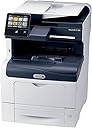
🚀 Elevate your office game with Xerox VersaLink C405/DN — where speed meets smart simplicity.
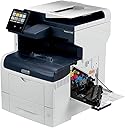
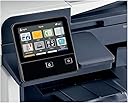
The Xerox VersaLink C405/DN is a high-performance color laser multifunction printer delivering 36 pages per minute with 600x600 dpi resolution. Featuring a mobile-inspired touchscreen, robust paper capacity (up to 700 sheets combined), duplex printing, and seamless Ethernet connectivity, it’s designed for busy professionals seeking efficiency and ease. Preloaded with productivity apps and backed by a one-year on-site warranty, this printer transforms everyday office tasks into streamlined workflows.
| ASIN | B01N7JASW3 |
| Additional Printer Functions | All In One |
| B&W Pages per Minute | 36 pages_per_minute |
| Best Sellers Rank | #460,087 in Office Products ( See Top 100 in Office Products ) #649 in Laser Computer Printers |
| Brand | Xerox |
| Built-In Media | Fax Cord, Installation Guide, Power Cord, Quick Use Guides, VersaLink C405 Color MultiFunction Printer, software and documentation CD, starter capacity toner cartridge: One each of cyan, magenta, yellow: 2K capacity, Black: 3K capaticy |
| Color | Gray |
| Color Depth | 24 bpp |
| Color Pages per Minute | 36 |
| Compatible Devices | Smartphones |
| Connectivity Technology | Ethernet |
| Control Method | App |
| Controller Type | Android, iOS |
| Customer Reviews | 3.6 out of 5 stars 189 Reviews |
| Display Type | LED |
| Duplex | Yes |
| EU Spare Part Availability Duration | 1 years |
| Global Trade Identification Number | 00095205841725 |
| Hardware Interface | USB |
| Initial Page Print Time | 36 seconds |
| Ink Color | Black |
| Item Dimensions D x W x H | 17"D x 21.3"W x 23.6"H |
| Item Type Name | Color Laser MultiFunction Printer, Print/Copy/Scan/Fax, letter/legal, up to 36ppm, automatic 2-sided printing, USB/ethernet, 550 sheet tray, 150 sheet multi purpose tray, 50 sheet DADF (single pass duplex) |
| Item Weight | 72 pounds |
| Manufacturer | Xerox Office Products |
| Maximum Copies Per Run | 150000 |
| Maximum Copy Resolution Black and White | 600 x 600 dpi |
| Maximum Copy Resolution Color | 600 x 600 dpi |
| Maximum Media Size | 8.5 x 14 inch |
| Maximum Sheet Capacity | 1250 |
| Maximum print Resolution Color | 600x600 dpi |
| Model Name | C405/DN |
| Model Number | C405_DN |
| Model Series | C405 |
| Number of Ethernet Ports | 1 |
| Number of Trays | 3 |
| Other Special Features of the Product | Ethernet |
| Paper Size | 8.5 inch x 14 |
| Power Consumption | 82 watts |
| Print media | Envelopes, Labels, Paper (plain) |
| Printer Connectivity Type | Ethernet |
| Printer Output Type | Color |
| Printer Type | Laser |
| Printing Technology | Laser |
| Processor Count | 2 |
| Resolution | 600 |
| Scanner Type | document |
| Series Number | 405 |
| Special Feature | Ethernet |
| Total USB 2.0 Ports | 1 |
| Total Usb Ports | 1 |
| UPC | 095205841725 |
| Unit Count | 1 Count |
| Warranty Description | 1 year on-site warranty |
| Warranty Type | one-year warranty |
| Wattage | 82 watts |
P**C
Feature packed business class printer
Have purchased three of these printers for our office about a month ago and have been very pleased so far. The print quality, ADF handling, and wonderful speed are very impressive, with setup straightforward and build quality excellent. It is clear this is a serious business class printer, with as well screen customization and printer website granular adjustments. Understood beforehand it needed a separate wireless adapter, which I think for business security reasons is not automatically built in. Wireless was easy to setup and is much faster than USB. Purchased these due to their speed, large 0 to 90 degree adjustable display and Xerox print quality. Especially like the full ream (550 sheet) built in paper tray, so no need to purchase for $150-200 an add on tray (which I've found never seem to work properly). Scan by USB supported, at least for my setup to an iMac with OS 11.0 (beta). Pleased as well with ability to purchase generic high capacity toner that brings the black & white page cost to about 0.25 cents and color to about 0.45 cents. Generic toner (ld products) I've purchased works well with no error codes and no need for proprietary chip replacements. Price of printer without need to purchase separate tray is the same or even less than most other printers, such as the Canon 743 or Brother 8900. This easily allows the purchase of an extended warranty, so no future worries there. Tech support for a minor setup issue (my fault actually) was quick and professional. Highly recommended.
P**R
The Xerox C405 printer is a scam
We've been using Xerox C405 for 3 months now. We printed 2885 B&W pages and 6650 color pages. We keep getting error 092-320 all the time. A technician showed up today for 5th time to fix it. When I called Xerox, I requested the printed be replaced because it is garbage. They said they can't replace it; the technician must initiate a replacement of the printer. I asked the tech today, to get it replaced. The tech said it is not his job to do such a thing, and he wouldn't even know who to call anyway. Xerox C405 is a scam, a waste of money, and a joke. If I needed a printer to print some 20 pages a week, then I'm sure it would be a fine printer. Printing 9500 pages in 3 months is too much for the printer to handle. Update 2024-03-07: This is a history of our Xerox C405 service person visits since I decided to start keeping track of it. Initially I did not bother because I didn't think much of it when it had initial few problems. 2024-01-17: Fault or Error (092–320), case number: 261 943 xx, technician replaced drum, printer working again. 2024-01-26: Fault or Error (092–320), case number: 261 986 xx, technician replaced toner, printer working again. 2024-01-30: Fault or Error (092–320), case number: 261 996 xx, I wasn't in the office and nobody told me what was done, printer working again. 2024-02-07: Fault or Error (092–320), case number: 262 030 xx, I wasn't in the office and nobody told me what was done, printer working again. 2024-02-28: Fault or Error (092–320), case number: 262 118 xx, Xerox phone support guy advised to ask the technician to request a printer replacement when he is on-site. 2024-03-01: Technician on-site refused to get it replaced saying he is not authorized to do so. He did something and it works again. Current printer usage data: Black Impressions 2885 Color Impressions 6650 Total Impressions 9535 2024-03-07 Called support to find out what the deal is with replacing the printer. Xerox person confirmed that only the on-site technician can initiate a printer replacement. If he refuses, then we should call his supervisor. Xerox company cannot do anything about it. --- end of story for now I will never ever, zero chance, buy another Xerox device again. That company is a sick joke. I didn't like HP before, yet now I can't sing praises on HP any louder. HP replaced a faulty printer immediately, no need for 5 service visits (in fact it was more) to make a move.
D**R
Best multi-function machine for the money
I'll keep this short... This is easily the best value for a fast, multi-function, full color machine that money can buy. This is my second one and it really is shocking at the quality of this machine. First of all it uses genuine Xerox toner and produces the quality that you would expect from Xerox. All the features you could possibly want including scan to email or to your desktop is incredibly simple through a lightning fast set of process. If you're not great with computers, call Xerox customer support and they will remote into your computer and get everything set up for you. The nicest feature for me is the fact that I can put stationary in one feeder and a full ream of paper in the tray. if you're considering a printer that does not hold 500 sheets or more don't buy it. It's a royal pain in the butt when you run out of paper. More and more businesses are going paperless and this machine handles that beautifully. Give the machine a try, you'll be glad that you did.
R**Y
so far so good
Brought this laser printer after getting burned on a canon mf743cdw printer that i just brought and it quit working this printer is kinda hard to setup at first but if you read the instruction that comes with the printer you will get it going with no issues print quality is amazing so bought the wifi module for this and with wifi! and for those that are having connection issues just set your router for a daily reboot and you will be fine most wifi routers times out the connection after so many hours and a daily reboot will keep you internet connection fresh
K**K
Small Office Printer
We purchased this printer/scanner to replace the leased printer/scanner in my office since we have gone paperless and print very little paper now. Xerox has been a good product in the past for me and this seems to be a good choice so far. Be aware that if you enter the admin password wrong a few times, you are in trouble because it will lock you out of the machine and you'll have to pay Xerox tech to help you out. The documentation says the password is 1111 or 11111, but that is out of date. It is the machine serial number, which would have been nice to know before I locked it up and had to pay to get it unlocked. First of all, this is not good business to charge your customers to unlock their own machine. That policy at Xerox should change. Now, the machine, once you get into the admin console is not terrible to set up, but does take some knowledge if you want to setup print to email or print to folder. Best bet is to let the machine jump on the network with DHCP rather than setting a static IP, it just doesn't do well, even when manually typing in the IP, subnet and gateway. Scan to email is also tricky because you need to know an SMTP relay based on your email and all the settings, such as port numbers, SSL, etc... For an IT person, this is easy stuff, but for a typical business owner, it's not. Overall, after a few hours to set it up, and the machine restarting dozens of times everytime you make a change, it seems to be running fine. For users, download the Xerox app from the Microsoft store and let it auto-find and configure on the network.
J**.
BUYER BEWARE - This is an outstanding printer, but you may have to use genuine Xerox replacement toner cartridges
I really loved this printer, until it came time to replace a toner cartridge. A set of 4 genuine Xerox high-yield replacement toner cartridges can easily cost you more than the price of the C405/DN printer, so I looked for a good generic compatible cartridge brand. Long story short - generics won't work in this printer. I received this printer new less than two weeks ago from Amazon. I had a large color print job that burned through one of the toner colors in a couple of days, so I ordered a set of 4 generic compatible toner cartridges. When I inserted the replacement cartridge, I got a Toner Fault error. I assumed it was a bad brand, since there were no reviews yet on Amazon. So, I ordered another brand that had good reviews on Amazon and reportedly worked with this printer. When I inserted that cartridge, I got the same result - Toner Fault. After several correspondences with the toner vendor, I reached out to Amazon today for support, who got Xerox technical support on the phone. The Xerox tech towed the company line, insisting that they only support genuine Xerox toner cartridges. This printer was recently manufactured by Xerox (March 2018) with the latest March 1, 2018 version of the firmware. I suspect that Xerox has clamped down on the use of non-genuine toner cartridges in the latest version of their firmware, causing the Toner Fault error to be issued, although the Xerox tech would not confirm that. Xerox does not post earlier versions of the firmware on their site, and the tech said the only way I could get that was through an in-person service call. This experience has left me feeling angry at Xerox, if in fact they have altered their product firmware to forbid usage of generic toner cartridges. This is a huge step that will seriously alter the operating costs for anyone planning to use generic toner cartridges. I've returned this printer to Amazon, and I don't plan to ever buy another Xerox product! This really is an outstanding printer, but be prepared to pay for genuine Xerox toner cartridges.
A**R
Waste of MONEY
This MFP has been a thorn in my side. It constantly has issues. The main reason I bought it was that I had the same model that lasted about three years, and I had a surplus of toner several hundred dollars worth of toner that I was stuck with because the last machine broke, and I had a service company come out and tell me it would be cheaper to buy another one rather than fix it. So, I caught it on sale and purchased it. It worked flawlessly for the first three months, and then there was one problem after another. Customer support is very expensive, and it's just about the same as buying a new machine. Xerox will not support you if you use aftermarket toner, even if it is from a reputable company. Xerox OEM toner for this machine is over $900 for a full set. That is more than the machine... I will not buy this product or any other product from Xerox again. As a small business owner who doesn't do much volume on the machine, I feel ripped off by Xerox. It's hard enough already. Do companies care about the quality of their products anymore? I don't think XEROX does...
J**W
Easy to set up and use
I've had this printer for about a year now and have not had to purchase a toner cartridge yet. It is used for heavy home use or light commercial use as I do work from home and have started a contract using it. Print quality is good (inkjets are still better for pictures), scanning and copying is excellent. The fax capability has come in handy on occasion (it's surprising who uses faxes these days). Fairly easy to set up and print from the network. Both sons have visited and set up their laptops to use it in just a few minutes. The feeder has only jammed when I tried to scan something with very thin paper, but recovery was easy and it didn't tear the original.
C**E
Xerox
great connectivity
A**R
Clear color printing
We like the scanning of both sides in one step, speed, setting up other locals, software for phones
A**S
Quand c’est une grande compagnie
Excellent équipement, service à la clientèle de Xerox, ça c’est autres choses!!!🥴
G**A
Buena impresora
Excelente impresion, buena velocidad
C**N
Calidad y servicio del vendedor
excelente servicio del proveedor y calidad del equipo tambien
Trustpilot
4 days ago
2 weeks ago