Buy anything from 5,000+ international stores. One checkout price. No surprise fees. Join 2M+ shoppers on Desertcart.
Desertcart purchases this item on your behalf and handles shipping, customs, and support to Slovakia.
๐จ๏ธ Print smarter, not harderโyour last printer, guaranteed!
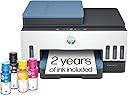
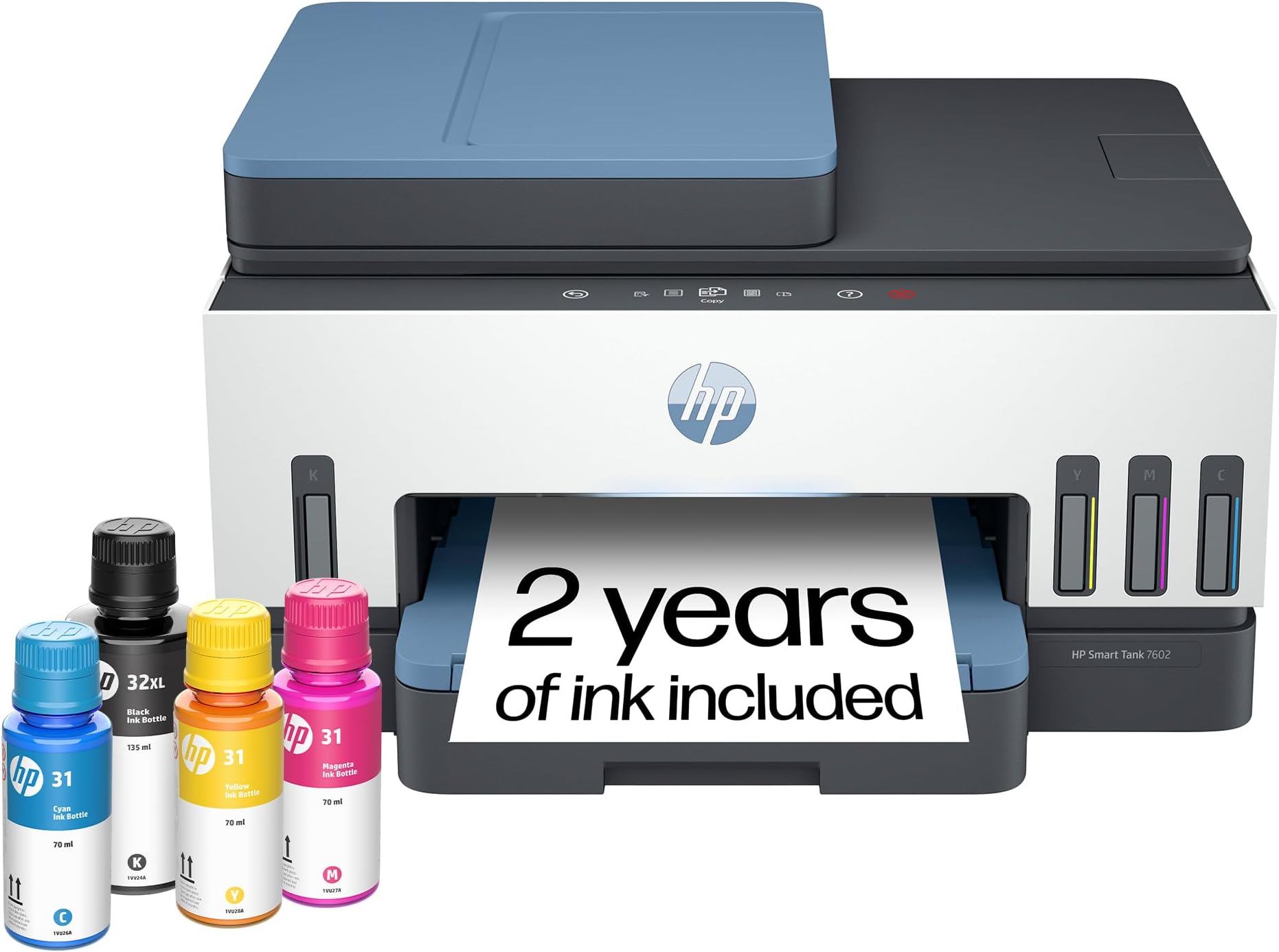
The HP Smart Tank 7602 is a high-capacity, cartridge-free all-in-one inkjet printer designed for home offices and small businesses. Featuring ultra-high 4800x1200 dpi resolution, automatic duplex printing, and wireless connectivity, it includes 2 years of original HP ink for up to 8,000 color pages. Its AI-enabled printing optimizes layouts to reduce waste, while mess-free refill bottles and a large 250-sheet tray maximize convenience and efficiency. This durable, low-maintenance printer combines speed, quality, and cost savings in one sleek package.


| ASIN | B09CJCNJBL |
| Additional Printer Functions | All In One |
| B&W Pages per Minute | 15 ppm |
| Best Sellers Rank | #7,760 in Office Products ( See Top 100 in Office Products ) #18 in Ink Tank Printers |
| Brand | HP |
| Built-In Media | 28B98A HP Smart Tank 7602 All-in-One Printer; HP 32XL Black Original Ink Bottle; HP 31 Cyan Original Ink Bottle; HP 31 Magenta Original Ink Bottle; HP 31 Yellow Original Ink Bottle; HP Black Printhead; HP Tri-color Printhead; Power cord; Ink caution flyer; Setup guide; Reference guide; Regulatory flyer; Warranty flyer |
| Color | Blue |
| Color Depth | 24 Bits |
| Color Pages per Minute | 9 ppm |
| Compatible Cartridge | HP 32XL 135-ml Black bottle (~6000 pages), HP 31 70-ml Cyan bottle (~8000 pages), HP 31 70-ml Magenta bottle (~8000 pages), HP 31 70-ml Yellow bottle (~8000 pages) |
| Compatible Devices | Laptops, PC, Smartphones, Tablets |
| Connectivity Technology | Wireless |
| Control Method | App, Touch |
| Controller Type | Amazon Alexa, Android, Hand Control, iOS |
| Customer Reviews | 3.9 out of 5 stars 1,995 Reviews |
| Display Type | MGD |
| Dual-sided printing | Yes |
| Duplex | Automatic |
| Hardware Interface | USB 2.0 |
| Initial Page Print Time | A4 Black 14 sec; A4 Color 16 sec Seconds |
| Ink Color | Black, Cyan, Magenta, Yellow |
| Item Dimensions D x W x H | 16.83"D x 9.46"W x 14.33"H |
| Item Type Name | Inkjet Printer |
| Item Weight | 17 Pounds |
| Manufacturer | HP, Inc. |
| Maximum Copies Per Run | 99 |
| Maximum Copy Resolution Black and White | 600 dpi |
| Maximum Copy Resolution Color | Up to 600 x 600 dpi |
| Maximum Copy Speed Black and White | 13 ppm |
| Maximum Media Size | 8.5 x 14 inch |
| Maximum Print Resolution Black and White | 1200 x 1200 Dots Per Inch |
| Maximum Sheet Capacity | 250 |
| Maximum print Resolution Color | 4800 x 1200 Dots Per Inch |
| Model Name | ST 7602 AIO |
| Model Number | 7602 |
| Model Series | Smart Tank 7602 |
| Number of Drivers | 2 |
| Number of Ethernet Ports | 1 |
| Number of Trays | 1 |
| Other Special Features of the Product | Auto Document Feeder (ADF), Auto-Duplex, Display Screen, Refillable Ink Tank, dual band Network-Ready |
| Output sheet capacity | 250 |
| Paper Size | 3.5" x 5", 4" x 6", 5" x 7", 8" x 10", 8.5" x 11", 8.5" x 14", A4, A6, half letter, legal, executive) Inches |
| Power Consumption | 1.1 Watts |
| Print media | Envelopes, Glossy photo paper, High-resolution paper, Labels, Paper (plain) |
| Printer Connectivity Type | Wireless |
| Printer Output Type | Color |
| Printer Type | HP Thermal Inkjet |
| Printing Technology | HP Thermal Inkjet |
| Processor Count | 1 |
| Resolution | 4800 x 1200 |
| Scanner Type | ADF, Flatbed |
| Series Number | 7602 |
| Special Feature | Auto Document Feeder (ADF), Auto-Duplex, Display Screen, Refillable Ink Tank, dual band Network-Ready Special Feature Auto Document Feeder (ADF), Auto-Duplex, Display Screen, Refillable Ink Tank, dual band Network-Ready See more |
| Specific Uses For Product | Home and small business |
| Total USB 2.0 Ports | 1 |
| Total Usb Ports | 1 |
| UPC | 195908302605 195908302599 |
| Unit Count | 1.0 Count |
| Warranty Description | One year limited hardware warranty from the date of purchase; user replaceable parts have separate warranty periods. |
| Warranty Type | Limited |
| Wattage | 1.1 watts |
O**1
Color me impressed!
Compact, high quality unit, SUPER easy ink refills, great value, fast print and good color. I've lived with 2 printers and moved them between 5 states. A laser printer for good, fast, low cost prints and an all in one ink jet. It was a total pain, they were both big, both have me headaches, heavy and I needed 2. FINALLY, FINALLY I have 1 printer to replace both, do anything I might need and the ink refills MAKE SENSE! Imagine that?! Haha. A printer that doesn't come with just enough ink to print a test page, but comes with 2 full years with of COLOR ink! This is the way forward and thank you HP for going this route. The idea that buying a new printer is cheaper than buying ink refills warms my heart because there are so many printers that end up in landfills, not to mention how much of a consumer headache it is. I will say that I had concerns regarding color print quality and that it might be messy to refill. I'll put your mind at ease - impressive color print quality, speed and adding ink couldn't be easier! (Idk how this printer would travel while full, but everything seems tight and sealed) Overall I couldn't be happier with the end result. The cost, functions, ease of use and low ongoing ink cost are 100% with it in my opinion. I forgot to mention that I've never found a personal or work printer that was easy to use wirelessly. I'd have a headache adding the printer to my PC or couldn't get a crappy app to work. Once I did, I'd get error codes or a jam... Idk, I'm very techy but that's been my experience. This HP worked without issue and the app was very straightforward. I haven't tried advanced options but it does what I need... It just works! I did try scanning and they was fast and easy as well. I have the printer on a 6ft hutch, so fingers crossed everything continues to work and I won't have to bust out the step ladder 6x like I used to.
J**.
I started my own photo printing shop
Having a printer that performs this well has been great. Setting it up was easy to do with the included instructions. I already have a color laser printer which I use all the time, and you may be wondering why I would go buy an inkjet printer. Photos. You can't print on glossy paper with a laser printer very well. All the photo paper I've purchased clearly says it's for inkjet printers. While this hasn't stopped me from trying. The results have been very poor. Especially if you want to cut the photos to specific sizes. Little bits of toner get everywhere. I've been putting off getting an inkjet because the cartridge system is too expensive and messy. I got more ink on my hands pulling the stickers off the refills than filling every tank on the HP 7602. This printer has all the features you would expect such as Wi-Fi, flatbed scanner, automatic document feeder, 2-sided printing, and even an ID card copy function. If your business provides financing this is something that would really make things easy for you. My wife and I print photos from our phone using the HP Smart app or the phone's default printing app and both produce excellent results. The photos are where you would expect them to be, and the quality is as good as getting them from the pharmacy. Like I said I have a laser printer, but I was curious how this would work just printing some regular documents. Itโs not quite as fast obviously but the results are just as good. I love the user interface that is so seamlessly placed into the front bezel. Unless itโs telling you something you would never know it was there. This Printer checks a lot of boxes for me and was 100% worth the investment.
D**G
HP Warranty: Know this before buying; Unit malfunction in less than 5 months
UPDATE: Not even 5 months using this printer and there are problems. 1 - the printer's black ink is not working. A blank paper comes out for documents printed in black ink only. The problem: the black ink is not running through the tube that connects the blank ink tank to the ink cartridge. The tube is totally clear. 2 - The ink cartridge does not move to the center when opening the printer cover, preventing access and removal of the ink cartridge. HP Tech Support: Spent about an hour with tech support for them to tell me what I already knew - the printer is defective. HP Warranty: HP is not abiding by the terms of the warranty. According to the standard warranty, HP is to first ship a replacement. To ship the defected unit back, the customer is to use the prepaid shipping label provided by HP and use the box of the replacement unit to ship the defective unit back. Without any advance notification to the customers, HP has indicated to me that this policy does not apply to Smart Tank printers. Smart Tank purchasers are responsible to bear the cost of shipping the defective unit and providing the box. Once HP receives the defective unit, they will then ship the replacement. This policy obviously extends the period the customer is without a working printer. I tried pushing back, but to no avail. Replaced a HP Officejet Pro 8600 printer. The HP 7602 takes up less space, is well made, looks nice and the printing quality is better. The printing speed is slower, which will be much more noticeable when printing multiple, double sided pages. The paper tray does not have a slider from the top to ensure that the paper stays level and in place. It only has sliders on the side. I would have liked to see an Officejet Pro 8600 equivalent tank printer. The cost of ink cartridges for regular inkjet printers can not be justified for someone that does not print much.
M**.
Why didnโt I buy this sooner?
I am so happy I shelled out for the 7602. HP makes less expensive Ink tank printers but this is perfect for me. Pros: 1. The printing quality is great. Iโm in the middle of a massive project that requires thousands of pages to be printed. I upgraded to 32lb paper to ensure the project would be quality, but also to handle double sided printing with images. The images with this printer and clear with zero smudging. 2. Itโs fast. It said 12 pages per minute, but Iโm getting more than that double sided. 3. The paper tray. The ad doesnโt go into this, but the paper tray is rad. I have terrible back pain so to sit and do a project for hours is hard enough. To have to get up to reload a paper tray sucks. This paper capacity has got to take 200-250 sheets. I grab about half the package of paper to fit a load snuggly. I LOVE this feature. 4. The cost I was worried about the reality of the savings on ink. The initial cost is over $300. However the little ink jet cartridges are between $30 to $50 each time. They run out so fast. Plus, HP changed the machines to only read their proprietary cartridges, so you canโt order a cheap fast cartridge off Amazon. I printed close to 1,000 pages last night and Iโm only seeing a slight dip in the ink levels. Thatโs crazy. Now consider the ink. The bottles are designed so they fit over the loading tube. No mess. I was worried about this because I am a stone cold clutz. I did spill a drop of blue, but I was moving fast. The bottles have a plastic top the presses into the tube creating a seal. Imagine when you pull a gas nozzle out of your tank. If you are in a rush you might drip gas on your car. This is the same. You pull the bottle up slowly allowing the plastic barrier to seal. I just whipped off the bottle but only 1 drop spilled, by the tube. I havenโt tried the scanner. I will update in awhile. The only con is the paper catch. This is where the prints come out and stack up. It has a manual slide out. If you forget to pull it out your pages will end up on the floor. Iโm a bit spoiled from the automatic arm that extended on my ink jet when you press print. To me that is such a small sacrifice for all the advantages. I highly recommend this printer. In the last 3 months I spent $600 on cartridges. I wish I had done this sooner!
M**S
So far a great printer
So far a great printer. Was a little worried after reading a lot of the reviews. However I was tired of ink cartridges and wanted to give the tank a shot. Heck I have 30 days to try it out with Amazon returns , so why not. Setup only took a couple minutes. Simple to read instructions, online setup guides made it quick and easy. Filling the ink tanks was painless. Installing printer heads was easy. Although was a little worried as it took a little more force the. Expecting to close the cover. Was afraid I was going to brake it. Zero problems connecting to internet. Did a test fax and worked great! Did a test scan with zero issues! Printed several test pages from cell phone and computer with zero issues. Print quality was great even with testing on plain printer paper. Only negative I have is the power cable does not connect securely and can easily come loose causing power to disconnect. Which is my reason for 4 stars as I can see how this might become an issue
C**M
the way to go in printing
i have to say this smart tank printer is awesome, it is easy to set up and prints wonderfully. it is not too heavy at all actually pretty lightweight. this is great for a small home office as it will save you $$$$ on the ink cartridges. the only thing I hate is that HP makes it difficult to cancel the instant ink subscription but that is not this printers fault. I highly recommend this for anyone who wants to avoid the expensive cartridges and wants a bigger paper tray.
C**Y
good and bad
Good: The ink tank concept is brilliant. It was insanely easy and mess-free to install the print heads and fill the ink tanks. The control panel is elegant and nicely integrated into the printer. The whole thing was relatively easy to set up. The print quality was fine. Bad: The first printer I received was covered in ink because apparently the black ink exploded in transit. The replacement printer came barely in time. I tried to print Microsoft Word labels from the HP app, and wasted a lot of labels because it refused to format correctly. Then I had trouble printing in color from Microsoft (but at least the formatting matched the labels). After an update, I was able to print labels in color, BUT had to do one sheet at a time because they kept jamming (set at specialty paper glossy since they were glossy labels) -- again wasted a lot of labels. AND it took FOREVER to print one sheet of labels in color, even when there was barely any color. After it jammed, the color on the labels changed and took several sheets to return to the original colors. I donสปt know yet if the print heads were actually damaged, but it seemed to recover eventually If you want to print a lot of labels in color in a reasonable amount of time without having to feed one sheet at a time, this is not the printer for you. If you mostly print black & white on regular paper, and only occasionally need color, then maybe it will work for you. I havenสปt tried scanning. Again, the ink tank concept is a game changer, but this printer is far from perfect.
J**H
Well-made and user friendly
I am happy with this printer, it has all the functions needed, fax, scan, print, its lightweight, holds plenty of paper and my favorite part is the ink is good for over a year.
A**R
Absolutely Delighted with my new HP 7602 printer
This HP All-In-One, scanner, printer & fax is great. It was easy to set up and works fine. The controls are easy to understand ( but very different from my previous printer). HP apparently has an easy system for getting help with the setup but I didnโt need to use it. I have no concern about recommending this HP Smart Tank 7602 All-in-One printer/copier.
D**H
Great Printer
Fast Printing and easy setup
T**D
Poor Quality Print
Very unhappy with this printer, I have had it 6 weeks and it is malfunctioning.
D**I
overall a good printer with lots of functionality
Overall a good printer. Even tough from a tech point of view it is only an incremental inovation ... the printer is still using cartriges that are filled as it needs from the tank. Some of us remember the day when we were re-filling the cartriges with ink using a syringe to cut ink cost .... so I'm not sure how the smart tank solution is that innovative. Remain to be seen how often these cartriges have to be changed. From an environmental point of view, I have doubts that this is the best solution. I think HP can and should do better! Then the firmware that the printer comes with seems to be buggy. The WebService & firmware upgrade did not worked from the HP Smart. That forced me to do an upgrade from the PC and I got the dreaded 8AF300001 firmware error. Kudos to 'Ryan S' that wrote in his review how to recover the printer. It did worked - I had to try several times until I got the maitenance screen, since the red 'X' button did not react well. Afterwards, the WedService worked & the firmware tool from the HP Smart showed the latest firmware version, etc ... I did not get dirty with ink when I purred in the tanks but I did got dirty when I put the cartriges in. Otherwise the printer seems of good quality. A bit noisy at startup/shutdown.
S**C
Excellent purchase!
Setup was easy, beautiful print quality. A++
Trustpilot
1 month ago
2 weeks ago