Desertcart purchases this item on your behalf and handles shipping, customs, and support to Slovakia.
🖋️ Elevate your iPad game—precision meets power in one sleek stylus!
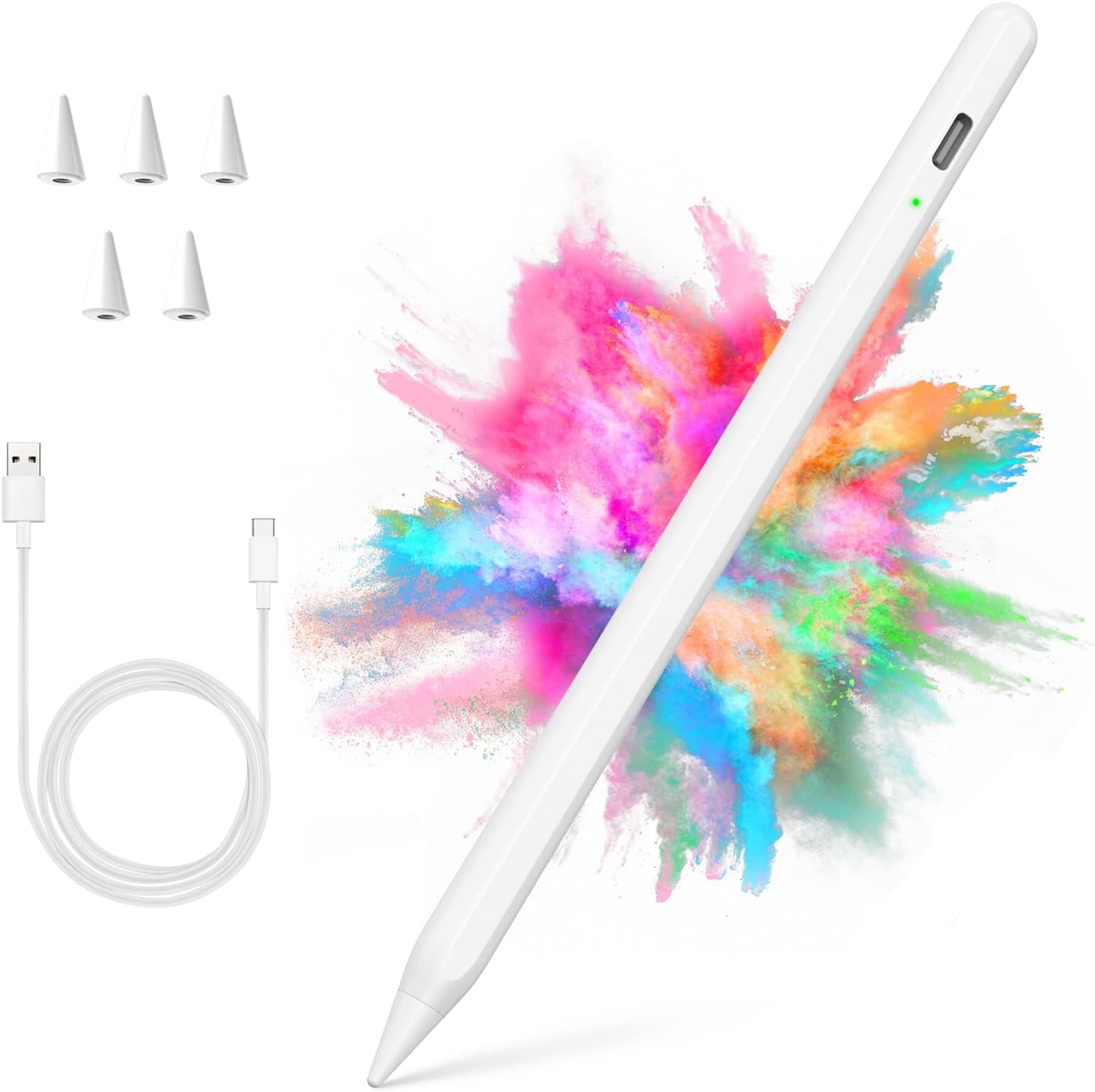
The COO Stylus Pen is a high-precision, palm-rejection stylus compatible with iPad models from 2018 through 2026. Featuring a 1.2mm fine tip with tilt and pressure sensitivity, it offers a natural writing and drawing experience. It charges fully in 30 minutes for up to 12 hours of continuous use and boasts an impressive 180-day standby time. No Bluetooth or app setup required, making it the perfect plug-and-play tool for professionals and creatives alike.


| ASIN | B09V4FNCVC |
| Battery Average Life Standby | 180 days |
| Battery Description | Lithium-Ion |
| Best Sellers Rank | #5 in Digital Pens |
| Brand | COO |
| Charging Time | 30 minutes |
| Color | White |
| Compatible Devices | Compatible with iPad 10th/9th/8th/7th/6th Generation; Compatible with iPad Pro 12.9"/11" (2018-2023); Compatible with iPad Air 5th/4th/3rd Generation; Compatible with iPad Mini 6th/5th Generation, For iPad 2022 (10th gen) A2696 / A2757 / A2777 ; For iPad 2021 (9th gen) A2602 / A2604 / A2603 / A2605 ; For iPad Air 2022 ( 5th gen) A2588 / A2589 / A259 ; For iPad Air 2020 ( 4th gen) A2072 / A2316 / A… |
| Compatible Tablet Computer Models | Apple iPad (10th generation), Apple iPad (6th generation), Apple iPad Air (3rd generation), Apple iPad Air (5th generation), Apple iPad mini 5, Apple iPad mini 6 |
| Customer Reviews | 4.4 out of 5 stars 3,001 Reviews |
| Enclosure Material | Polyoxymethylene |
| Item Diameter | 1 centimeters |
| Item Dimensions | 8.19 x 2.36 x 0.67 inches |
| Item Weight | 70 g |
| Manufacturer | COO |
| Material | Polyoxymethylene |
| Mfr Part Number | 202_1_w |
| Model Number | 202_1_w Stylus Pen for iPad |
| Number of Batteries | 1 A batteries required. (included) |
| Number of Packs | 1 |
| UPC | 612368019466 |
| Unit Count | 1 Count |
| Warranty Description | 1-year product warranty and 30-day money back |
S**A
Smooth and Accurate Stylus Pen for iPad Use
I’m really impressed with this COO stylus pen! It works smoothly with my iPad and makes writing, drawing, and navigating much easier. The precision is great, and it feels comfortable to hold for longer periods of use. I love that it’s lightweight, easy to use, and a great alternative to more expensive stylus options. The response is quick, and it’s perfect for taking notes, sketching, or everyday iPad tasks. Great quality and a great value for the price!
M**L
This Pen is a must Buy. Amazing product for an even better Value.
Love this Pen. It has a lot of great features and works like a dream. It’s Sleek and feels really premium without the premium price tag. It’s ultra responsive with zero detectable delay. Accuracy is on point allowing incredibly precision and absolute freedom of artistic expression. It Works flawlessly with my iPad Mini with zero setup.
J**E
Great
Very good and very affordable
D**D
How to turn off Pen
I just recently got this pen and works very well. I was confused as to how to turn it off because it’s not the same as what it says on the instructions but ‼️I figured out you just double tap the top of it for it to turn off‼️ I hope this was able to help anyone that was confused on how to turn it off! My only other “caution” is that if you have the paper like feel protector screen, the tips do dull pretty fast / easily but other than that I love it! ‼️8 month update‼️ I’ve had this pen for 8 months now and can say that it is definitely worth your money if you’re considering it rather than the apple pen. Coming from someone who doesn’t usually go for dupes, this one is for sure worth it!! I have two of these pens just for backup in case one of them dies when I need to use it, but the battery life on these is so great that I haven’t even had to use my backup one yet! I’m a college student and do all my notes, reading, and studying on my ipad with my pen and it hasn’t failed me yet. It charges so fast and I haven’t had it die on me once yet when the light turns blue indicating that it’s past the 90-100%. The ONLY caution I would definitely tell you is that the tips for the pen is not very compatible if you have a paper like screen protector. The writing of the pen works amazing, however the tips dull down so fast that it’s not worth it if you are certain you won’t ever change your screen protector to a glass one. When I had the paper like screen protector I would go through tips every week, the packaging comes with extra tips, however there is no way to repurchase them :/ I have now been using a glass screen protector for the past 4 months and my tips don’t dull at all and work just the same as they did on my paper like screen protector. If you really want to stick with your paper like screen protector and are able to find extra tips to buy, go for it! Other than that though, I would caution you to find a better stylus or buy the apple pen. Other than that I would highly recommend this pen for college students on a budget or any artists!
L**S
This REALLY WORKS!!
Decided to take a chance and purchase 2 of these for our ipads. I have a 2016 IPad Pro ( yes it still works too) an IPad 6 and 2 IPad 9's. I have an Apple Pencil for the IPad Pro which is still functional, but wanted backups bur didn't want to pay the ridiculous price they still want for a 1st Generation. So I bought these. First....... I actually like the feel of these stylus pens better than the Original i Pencil. They're not as thick or as glossy/ slippery smooth as the Original Apple brand. I like the little flat ridge running down one side of it. Allows for your finger to have something flat to grip onto while writing. Set up is a little tricky. READ THE INSTRUCTIONS. If you have had an apple pencil paired, you FIRST have to UNPAIR it from your bluetooth list, before you can pair this one in it's place. Once that's done, it works flawlessly. It has a C port on the side of the pencil for charging. The lights color emitting tells you what's happening. Turn on with ONE long holding down on the top... wait and you'll see a green light that you're connected, 2 rapid taps to the top emits a blinking red light meaning it's shut off. It also has a timer to shut it down if you forget or the pen is inactive. Comes with a "C" end recharging cord going to the pencil and a regular USB plug to your outlet or laptop. If your outlet only has "C" PORTS for charging might I recommend getting C to USB adapter doggles. Amazon sells them. I had to get the USB TO C for my auto which only has USB PORTS, but my IPhone 16 Max Pro needs a C charging port. So I recommend this item as I've connected it to my 2016 IPad Pro , the IPad 6 and both IPad 9's One last note......... I had a green light meaning it had a charge, but the instructions STRONGLY recommend you charge it up for 1 hour FIRST before using it. I did just that and everything worked flawlessly
R**L
Great Stylus
I love this Stylus! A little upset that I had to purchase because my iPad did not come with a Stylus.
K**B
Great
I’ve been using the Stylus Pen for iPad (2018–2024) with Palm Rejection for weeks, and it’s become my go-to tool for notes, sketches, and everyday use. Right away I noticed how smooth and precise the tip feels on the iPad screen. Writing and drawing feel natural, with minimal lag. The palm rejection works well — I can rest my hand on the screen without stray marks or interference. That makes long notes and sketches much more comfortable. The stylus pairs easily via Bluetooth and stays connected reliably. The battery life is strong too — I can go several days between charges with moderate use. Charging itself is simple and fast. Build quality feels solid and balanced in hand. It’s lightweight but doesn’t feel cheap. The clip and cap are handy for carrying it with a notebook or in a bag. I’ve dropped it a couple of times and it still works fine. A few honest notes: • It’s not as pressure-sensitive as high-end styluses like the Apple Pencil. If you do professional digital art, that might matter. • Some of the shortcut buttons take a little time to get used to. Overall this stylus is responsive, comfortable, and reliable for everyday tasks — note-taking, annotations, sketching, and browsing. For the price, it delivers excellent performance and value.
M**N
Great buy!
Works great with 11th gen IPad. Charges easy. Easy to use.
M**.
Não sei opinar ainda
Ainda não usei
J**E
Worth it!
Love it, works exactly like an Apple pen. Love how it comes with extra tips, as well as a silicone plug for the charge port. Holds a charge really well, and super simple to connect to my iPad.
B**Y
A Must-Have Accessory for Any iPad User
As someone who enjoys tech but doesn’t get too caught up in the specs, this stylus totally exceeded my expectations. It feels natural to use and responds smoothly, making everyday tasks like note-taking and doodling a breeze. I was surprised by how quickly I was able to start using it—no complicated setup needed. The design is sleek and comfortable, and it works just as well for casual use as it does for more detailed work. What I really appreciate is how it doesn’t get in the way of the iPad experience—it just enhances it. It's reliable, holds a charge well, and fits seamlessly into my routine. Definitely one of those tools you didn’t realize you needed until you start using it.
P**S
Caneta é boazinha
Caneta boazinha, mas tive o azar de pegar um lote com problema na bateria. Porém o atendimento do vendedor é excelente. Cuidou certinho do pedido no envio e também para resolver a questão do problema no produto, o qual optei por devolução do dinheiro.
M**A
Works well but turns off randomly
This pencil was worth the money. The only negative thing about it is that it turns off randomly. This isn't really a big deal because it's easily turned back on. It's just a little bit annoying.
Trustpilot
2 weeks ago
4 days ago