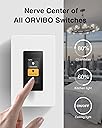
๐ก Elevate your home vibe with smart lighting that listens, adapts, and connects.
The ORVIBO Smart Dimmer Switch features a 1.9-inch touchscreen for precise dimming from 0% to 100%, supports Wi-Fi and Matter protocols for broad smart home compatibility, and enables voice control via Alexa and Google Assistant. It offers customizable lighting scenes, intercom and broadcast functions between multiple units, and supports up to 250W load with easy installation requiring neutral and ground wires. Designed for single-pole setups, it enhances home ambiance while integrating seamlessly into modern smart ecosystems.
| ASIN | B0B6PDKC64 |
| Actuator Type | Touchscreen |
| Best Sellers Rank | #689,836 in Tools & Home Improvement ( See Top 100 in Tools & Home Improvement ) #1,195 in Dimmer Switches |
| Brand | ORVIBO |
| Brand Name | ORVIBO |
| Circuit Type | 1-way |
| Color | Black |
| Compatible Devices | Amazon Alexa, Google Assistant, Apple Home, Samsung SmartThings |
| Connectivity Protocol | Bluetooth, Matter, Wi-Fi |
| Connector Type | Crimp |
| Contact Material | Plastic |
| Contact Type | Normally Closed |
| Control Method | App, Touch, Voice |
| Control Type | full |
| Controller Type | Amazon Alexa, Google Assistant, SmartThings |
| Current Rating | 2.5 A |
| Customer Reviews | 3.8 out of 5 stars 221 Reviews |
| International Protection Rating | IP40 |
| Item Dimensions | 4.12 x 1.75 x 1.8 inches |
| Item Weight | 4.8 ounces |
| Lower Temperature Rating | 32 ยฐF |
| Manufacturer | ORVIBO |
| Material Type | Plastic |
| Model | V70X |
| Mounting Type | Wall Mount |
| Number of Items | 1 |
| Number of Positions | 1 |
| Operating Voltage | 120 volts_of_alternating_current |
| Operation Mode | Off |
| Part Number | V70X |
| Specification Met | Fcc, Ic |
| Switch Type | SPST |
| Terminal | Wires |
| Unit Count | 1 Count |
| Upper Temperature Rating | 113 ยฐF |
| Warranty Description | Manufacturer warranty for 365 days from date of purchase |
| Wattage | 250 watts |
S**R
Good Looks and Simple Integration
This is a great looking switch. My family, including my wife, think it looks great. It was easy to install (I am probably biased as I am an electrical engineer familiar with electrical installation). The Matter integration with Home Assistant worked like a charm. There are a couple of things I would like the vendor to improve: 1. Higher Wattage: The switch can only handle up to 250W incandescent, halogen, magnetic low voltage (low voltage lights with a transformer), electronic low voltage (low voltage lights with a switching power supply), and 120W LED. Most switches can handle up to 600W. In most cases that is not much of a problem but something to watch out for. 2. Intercom Function via App: It would be great if the app allowed to use the intercom function of the switch. It would also be great if the API for intercom can be exposed for use with home automation. 3. Switch Home Screen: The various screens that can be used (also automatically changing) are great. There are a couple of screens that have the light control on the bottom. It would be great to have one or more home screens, like the one with the clock etc) that can control the light by simply touching the screen: tap on top half -> turn on, tap on bottom half -> turn off, hold on top half -> dim brighter, hold on bottom half -> dim lower, swipe up/down -> dim brigher/lower. That would make it much easuer to operate the switch when entering the room and would make it feel more like a regular light switch. (The hard button on the bottom of the screen is good but sometimes hard to hit when walking into the room). 4. Hard Switch under Display: Put a rocker function hard switch under the display which would allow the switch to be operated like regular Decora style dimmer/switch. 2) and 3) could easily be done via software updates. It would be wonderful if the manufacturer could implement these. 1) and 4) would require hardware changes. Overall, a very good switch for a reasonable price.
P**J
The best customer support team so far on Amazon
I bought 2 items. First, one is work perfectly fine. However, the 2nd screen keeps turning off after 25 sec. I contacted tech support and reset everything they recommended but nothing changed. I also bought the 3rd one to try. Sadly it is still the same. What is the point of having this switch but can not show the screen!!! Edited After getting a very helpful and quick response from the technical team. My 3 devices work perfectly fine again. I would say this is the best technicians team I've got so far from buying products on Amazon. Keep up your good work Orvibo Team.
Z**B
On - Off - Dim | Don't expect any more control than that.
Awesome little wall switch. Looks good, it's easy to install. Configuration is also pretty easy. Matter Integration works. I will say that the switch is just cool. But it's really crippled. Matter integration only exposes the switch. You cannot control other devices with this switch. This is just a wifi connected switch with a touchscreen clock on the face. It's not possible to set-up virtual switches to control other devices from this screen. Orvibo has communicated that virtual switches will never be a feature of this device. You cannot turn off all of lights at night, for example, from this switch. There is not a way to have double tap or hold commands. You cannot activate any automation scenes other than the 3 options only inside the Orvibo ecosystem. The screen cannot control any hue bulbs, it cannot set window shades, you cannot see any status of any other devices. I went back to using a regular z-wave keypad switch. I wanted to be able to use this in place of an ugly keypad switch, but it doesn't really do anything special. It's really frustrating how polished the actual device is, but the integration is half-baked, and I'd argue useless. Don't expect to be able to have complicated automations via matter integration.
N**S
Interesting device - minor issues but support from the Orvibo Team ended up being really strong
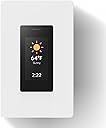
I will start by saying my use case for the two devices is probably rare to non existent... and the problem I had to sort out is very likely not going to be a problem for most people... in fact, for most people, the problem I had would probably be a feature that users would appreciate. I will explain: Devices arrived and installed easily and just like any other smart switch with a neutral wire requirement would be expected to. The problem, for me, was that I am installing these to simply fill in blank locations in my bedrooms where I had two switches to operate fans which were no longer required. Instead of using a blank (which would have been fine but I wanted to do something unique), I decided to wire in these units into the blank slots and essentially use these in an "intercom and weather/date/time" capacity only... meaning, I never had any intention of running a switch through these units (I already had smart switches running the lights). So the problem arose (and again, I think it is likely most people will appreciate this change) is after installing, the device did a firmware update and when that happened, the home screen which previously displayed Weather/Temp/Date/Time dropped the Date and Time information and placed a button at the bottom. Those people who are using this switch to turn things on can now do so without swiping the screen to turn the power on... so 99 percent of users will enjoy this change. For ME, and because I never intended to use the switch, this new button made it obvious that this screen was supposed to operate something and it wasn't doing anything... AND it covered up some of the data I wanted to be displayed. I took a shot and messaged Orvibo Support through Amazon (I didn't go direct to their website)... and while it initially took some time to get traction on my request, eventually they were able to identify my products, push the old firmware back and set up my devices to no longer receive updates (at my request to avoid this in the future). Honestly, I thought my request would be turned down, but on all fronts they worked with their dev teams and were able to successfully configure my devices like I wanted. I am super impressed with their support. I can also say that the product looks great, is simple to use, is simple to set up, and completely works as one would expect... AND the update (the same update I just happened to not want) would probably be useful for most people because now you can just walk up to your switch in home screen and hit the switch without swiping the screen around. Honestly, pretty impressed so far. My only feedback would be that their App is pretty confusing to get configured right. I wouldn't call it terrible... but it takes some getting used to. Once you get oriented, it makes sense but it took a little patience to figure out what I was doing. I wouldn't ding the product severely for the App...and for me, since I am not really using these to power anything, I probably won't ever experience any improvements but it is the one thing I would recommend they put some effort into for this to really be a 10 out of 10.
N**N
Does not work alone on a 3way setting.
01/02/2024 update: Unstable, unreliable, deserves a negative start....................... They failed to mention that for a 3way setting you need 2 of these ($$), weird to have in the same room with all those features. they should a reduced companion. Getting below 30% will get flickering and not too accurate (shuts down on 20%). So far they are not too reliable, One of my units stop responding and the support suggestion given (I asked for factory reset, they send me a reboot) did not work. the web manual talks about factory reset but it can't be found anywhere. what work was to shut down the breaker and "mess" with the unit before it reboots. The other unit refuses to stay at 100% after pairing with "Matter" (compatible LED that was working fine for months).
C**R
Works best if you have two or more switches
I had some initial problems with the setup process. After a lot of trial and error I discovered it was best to do a reset using the menu on the switch. This reconnected the switch with my wifi and linked up with the Alexa skill. Reach out to their tech support if you have problems. They were very helpful in getting it back online and working. Actually a lot of features once you get it setup. It's a dimmer that can be controlled four ways. A switch below the touchscreen, the touchscreen control, voice control, and from another switch. It's a clock and has weather. It's a whole house intercom, and it's a switch to switch phone. Having multiple switches throughout your house will use the full features of this device. Once they are linked together in the app you can call any other switch and also control (turn on or turn off) any other switch using the touchscreen. Has all the standard features you would expect with a smart switch. Alexa control with your voice, on and off timers, and app control. You can also set up scenes to vacation mode that will randomly turn on lights, set the brightness to automatically go to a certain level, or press a scene button and turn every switch off or on. The app is a little confusing when you have multiple switches. Be sure to name each one something different and set which room it is in. This will help when configuring the features so you know exactly which switch you are configuring. Instalation is standard as with any other smart switch. You need a neutral wire, hot, ground, and load wire. Pretty basic if you know how to wire a switch. Next step is a little tricky because you need to scan a QR code with the app to setup the wifi. Hold the phone really still and try to focus on the code with your camera. Once it reads the QR code setup in the app is pretty basic. Give it a name and set which room it is located in. If you have multiple switches you have to enable the calling features. At the top of the page for the features you will see the name of a switch with an arrow down, click on the arrow and will list all the switches, click on the one you want to configure. If you are having wifi issues or it will not respond to voice commands with Alexa/Google try a reset in switch menu. In the app always check the top of the page to determine which switch you are configuring, be slow and steady and have good lighting when scanning the QR code. This will fit in a standard 1gang, 2gang, or 3gang box which is not always the case with a lot of smart switches. It comes with a screw less one gang cover. If you are into home automation and like really cool looking switch devices this is a winner. Get multiple switches to use the intercom and calling features.
J**Z
How to Reset the switch
Had my first issue after over a year. Iโm not sure why the switches black out but they are easy to reset by removing the plate and pulling out the reset button. Other than that thereโs no other switch that comes close to this for the price and modern look. Wish it was UL listed but I use this for LED lights anyways.
P**S
Cool device, nice matter integration (works with homekit), but few details makes this a NO for me.
It has two critical issues are: - The device freezes from time to time (and you need to reset the devie by cutting the house power for few secs to reset it) - Also lights tend to flicker if you use the dimmer mode :( Other than that, materials looks good (it feels solid). The screen is nice, it works smoothly right out of the box. Support team is responsive I contacted them to get the beta version of the next firmware, just to test Matter integration, and they answered super fast. So now I have this device working with HomeKit and Home Assistant. If they can fix the freezing and dimming issues, will be a perfect device.
Trustpilot
4 days ago
1 month ago