Desertcart purchases this item on your behalf and handles shipping, customs, and support to Slovakia.
๐ Legacy Meets Lightning: Connect More, Configure Less, Work Smarter!
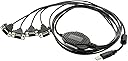
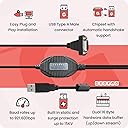
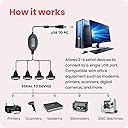
The Gearmo 4 Port USB to RS232 Serial Adapter leverages a premium FTDI chipset to connect up to four DB9 serial devices through a single USB port. Designed for plug-and-play ease across Windows, macOS, and Linux, it supports high-speed data transfer up to 921,600 bps with full hardware flow control. Built tough with industrial-grade shielding, screw-lock connectors, and ยฑ15kV ESD/surge protection, this adapter ensures reliable, noise-resistant connections in demanding environments. Ideal for professionals managing legacy serial equipment in modern workflows.


| ASIN | B004ETDC8K |
| Best Sellers Rank | #106 in Serial Adapters |
| Brand | Gearmo |
| Color | Black |
| Compatible Devices | Devices with DB9 female serial connectors such as printers, scanners, modems, CNC machines, PLCs, and other legacy serial equipment Compatible Devices Devices with DB9 female serial connectors such as printers, scanners, modems, CNC machines, PLCs, and other legacy serial equipment See more |
| Connector Type | DB9 Male w/ Screws, USB Type A |
| Customer Reviews | 4.6 out of 5 stars 222 Reviews |
| Global Trade Identification Number | 00729440626044 |
| Input Voltage | 5 volts |
| Item Dimensions | 36 x 1.5 x 0.5 inches |
| Item Weight | 6.24 ounces |
| Item dimensions L x W x H | 36 x 1.5 x 0.5 inches |
| Manufacturer | Gearmo |
| Mfr Part Number | USA-FTDI4X |
| Model Number | USA-FTDI4X |
| Number of Items | 1 |
| Number of Ports | 4 |
| Package Quantity | 1 |
| Power Plug Type | No Plug |
| Specific Uses For Product | Connecting legacy serial devices to modern USB host systems |
| UPC | 729440626044 |
| Unit Count | 1 Count |
| Warranty Description | 1 Year |
| Warranty Type | Limited 1 year warranty |
H**Y
Works as designed on Windows 7
This USB to serial port adapter has 4 separate serial cables that connect to a single USB 2.0 plug. Each of the 4 serial cable ends is slightly more than 3 feet long. The USB cable end is one foot long. Total end-to-end length is a little bit more than 4 feet long. Each serial cable is labeled "1", "2", "3", or "4" which makes it easy to track your connections. The connections always retain the same com port, so you won't need to reconfigure you software after restarting you computer. The adapter has 3 separate LEDs: red = power, green = TX, yellow = RX. The adapter comes with a CD-ROM that contains USB 1.1 and USB 2.0 drivers for many operating systems including Linux, Mac, Windows, and more. The release notes on the CD-ROM mention that newer drivers can be found at [...] No paper instruction manual is included which might cause inexperienced computer users to have moderate difficulty with the setup. Experienced users will find the setup straight forward and simple. Installation on Windows 7 was easy for me. I found the appropriate installer on the CD-ROM. I had to right-click the installer and select run-as-administrator. The first time I plugged the adapter in it took several minutes for the device to be detected, so be patient. Subsequent detections are fast. All 4 serial adapters can be used simultaneously. Overall I am satisfied with the quality of this device.
S**E
Reliable Connection for Legacy Devices
I needed to connect multiple RS232 devices to my laptop, and this adapter works well. The drivers installed quickly, and data transfer is stable. It does get a bit warm after long sessions, but overall, itโs a solid and dependable solution for older equipment. Very good value for the money, very stable conenction, windows preserves COM port numbers when you change the USB port (Persistent COM ports), the cable lenght is short but you can use an extension. Very easy to use.
M**I
Great product!!!!
I recently purchased two Gearmo 4 Port USB to Serial RS232 Adapters to set up a console server for managing my Cisco network lab, and I must say, I'm absolutely thrilled with their performance! These adapters are connected to a single Raspberry Pi 4, and the setup was a breeze. The installation process was straightforward, and I encountered no issues getting them up and running. What impresses me the most is the seamless integration and ease of use. The adapters are highly reliable, providing consistent and fast data transfers, which is crucial when managing a network lab. I've experienced zero lag or connectivity issues, making my lab management tasks significantly more efficient. The build quality is excellent, and the adapters are compact enough not to clutter my workspace. They've proven to be an invaluable addition to my setup, and I couldn't be happier with how well they've met my needs. If you're in the market for a reliable and high-performing USB to Serial adapter, look no further than the Gearmo 4 Port model. It's a game-changer!
G**R
Windows 8 Hams: This is Your USB to RS-232 Serial Adapter
This cable is essential for Windows 8 users who need RS-232 serial ports for legacy hardware interfaces. In general, I have found this adapter to be a reliable addition to my Windows 8 system where I have multiple RS-232 serial devices that I use regularly. Information for Amateur Radio Operators: I use this cable to convert one USB 3.0 port on my late 2013 iMac (OS X 10.9.x Mavericks, Windows 8.1 Professional 64-bit) to 4 RS-232 serial ports to which I have connected my amateur radio transceivers, an auto tuner and a Kenwood TH-F6A programming cable. I used to have a USB to 4-port adapter made by another, well-known manufacturer that had the Prolific chipset, which is not compatible with Windows 8. This is what I like about this adapter: It worked immediately in Mac OS X 10.9 and Windows 8.1 without needing to run any driver updates to configure the ports. Port conflicts are non-existent even when I have my SignaLink USB digital interface and MasterKeyer MK-1 in use. Where I used to have problems getting the correct rig information from a Yaesu FT-100D in my logging program, I no longer have that issue. I couldn't have asked for an easier, pain-free setup experience. Now for a nit to pick: I question the need for the dongle style adapter cable/serial ports. Since I use this in an amateur radio environment, shielding and reduction of RF overload is very important. This cable can be susceptible to RF interference that I suspect is caused by the long runs of cable with insufficient shielding between the USB port and serial port connectors. This is also the reason why I stopped short of giving this cable a 5 star rating. I will try the usual mitigation steps - install chokes, go over grounding system again - and see if that makes a difference. Otherwise, I may be limited to operation on all bands 20m and down if I want to use the rig control interface of my logging and contest software.
W**N
EXCELLENT Product!!
The USB "jungle" under my desk was becoming a nightmare & I was quickly running out of ports on my USB hub to connect my ham radio equipment to, so I went looking for a good multi-port USB~RS-232 adaptor. Between my 2 main ham transceivers, the packet TNC and the internal TNC I needed 4 RS-232 ports that did RTS/CTS handshake correctly (Kenwood radios are kinda picky in this regard {especially the TM-D710A in EchoLink sysop mode}, as is my TNC). I had been told by numerous fellow hams that USB~RS-232 adaptors that used the FTDI ICs where the only way to go, so I limited my search to these. I saw this item on Amazon & read a review from a fellow ham that had dealt with this same issue, and he praised this unit highly, so I decided to purchase it. I'm VERY pleased with the results. I've hooked up the adaptor to my Toshiba laptop PC (my "shack computer") and to the Kenwoods and everything works just like it is supposed to. There where no issues with the adaptor operating correctly with the radios running full power output (100W on the HF bands & 50W on 2M/70CM) - no "glitches" at all. One thing that had concerned me was possible interaction between the 4 ports when 2 or 3 of them are active (actually passing data) at the same time, which is the situation when running packet. However, no such interaction had been observed. I would HIGHLY recommend this USB~RS-232 adaptor to any ham that is running multiple radios and/or aux. items like a TNC that wants reliable data transfer when you've got a bunch of RF floating around the shack on multiple bands. Gearmo makes a fine product in this item & I WILL personally recommend it to my ham friends. NOTE: I would recommend that anyone that uses this product go to FTDI's web site & download the ComPort Reassign utility - it makes Com Port assignment of the ports on this device much easier than using Device Manager in Windows.
B**B
This ROCKS for network engineers!
In short, the GearMo 4-port serial adapter ROCKS! I am a professional network engineer and often need to connect to serial console ports on routers, switches, firewalls and more. An RS232 serial connection is pretty much the industry standard for a local console connection to these devices. Since it's common for me to be working on several devices at once -- often trying to make coordinated changes on 2 or 4 devices that must be executed with relatively precise timing -- this product seemed like a better option than moving my console cable back and forth between devices. The 36" cables are a bit bulky when coiled up but the spare length for connections is great when working in a data center rack. The FTDI chipset retains its COM port assignment on Windows after reboots and regardless of which USB port the adapter is connected to -- an enormous improvement over the PL2303 chipset which always changes its COM port assignment. Each RS232 port is embossed with a number (1-4) that indicates which port it is. I mapped these to COM11-14 on my system so I could make an easy mental association with the COM port to the physical connector. This item also works reliably in Mac and Linux OSes. I've been strongly considering building a battery-powered RaspberryPi terminal server with one or two of these to provide an easy-to-access WiFi-connected terminal server.
A**S
Best USB to serial adapter I've used
This four port adapter has been absolutely rock solid under Linux. I just plugged it in and it worked. I have been using this non-stop for a couple of months now and have had absolutely zero problems. I usually run it at 115,200 baud but have had no problems when pushing it as high as 460,800 baud. I have used a number of different USB to serial cables in order to work with numerous embedded devices and I always seem to have problems. I have seen adapters suddenly stop working, requiring me to disconnect and reconnect them or having their baudrate suddenly change or just start spewing garbage. Not this one. The transmit and receive LEDs are also nice to have since they can indicate that something is happening on another serial line I am not currently looking at. The cables are nicely molded with the serial port number molded into each connector. I am saddened to see that it is listed as no longer available since this is such a great adapter.
A**R
Works well, includes XP software, and is a great value
This 4-port serial adapter works equally well with Win7 and WinXP. Win7 does not require installation of the device driver; it is supported natively. WinXP requires installing the included CD_ROM device driver. Because the XP-based instrument does not have a CD-ROM, I copied the contents of the CD-ROM to a flash drive and installed from there. Documentation is provided on the CD-ROM. I have had no problems at all with the adapter under heavy, albeit standard, use. Unfortunately, I have not used it with Win8 but will augment this review once I do. This 4-port adapter is roughly the same price as the 1-port adapter at my local electronics hobby store. I am really glad that I found it at a great price because I was anticipating having to use four 1-port adapters and a hub, which would have been very messy, cost five times as much, and required storing lots of stuff after my project is over. It's a cool solution.
A**R
Five Stars
Great
Trustpilot
1 month ago
2 weeks ago