Buy anything from 5,000+ international stores. One checkout price. No surprise fees. Join 2M+ shoppers on Desertcart.
Desertcart purchases this item on your behalf and handles shipping, customs, and support to Slovakia.
🚀 Elevate your workspace with power, speed, and style — don’t get left behind!
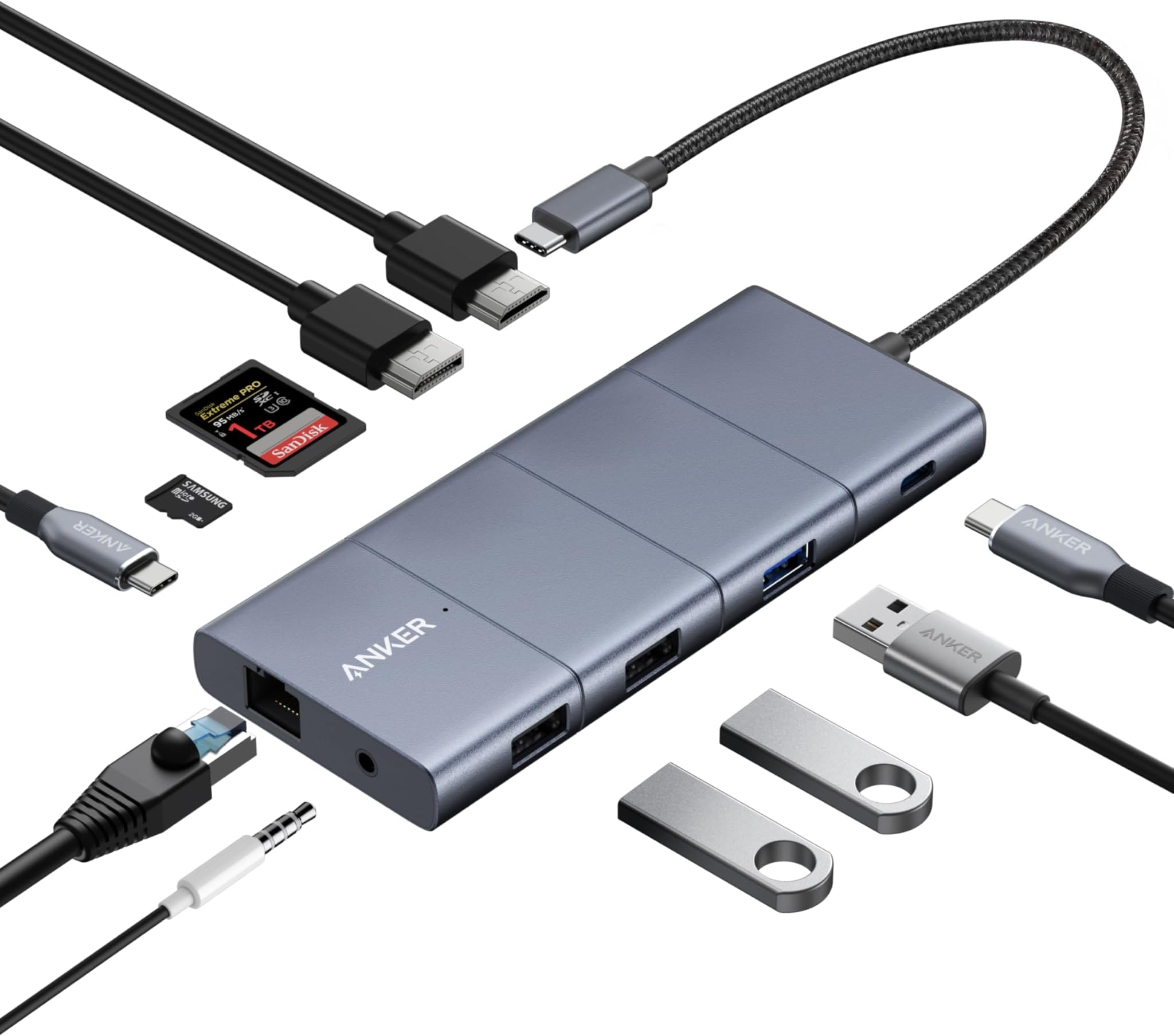
The Anker 11-in-1 USB-C Hub transforms a single USB-C port into a powerhouse docking station featuring dual 4K display outputs, ultra-fast 10Gbps data transfer ports, and 85W pass-through charging. Designed for professionals demanding seamless multi-device connectivity, it offers 11 versatile ports including Ethernet, microSD/SD card slots, and audio, all housed in a sleek aluminum chassis compatible with Windows and macOS systems.


| ASIN | B09Q5V9G5P |
| Best Sellers Rank | 2,046 in Computers & Accessories ( See Top 100 in Computers & Accessories ) 20 in Docking Stations |
| Brand | Anker |
| Brand Name | Anker |
| Colour | gray |
| Compatible Devices | Laptops, Monitors |
| Compatible devices | Laptops, Monitors |
| Country of Origin | China |
| Data Transfer Rate | 10 Gigabits Per Second |
| Enclosure Material | Aluminum |
| Hardware Interface | Ethernet, HDMI, MicroSD, USB 2.0, USB Type C |
| Hardware interface | Ethernet , HDMI , MicroSD, USB 2.0, USB Type C |
| Item Dimensions L x W x H | 13.7L x 5.7W x 1.4H centimetres |
| Item Weight | 0.3 Pounds |
| Manufacturer | Anker |
| Manufacturer Part Number | A83880A1 |
| Minimum Required Operating System Version | Mac OS 13 Ventura |
| Model Number | A8388 |
| Number of Ports | 11 |
| Operating System | macOS, iPad OS |
| Product Features | Fast data transfer, Multi-monitor display, Cargo passthrough |
| Product Warranty | 2 |
| Special feature | Fast data transfer, Multi-monitor display, Cargo passthrough |
| Total USB Ports | 4 |
| Total USB ports | 4 |
| UPC | 194644096076 |
| Unit Count | 11.0 count |
A**B
Nicely made, reliable USB-C hub with nearly every socket you would want for an affordable price
I have tried other cheaper brands of USB-C hub and although they were cheaper they were poorly made or didnt work as promised and were tempremental. This hub works great, its nicely made and works as promised with plenty of connections to suit even a demanding user. I have mine wired up and using the below perfectly: 1x Display port 34" 1440p monitor 1x HDMI port 27" 4K monitor 1x Wireless Keyboard & Mouse (Via single USB-A socket) 1x Wireless Plantronics headset 1x Logitech Webcam 1x USB-C laptop power supply My advice would be to not go too cheap when buying USB-C hubs as you get what you pay for, Anker makes nice products.
P**L
Beautifully Made USB Hub with Lots of Functionality
Bought this for use with a Dell XPS15 Laptop which was a bit lacking in USB ports other than USB-C meaning I couldn't connect some devices I already had. All works really well. One thing to note, if you're using this with a Dell laptop: To start with I used the Pass-Through power cable so that I only ever needed to connect one cable to the laptop. The Dell XPS complained that it was slow charging as it seems Dell laptops need more power, even so, it still seemed to stay full charged while being used. However, after a few weeks the laptop pretty much stopped charging altogether when being used. So I plugged the original adaptor back into the laptop but it still complained so clearly something had got 'upset' by using the pass-through. Had to leave it switched off and on charge overnight to get the battery back up. Had to use Dell's support to get it working again. So, if you're using this with a Dell laptop... don't use the Pass-Through on this Hub. Connect your Dell charger to your laptop directly
O**E
Versatile mid-range port dock/expander (with cable connection) for Macbook.
This is a mid-range port dock/expander designed for Macbooks which might also work on other models of Laptop. I found it to be "plug and play" when used with my Macbook. I liked that it has HDMI and display ports, plus SD and micro SD card slots. It also has one fast and two slower USB-A ports. These are intended for external storage, keyboard and mouse, but can have other uses. I liked that it connects to the Macbook via a short attched cable and USB-C plug. It does not obstruct any of the other ports on the Macbook, unlike some other dock devices. (Although this is not as neat)
H**M
Works well for my application
This is a review of the Anker USB C Hub, 11-in-1 Docking Station. It works really well for me. I use it to connect my laptop (A Lenovo Chromebook adapted to run LUbuntu) to my KVM switch (a PVBCTCSID 8K HDMI KVM Switch). This arrangement work perfectly for my application, allowing me to use my 4k Alienware monitor (and KBD & mouse) when I need a bigger 2nd screen attached to the laptop. The hub also works well with my Streamdeck.
A**Y
Some macbook issues, works, but would love to find a better option for a permanent desk.
I've owned a few of these on different desks over the past few years. It's worth noting there is a bug with Macbooks where the device reports a maximum refresh rate of 85hz at certain resolutions (3840x1600 in my case). The device however only supports 60hz at this resolution, so the display doesn't work. This is fine if you're using an extended display as you can use the other display to change the refresh rate, but if you're using the monitor on its own, it can be problematic as it defaults to 85hz, and you get no picture at all, and no way to change the refresh rate! I had to VNC into the MacBook in order to set the correct refresh rate. It has habits of dropping connection. After much testing over a couple of years, I've concluded that ther HDMI seems to struggle when you're using other devices attached to the hub. So if you're using HDMI and also doing a call on Zoom/Meet, you'll start getting drop outs. It's as if the hub just can't cope with the bandwidth. With displayport there seem to be random flickers and dropouts, I think specifically related to static discharge. I have no such problems with my PC using the same monitor, but I suspect there's some poor shielding on the device which causes these issues.
E**O
Good amount of ports
Got this one to replace my old one from Satechi. Great quality and work as intended. I can connect all peripherals I have without problems.
A**.
Wire is too short
It was very good quality but returned because wire was too short
J**K
works with Linux and Windows
It works reliably and is compatible with Windows and Linux. I needed to connect it to a USB PD power supply (using the PD socket) in order to use the monitor ports. It was good value for money and is light.
A**R
Ik wilde meer poorten. Ik kreeg een controlecentrum.
Ik had één probleem: mijn laptop had te weinig poorten. Een bescheiden probleem. Een klein ongemak. Deze hub zei: "Zullen we meteen álles oplossen?" 🔌 Van laptop naar NASA-console Je plugt hem in… en ineens heb je 11 poorten. Elf. Dat is geen uitbreiding meer, dat is een machtsgreep. HDMI, DisplayPort, Ethernet, USB’s, SD-kaarten… Ik mis alleen nog een knop om een raket te lanceren, maar eerlijk: die zit waarschijnlijk in een firmware-update. Volgens de specs krijg je: 10 Gbps data-poorten 4K beeld via HDMI/DisplayPort Ethernet kaartlezers en stroomdoorvoer tot ~100W () Met andere woorden: dit ding zegt tegen je laptop "Je bent meer dan je dacht." 🧠 Gebruikservaring: ik ben nu “die collega” Sinds ik deze hub heb: sluit ik dingen aan die ik niet eens nodig heb zeg ik zinnen als: “even via de hub” kijk ik licht bezorgd naar mensen die nog maar 2 poorten hebben Collega’s denken dat ik IT begrijp. Ik laat ze in die illusie. ⚙️ Bouwkwaliteit: solide als een baksteen (maar dan nuttig) Stevig aluminium, geen gekraak, geen drama. Dit voelt niet als een gadget — dit voelt als gereedschap. En belangrijk: alles werkt gewoon. Geen rare kuren, geen “probeer opnieuw”, geen existential crisis van je laptop. ⚖️ Kleine realiteit-check Het is geen Thunderbolt-dock van €300+, dus: sommige poorten delen bandbreedte niet alles kan tegelijk op maximale snelheid Maar eerlijk: als je dát niveau nodig hebt, zit je al in een andere prijsklasse en waarschijnlijk ook in een andere levensfase. Pluspunten: 11 poorten = absurd veel mogelijkheden 10 Gbps data en 4K display support Ethernet (voor mensen die wifi niet vertrouwen, zoals het hoort) Stevig en professioneel gebouwd Minpunten: – Je gaat dingen aansluiten “omdat het kan” – Je laptop voelt ineens tekortschieten zonder dit ding Conclusie: Dit is geen hub. Dit is een persoonlijke infrastructuur-upgrade. Je koopt hem voor meer poorten… maar je houdt hem omdat je ineens het gevoel hebt dat je je leven technisch onder controle hebt. En dat gevoel… is onbetaalbaar.
F**-
Qualité fidèle à Anker
Fidèle au produits Anker ce hub usb-c fonctionne à merveille avec un MacBook Pro M1. Bonne qualité de fabrication en alu gris et câble de bonne section tressé. Il est assez gros par rapport à certains mais il y a tous les ports disponibles en 1 seul appareil Je recommande pour ceux qui utilise leur pc portable en mode bureau avec un écran externe
S**A
Prisvärd
Fungerar bra
P**L
compatibility problems with USB 3.2 on Mac
On a MacBook Pro M4, not all devices connected via USB 3.2 port were discovered by the OS. (They are discovered with an older hub, and with direct dongle connection).
A**5
Docking station muy completa y estable, ideal para ampliar puertos en portátiles con USB-C
Compré el Anker 565 Hub USB-C porque necesitaba ampliar conexiones en mi portátil y centralizar varios dispositivos en un solo punto. Tras usarlo de forma continuada, puedo decir que es un hub muy completo y fiable. 🔹 Conectividad Ofrece una gran variedad de puertos, lo que permite conectar monitor externo, periféricos USB, tarjeta SD y cargar el portátil al mismo tiempo. Para quienes trabajamos con varios dispositivos, es una solución muy práctica que evita tener varios adaptadores. 🔹 Rendimiento y estabilidad El rendimiento es estable incluso con varios dispositivos conectados a la vez. No he notado cortes, desconexiones ni pérdida de señal, algo importante en hubs de este tipo. La transferencia de datos es rápida y fluida. 🔹 Calidad de construcción El acabado es sólido y transmite buena calidad. El hub no se calienta en exceso incluso tras varias horas de uso, y el cable USB-C tiene una longitud adecuada para trabajar con comodidad sobre la mesa. 🔹 Uso en el día a día Es ideal tanto para uso doméstico como profesional. Permite convertir un portátil con pocos puertos en una estación de trabajo mucho más completa, especialmente si usas monitor externo, teclado, ratón y almacenamiento adicional. ✅ Lo mejor Gran cantidad de puertos en un solo dispositivo Funcionamiento estable Buena calidad de materiales Marca fiable y reconocida ⚠️ A tener en cuenta Es algo más grande que hubs básicos Precio más alto, aunque acorde a lo que ofrece 🔎 Conclusión Un docking USB-C muy completo y fiable, pensado para quien necesita ampliar seriamente la conectividad de su portátil. No es el más barato, pero sí una inversión acertada si buscas estabilidad y versatilidad.
Trustpilot
3 weeks ago
2 weeks ago