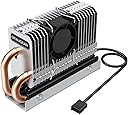




G-M2HP04-F
Product ID: 469124251
Details
- BrandGRAUGEAR
- Cooler Heatsink CompatibilityM.2 2280
- Cooler Heatsink MaterialCopper
- Item Weight95 g
- Product Dimensions3.15"L x x
🌀25mm PWM adjustable fan
🔥60% heat reduction
🛠️Copper heat pipe with DHT
Desertcart purchases this item on your behalf and handles shipping, customs, and support to Slovakia.
❄️ Keep your SSD chill and your workflow hotter than ever!
The GRAUGEAR M.2 2280 SSD Heatsink with built-in PWM cooling fan combines a copper heat pipe and a 25mm adjustable fan to reduce SSD temperatures by up to 60%. Compatible with single-sided M.2 2280 NVMe and SATA SSDs, it includes all necessary mounting accessories for easy installation, ensuring your high-performance drives stay cool and reliable under heavy workloads.


| ASIN | B09LD9BZ17 |
| Best Sellers Rank | #1,091 in Heatsinks |
| Brand | GRAUGEAR |
| Brand Name | GRAUGEAR |
| Cooler Heatsink Compatibility | M.2 2280 NVMe&SATA |
| Cooler Heatsink Material | Copper |
| Customer Reviews | 4.3 out of 5 stars 156 Reviews |
| Included Components | GRAUGEAR M.2 2280 SSD Heatsink |
| Item Dimensions L x W x H | 3.15"L x 0.96"W x 2.13"H |
| Item Weight | 95 g |
| Manufacturer | GRAUGEAR |
| Model | G-M2HP04-F |
| Mounting Type | PCB Mount |
| Number of Items | 1 |
| Part Number | G-M2HP04-F |
| Product Dimensions | 3.15"L x 0.96"W x 2.13"H |
| Unit Count | 1 Count |
K**3
Amazing heat sink for my M.2 SSD!
Received this heatsink today and installed, I would give this product 6 stars if such option exists. My recently installed Samsung 970 EVO Plus SSD was getting up to 65 degrees Celsius under load. With GRAUGEAR heatsink installed, it has dropped max temperatures to 40-45 degrees Celsius under heavy load. It seems to work well enough for a 20°C difference. This heatsink performs effective dissipation due its design. Two heat pipes draw in more heat fast and has fan driven air flow over the aluminum fins. I would recommend getting better thermal pads as the ones they shipped with are fine. But if you are going far with your cooling, you are definitely want to get higher performance thermal pads. As for heatsink fan, I noticed that the fan is running at full speed and the noise is a bit loud. The instructions show that it’s PWM fan and the speed is controllable. I set the fan controller to PWM from my bios, and it appears to be working and I can’t really hear this fan over the others in my case afterwards. Overall, it is easy to use and works pretty well. Highly recommend.
R**B
Cool product! literally..
Very cute and small cooling for M.2 devices, the fan is extra small, so small I think it'll make too much noise, it's a bit too small I eventually did not install it because the excellent passive cooling on my mobo overtakes it I think.
C**M
5C+ drop compared to a passive heat sync
I put this on a Crucial T705 4TB Gen5 NVME Drive. Using a passive heat sync, this drive idled around 50C and would hover in the low 60C range during typical usage. Installation was straightforward, and all the provided parts were good. Moving to this heat sync and setting up a fan curve, the Crucial NVME Gen5 drive now hovers around 43C, and runs around 50C during moderate use. That's a 5C+ difference, which is good. The fan on this runs up to 8000RPM and is inaudible at all but the top speed setting. The fan curve (using FanControl) I setup runs the fan at 25% for anything over 40C, and 50% for temps over 50C, ramping up to 90% of max fan speed. So far, so good. Everything works exactly as I would expect.
D**N
Works, but the fan and airflow hold it back
Nice idea, and it does reduce NVMe temperatures under sustained load, but the cooling solution is limited by both the fan and the airflow design. The fan has low airflow and poor static pressure, so it does not move much air through the fins, and the airflow path itself is inefficient, which further reduces cooling effectiveness. Over time, the fan becomes a bigger drawback. After about a year of normal use it developed a loud rattling noise that is hard to ignore. While it still spins, the noise and vibration make the active cooling aspect more annoying than beneficial. The heatsink is also quite tall, which can create clearance issues depending on motherboard layout. Overall, it works, but the combination of weak airflow, subpar fan quality, and inefficient air channeling prevents it from delivering the performance you would expect at this price point.
J**F
Keeps nvme drive max 50c
It's a close fit to the video card but it does fit just fine. Keeps my drive around 40c idle and 50 c while gaming. I would recommend this to anyone with an nvme that does not have a heatsink. The stock motherboard heatsink killed my old nvme.
M**B
Reduced M.2 drive temp by 10-15 degrees.
I added additional M.2 drives to my high-performance gaming system. One of the three M.2,s in my system is under the GPU and has the build in heat sync, the OS M.2 is under the motherboard aluminum heatsink. The third M.2 (where all the games and data reside) shows in Samsung Magician that the Graugear heatsink, (it is more like a heatpipe radiator) keeps the 3rd M.2 running cooler than my other two M.2s. I plan on adding a second Graugear heatsink to replace the factory motherboard M.2 (where the OS resides) aluminum heatsink. The M.2 under the GPU has the factory Samsung heatsink. If I move my GPU to a vertical mount in the future I will add a third Graugear. So far I am impressed with the drop in temp this has provided.
J**E
Dropped my M2 temps around 15C degrees, isn't much larger than the drive itself
I am using this cooler on a Corsair MP700 2TB PCIe Gen5 x4 NVMe 2.0 M.2 SSD on a MSI MPG Z790 Carbon WiFi Gaming Motherboard . My typical M2 temps were 50-55C degrees using just my motherboard's built-in heatsink. With this cooler, the typical temp is now 35-38C degrees. Huge difference. I wasn't expecting that much of a difference but it really works! It was a tight squeeze on my motherboard between my M_1 slot, my M_2 slot (which is where this cooler was installed, on a PCIe 5 drive), and my video card. But this cooler really wasn't any wider or deeper than the drive itself, so it fit nicely even though things were tight. Couldn't be happier with this cooler.
A**3
Does cool down NVMWE but only 5 to 10 degrees cooler.
Does cool down NVME, but I had to add extra heat tape to make the parts touch the Heatsink and only get 5 to 10 degrees f on a good day. Better than nothing at all. I will say the NVME slot is right above the GPU and so is in a bad spot for air flow. The main issue is the work to get the heat sink to meet with the chips so that they can work.
M**E
Affidabile
Necessario per mantenere sotto temperature, sistema del PC in M2 di 1 tb mai avuto problemi, funziona.
A**.
The best passive cooler I've found
I built a passive desktop PC. For cooling the SSD, most passive coolers were bad, as they had horizontal fins, which don't work in a passive environment. Others have very small fins together, which are also bad for airflow. This one was the best one (and I've bought 5 different coolers to try them) I've tried. I simply removed the fan, and it works great as a passive cooler. It would probably be even better with less fins, but this is what I could find.
T**S
GRAUGEAR Ventilateur Heatpipe pour M.2 NVMe SSD (2280)
Fonctionne parfaitement, achat non indispensable.
V**)
5インチベイに寝かせて2台いけます!
5インチベイに縦に5台3.5インチが入るマウンターの場合に、左右に1台ずつM.2を取り付けた際に使用しました。 5インチベイなので、理論上は左右の両端から取り付けられるはず…と思って買いまして、ピッタリのサイズでした! もしかして、『これを想定しているサイズなのか?』と言わんばかりでした(笑) 小型ファンは、絶妙に耳障りの悪い音がする印象だったので、かなり心配でしたが、かなり静かです。 最大回転数にしても、低音よりのブォーっという音なので不快ではなく良い感じです! 一点、あえて不満を書くなら付属の熱伝導シートが2種類の厚さの物が2セット入っていたのですが、説明書には、どのような組み合わせを想定してるのかの記載が無く悩みました。 他は全く不満はないです! 作りも仕上げも完璧です!
G**I
Günstig und Leistungsstark
Verbaut auf einem Aorus Master X870E Board auf M2 Slot1. Passt genau zum Abstand der GPU. Einzig das PWM Kabel musste ich über das Board zum Anschluss verlegen da oberhalb nur CPU und CPU optional liegen und belegt sind. Der Lüfter ist winzig und schafft es bei voller Eunstellung im Bios auf 8800. Sas ist Brutal. Allerdings keine spürbar störende Geräuschkulisse. Ich hab im Bios die Kühlkurve manuell eingestellt und lasse ihn bei 2000 drehen, bis die Temps ansteigen. Mit den Wärmepads müsst ihr im Vorfeld schauen, welche gut passen. Darauf achten, dass das dünne Blaue Pad auch auf beiden Seiten eine Schutzfolie hat. Beim Aorus Master ist die Originalkühlruppe länger und rastet mittels Snapverschluss selbst ein. Durch das dünne Blech auf der Unterseite der M2 Disk ist etwas mehr Druck nötig um den Verschluss einzurasten, doch es passt. Alles in allem konnte ich Tatsächlich eine enorme Kühlungssteigerung über mehre Grad feststellen. Gekühlt wird eine Patriot Burst 700Pro
Trustpilot
2 months ago
1 week ago