🎬 Elevate your entertainment game—3 inputs, 1 switch, endless possibilities!
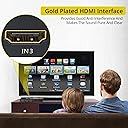
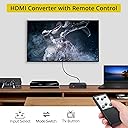
The Proster 3x1 HDMI Switch with Audio Extractor is a compact, high-performance device that allows users to connect three HDMI sources to a single 4K display, supporting up to 4K@30Hz and 3D video. It features advanced audio extraction capabilities, delivering both stereo and 5.1 channel surround sound via Toslink and 3.5mm outputs. Equipped with an IR remote and premium gold-plated connectors, it ensures seamless switching and superior signal quality, compatible with a wide range of devices including streaming sticks, gaming consoles, and Blu-ray players.


| ASIN | B073TTS9QG |
| Audio Output Mode | Stereo, Surround Sound |
| Best Sellers Rank | #856 in Audio & Video Selector Boxes |
| Brand | Proster |
| Built-In Media | 3.5mm to 2 RCA Cable, HDMI Audio Extractor, HDMI Cable, IR Remote Contraller |
| Cable Type | HDMI, USB |
| Color | 3x1 Hdmi Switch With Audio Extractor |
| Compatible Devices | Blu-Ray Player, Camera, DVD Player, DVR, Gaming Console, Personal Computer, Television |
| Connector Type | Auxiliary, DVI, HDMI, RCA |
| Connector Type Used on Cable | Auxiliary, DVI, HDMI, RCA |
| Customer Reviews | 4.2 out of 5 stars 2,561 Reviews |
| Item Dimensions D x W x H | 3.26"D x 2.91"W x 0.74"H |
| Manufacturer | Proster Trading Limited |
| Mfr Part Number | 4330353443 |
| Model Number | 4330353443 |
| Number of Items | 1 |
| Number of Packs | 1 |
| Number of Ports | 3 |
| Power Source | AC adapter |
| UPC | 711583415739 |
| Unit Count | 1 Count |
| Warranty Description | One year |
D**9
**UPDATE** - It works now.
I had a lot of trouble getting this switch to work. To Proster's credit, they sent me a replacement, and then when I couldn't get that one to work, they sent me a standalone audio extractor. I got the audio extractor earlier and got it to work fine, with the exception that the PS3 input seemed to cut out. I decided on a hunch to try it straight through the extractor instead, and no problems. I guess at this point I worried the problem I had getting the Proster switches to work was caused by the cords. I knew I had just replaced the PS3's HDMI and hadn't tried since then, so I got out the switch after independently testing all the cords, and voila, it functions perfectly. My best hypothesis is that this was caused by the HDMI cable Proster sent with their switch, which didn't work to convey the signal properly from the switch to my TV. Gotta say, egg all over my face now. Anyway, here's a review of the actual features of this switch: Pros: - Very reasonably priced for the features. - Switches audio when you switch inputs. - Comes with a remote for switching input. - Supposedly supports 4K (I haven't upgraded to a 4K TV yet, so I can't confirm). - Outputs 1080p. I only mention this because I could not find it written about this device anywhere, but it's important to know before buying if you're like me and don't have a 4K TV yet. - My experience with ProsterUS was very positive, they were very interested in fixing my problem, even before I posted a negative review. Sure, there's a bit of a language barrier that made me wonder Cons: - Might come with cheap (free) cables. For best results, you may want to provide your own connections. - Uses a USB cord as a power source. USB chargers come in a variety of different outputs, and the manual doesn't specify what is required to power the HDMI switch. A regular purpose-built power supply would take out the guesswork, though obviously then they'd have to ship with region specific plugs. Anyway, I'm willing to admit when I'm wrong, and I'm pleased to be wrong this time, since getting the switch working fulfills my current needs and also means I'll have an easy time when I do eventually upgrade to 4K. So to any of you with this switch and problems; check your connectors, maybe it's not a dud after all.
W**.
Works as intended.
I bought this converter about a month ago to use for our back yard outdoor movie theater because the Epson 1060 HD movie projector we have does not have an audio out option for surround sound (which is crazy because it costs about $600 so it should give you some decent sound options; however, the picture quality is amazing). Even though it's awesome watching movies and streaming live tv on a 10 ft x 16 ft screen in our own back yard, it just wasn't as great as it should have been because of the lack of sound. I am not good with technology at all, so I googled to find out how I could get surround sound hooked up to the projector, and I ran across a Youtube video of someone using this audio extractor. I found it on Amazon for like $25 with a protection plan and figured even if it didn't work I could send it back or else just be out a small amount of money. It arrived like 2 days later and was very simple to figure out how to get it all hooked up and test it out. It even comes with an HDMI cord, and has 3 input options, so we can plug in our Fire Stick and PS4 at the same time, and we just use an aux cord to run from the converter to our sound system and extract the audio to surround sound. We've been able to enjoy basically a movie theater experience every weekend in our own back yard on a 220" screen watching Netflix, live TV and football games (Go Buckeyes!!! Even though they cant even beat Purdue...) But we now have awesome surround sound thanks to this nifty little converter switch.
C**O
For the money it's a good audio extractor/switcher but not perfect
I was looking for an HDMI audio extractor to use my Roku stick with an older AV receiver and projector. I used to plug it into the Xbox One, but Microsoft has made it so hard to use the input on the Xbox, I gave up and looked for another solution. This unit extracts audio to go via an optical cable into my receiver but it also has three inputs which makes it very versatile. So, what is the bad? There is a minor audio delay through the unit and into the receiver. If you have the output going to a TV and your AV system and use both the TV audio and the AV sound you will hear an echo as the audio out the TV arrives faster than the audio being processed (extracted) by this unit. It's minor and you just need to turn the TV audio down or off but it is there. I also noticed that the audio through the device dropped out for a second or so a few times over the course of weeks worth of testing it. You also need it powered to work and/or to pass video through it. Overall, for under $25 it solved a major issue I had. It's not perfect but works well enough.
T**D
Hub works as expected.
I'm very impressed with this hub. My use case is a little different from normal HDMI switching. I helped a friend consolidate and simplify their cabin's audio and video hookup. There is no centralized amplifier with HDMI inputs and we didn't want to spend that much on the installation. So, I needed a way to switch between video sources and split the sound from the HDMI to send to a DVD player/sound combo system. This hub did the trick! (see photo for full wire diagram). The Hub is built well and it performs beautifully. It easily switches the video and sound of 3 very different HDMI sources, 2 of which are 6+ years old. Two of the sources: an Amazon Fire Stick and DVD Player both have their HDMI output connected to the Hub inputs. The third is a Cable box that did not have an HDMI output. So, I use a separate convertor to convert RCA (Y/R/W) to HDMI which is connected to third input of the Hub. The Hub HDMI output is goes through an extender that powers and splits the signal to a TV and Projector. Both monitors are a couple of years old and neither are 4K so I can't speak to resolution capability but picture is clear with no blinking or lines. I split the sound from the hub using optical to 5-speaker surround sound system and 1/8" stereo jack to an all-in-one center speaker. There is a slight echo if both speakers systems are on. Most likely because optical transmits faster than stereo jack. However, in my application only one sound output will be used at a time so that was no big deal. The remote control is super simple but it does the job. The Hub uses USB power cable so DON'T FORGET TO GET A USB POWER BRICK if you have teenagers and you don't have an extra one lying around your house.
T**P
So far, so good!
My TV does not have audio outputs, so when I hooked up my Firestick, I quickly realized I could not get sound from my sound bar or other speakers. After a day or so of trying to get used to the limited sound quality from my TV, I decided that I either needed to upgrade my TV, or get an HDMI splitter. So far, it works wonderfully. I plugged the Firestick into the splitter, ran an HDMI cable from the splitter to one of the HDMI ports on the TV, then was able to run an optical cable from the splitter to the sound bar, and used the additional analog port to run audio cables to the other speakers that I have (actually I ran them to another splitter first, so I could control sound for multiple components). Overall the sound quality and picture quality using this device is excellent! Depending on your set-up, this is a good workaround if your TV does not have audio out ports. If you are splitting the speaker power between multiple sets of speakers as well as a sound bar, you will need additional cables and Y-splitters, etc. that do not come with this device. You also will need some patience, and basic understanding of how to hook up audio, and what the settings need to be at, across each component (TV, Firestick, Splitter(s), DVD/Blu-Ray, Tuner, VHS, etc.). If you don’t have the settings set correctly, you won’t get the sound! You also need to understand a bit about current, and how the sound gets to the speakers, and be able to work through problems such as echos, and diminished sound quality, each time you split the signal, especially if not using quality cables and adapters. I’ve been doing this for a long time, so it was fairly easy for me, and I have many components hooked into my sound system. It would not have been so easy, if I was just starting out, however (at least with the amount of wires, cables, components, etc. that I had to deal with). If you are just dealing with a TV and a sound bar, it should be pretty straightforward.
R**E
Doesn't work as advertised
The description says this has automatic switching. I previously had an automatic HDMI switch without the audio extractor, and I could connect my cable box and PS4 to it. Whenever the PS4 would turn on, it would switch to it, and when the PS4 would shut off it would switch back to the cable box. This one does not do that. The only time I got it to automatically switch was when I physically unplugged and plugged back in the cable. Well, I could just do that to the actual devices if that's how it's supposed to work. Plus, the remote has VERY short range. We're talking maybe 2 to 3 feet. Which means I have to get up and walk across the room to switch it, at which point I might as well just press the button on the front of the box. As others have mentioned, the PIP is extremely tiny (takes up about 2% of my screen) making it pretty much useless, and it can't be moved if it's blocking anything important. Everything about the way this device is supposed to work, beyond pressing the button on the front to cycle through inputs, simply does not work. I would ask for my money back, but then I would have to go back to physically switching the cables themselves, which is exactly what I was trying to avoid.
J**8
Great when it is able to turn on
This is a great device. I bought it so I could get sound from my chromecast to my sound system using the optical port. It works like a charm when it is able to turn on normally. I have this plugged into my television and it works great initially. When I turn the T.V. on and off, the device will follow accordingly. The problem is when it is left off for more than an hour. I am not sure why but when the device is off for a long period of time, it wont turn back on when the Television is turned on. It is only when I unplug all hdmi cords that are going into the device then unplug and plug back in the power cord that it turns back on. At first I thought it was the television that wasn't giving it sufficient power so I gave it its own power brick that was rated for its specific voltage and I had the same problem. So I constantly have to unplug and plug cords into the device to get it to work. Other than that issue, the device works great.
J**L
Compact, easy to setup and performed as expected.
UPATED to 5 Stars (from 1 star): Shortly after my original 1-star review (see below), the company reached out and promptly sent out a replacement unit. It's been a few weeks and I'm happy to report that the new unit has performed flawlessly. No issue with the sound and the Optical port door hasn't fallen off. Much kudos to their customer service team for promptly addressing an issue. This is how you turn an unhappy customer into a loyal fan. Cheers! ************Original Review*************** I originally started drafting this as a 5 star review, unfortunately the product quality failed to live up to the initial positive impression. Shortly after using this device, the TV will not recognize the video signal - all you get is black screen and audio only (this happened with all the TVs in the house). A few days later, the TV wasn't getting the audio signal - I had to unplug then plug back in the Optical cable to restore sound. The second time this happened, the door on the optical port came off and I can no longer plug my optical cable back in - see attached picture. Had this device held up, it is a perfect solution for my Tivo, Apple TV and Amazon Fire TV to feed into a single HDMI port to give you that clean look.
V**A
Me ha funcionado excelente
Compre este producto para poder conectar varias fuentes a un proyectos de cine en casa y a mi equipo de sonido, ha funcionado muy bien, tengo conectados una PC, un chromcast y un blu-ray, la separación de audio funciona de maravilla, el audio tiene muy buena calidad (tengo un equipo high end y se escucha muy bien). El único defecto es que en ocasiones se tiene que desconectar y volver a conectar alguna fuente para que las reconozca nuevamente, pero es algo muy sencillo.
O**N
Easy to use
I’d plugged in and worked without issue. Very easy to use.
P**L
**Updated - Awesome Customer Service
***Update - after posting my initial review the vendor reached out to me and offered to send a new unit as the first one arrived defective and I could not use it. Within a few days I received the replacement item and was able to set it up. Works great! The original reason I purchased this unit was for my mother as she is losing her hearing and can no longer hear the TV. She has a pair of Wireless headphones with only 1 audio input which made it a pain from changing from one audio source to another.... This product has solved that issue and makes it so easy to change from audio sources. And the best part is everyone else in the room can still hear the TV with no issues. Not only has this product met my satisfaction - I am most impressed with the customer service. I would purchase from this seller again in the future. Original Review- I’ll update this review later if I can resolve the issue I’m having. I’m not sure if perhaps I received a defective unit - the sound from input 1 comes through the audio output no matter what input I choose. I could not get the sound from input 2 or 3. After several minutes I’ve lost the picture and can’t get any video to pass through. Still have sound on input 1 passing through. I’ve read through the manual and can’t see the resolution for this - I’ll try again this evening when I have more time and if I can make it work, I’ll update my review.
X**N
Best product for console gaming on monitor and speakers
This product is exactly what I was looking for and it delivers. With this product, I have my Xbox One, Nintendo Switch, and laptop all connected to the same monitor and external speakers. My monitor doesn't have an audio out port so the built-in DAC comes in handy. Build quality is great and the package includes three cables. This is a lifesaving product for me and I highly recommend it to anyone connecting consoles and monitors.
J**S
Muy práctico
Lo uso a diario para distribuir distintas señales de video y audio. Se puede operar con el control remoto (incluido) o de forma manual. Es una buena compra que resuelve el problema de utilizar sólo una entrada de tu monitor o TV. Sólo necesité un adaptador de corriente para el cable usb de alimentación, ya que no lo incluye.
Trustpilot
1 week ago
1 month ago