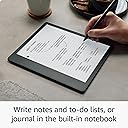
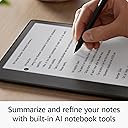
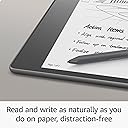
🖋️ Kindle Scribe: Where your ideas meet the page, digitally redefined.
The Amazon Kindle Scribe (16 GB) is a cutting-edge 10.2" Paperwhite e-reader combined with a digital notebook, featuring a glare-free 300 ppi display and a Basic Pen with replaceable tips. It supports direct writing on books, documents, and PDFs with AI-powered note summarization tools. Designed for professionals, it offers up to 12 weeks of reading and 3 weeks of writing battery life on a single charge, making it the ultimate device for seamless reading, note-taking, and document markup.
| Display | Amazon's 10.2” Paperwhite display technology with built-in light, 300 ppi, optimized font technology, 16-level gray scale. |
| Size | Device: 7.7” x 9.0 x .22 (196 x 230 x 5.8mm excluding feet) Basic Pen: 6.4” x .35” x .33” (162 x 8.8 x 8.4 mm) |
| On-Device Storage | 16 GB, 32 GB, or 64 GB |
| Weight | Device: 15.3oz (433g device only). Basic Pen: .49oz (14g). Actual size and weight may vary by configuration and manufacturing process. |
| Wi-Fi Connectivity | Supports 2.4 GHz and 5.0 GHz networks with support for WEP, WPA, WPA2 and WPA3 security using password authentication or Wi-Fi Protected Setup (WPS). Does not support connecting to ad-hoc (or peer-to-peer) Wi-Fi networks. |
| Content Formats Supported | Kindle Format 8 (AZW3), Kindle (AZW), TXT, PDF, unprotected MOBI, PRC natively; PDF, DOCX, DOC, HTML, EPUB, TXT, RTF, JPEG, GIF, PNG, BMP through conversion; Audible audio format (AAX). Learn more about supported file types for personal documents. |
| Accessibility Features | VoiceView screen reader, available over Bluetooth audio, provides spoken feedback allowing you to navigate your device and read books with text-to-speech (available in English only). Kindle Scribe also includes the ability to invert black and white, adjust font size, font face, line spacing and margins. Learn more about Accessibility for Kindle. |
| Warranty and Service | 1-year limited warranty and service included. Optional 1-year, 2-year or 3-year Extended Warranty available for U.S customers sold separately. Use of Kindle is subject to Amazon's Conditions of Use and the terms found here. |
| Setup Technology | Amazon Wi-Fi simple setup automatically connects to your home Wi-Fi network. Learn more about Wi-Fi simple setup. |
| System Requirements | None; fully wireless and doesn't require a computer to download content. |
| Included in the Box | Includes wifi-enabled Kindle Scribe, Basic or Premium Pen, USB-C charging cable, 5 replacement tips, tip replacement tool, and built-in rechargeable battery. |
| Generation | Kindle Scribe 1st generation - 2022 release |
| Battery Life | For reading, a single charge lasts up to 12 weeks based on a half hour of reading per day, with wireless off and the light setting at 13. For writing, a single charge lasts up to 3 weeks based on a half hour period of writing per day, with wireless off and the light setting at 13. Battery life will vary and may be reduced based on usage and other factors such as Audible audiobook streaming and annotating content. |
| Charge Time | Fully charges in approximately 7 hours from a computer via USB-C cable; or fully charges in approximately 2.5 hours with a 9W USB-C power adapter. |
| Documentation | Learn more about Kindle devices with our Quick Start Guide and Kindle User Guide. |
| Available Color | Tungsten |
| Software Updates | Learn more about these software security updates. If you already own a Kindle, visit Manage Your Content and Devices for information specific to your device. |
L**E
Wonderful
I’ve had my scribe for a few weeks now and while I rarely write reviews, thought I would for this since I’ve had kindles since they came out. First, I’ve had kindles hd and the paperwhite and while I like the paperwhite better for my eyes, I’ve not found one I consistently used one, since the kindle DX (which only recently died), because the screens were so small. I have trouble with my eyes and need to enlarge the print, so the small kindles really don’t work as well for me. That said, I still have a kindle hd with my scribe. I haven’t tried the website on the scribe — I don’t see it — and I like to be able to look things up based on what I read as I’m reading so that is an advantage to the hd. I’ll have to see about the web browser on the scribe when I find it (I missed the return date on the hd too, so that’s why I have it. I love the larger size of the scribe. This and the pencil are what really sold me. I feel like I have my dx back (off only it had cellular!!!), my favorite kindle ever. It allows me to enlarge the font based on how my eyes feel, which is great when I pass the 3 hour mark. I also love the ability to change the screen from grey to a warmer color. I am one who prefers warmer colors to cool colors, so that’sa nice thing they added. What I most like is the ability to take handwritten notes and to have the notes you’ve taken across books collected together into one notebook. I need to play with this more, but I’ma writer, so this feature is amazing for me for many reason. I start with a vague idea that different books not necessarily having anything to do with each other May actually be put together to form a premise, so to have mother from those books smushed together is incredibly helpful. That’s basically how I would organize my hard paper research. I don’t know if this is possible but if not, this would be a great update, and that is to create collections of notes in different notebooks, to create a collection of books and then have a notebook within that collection with all the notes for the books in that collection. That would be pretty easy to code. Finally the pencil. I love it. I love it so much better for writing than my Apple Pencil. I feel like I’m writing on paper. It’s beautiful. I like the Apple Pencil for things like procreate and my scribe for taking notes. I’m left handed and I usually don’t have problems. Every now and then my palm will change it from a handwritten note to a text note, but it’s not a big deal. I use the pencil to tap on handwritten note and it puts me back. As a lefty you get used to dealing with these things. I’ve had worse problems trying to write in apps. I also tried the oasis. It was nice. It also worked with my eyes. The buttons for the pages was a nice added touch. It is small, but it makes great use of the real estate available on the page. I was a little frustrated because I twice ordered the cellular version and both times received the Wi-Fi version, so I gave up on the oasis and bought the scribe, which I hadn’t bought because it was Wi-Fi. I’m so glad I did. Aliso, I’m case you don’t know, you can change your kindle address to something simple like [email protected], so it’s easy to tell someone where to send documents or books to you (and easier to send things to yourself). If all you want to do is read books, the oasis is fabulous. If you like having things in color and want the ease of a quick Internet to research concepts you read about, the hd is great. If you like to research and like the idea of having your notes from different books collected in one notebook, or would appreciate a larger screen, or would enjoy a writing experience, the scribe is great. There’sa kindle out there to meet just about everyone’s needs. (I’m posting without proofing, so please forgive typos.)
A**J
Perfect for my needs.
I have been wanting a bigger screen kindle since the slow death of the DX. I love reading, I read and listen to between 50 and 100 books a year. The screen on the scribe is terrific, better than the competitors I've seen, I love the e-ink screen. It's also, and this is crucial as it is part of my profession, PERFECT size for textbooks. I write on paper quite a bit. But, I also have a surface I've been taking to meetings and the like. It's heavy, and I have to keep it charged. Then, I lost my pen and the university I work for said they couldn't purchase me a new one. They could, however, purchase a new surface, which, well, is the idiocy of bureaucracy. So, in protest, I went back to the ubiquitous yellow legal pads. My note taking is rudimentary, I am not a digital artist, I have a huge kindle library, and I like the bigger screen to read from. This is probably who the Scribe is made for. The writing experience is great. It has a tactile feel, a bit like that you get from the surface pro pen 2, or, you know, actual paper, but, you never have to charge the pen. It also has the digital eraser on the pen, just flip it over and rub away (heh). The premium pen has a button that is set out-of-the-box as the highlighter button. There is no lag in the writing, if there is, I can't tell. It feels goooooooood, and looks good. There are some things you won't get. You won't get any kind of compatibility with note-taking apps, but, you can quickly send your note or whole notebook to your email as a pdf. If you want to use that pdf with your note taking apps or the like on your tablet, it's really straightforward. I imagine this is something that Amazon will add at a later date. Very important was the ability to mark-up pdfs. I do a lot of writing and research, and look at a lot of pdfs. I usually print them out and mark them up, because I care more about my comfort than trees. I don't have to do that, now. For ebooks and the like, you have a sticky note feature, which opens a box for you to write a note and then the box closes, like adding a comment in Word. For the peer-reviewed papers I download, I make sure they are in pdf and then just send them to my kindle using email. It isn't hard, and anyone making it out to be is missing something completely, like how to use email. Compose a new email, drag your pdfs to it, send it to your kindle email. On the pc, and I think the kindle app now, too, you can just drag and drop on amazon, too. It is painless. Once the pdfs are on my kindle, I can mark them up as if I'm writing on the pages, just like the notebook feature. So, this has been worth it to me. Load it up with pdfs, I'm able to read through them and mark them up, send them back to myself through email if I want. So, for me, this is great. I also got the discount for trading in my old kindle, so the price point was very reasonable. I don't need flashy. I don't need colors or brushes to paint with. I just needed something I could use to mark up pdfs and read my kindle books, and not have to charge EVERY DAY. Probably won't have to charge it every week. The battery life is magnificent. Ill say that again.... The battery life is magnificent. I've used it for 5 hours straight, including using the notebook a lot, and I've lost 2% of the battery. I'll leave it to others to complain about the price, or the writing not having enough features, or whatever else they want to complain about. I do not use the kindle to surf the web, because I have a computer, a tablet, and a phone, and I do not need to use it as a digital artist. My doodles are pretty impressive, but that's the most I need to get out of it. 1) I don't have to jack around with books, kindle has the best access and the best library and I want it to be easy and 2) I can mark my stuff up without having to charge my pen or my tablet. That's all I need and this Kindle has delivered. Edit: I see reviews about the little notebook tool bar thing hanging out on the margin of your page, including a picture with it circled. It's pretty easy to hide, click those three buttons at the top and HIDE THE TOOLBAR. Not rocket surgery at all. There are a lot of reviews complaining about features that they don't understand, or complaining about something not being a feature....when it actually is. So, do your research before believing any reviews, mine included. It's a lot of money to spend or not spend based on the opinion of people who may not use it like you would want to or who are complete morons who can't figure out how to use it.
Trustpilot
2 months ago
2 months ago