Desertcart purchases this item on your behalf and handles shipping, customs, and support to Slovakia.
⚡ Power Up Your Productivity with 4 Ports of Lightning-Speed Connectivity!
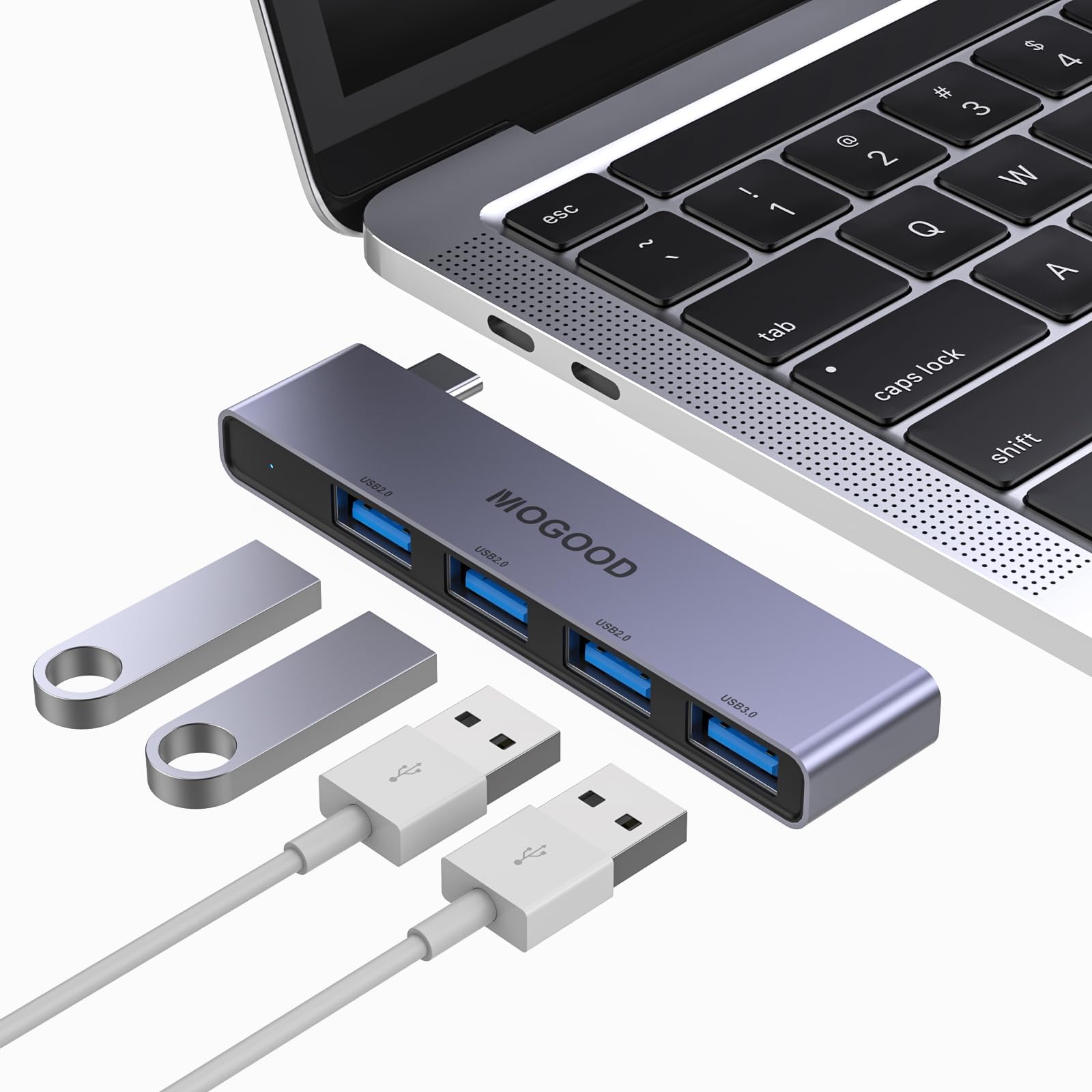
The MOGOOD USB C to USB Hub is a sleek, plug-and-play multiport adapter that expands a single USB-C port into four USB ports (1 USB 3.0 and 3 USB 2.0). Compatible with a wide range of devices including MacBook Pro/Air, Surface Pro, and Chromebooks, it delivers ultra-fast data transfer speeds up to 5Gbps. Its slim, space gray aluminum design complements professional setups and is easy to carry, making it an essential accessory for multitasking millennials on the go.


| ASIN | B0BB7R5QQT |
| Additional Features | Plug and Play |
| Best Sellers Rank | #219 in USB Hubs |
| Brand | MOGOOD |
| Color | Sky Grey |
| Compatible Devices | Keyboards, Laptops, Mouse, Smartphones, Tablets |
| Customer Reviews | 4.0 out of 5 stars 1,007 Reviews |
| Data Transfer Rate | 5000 megabits_per_second |
| Enclosure Material | Aluminum |
| Hardware Interface | USB 2.0 |
| Item Dimensions L x W x H | 2.76"L x 1.97"W x 0.59"H |
| Manufacturer | MOGOOD |
| Mfr Part Number | C-Hub-4usb |
| Model Number | C-Hub-4usb |
| Number of Items | 1 |
| Number of Packs | 1 |
| Number of Ports | 4 |
| Operating System | Android, Chrome OS, Windows, macOS |
| Special Feature | Plug and Play |
| Total USB Ports | 4 |
| Total Usb Ports | 4 |
| UPC | 700445984568 |
G**N
Minimal size, maximum expandability
I'm writing this review for the "black" hub with 3 USB-C on the side and 1 USB-A on the end. This hub was exactly what I was looking for! It is very small and light weight. In fact, the end is the exact size of a USB-A port, I don't think it could physically be smaller. The device worked as expected and added addition ports to my tablet. It also supports power delivery (PD) so you can leave it plugged in and charge your device. It will consume power from your device, so keep that in mind if you are on battery. It's also fairly inexpensive and seems solid. It was exactly what I needed and if you need a very compact way to add ports to a tablet, laptop, (or even a phone in a pinch), this is perfect.
M**M
Excellent Little USB-C Hub – Fast & Reliable
This USB-C to USB hub is fantastic! It instantly gave me four extra USB ports for my MacBook and worked right out of the box with no setup needed. The transfer speeds are quick, the build feels solid, and it’s small enough to throw in my bag for travel. I’ve used it with my MacBook Pro and a Surface Pro and it’s been perfectly reliable on both. For the price, the quality and convenience are outstanding. It doesn't weigh a lot and the charging capability is great. It definitely can help to transform your computer into a power supply if needed.
N**I
Good USB Hub for Quest 3 DIY
I actually got this to use it with my Quest 3 for when I add on DIY accessories in the future and such. It works really well and quest 3 was still able to be charged while playing. It has the right amount of USB ports for my needs, such as 2 for face and eye trackers and an extra USB-A port, the build quality of the usb c input might be a but wobbly due to the length of the device but it still holds well and is thin and small enough to not be bothersome. For the price too, it was pretty worth it and there wasn't much sleek easy-to-setup usb c hubs that used a cable instead of it being built in Also tested it out with my phone and laptop because just needed to transfer some files on a flash drive, works as expected!
J**V
Great idea, not so good execution
I really liked the idea of having a hub that sits close to my laptop so it doesn't get pulled out. I always struggled with ones that have a cord that hangs down from my laptop stand. It would be perfect if I could get all the ports to work. I was able to use all 4 ports for about 1-1/2 weeks. Now only 2 of them work all the time. The other 2 are hit or miss. I always disconnect the hub when I travel with my laptop so it won't get damaged. Not sure why they stopped working. **edit April 22. The hub has stopped working completely. I don't recommend buying it.
G**.
Works.
Great idea, and it works as intended. Only complaint I have, is for the USB drives I use, I have to insert them "upside down". Mine tend to light up when inserted. This function is on the underside now. Otherwise this would be a 5 star product for me.
N**Z
Sold device but not good for the on the go users.
I would give it a three (for the average use) but since it does not work the way I needed it to I went with 2 stars. This is an excellent device for home use, provided you are not frequently plugging and unplugging peripherals during a session. Once connected, it remains very stable and maintains a reliable signal to my hard drive with no dropouts.The only important precaution is to properly eject all devices through your operating system before physically removing any cables. If you unplug a device without ejecting first, the hub can lose its connection to the remaining peripherals. While it connects solidly at the start, removing a device can inadvertently pull the entire unit loose.I had originally planned to use this on stage, but the connection behavior makes that impractical. Overall, it performs very well and stays stable once plugged in—just be careful when removing devices to avoid any unintended disconnections.
C**S
Reliable and Versatile USB C Hub!
I recently purchased the MOGOOD USB C Hub for my laptop, and I couldn't be more satisfied with its performance. This hub has proven to be a reliable and well-built solution for expanding connectivity options on various devices. I've used this hub on my laptop, Nex Dock, and Samsung tablet, and it has consistently delivered as expected. One notable feature is the absence of any overheating issues, which is crucial for prolonged usage. One standout feature is the thoughtful design of the three USB C ports. I particularly appreciate that one of them is designated for power only. This ensures a dedicated and reliable power source, which is essential for charging devices without any hiccups. Furthermore, the inclusion of a USB 3.0 port is nuce when using a tablet. This port comes in handy for connecting a mouse and keyboard, enhancing the overall usability of the tablet. The convenience of having multiple ports in one hub is a definite plus for anyone looking to streamline their connectivity needs. In conclusion, the MOGOOD USB C Hub is a versatile and dependable accessory that adds valuable connectivity options to your devices. I recommend it for its solid performance, thoughtful design, and overall reliability.
D**N
Smart Design + Tiny Accessory Make Big Difference (To Me At Least)
I received a recent Dell Precision 5560 for work, which only has USB C / Thunderbolt ports, and I have several perfectly fine USB A peripherals I wanted to keep using. I also wanted an adapter solution that would sit flush against the laptop side. Motivations for NOT wanting a gap between the laptop & the adapter (and therefore also excluding adapters with a cable) included: 1 - Looks (yep, I am that shallow ;-D) 2 - USB C connectors just feel flimsy compared to USB A ones, and many reviews for these C-to-A hubs that do not sport a cable, mention that they need to be handled carefully or they will break. Unfortunately I picked a first unit based in part on slightly misleading pictures (probably just CGI renderings instead of pictures of the real product actually in use) that made it look like it would be perfectly flush with the laptop side: in reality, it had a small black plastic jacket around where its USB C male connector attaches to the hub body, which means there was a gap between the rest of the hub body and the laptop side. In addition the main hub body had slightly rounded sides, which would have made a seamless mating with the laptop side impossible even if the USB C connector could fit fully into the laptop port. This MOGOOD unit has a male connector which is unencumbered by extraneous plastic parts, and the side going against the laptop is flat. The tiny accessories included that are a nice plus in my opinion, are a few small double-sided adhesive stripes: cutting one of those in half length-wise allowed me to secure the MOGOOD hub pretty firmly against the Precision side, and the whole setup feels decently sturdy (the adhesive is quite strong) ... Time will tell I guess, and I will still be careful when plugging / unplugging USB A dongles & peripherals in the hub, but this setup feels like it should survive normal day-to-day usage ... NOTE: I did not look into the bandwidth performance aspect of this hub because that's not important for my own use case.
G**A
Tutto perfetto
Articolo corrispondente, spedizione veloce, venditore consigliato!
K**M
Super
hab es gekauft, weil es direkt am MAC anliegt, bestens, funktioniert und tut was es soll
K**.
Endlich
Ich habe mir einen neuen Mac gekauft, da wurde sich tot gespart für so viel Geld quasi nix mehr dran. Also musste dieser kleine Freund her. Ich war erst skeptisch, denn bei Appleprodukten hatte ich auch schon öfter die Meldung "dies Zubehör wird nicht unterstützt", wenn es sich nicht um ein Orginalprodukt handelte. Anders hier, angeschlossen und gleich erkannt. Super!!! Bin total zufrieden. Klare Empfehlung pro MOGOOD!!
ふ**3
割りきれば安くて便利
windowsマシンのusb c(メス)を増やしたくて安いのを探したところ、この商品を見つけ購入。結論から書くと、工夫と割りきりが出来れば便利だったので似たような物を探している方の参考になれば。 【仕様】 ・ハブ本体からusb c(オス)までのサイズは約2.5ミリ ・3つあるusb c(メス)のひとつ(pd/電源供給)は使えない ・パソコン本体にさしてもハブがぐらぐらするので、気になる方は両面テープ(紙タイプではなく1ミリ弱のスポンジ付きの物)を使うと安定する 【このハブをオススメ出来る方】 ・usb c(メス)の1つが使えないことを許容出来る人 ・パソコン本体に両面テープでハブを固定することを気にしない方 ・とにかく安くusb cのインターフェースを増やしたい方 【このハブをオススメ出来ない方】 ・usb c(メス)を3つ使いたい方 ・pd機能で電源供給をしたい方 ・両面テープでハブを固定するのに抵抗がある方 ・このレビューの内容を自己責任で行えない方(笑)
A**E
USB C Hub
Funktioniert gut war genau das Richtige
Trustpilot
4 days ago
5 days ago