Buy anything from 5,000+ international stores. One checkout price. No surprise fees. Join 2M+ shoppers on Desertcart.
Desertcart purchases this item on your behalf and handles shipping, customs, and support to Slovakia.
โจ๏ธ Elevate your typing game with the pro-grade ergonomic powerhouse
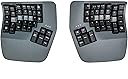
The Kinesis Advantage360 Professional is a Bluetooth-enabled, split ergonomic mechanical keyboard featuring concave keywells, adjustable tenting, and thumb clusters designed to minimize wrist strain and maximize typing efficiency. Fully programmable with open-source firmware, it offers a compact footprint that brings your mouse closer for reduced arm fatigue. Backlit keys and rechargeable batteries with over two weeks of life make it a durable, high-performance tool for professionals seeking comfort and customization.


| ASIN | B0BCHMGZMD |
| Additional Features | Backlit, Ergonomic, Hotkeys and Media Keys, Split Keyset Design, Wrist Rest |
| Antenna Location | Office |
| Best Sellers Rank | #302 in Computer Keyboards |
| Brand | KINESIS |
| Built-In Media | Bridge Connector, Extra Keycaps, Keycap Puller, USB Charging Cables (Two) |
| Button Quantity | 87 |
| Color | Dark Gray |
| Compatible Devices | PC |
| Compatible Operating System Family | Linux, MacOS, Windows |
| Connectivity Technology | Bluetooth |
| Customer Reviews | 4.3 out of 5 stars 360 Reviews |
| EU Spare Part Availability Duration | 3 Years |
| Enclosure Material | Plastic |
| Global Trade Identification Number | 00607998360026 |
| Hand Orientation | Ambidextrous |
| Item Dimensions L x W x H | 15"L x 8"W x 3"H |
| Item Type Name | Keyboards |
| Item Weight | 3.2 Pounds |
| Keyboard Backlighting Color Support | Single Color |
| Keyboard Description | Mechanical |
| Keyboard Layout | QWERTY |
| Manufacturer | Kinesis |
| Mfr Part Number | KB360-PRO-GBR |
| Model Name | Kinesis Advantage360 Professional |
| Model Number | KB360-PRO-GBR |
| Number of Keys | 76 |
| Number of Sections | 1 |
| Power Source | Rechargeable Lithium-Ion Batteries |
| Recommended Uses For Product | Office |
| Series Number | 360 |
| Special Feature | Backlit, Ergonomic, Hotkeys and Media Keys , Split Keyset Design, Wrist Rest |
| Style Name | Professional (Bluetooth) | Tactile Switch |
| Switch Type | Tactile |
| UPC | 607998360026 |
| Unit Count | 1.0 Count |
| Warranty Description | 3 Year Manufacturer |
| Water Resistance Level | Not Water Resistant |
Z**R
Good, bad, and the awesome
It's been about twenty years since I first used a Kinesis and haven't used one since. For the past 14 months I've been using a Moonlander split keyboard. It's a decent keyboard, but the options for tenting are very poor unless you invest in more hardware purchased from their site. They do offer excellent support, though. I'd had the keyboard for about six months when the right side thumb cluster hinge broke. They sent me a replacement for free. Back to the Kinesis. I write A LOT. I'm a full-time author so I bang out hundreds of thousands of words per year. I'm in my mid-fifties, and fingers and wrist hurt all the time because of poor ergonomics and cheap keyboards. The Kinesis Advantage 360 is kind of amazing. It has true tenting, and the concave nature of the pieces means you can comfortably rest your palms on the outside and only move your fingers. Since I have used a split ortho board for over a year, this was not a huge learning curve. The keys are laid out well, but I had to change a few. I like the CTRL and ALT on the left side on the bottom row. I moved those keys using the ZMK software which is not really friendly. You have to have a Github account, fork builds, and then use the key mapper to generate new firmware. Each piece of the keyboard them must be connected via USB. Copy the corresponding builds to each piece and then swap key caps. I'm happy with the four or five keys I moved and have this looking almost exactly like my Moonlander layout. Bluetooth has worked perfectly on my PC. I've had zero issues so far. I hit a key in the morning and my PC wakes up. I leave the backlighting off. After two weeks of heavy use, the batteries are still going strong without a recharge. I purchased the palm pad separately. Why aren't these included with this very expensive keyboard? Come to find out, they might not be needed depending on your hands. I find them okay, but I will probably switch back to using the palm rests without the pads. They are comfortable and all, but I'm making more typos with them installed. This is a very expensive keyboard, and it will not be for everyone. There is a learning curve. When I initially switched to a Moonlander, my WPM dropped to about five words per minute. I'm a slow and not very accurate typist, but after this short amount of time I'm up to about 70 WPM with a 98% accuracy rate. This is fantastic for my old hands. Overall, this is a technical board that requires an understanding that the interface software is far from user friendly. Remapping keys will be challenging. I find that the key caps get oily from my fingers rather quickly, which is a weird thing to write, but it's true. So far this has not affected my typing, but I feel like I need to wipe them with a cloth a few times a week. Lightly textured key caps would have been perfect on this thing. Even with these negatives, I feel this keyboard beats the Moonlander by a mile. This is a true ergo keyboard and so far I love typing on it. The Gateron brown switches feel really nice. Negatives aside, this is the best keyboard I've ever owned. I look forward to many years with this thing.
T**R
Pricey, but worth it.
Great product, learning curve is 1-2 weeks before getting back to your pre-kinesis typing speed, build quality is very high, Bluetooth connectivity is great w Apple products (using MacBook Pro M1-M4), curiously kinda sucks with windows though with random intermittent disconnects (easily fixed by plugging in USB cables) I purchased these in a last ditch attempt to help my carpel tunnel and was pleasantly surprised with almost immediate relief. Even w the weight and size of these I find myself making excuses to bring this with me on business trips due to how much they help/correct my wrist and finger pain and numbness. The only downside is as a coder you will feel the unavoidable draw to NeoVim..
B**B
Almost perfect keyboard
This keyboard is miles above the standard qwerty staggered layout keyboards. Typing on this for the last ~10 months has been extremely comfortable and has reduced my shoulder and wrist pain caused by regular non-split staggered keyboards. If you are on the fence just buy it and give it a solid try for at least 1-2 weeks. The process will be painful trying to learn the new layout. Do some typing tests and learn the proper home-row finger placement to take full advantage of this board. While I do highly recommend this keyboard if you are typing on a keyboard a lot, there are some issues to be aware of. The main annoyances of this keyboard are the Bluetooth connection, connection issues between the two halves of the boards, and double key-pressing issues. I ended up having to RMA my board because the double-pressing issue became so bad. I still have the same issue after RMA occasionally though Kinesis has recently put out a new firmware that claims to fix this. If this keyboard used a 2.4ghz USB dongle in addition to the Bluetooth, and the double pressing issues were fixed this would be the perfect keyboard. Update: Kinesis latest firmware has fixed the Bluetooth issues making this keyboard even better
A**O
Excellent product, no Bluetooth issues, incredible typing exp.
This is an excellent product, the build quality aligns with its price and surpasses it. The typing experience is incredible once you get used to it. You can achieve a "flow state" typing that is so pleasant is incredible. Not to mention my wrists pain got away from two weeks of using it. The Bluetooth problems are a thing of the past and the programability is super easy with clique and the latest update which already came with the shipped product from the factory. The pink switches are amazing, I was afraid that they would be too easy to press but they are not.
C**M
Super comfortable, but expensive for an imperfect fit
I really liked this keyboard overall. It was extremely comfortable to type on and I had basically zero hand or wrist discomfort using it. That part absolutely lived up to the hype. My biggest issue was the reach to the upper pinky letter keys. I have pretty average-sized hands for a man in the US, maybe even slightly above average at around 7.8 inches, and I still could not comfortably reach those keys with my pinkies when my hands were sitting where my palms naturally wanted to rest. If my palms got even a little sweaty, they would kind of stick, and I would have to peel my hand up to reach those keys. A lot of the time I ended up using my ring finger instead. I did not buy the optional palm rests, so I canโt say whether those would have helped. I also was not a huge fan of the Kinesis Clique software. It felt a little too limited for what I wanted, so I ended up going the older route and manually flashing the firmware so I could set up combos and custom timings. That process was not great. The documentation was not very clear, and it took me a while to figure out that you have to use the โno Cliqueโ firmware version. If you use the Clique version for manual flashing, it does not seem to work right. Until I figured that out, the whole experience felt kind of buggy. The other downside for me was gaming. For regular typing this keyboard was great, but for gaming it felt basically unusable unless I wanted to remap a ton of keys. If you play WASD games in the usual way with your ring, middle, and index fingers, the layout just does not feel natural. Aside from those issues, I really did love the keyboard. I ended up returning it because the price is high, and for that kind of money I needed it to fit my needs a little better. Still, for pure typing comfort, I can absolutely see why people love it.
A**R
Poor Bluetooth IME
Loving the keyboard itself so far but the Bluetooth is absolutely awful for my setup. I have a work pc that sits 2 feet away with no latency or connection issues with Bluetooth but my home PC on the other side of the desk on the floor randomly disconnects frequently and gets occasional high latency. I'm pretty much at the point where Bluetooth for woek is fine but I am forced to run a wireless keyboard wired for my personal computer which kind of defeats the entire purpose of me buying the pro model. Tried several things, drivers, external Bluetooth dongles, nothing seems to help me get a consistent reliable connection. Updating my product review. Upon trying to use it wired for several days as the wireless version, I am getting constant issues where keys or sticking or where keys aren't registered while gaming wired with the left set, even with right turned off I do love they keyboard after extended use but I think wired is the way to go after using other brands of wireless.
D**N
Quietest, most versatile and useful Ergonomic Keyboard on the planet!
This is not my first Kinesis keyboard and I switched to ergonomic keyboards about 2000 and have tried them all to reduce wrist pain. I loved my Advantage2 (when I received one from a friend who upgraded there's) over my previous favorite (classic MS Ergonomic) and unfortunately spilled coffee on the 360 I bought a year ago (grabbing my kitty having a seizure on my desk). It had the "quiet" keys but still made too much noise. This version with the pink keys is *chef's kiss* for me. I get the format and versatility I need for comfort and reduce the noise so it's not distracting when I'm on conference calls - and it doesn't scare my kitty and trigger a seizure (it's a thing unfortunately). While they are expensive, I've learned that there are a few places you really need to not skimp for your quality of life. 2 spots I don't skimp is a good keyboard and office chair (since I'm using them constantly for a minimum of 8 hours a day, 5 days a week). Same for bed\pillows. Your body will thank you as you reach "a certain age". What I love about the 360 is that it's not fixed. I can separate (or not) the keys more, offset them if I'm gaming, change the "tent" angle AND you have a 10 key in the same format. When you need to 10 key you need to 10 key. It does take some getting used to and won't help hunt and peck typers much, but if you're typing all day (with decent typing form) - switching to this keyboard could be a game changer in your comfort on a daily basis. 10/10 can (and will) recommend the Kinesis 360 - even if you don't use all of the options - especially now that you CAN get the pink keys if you need or want the short throw, quiet keys.
J**I
Kinesis Keyboards are great but...
Background - I have been using Macs since 1986. I-do-not-code! I just run my business with it. I Love my Advantage keyboards - I have been using them for 20 years and currently have 3. They quickly solved my carpel tunnel issues and enabled me to touch type without looking at the keyboard. I can even finish typing a sentence while listening to my office manager's question as she walks in the door. 6 or 7 years ago, I bought an extra one as a spare just in case the company did not survive. All of them were very easy to convert to the Mac Keyboard. BUT - I have had the Adv360 since early December and still have not figured out how to convert it to the Mac configuration. They have great introduction videos and even mention the ability to convert to Mac layout โฆ but they never explain it. Good news - they have an excellent support team. Bad news - they are swamped with all the new orders - and questions. So one has to submit a tech request and wait in line to get a response. While I am delighted that they are finally getting the recognition they deserve, I am running out of time to be able to test the new layout. Tyler has been trying to help. "All you need to do is remap the keys to the positions you are used to. You can do this with onboard programming tools pretty quickly. Rules of remapping: 1. Remaps always pull from the default layout. 2. You cannot remap a remap 3. You cannot lose access to a key 4. Remaps only go in one direction, if you want to swap two keys, that is two remaps. 5. You can move in/out of any layer during remapping. Layer keys are immune to onboard programming. Think of remapping as Copying/Pasting an action. To โRemapโ any key on the Advantage360 to a new location: 1) Press and hold the SmartSet Key, then tap the Remap Key. 2) First select the source key (i.e., the action you want to โcopyโ). 3) Then select the physical destination key (i.e., where you want to โpasteโ)." Did I mention that I do not code? I am sure that the above will tell an experienced Windows and Macintosh coder how to convert the keys - but to me, it is greek. Example - the above #2)"First select the source key (i.e., the action you want to โcopyโ).โ - WHERE IS THE SOURCE to copy a "Mac Commandโ or โMac Optionโ on the all-Windows keyboard? ONCE I HAVE THE SOURCES FOR THE MAC Left COMMAND, OPTION, CONTROL, Right COMMAND, then I suppose I can follow #3) โpasteโ that in the exact locations as the โWindows Ctrlโ or the โWindows Altโ keys. So unless I can get the keyboard to type Macintosh, I will have to return it and stay with my tried and true, very old Advantage keyboards. Sign me as very disappointed...so far.
V**M
Great keyboard
It took me ~ a month to get used to the keyboard, but now I love it. Something that it pushed me to do is to use right fingers to type certain keys. Also I feel a bit more efficient after I started to use VIM motions with the keyboard almost everywhere - magic.
I**N
Comfortable ergonomic keyboard
This keyboard is awesome! I've gone through a bunch of other keyboards over the years from cheap Dell ones, Keychron mechanical keyboards (great keyboards for normal layouts), Unicomp IBM Model M and was skeptical at first about this, primarily as I've never touch-typed.. can type fast with numerous fingers but mostly looked at the keyboard. This Kinesis has taught me to touch type too now, within a few weeks. I remapped a few of the keys due to programming needs, but it's so comfy and allows me to sit in a better position. It's not cheap, bit if you're looking for a split ergo keyboard, I'd highly recommend it!
J**S
Perfect
Best purchase of my life. Solved my issue. And does so with outstanding quality and support. Even improving productivity by forcing better typing habits. The huge macro and mapping memory on the device make the work experience perfect(no need to bother IT for software as you can set it up off prem and bring it in with your setup stored on device!). You can really tell that a lot of RnD and thought has been put into this over the years! My wrist issue is pretty much all gone, thanks to this. If you aren't disciplined enough, like myself, and use the keyboard without hovering your wrists, I'd highly recommend also picking up the magnetic wrist rests. If purchasing to cope with a specific injury, you could diagnose the issue and get a keyboard that targets that specifically. Whereas this keyboard targets everything. No that it's a jack of all trades and master of none, it genuinely is perfect. Just rather pricey. Would buy again, regardless. And might if I ever also have to do any serious typing from home...
E**A
Pricy but worth it
Saved my wrists. Once you get used to it, the strain on your wrists and forearms disappear. A bit pricy but worth it if you type a lot. Would be five stars but it bugs out sometimes, needing to be unplugged and replugged in (macros stop working)
D**Y
Junk
This keyboard is awful. Nearly 1000 dollars and you have to use a janky fork of a GitHub repository to change anything.
Trustpilot
1 week ago
2 days ago