Buy anything from 5,000+ international stores. One checkout price. No surprise fees. Join 2M+ shoppers on Desertcart.
Desertcart purchases this item on your behalf and handles shipping, customs, and support to Slovakia.
๐ธ Capture the moment, even when you're not behind the camera!
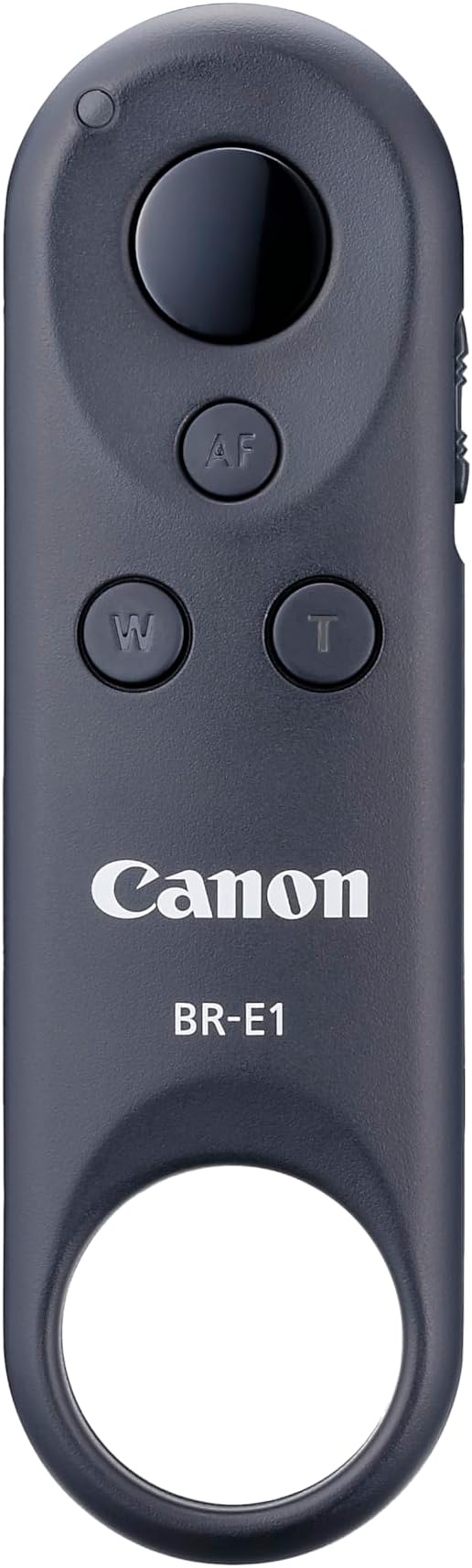
The Canon BR-E1 Wireless Remote Control offers effortless Bluetooth operation up to 5 meters, with tactile zoom and shutter buttons designed for precision photography. Compatible with numerous Canon EOS and PowerShot cameras, it prevents camera shake for superior image quality and boasts a remarkable one-year battery life, making it an essential tool for professional and enthusiast photographers alike.


| ASIN | B06X92TNR3 |
| Battery Types | Lithium-Ion |
| Best Sellers Rank | 12 in Camera Remote Controls |
| Box Contents | BR-E1 Wireless Remote Control |
| Brand | Canon |
| Brand Name | Canon |
| Button Quantity | 3 |
| Colour | Black |
| Compatible Devices | EOS R, 6D Mark II, 77D, 800D, M50, RP, PowerShot G7 X III, G5 M200, Ra, 850D, R5, R6, M50 R3 |
| Compatible devices | EOS R, 6D Mark II, 77D, 800D, M50, RP, PowerShot G7 X III, G5 M200, Ra, 850D, R5, R6, M50 R3 |
| Connectivity technology | Bluetooth |
| Controller Type | Button Control |
| Customer Reviews | 4.5 out of 5 stars 353 Reviews |
| EU Spare Part Availability Duration | 1 Years |
| Global Trade Identification Number | 04549292087864 |
| Item Dimensions L x W x H | 27L x 92W x 12H millimetres |
| Item Weight | 40 Grams |
| Manufacturer | Canon UK Ltd |
| Manufacturer Part Number | BR-E1 |
| Max number of supported devices | 1 |
| Maximum Number of Supported Devices | 1 |
| Maximum Range | 5 Metres |
| Model Name | BR-E1 |
| Model Number | BRE1 |
| Network Connectivity Technology | Bluetooth |
| Number of Batteries | 1 Lithium Ion batteries required. (included) |
| Product Features | Lightweight, Wireless |
| Product Warranty | 2 Year Manufacturer |
| Smart Home Compatibility | Not Smart Home Compatible |
| Special feature | Lightweight, Wireless |
D**L
Connecting...Connecting.. Do this first.....
Bluetooth paired first time but then didn't take pictures, kept saying connecting.... I was ready to return, then thought I would have another try. I discovered my M50 has an option for 10sec/remote. And now the remote works perfectly. On the 'Q' menu, where I usually select the 2sec timer function is where my 10sec/remote option is. It also has a tiny icon for a remote controller. Select this option and the remote now works with instant shots and 2secs if I use the slider on the remote. (Not 10 secs). Your camera may be different, but might be worth a try. It's probably all in the camera manual, but that was too small to read! Great remote if you are happy with the price.
M**M
Works well
Works well on my R6 could possibly be a little larger as mine as a habit of going AWOL but thats possibly a me problem. A little pricey as are most canon products but useful when you want minimise the risk of camera vibration
J**S
Simple to use and fast to connect
Been using self timer but took the plunge and got this lovely small remote. Simple to connect with camera. Button for focus and another to trigger the shot. Not much more to it. It works.
W**S
Works great
Purchased for use with Canon mirrorless camera. Works perfectly fine, with one button to capture the photo and another to activate auto focus. Would have been great if there was a pad where I could move the auto-focus point remotely. But the control does not offer this, probably due to support for older cameras which didn't have support for moveable focus point. Interaction with the camera is not ideal either, if you enable automatic image review (to see the captured image) the displayed image is flipped horizontally compared to what the actual photo is (I couldn't find an option to change this on the camera) you then must use the auto-focus button to back-out of the preview, if you use the shutter button it takes another photo immediately. However, if you bring up the preview by hand then the image is correct on the horizontal axis but you now can only back-out with the controller using the shutter button. This can get confusing when reviewing/testing new images and can result in quite a few 'accidental' images. It would be nice to be able to use the other buttons to cycle forward/backward when in image-preview but they seem dedicated to video and don't really do anything else. Also, it doesn't appear you can tether to the camera whilst at the same time using the remote to take photos. When you connect to the computer via the tether cable, you can no longer use bluetooth (though, I do wonder if I could connect the controller to the computer rather than the camera which I haven't tried yet). Overall, for taking photos on the camera it works great. There are some usability improvements I can see immediately and wish they were available. But getting up and running and taking photos it does what I needed.
S**Y
Camera remote control
Awsome bit of kit to remote trigger the camera
I**N
simples
Easy to use..
M**B
Works perfectly with the EOS 250D (aka SL3)
Resist the temptation to launch the camera or phone across the room and just buy the BR-E1. Much less of a faff than connecting the Canon 250D via WiFi. WiFi was great on the old app but the Canon CC app never really connected well with my current Android phone. Selected Bluetooth remote control in the connection menu and held down the two buttons on the remote control for at least three seconds to pair the devices. Did a few test shots, including one in Bulb mode, and it works perfectly.
S**Y
Excellent Kit
Spot on Just what I needed ! Easy to connect Just follow instructions.
Trustpilot
3 weeks ago
3 days ago