Buy anything from 5,000+ international stores. One checkout price. No surprise fees. Join 2M+ shoppers on Desertcart.
Desertcart purchases this item on your behalf and handles shipping, customs, and support to Slovakia.
🚀 Elevate your office game with speed, security, and seamless connectivity!
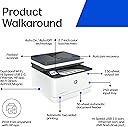
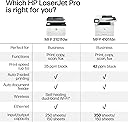
The HP LaserJet Pro MFP 3101fdw is a monochrome all-in-one laser printer tailored for small teams up to 7 users. It delivers professional-quality black & white prints at speeds up to 35 pages per minute, featuring automatic duplex printing and an auto document feeder for efficient workflows. Equipped with intelligent Wi-Fi, Ethernet, and Bluetooth, it supports wireless printing from virtually any device. Built-in HP Wolf Pro Security ensures your data stays protected, while cloud connectivity and HP Smart shortcuts streamline management and mobile printing. Ideal for office environments demanding reliability, speed, and robust security.


| ASIN | B0BJ194Z43 |
| Additional Printer Functions | All In One |
| B&W Pages per Minute | 35.0 |
| Best Sellers Rank | #2,806 in Office Products ( See Top 100 in Office Products ) #9 in Laser Computer Printers |
| Brand | HP |
| Built-In Media | LaserJet Pro MFP 3101fdw Printer |
| Color | white |
| Color Depth | 1 bpp |
| Compatible Cartridge | Cartridges with original HP chips or circuitry |
| Compatible Devices | Laptops, PC, Smartphones |
| Connectivity Technology | Ethernet, USB |
| Control Method | Touch |
| Controller Type | Android |
| Customer Reviews | 4.2 out of 5 stars 865 Reviews |
| Display Type | LCD |
| Dual-sided printing | Yes |
| Duplex | Automatic |
| Hardware Interface | Ethernet, USB |
| Ink Color | black |
| Item Dimensions D x W x H | 16.5"D x 12.3"W x 15.7"H |
| Item Type Name | Laser Multifunction Printer |
| Item Weight | 10.5 Kilograms |
| Manufacturer | HP |
| Maximum Copies Per Run | 5000 |
| Maximum Copy Resolution Black and White | 1200 x 1200 dpi |
| Maximum Copy Speed Black and White | 35 ppm |
| Maximum Media Size | letter |
| Maximum Print Resolution Black and White | 1200 dpi |
| Maximum Sheet Capacity | 250 |
| Model Name | LaserJet Pro |
| Model Number | 3101fdw |
| Model Series | 3100 |
| Number of Drivers | 1 |
| Number of Ethernet Ports | 1 |
| Number of Trays | 1 |
| Other Special Features of the Product | Auto-Duplex |
| Paper Size | 7.68 x 10.63, 7.76 x 10.75, 3.54 x 5.12, 3.94 x 5.91, 8.50 x 14 |
| Power Consumption | 436 Watts |
| Print media | Glossy film, Glossy photo paper, Labels, Paper (plain) |
| Printer Connectivity Type | Ethernet, USB |
| Printer Output Type | Monochrome |
| Printer Type | Laser |
| Printing Technology | Laser |
| Resolution | 1200 x 1200 |
| Scanner Type | Flatbed |
| Series Number | 3100 |
| Special Feature | Auto-Duplex |
| Specific Uses For Product | office settings, small team collaboration, remote work, professional document printing, cloud-based workflows |
| Total USB 2.0 Ports | 1 |
| Total Usb Ports | 1 |
| UPC | 195122462000 |
| Unit Count | 1.0 Count |
| Warranty Description | 1 Year Limited Hardware Warranty |
| Warranty Type | limited warranty |
| Wattage | 110 watts |
S**A
Great for Students and for Home Use
I think this is a great printer at this price point. I printed thousands upon thousands of pages on this and the printer held up. I was a law student, and printed electronic copies of text books that were greater than a thousand pages. I printed up research for my classes. I easily printed more than 20,000 pages on this printer alone within in 9 months and it held up. I did not have any issues with the pages jamming. I took care to ensure that the pages were neat and together when I loaded the printer. I did not put them in willy nilly. Having the ability to scan and to copy pages was also invaluable to me as a student. The only time i had issues with the printer jamming is when I accidently printed something and turned the printer off mid-printing so that I could delete the print job from the queue. To save money, on the cartridge, I made sure I only printed in economode. HP says that this can cause issues with the printer if you print every print job in economode. Said the cartridge could dry out. This was not the case for me. It doubled the print jobs that I got out of every cartridge. If the cartridge said 5000 pages, I got at least 10,000 pages. It did not harm my printer, and the cartridge did not dry out. This printer is an excellent printer for home use. If you are a business, this can work for you, but I personally would invest in one of the business printers that are designed to be a workhorse.
K**N
Good, solid, reliable printer.
Following the slow and unreliable Epson inkjet we fought with far too long, this printer is a gem. Easy set-up, fast, quiet, double sided, no problems. Have not used the scanner yet, so can't speak to that feature, but I recommend this printer. Being for home, personal use, we had no need for a color printer, so this one fits our needs.
T**K
Very responsive and clear prints
Fast, very responsive using network connection. Remember not to update firmware or the off brand cartridges bought from Amazon will not work, you will have to purchase OEM HP cartridges.
R**S
Good so far! One week. LOL
Easy quick set up! Works well. Only had 1 week though. We shall see?
J**S
High price, poor quality, failed quickly
We finally replaced our old HP LaserJet for this one and after using the HP LaserJet Pro MFP 3101fdw for about 3 weeks, I would rate this device 1 out of 5 stars. My experience with this printer has been extremely disappointing — especially when measured against its high price, expected performance, and typical reliability associated with HP. The combination of poor print quality, device failure shortly after purchase, and underwhelming overall performance makes this a regrettable purchase. From the outset, I was struck by how expensive this all‑in‑one printer is relative to what it actually delivers. Given its positioning as an office‑ready machine — capable of printing, scanning, copying, and faxing — I expected higher build quality and consistently sharp output. In reality, the device felt overpriced for its actual performance. Many lower‑cost HP models or competitors offer better reliability and print fidelity. One of the most frustrating aspects of this printer was the print quality. Despite being a laser device (which typically produces crisp text and clean graphics), the output was frequently fuzzy, uneven, or faded, even when settings were configured for the highest quality. Text edges lacked sharpness, and grayscale graphics looked washed out. Several test pages were essentially unusable for professional documents. I tried multiple adjustments: changing print settings, updating drivers, using different paper stock — but nothing noticeably improved the output. For a device marketed as “best for office use,” the print quality was unacceptably inconsistent. The worst part of this experience was the fact that the printer stopped working entirely after roughly 3 weeks of light use. One morning I powered it on and the control panel failed to respond, and the device would no longer connect to Wi‑Fi. All attempts to reset the printer, reboot the network, or update firmware failed to restore functionality. This complete failure so early into ownership is not only inconvenient but suggests poor hardware reliability. Even during the short time it was working, setting up the wireless connection was frustrating. The Wi‑Fi setup wizard was slow and inconsistent. The connection dropped intermittently, forcing me to reconfigure it multiple times. Scanning over the network to a computer or phone was equally unreliable — sometimes failing altogether or requiring repeated attempts. Why This Earns 1 Star: High price with poor value: Costs more than comparable printers yet performs worse. Bad print quality: Fuzzy, inconsistent text and graphics even at best settings. Premature failure: Printer stopped functioning after roughly 3 weeks. Connectivity problems: Unreliable wireless setup and scanning. Overall reliability: Did not meet basic expectations for an office‑ready HP device. Final Verdict; 1 out of 5 stars. Despite its premium pricing and feature list, this printer delivered unusable print quality, unreliable performance, and failed entirely in a matter of weeks. I cannot recommend it under any circumstances — especially not for office or professional use — and would advise steering clear unless you want significant frustration and wasted expenditure.
S**N
Great printer
I received the printer the day after I ordered it. It replaced a 5 year old color Laser JET. THE SETUP TOOK ABOUT 5 minutes and performed perfectly. I was amazed at how fast the first copy came out. The only disappointment was that the two sided copying required me to manually put the second side in. It does not do duplex scanning. Two sided printing from the computer worked just fine.
P**A
A great buy - HP solid
It's an HP. Had it for some time now. No problems. Switched to Linux and still have functionality throughout.
J**恩
Splotches on when printing to an Art Paper. Some compatibility issues with MAC
Printer does well but has problems with heavy stock paper. When trying to print on Aquapad Watercolor pad for fountain pens. HP has a problem. The first print is fine, but the 2nd print you begin to see toner splotches, and then the 3rd print is unacceptable. Then, printing on regular paper, you have to print about 5 or 6 pages to get your printing back to normal. Normally, I like HP. And I am a loyal customer of HP. I am a little disappointed in this printer. I can’t print my drawings on this paper and then ink them up with a fountain pen. I can draw electronically, not so well on paper, so I printed my artwork, inked it up, and it looks very nice. Having discovered an error in my Chinese writing, I tried to do a copy of my drawing, and it really looked bad. Not recommended to print on cold-pressed 300 g/m paper. The setup of the printer on the network is fine, but if you power down the printer and power it back up, the printer is lost to the network, and you have to reboot your device to see it again. This is a problem. It’s compatible with MAC and iPad, however, it is a bit more of a challenge. I have not tested it with my PC as I mainly only use my PC for games. MAC is more professional for me. Higher graphics, better sound, and faster computer. Both systems are new. But Windows 11 makes the PC slower than Windows 10. So I use my iPad mostly for printing to my HP printer. What I love about Apple is. iMac, Mac Book, iphone, ipad can share the clipboard with each other. Easy to capture a web page on my MAC and Print it from my ipad. Using GoodNotes 6, Apple Notes, and Bear Pro version.
A**R
Great printer
This is a great printer, fast, efficient and everything you’d need in a laser. The one downfall though is it’s big , bulky and takes up more space than I would like, however for the quality I’m ok with it. Super fast printing and was crazy way to set up with an Apple computer.
A**N
Nice product
Nice product
R**G
Laser toner
Toner worked perfectly and the chip was compatible with HP.
R**Y
HP PRINTER SCANNER FAX
GREAT PRODUCT I RECOMMEND IT
S**E
A lot better than alternative
This is a good printer. I had a color laser printer for a short while (also HP) and it was garbage. It kept running out of magenta, despite the fact I hardly ever print in color. Apparently it “cleans” itself all the time so you run out … and then can’t print without messing w errors all the time. This printer is black and white. Printing quality seems fine. I’m a bit tired of toner replacement costing so much. I don’t think I get close to the 2000 pages before replacement, but I’ll let it slide. If you can stomach that, this printer is great. Certainly better than color printing which to me is a nonstarter.
Trustpilot
2 weeks ago
2 weeks ago