


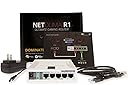
Netduma R1 Gaming Router (UK PLUG)
Product ID: 49152067
Details
- BrandNETDUMA
- Compatible devicesPersonal
- Connectivity technologyWi-Fi
- Frequency band classDual-Band
- Item weight0.35 Kilograms
- Number of ports5
⚡Lag Fix
🌐Geo Filter
📶5 LAN Ports
🎮 Game On: Elevate Your Play with Zero Lag!
The Netduma R1 Gaming Router is a cutting-edge device designed specifically for gamers and busy households. With its unique Anti-flood technology, it eliminates lag and congestion, allowing multiple users to enjoy high-speed internet without interference. The patented geographic filter guarantees that game servers are located near your home, significantly reducing latency. Its user-friendly interface allows for easy bandwidth allocation to your favorite devices, and it is compatible with all internet connection types and service providers. With 5 Gigabit LAN ports and robust customer support, the Netduma R1 is the ultimate router for serious gamers.
| ASIN | B01DBISJLO |
| Antenna Location | Gaming, Home |
| Brand Name | NETDUMA |
| Compatible Devices | Personal Computer |
| Connectivity Technology | Wi-Fi |
| Customer Reviews | 3.9 3.9 out of 5 stars (45) |
| Data Transfer Rate | 300 Megabits Per Second |
| Frequency | 5 GHz |
| Frequency Band Class | Dual-Band |
| Global Trade Identification Number | 00731275814992 |
| Is Electric | Yes |
| Item Weight | 0.35 Kilograms |
| Manufacturer | NETDUMA |
| Manufacturer Part Number | NETDUMA |
| Model Number | NETDUMA |
| Number of Ports | 5 |
| Operating System | Windows |
| Other Special Features of the Product | Geographic Filtering, Patent-pending Anti-flood, User-friendly Interface |
| UPC | 731275814992 021235433456 |
| Wireless Compability | 802.11bgn |
J**N
the QOS is great and this will surely get better
This router makes living in a house share a dream when gaming online, the QOS is great but would love to see features added for more control over devices in the home. Device groupings would help, currently each new device automatically get's assigned some priority which means re-adjusting the sliders after having guests over. The wifi is strong compared to a lot of default provider routers but unfortunately missing 5g or the ability for external antennas. You can add an access point if you need that purely for wifi and to clear the 2.4ghz channel a bit as I have a lot of bluetooth mice/keyboards/speakers/ps4 controller which are all prone to interference. The geo filter is great also. The upcoming software update looks like a complete game changer once again so will be interesting to see how good that is. The team are always happy to answer questions on their forum. Things I would like to see added in the future would be a 5ghz channel and possibly the ability to add external antenna without going down the DIY route. Going forward the software is going to be updated and likely most key features I could ask for will be addressed, mainly the ability to have groups to QOS them individually. My setup for anyone curious. 1. Modem - Billion 8000NL Modem (£60 - let's me change target SNR fibre or adsl, super handy, good broadcom chipset) 2. Router - Netduma, obviously. Handles DHCP and all QOS. Consoles/Streaming devices hardwired to this. 3. Wifi Access Point - Coredy ac1200 - acts as the Duma's wifi for 2.4ghz and 5ghz bands and I can mount it anywhere, handles 30+ devices fine.
S**L
Buy now!
I have used this product for 2 days now and already my gaming experience has skyrocketed. Easy to setup and use. Any gamers that are really down about lag, buy this and problem solved. Great work netduma.
G**C
Elimates ping spikes
I bought this router in an attempt to fix high ping while others are downloading, and it works flawlessly. My issue was partially bandwidth related, where streaming apps try to use all available bandwidth and partly a scheduling issue, where my small game packets get stuck in a queue behind the larger streaming packets. The router has two features that solves these problems: Anti-Flood and Hyper-Traffic. Anti-Flood allows me to limit the bandwidth being used by a device, making sure there's always bandwidth available to avoid dropping game packets. Hyper-Traffic enables prioritization of packets by device and process, allowing them to jump the queue for minimal latency. I am extremely impressed with how well these features work to eliminate ping spikes. I can game while Netflix is streaming and don't even see an increase in my ping of 1ms (previously it would spike +200ms). Currently I don't have an interest in the other features, but for me the router is worth it for the two I mentioned alone.
A**R
Good but when it decided to work
At first thought this router was good. Done what it was supposed to do. But then it wasnt doing its job whatsoever had to keep reseting it and it only work when it felt like
I**E
not suitable for purpose
well where do I begin this item was given such high praise for all its different ways of helping a gamer I felt I had to have 1 so got the cash together and ordered it WHAT A WASTE OF MONEY it has a geo filter which is useless as if you dont constantly monitor the host you will be in laggy games all day long got 2 xbox ones in our house the router has profiles for different types of games whoops only 1 profile can be used at a time ,helpful forums er no just a couple of sarcastic idiots and 1 of the moderators who asked me to post details of my connections so this is not plug&play its just an expensive replacement £150 for the £20 router I had DONT buy unless you live alone wish I had got a ps4 these routers have been in production for a year or so but its not fully developed and I dont want to develope it for them I want an item that does what it claims to not one that takes hours to setup and then doesnt perform well absolute tosh shot together by a couple college kids with a cheap router board and some unfinished software very misleading publicity its no better than my virgin superhub 2 it has no dmz and all i see on the forums is workarounds . IT shoud just work
W**K
Makes Destiny PVP crisp and virtually guarantees no lag
This device isn't cheap but if you play a fair bit of online gaming, and it's a game that pits you against opponents around the world, it may well transform your experience. It's worth checking on Netduma's website if your favourite game is suitable (I play a lot of Destiny) - and then the router can exclude players outside your chosen distance and players with bad ping times. And the QoS aspects of the router will certainly help if you share your Internet connection with enthusiastic downloaders and streamers. This device is really simple to use - you plug it in before your ADSL connection - you connect the Netduma to your existing router. Highly recommended.
M**Y
Easy to set up
Easy to set up, configuration is practically not needed, although you can tweak settings if you have specific use cases or are on complex networks or have unique needs. The hardest thing you will have to do is run a speed test to tell it your actual up and down speeds rather than just using what you theoretically should be getting. Only issue I had is not showing hosts, just unchek the device you want it to monitor and recheck it. At present the firmware version shipped is at 6j. That is higher than what is available for download on official site. I.E Do not downgrade to 6h or you will brick the router (it basically is now as much use as a brick if you do that) hence the term. If in doubt seek a technical advisor who you trust.
A**R
Four Stars
Not the best but does a better job!!
B**)
Lo he comprado para XBOX one para jugar a COD, y no me sirve de nada. Ahora no lo utilizo porque no cogía partidas con un pin bajo. En definitiva no noté ninguna mejora y no lo recomiendo para esta plataforma. Me ha decepcionado mucho porque tenia muchas espectativas en este aparato.
M**A
Like many people, I was really tired of the LAG I experienced in online gaming sessions. I specifically play Call of Duty, which is notorious for choosing horrible player hosts, creating lag so bad the game can sometimes be unplayable. Enter the NETDUMA! This device is specifically created for gamers who want to create the most ideal conditions for a good online experience. It can't change factors external to you, and that are out of your control, but it can do a lot for what you CAN control: the stuff going on inside your house, your router, your home internet traffic. It has so many features I can't even list them here, including congestion control, hyper-traffic, but the most important one is Geo-filtering feature. The #1 cause of lag is a host that is physically distant from your location. This increases your latency, and makes your online experience much worse. The NETDUMA allows you to determine a set radius for acceptable host locations. For example, you can set it so you will not be paired with a host more than 200km from your home. Many games are compatible with this amazing feature, but check out NETDUMA's website to make sure yours is too! The developers are always releasing updates, have great online support and although I ended up returning it (see below), I think it's an amazing product. The only negative I have to say is the wireless functionality: it's not that great, and sometimes I found that the range didn't quite cut it in the deeper parts of my home. As a result, I ended up having to return it. If it didn't have this kink though, I would have likely kept it. So for those who don't mind having mediocre wireless performance, and are tired of lag, i say... NETDUMA!
J**A
va bien como lo que me han prometido pero he tenido que gastarme 10 euros mas para comprar un adaptador para el enchufe de alimentacion que es difente al que tenemos en europa....
C**O
I returned the netduma R1. The hardware the netduma R1(600Mhz CPU) i think is not capable of get 250mbps with ANTI-FLOOD on. I was getting 130mbps. i was losing too much speed. Compared to my netgear r7000 with ddwrt on it with qos on was getting 180mbps. then i got a pfsense box with a J1900 2.42 GHz cpu and got 230mbps. I do like the netduma software/firmware but would like to put it one more powerfully hardware and i would pay for that.
A**A
Greatest gaming router I have ever purchased, I had thoughts about getting one because of the Youtubers showing it off...eventually I gave into my curiosity and I have to say it has exceeded my expectations by far :3 I would buy again.
Trustpilot
3 weeks ago
1 month ago