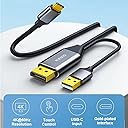
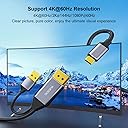
Why I bought this: I have 3 computers all hooked to 4 monitors. 2 of them use my 4K TV/monitor with HDMI 2.1 for 4K 120Hz. However, my main monitor for my work PC is my 3440x1440 ultrawide. I do not care about the resolution, but the extra real estate so it displaying in 2560x 1080p with a cheap HDMI isn’t a problem. However, as the second monitor or when ultrawide is beneficial in games with my other PC’s, that monitor I want the highest resolution and frame per second I can get. My ultrawide monitor also has a KVM feature The problem: my main gaming computer is the more powerful and as such, utilizes the ultrawide’s only DP port for 3440x1440 144Hz gaming. The HDMI ports only offer 100hz at that resolution but because the HDMI ports on both gaming computers are utilized by the 4K monitor, I tried going DP to HDMI from my backup/second PC but anything that said 2K at 120 or 144Hz would only display the picture in 2560x1080p at those refresh rates. If I change led it to my monitors true resolution, my max refresh rate was 60Hz Why this was the solution: my ultrawide supports USB-C A/V input. Remember I mentioned my monitor also has a KVM switch? That feature that combined with my physical KVM switch I already had, allows me to utilize the same mouse and keyboard with all three computers without adding more wires on my desk from a second manual switch. So, this cable allowed me to utilize my monitors built in KVM function, being able to plug the USB-A into my second computers motherboard to send mouse and keyboard commands and the DP on the video card the other way through the single USB-C into the monitor. I got the resolution (3440x1440p) I wanted as well as the KVM feature. There was a slight performance cost however. This solved my issue of running two cables to have the KVM and A/V, as well as reduced resolution (2560x1080p) when using a 144Hz rated 2K (2560x1440p) cable. In case you don’t know, the extra width of the monitor adds to the pixel count, which increases data for each frame, which lowers the rate at which the cable can transfer more data. To keep the same higher rate, it lowers the pixel count. This cable allowed my to send 3440x1440 A/V through USB-C to my monitor at 95Hz. Its not the full 144Hz my monitor is capable of but it didn’t limit me to 60Hz like DP to HDMI did. So for me, while I will still look for a cable that will meet the KVM and DP to USB-C functionality but support full resolution at the full refresh rate, I will happily use this until I find what I’m looking for or maybe, just maybe the manufacturer will see this and will create or suggest if already available a similar cable with a higher data transfer rate.